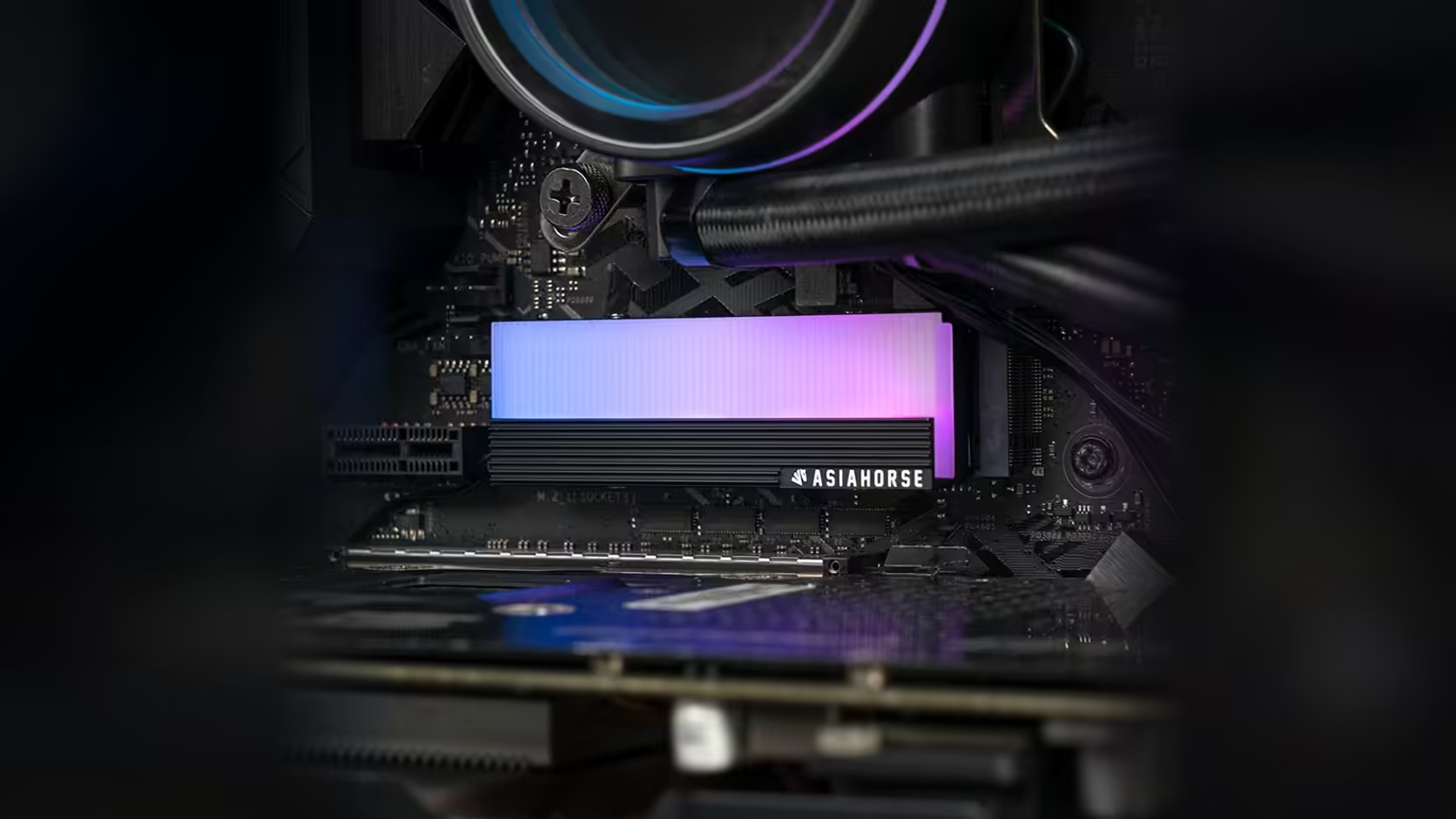
Ordering a drive cover is the easy part. The harder question is what is already sitting on the drive you plan to fit it over, because a factory heatsink or a thick manufacturer label can quietly rule out an aftermarket cover before you have even opened the box. AsiaHorse's aluminium M.2 2280 heatsink from Evetech is built to sit against a bare drive, and "bare" is doing more work in that sentence than it looks like.
Quick Answer
The AsiaHorse M.2 2280 heatsink sells for R199 with VAT already worked into that figure, though Evetech's live pricing can shift from what is quoted here, and it is shaped for a drive with nothing else already attached. A drive shipped with its own factory heatsink will not fit inside the cover as intended, and a sufficiently thick label can cause the same problem on a smaller scale. Check what your drive already carries before you commit to the cover.
🔍 Why "bare drive" is the operative phrase
Most NVMe SSDs ship as a plain circuit board with exposed chips, but a growing number arrive with a heatsink pre-attached from the factory, particularly on higher-end or gaming-branded models. AsiaHorse's cover is designed around the first case. Fit it over the second and you are trying to stack one heatsink on top of another, which the mounting screws and internal clearance were never built to accommodate.
What a factory heatsink actually looks like
It is usually a metal or composite strip running the length of the board, sometimes with its own graphics or branding printed on top. If your drive has one, it will be obvious the moment you look at it directly, rather than something you need to guess at from a product photo on a retailer's site.
🏷️ Labels can cause the same problem
A factory heatsink is the dramatic version of this issue, but a thick label or a graphene heat-spreading sheet stuck to the drive can be enough on its own to change how the cover seats. These are thinner than a heatsink, so the effect is smaller, though not always negligible on a cover with tight internal tolerances. If your drive carries a heavy printed label rather than a thin sticker, it is worth factoring into the same check.
🧰 Before you buy, look at the drive
The surest method here is visual. Pull up the drive, look at what is fitted to it, and compare that against a cover meant for a bare board. Product photography on a retailer listing will not reliably show you whether a heatsink is already fitted, so this is one of the few steps in a build where reading the spec sheet is genuinely less useful than looking at the part in your hand. If you are choosing a drive specifically to pair with this cover, browsing the current solid state drive range with that in mind from the start avoids the problem entirely.
🛡️ Warranty sits with the cover, not the drive
It is worth keeping the two separate in your head. The AsiaHorse cover itself carries a 1 Year Local Warranty, resolved locally in South Africa rather than needing an overseas courier round trip, but that cover applies to the cover alone; it has no bearing on whatever terms your drive's own manufacturer offers. Deciding whether to remove a factory heatsink to make room for this cover is entirely a drive-side decision, made against the drive's own warranty conditions rather than anything AsiaHorse states here. Keep the two warranties, and the two decisions that sit behind them, distinct rather than assuming one purchase somehow protects the other.
⚙️ What to do if you already own the drive
Some factory heatsinks can be removed, though that step carries its own risks: it can affect the drive's warranty terms, and separating a stuck heatsink from the chips underneath is not something to do casually. If you are not confident doing that, the simpler route is choosing a bare drive for this particular cover and putting the pre-heatsinked drive somewhere it can keep its own cooling. Either way, the board's own default heatsink, where one is fitted, usually needs to come off regardless, since it occupies the same physical space the cover is designed to fill. Have a look at case accessories for anything else you might need while the case is open.
Frequently Asked Questions
Why does a factory heatsink interfere with this cover specifically?
Because the cover is shaped to sit directly against a bare drive's chips, and a heatsink already occupying that space leaves nowhere for the cover to close.
Can I just remove the factory heatsink myself?
It is possible on some drives, but it can void the manufacturer's warranty and risks damaging the chips underneath, so weigh that against simply buying a bare drive instead.
Does a thin sticker cause the same issue?
Generally not. It is thick labels and full graphene sheets that are more likely to interfere, rather than a standard printed sticker.
Should I remove my board's own M.2 heatsink too?
Yes, in most cases, since it occupies the same space above the drive that the cover is meant to fill.
Is there a measured thermal difference between a factory heatsink and this cover?
No comparison figure is published for this product, so that is not something the listing settles either way.
Choosing a drive to pair with an aftermarket cover?
Browse Evetech's solid state drive selection and confirm what each model ships with before you add anything on top.