A real Apple spyware alert is not a normal virus pop-up. Apple says its threat notifications are high-confidence warnings for a very small number of people targeted by costly mercenary spyware. The safest response is calm verification, not a rushed click, download or device wipe.
Quick Answer
Apple has sent a fresh wave of mercenary spyware notifications. Set the first response budget at R0: open account.apple.com directly, verify that the warning appears there, and do not pay for an unknown cleanup tool. A genuine alert deserves urgent attention, Lockdown Mode consideration and expert help, but most users will never receive one.
🔎 Verify the warning without using its link
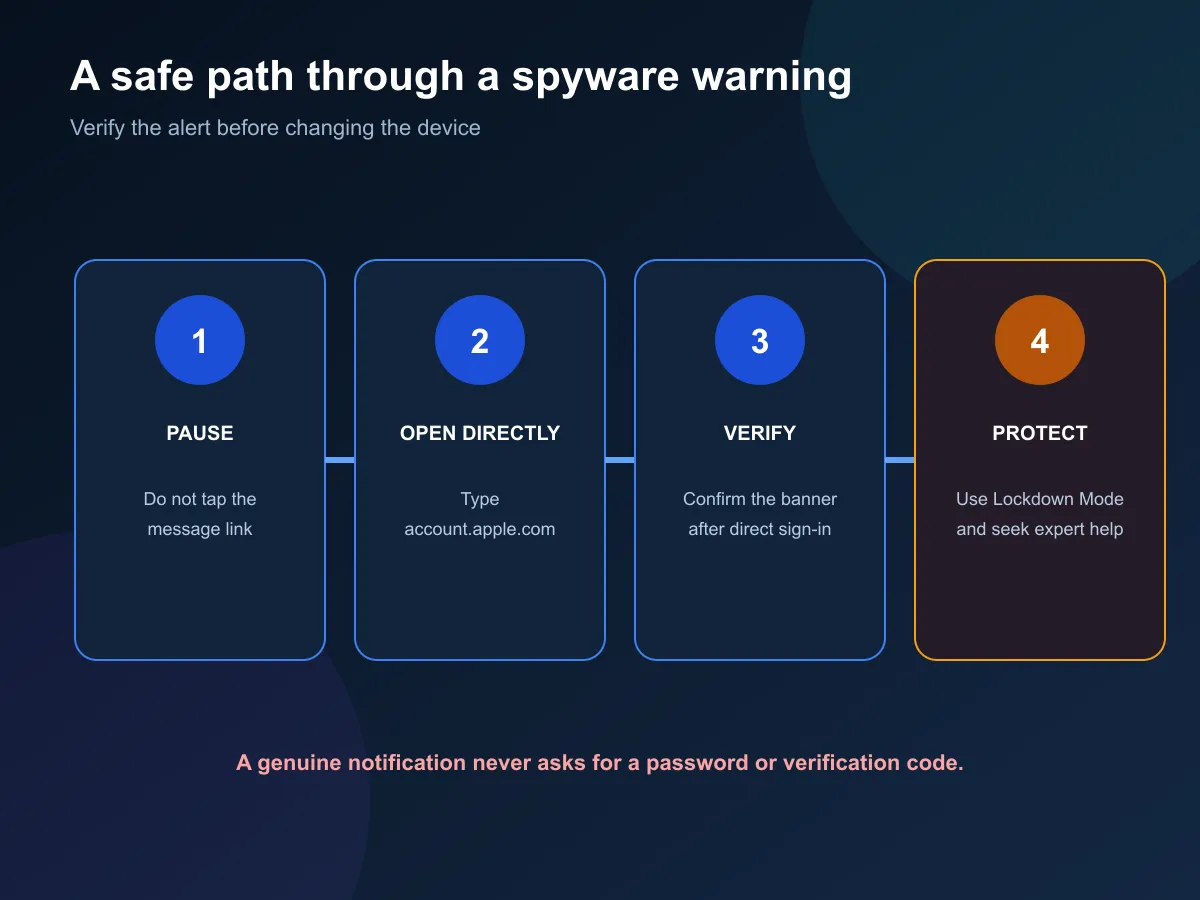
Apple delivers genuine warnings in several places. An alert can appear on the iPhone Lock Screen and in Settings, an email can go to addresses linked to the Apple Account, and a banner appears after the user signs in at account.apple.com. Opening that account site directly is the cleanest verification step.
Do not follow a link in a message that claims to be a security alert. Apple says its threat notifications never ask the user to open a file, install an app or profile, or provide an account password or verification code by email or phone. Any request for those actions is a reason to stop.
Fresh warnings may also attract copycat messages. A scammer can imitate urgent language without having access to the real account banner. Type the account address yourself, check the signed-in page and keep the suspicious message available for later review.
🔒 Protect the device and preserve useful evidence
If the warning is genuine, follow the security guidance shown in the account and consider enabling Lockdown Mode. Lockdown Mode reduces certain features and attack surfaces for people who may be targeted by highly sophisticated spyware. It is a protective setting, not proof that the device is already clean.
Seek expert assistance before erasing, replacing or heavily changing the device. A rushed reset can remove information that helps a specialist understand what happened. Apple points notified users toward emergency digital-security help, which can provide advice tailored to the person and risk.
Keep notes of when each alert appeared and where it was visible. Save the sender details without replying, and avoid forwarding sensitive screenshots widely. If a workplace manages the device or account, use its established security contact as well.
🧭 What ordinary users should do now
Apple stresses that the vast majority of people will never be targets of mercenary spyware. That distinction matters. A fresh news cycle should not push every iPhone or Mac owner into panic or expensive software. Normal security practice remains the right baseline for people without a verified alert.
Install current operating-system updates, use a passcode, enable two-factor authentication and turn on Stolen Device Protection where supported. Use strong, unique passwords or passkeys and avoid unknown links and attachments. These steps help with common account theft and malware even though mercenary spyware is a far more specialised threat.
Replacing a computer is not the first response to an account warning. If an older machine no longer receives important updates, compare current laptops only after confirming the support gap. Check the networking range when a home router is outdated, but remember that new Wi-Fi hardware cannot verify or remove a targeted device compromise.
🚫 Avoid the three dangerous shortcuts
First, do not trust the message because it looks polished. Verify it on the account page. Second, do not install a cleaner, profile or remote-support app suggested by an unexpected contact. Third, do not erase the device before expert advice if the alert is genuine.
The goal is to reduce risk while keeping control of the evidence and account. A verified notification is serious because it describes an individually targeted attack, not because every Apple device is under the same threat. The response should be specific, documented and guided by trusted support.
Frequently Asked Questions
Is an Apple threat notification serious?
Yes. Apple describes genuine notifications as high-confidence alerts that should be taken seriously.
How can a user verify the warning?
Sign in directly at account.apple.com; a genuine Apple threat notification appears at the top of the page.
Will the warning ask for a password?
No. Apple says these notifications never ask for a password, verification code, app install, profile or file.
What is the first protection step?
Follow the genuine notification, consider Lockdown Mode and seek expert help before changing or erasing evidence.
Will most Apple users receive this alert?
No. Apple says the vast majority of users will never be targeted by these costly, highly focused attacks.
What should everyone do even without an alert?
Keep software updated, use a passcode and two-factor authentication, and avoid unknown links and attachments.
Received a warning and need a safe next step? Open the Apple Account page directly, verify the banner, preserve the device and contact trusted security help before making major changes.