A Mac that exposes screen sharing to the public internet needs immediate attention. Authorities have observed attackers abusing CVE-2026-65400 to gain root access on affected systems and install a cryptocurrency miner. Apple has issued updates, so the practical response is to patch first, remove unnecessary exposure and investigate any machine that was reachable on port 5900.
Quick Answer
Update affected Macs now and stop exposing Screen Sharing or Remote Management directly to the internet. The software fix itself costs R0, and Apple has patches for current macOS Tahoe, Sequoia and Sonoma releases. If port 5900 was publicly reachable before patching, treat the Mac as potentially compromised rather than assuming an update removes earlier attacker access.
🚨 What makes this warning different
This is not only a theoretical vulnerability report. The Dutch national cyber authority said active abuse had been observed on multiple systems with port 5900 accessible from the internet. In the reported cases, attackers reached root and placed a Monero miner on the Mac. That combination raises the priority from routine maintenance to an incident check for exposed systems.
The flaw is tracked as CVE-2026-65400 and affects the macOS Screen Sharing Server. Apple's description says an attacker on the network may be able to authenticate to Screen Sharing without valid credentials. The issue was addressed through improved state management in security updates released for supported macOS branches.
Most home Macs sit behind a router and do not expose port 5900 directly. That lowers risk, but it is not proof that Screen Sharing is disabled or unreachable. Port-forwarding rules, remote-access software, business firewall settings and temporary support changes can all alter exposure. Check the actual configuration instead of relying on memory.
🔒 Patch and reduce the reachable surface
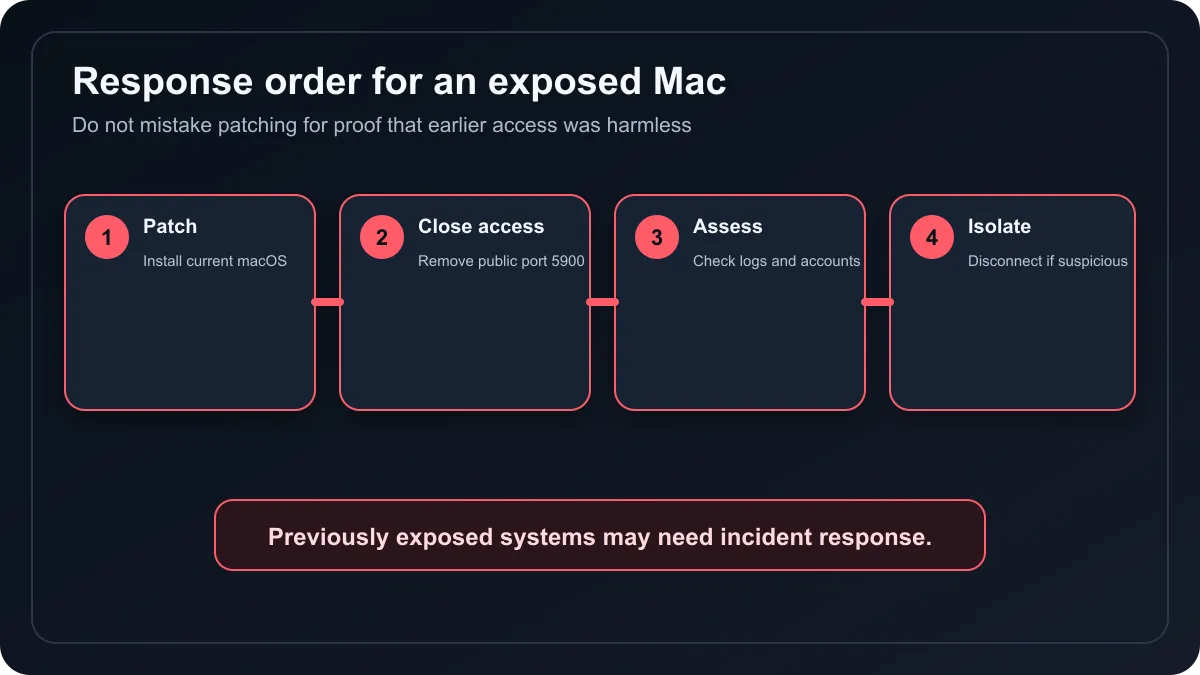
Open System Settings and install the latest macOS update offered for the device. Apple released fixes for current Tahoe, Sequoia and Sonoma versions. A Mac that cannot receive the relevant update should not remain exposed to an untrusted network through Screen Sharing.
Then review Sharing settings. Disable Screen Sharing and Remote Management when they are not required. If remote administration is essential, place it behind a properly managed VPN or another controlled access layer rather than publishing port 5900 to the internet. Also inspect the router and firewall for port-forwarding rules that may remain after a past support session.
Do not search for an unofficial patch or click a warning link sent by email. Use the Mac's built-in Software Update path and Apple's security pages. Security stories often trigger fake cleanup tools, so a calm direct route is safer than reacting to a pop-up or unsolicited message.
🧪 An exposed Mac needs more than an update
Patching closes the known authentication path, but it does not remove a miner, backdoor or changed account left by earlier access. An organisation that exposed port 5900 should preserve logs and involve its IT or security team. Check authentication history, launch items, unusual processes, new accounts, configuration profiles and unexpected network traffic.
Avoid deleting evidence before the scope is understood. Isolate a suspicious Mac from the network, record what was observed and use a trusted recovery process. Password resets should be planned from a clean device, especially if the affected Mac stored browser sessions, password-manager access or administrative credentials.
For home users, the same principle applies at a smaller scale. If the Mac was never publicly reachable and is promptly updated, the response can be limited to normal hardening. If a port was forwarded or an unexpected remote session occurred, seek hands-on technical help instead of treating a successful update screen as proof of cleanliness.
💻 Hardware is not the first fix
This issue does not require buying a new computer. A supported Mac with the relevant update can be secured without replacing hardware. Buyers evaluating a general replacement can still browse current laptop specials or current iMac options, but a purchase should follow normal performance and lifecycle needs, not panic around a patched software flaw.
The durable lesson is configuration discipline. Remote access should be disabled when unused, restricted when necessary, patched quickly and monitored. Internet-facing services turn an ordinary software bug into a much easier target, while a closed port removes an entire path even before a vulnerability becomes public.
Frequently Asked Questions
What is CVE-2026-65400?
It is a macOS Screen Sharing Server authentication flaw that can allow network access without valid credentials.
Has the flaw been exploited?
Yes. Dutch authorities reported active abuse on multiple systems that exposed port 5900 to the internet.
Which macOS versions have fixes?
Apple issued relevant updates for supported macOS Tahoe, Sequoia and Sonoma releases.
Is installing the update enough after exposure?
Not always. A previously reachable Mac should be checked for persistence, changed accounts and unexpected software.
Should Screen Sharing stay enabled?
Only when needed, and it should not be published directly to the internet through an open port.
Does this mean a new Mac is required?
No. Supported affected Macs can receive the software fix; replacement is not the security remedy.
Need to replace an ageing computer for normal lifecycle reasons? Patch and secure the current Mac first, then compare supported laptops or desktops without turning a software incident into a rushed hardware purchase.