The Microsoft September 2026 security update is unusually large. Ars Technica and CrowdStrike count 972 addressed vulnerabilities, including two zero-days and more than one hundred critical issues. Different security vendors can count the release differently, but the operational message is the same: supported Windows and Microsoft systems need a planned, risk-based update cycle.
Quick Answer
Back up important data, make sure the BitLocker recovery key is accessible, and install the September security updates on supported devices. Businesses should prioritise internet-exposed systems and endpoints handling sensitive work, test critical applications, then widen deployment while monitoring failures. The headline vulnerability count is useful for scale, but it does not replace the Microsoft Security Update Guide, product-specific notes or a recovery plan.
Why the count needs context
A large monthly total can include multiple product families, severities and deployment paths. It does not mean every Windows PC contains 972 directly exploitable flaws. Administrators should filter the Microsoft Security Update Guide by the products and versions they actually operate, then focus on exploited, publicly disclosed, remotely reachable and critical vulnerabilities.
CrowdStrike highlights CVE-2026-73010 as a critical 9.8-rated issue in Windows Routing and Remote Access Service. A service that is not enabled or exposed may face a different immediate risk than a public server using it, but that distinction should be confirmed from inventory rather than assumed.
The two zero-days deserve early attention because attackers or public researchers already have knowledge that reduces the defender's time advantage. Zero-day status still does not remove the need to test. It changes the order and urgency of a controlled deployment.
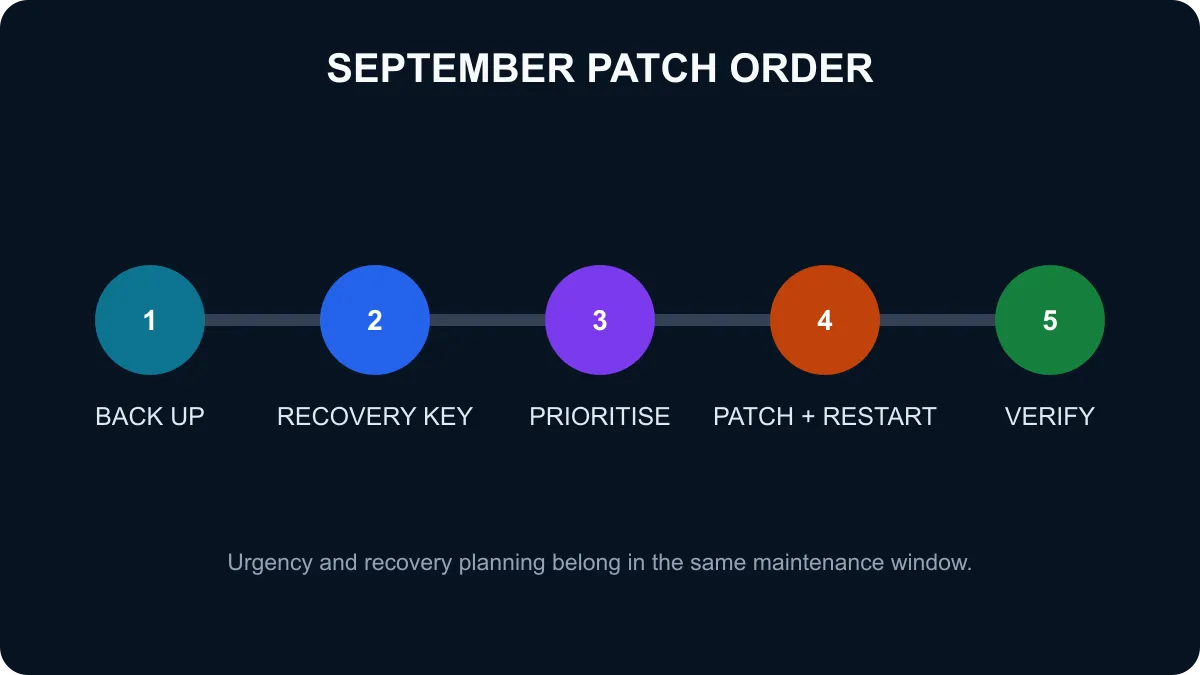
A safer home update sequence
Start with a current backup of irreplaceable documents and photographs. Confirm that the backup can be opened from a different device or location. If BitLocker or device encryption is enabled, make sure the recovery key is stored somewhere you can reach without the affected PC.
Microsoft documents a known issue in the September Windows 10 update that can lead some devices to a BitLocker recovery screen. That does not mean every updated PC will fail. It is a concrete reason to locate the recovery key before the restart rather than after a problem appears.
Run Windows Update, install the supported security release and restart when requested. After sign-in, check network access, audio, graphics, printing and the applications you rely on. If something breaks, record the update number and exact symptom before changing several settings at once.
A business deployment order
Businesses need a wider view: asset inventory, exposure, backups, recovery keys, application owners and staged deployment rings. Begin with a representative test group and the systems where an exploit would have the largest impact. Internet-facing services, privileged workstations and devices holding sensitive information deserve early attention.
Measure the rollout. Patch success, restart completion, application health and endpoint alerts should be visible. Keep an approved rollback method for a genuine operational failure, but do not use indefinite testing as a reason to leave exposed systems unpatched.
Users replacing unsupported hardware can review operating systems, pre-built PC deals and PC best sellers. A new PC is not required merely because a monthly update is large; it becomes relevant when the existing platform no longer receives supported security fixes.
What not to do
Do not download unofficial patch bundles, disable BitLocker just to avoid preparing the key, or assume antivirus replaces operating-system updates. Avoid making unrelated driver, firmware and application changes in the same maintenance window unless the combined change is tested. Fewer variables make a fault easier to isolate.
Frequently Asked Questions
How large is the September 2026 Microsoft update?
Ars Technica and CrowdStrike count 972 addressed vulnerabilities, although vendor tallies can differ by counting method.
Are any zero-days included?
Yes. The captured analysis identifies two zero-day vulnerabilities in the September release.
What should home users do first?
Back up important files, confirm the BitLocker recovery key is accessible, install supported updates and restart when prompted.
What should businesses prioritise?
Start with internet-exposed and high-value systems, test critical applications, then expand deployment with monitoring and rollback plans.
Why check BitLocker before updating?
Microsoft documents a known issue that can send some devices to the BitLocker recovery screen after affected updates.
Can antivirus replace Windows patching?
No. Security software can reduce some risk, but it does not repair the vulnerable operating-system code.
Use Microsoft's Security Update Guide to match the release to the products you operate.
Patch with a recovery path, not with crossed fingers.
Back up, secure the recovery key, deploy by risk and verify the result.