



PCIe 5.0 vs PCIe 4.0 for Video editing in 4k in SA
PCIe 5.0 vs PCIe 4.0 for video editing in 4k is mainly about fit, features, compatibility, cost, and upgrade path, not one automatic winner. SA buyers should match the choice to the setup.
Read moreA 125% sRGB monitor is worth extra rand when broad colour coverage supports the buyer's media or creative workflow. The UFree V costs R2,399 and combines that gamut with 350cd/m2, 1500:1 contrast and dual inputs, so its real price should anchor value.
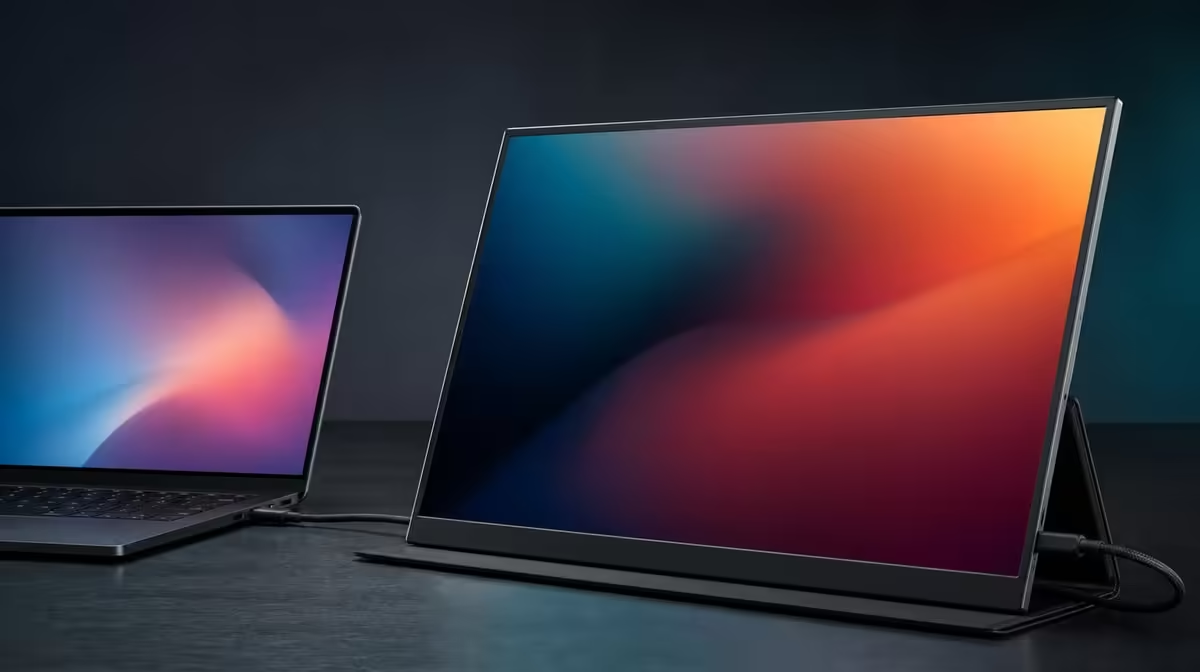
A broader colour gamut is worth paying for only when it survives the buyer's real applications and colour workflow. Whether a 125% sRGB monitor is worth extra rand cannot be decided from the percentage alone, especially when the R2,399 UFree V already combines that gamut with a complete portable panel.
The UFree V's 125% sRGB coverage is worth part of its R2,399 price for creators and media users who can manage and use the broader gamut. It does not guarantee accuracy. The value case also includes 350cd/m2, 1500:1 contrast, USB-C, Mini HDMI and flexible support.
Start with the buyer's content. Colour-aware photo work, illustration, video tools and vivid compatible media can benefit from a range beyond standard sRGB.
Open familiar files in the applications that will be used. Check natural skin tones, neutral greys, saturated objects and gradients from a centred position. A wide gamut has value when it reveals useful colour differences rather than merely making every image louder.
For office documents, communication and ordinary web use, colour range may be secondary. Text clarity, source reliability and stand placement can carry more of the price.
Keep a week-long count of sessions where gamut affected a decision. The number of available colours is less useful than the frequency with which the workflow benefits.
Compare wide-colour portable screens through Evetech's portable monitor category, using the same managed files.
The 125% figure describes coverage, not how closely output matches a target. Measure accuracy through the exact source, picture mode, profile and target when the work depends on it.
Colour-critical work needs measurement and calibration. Build a display profile at a stable brightness and room condition, then use applications that understand colour management.
Unmanaged sRGB content can appear over-saturated on a broad-gamut panel. Begin with a neutral picture mode and avoid a vivid preset as the default comparison.
The UFree V states 178-degree viewing, but critical judgement belongs near the centre. Off-axis visibility is useful for sharing without guaranteeing identical colour at every angle.
The 1500:1 ratio concerns bright-to-dark output. It can support tonal separation, but it is not evidence of chromatic accuracy.
The 350cd/m2 brightness figure offers headroom in bright indoor rooms. Use the foldable stand to remove reflections before raising output. Direct sunlight remains outside an honest guarantee.
Native 1920 x 1080 provides the spatial canvas. Resolution and gamut are separate: Full HD can display broad colour, while 4K does not automatically mean wider or more accurate colour.
USB-C can simplify a compatible laptop route when the host and cable carry video. Mini HDMI supplies a dedicated alternative, with power arranged appropriately. Connection flexibility adds value only when the buyer's sources use it.
The folding stand covers quick desktop placement, and VESA support can suit a fixed mount after pattern, screws and load are verified.
Video creators should plan source or compatible external audio. Mobile buyers should verify the monitor's weight and calculate the complete carried kit before adding travel value.
Use Evetech's broader PC display selection if a fixed calibrated monitor competes with the portable role.
Choose a lower-gamut baseline and a broad-gamut option. Keep source, room, application, files, resolution and viewing angle consistent.
Hide price during the visual and workflow test. Record whether managed colour changes editing choices, media enjoyment or delivery confidence. Then reveal the complete prices.
Do not assign the whole price difference to gamut when the models also differ in brightness, connections, stand design or resolution. Give each confirmed advantage its own value row.
At R2,399, the UFree V already offers 125% sRGB with strong stated brightness and dual inputs. A dearer monitor must bring another verified need, while a cheaper one should be compared on the full setup rather than gamut alone.
Review the decision after a month. If broad colour never enters the workflow, lower its value. If it supports repeated managed creative tasks, the extra rand has a concrete purpose.
Check Evetech's monitor best-seller list for live comparisons and current availability at buying time.
Build a four-week gamut trial. Week one uses the neutral baseline, week two introduces colour-managed editing, week three tests media and sharing, and week four reviews output on a standard sRGB destination.
Keep the same familiar files throughout. A changing source set makes it difficult to know whether broad gamut or simply more colourful content caused the impression.
Record one practical decision per session. The creator may distinguish similar saturated colours, avoid clipping during an edit or decide that the wider range made no difference to a document task.
Add a calibration row when the work requires accuracy. Record the measurement tool, target, profile and application rather than calling the panel accurate because calibration completed.
Check the neutral profile after moving between USB-C and Mini HDMI. Source colour settings can differ, so preserve the route in every result.
Use a central editing position and a side sharing position. The 178-degree viewing support can help collaboration without turning the colleague's seat into the reference.
Control room brightness before judging value. A 350cd/m2 maximum does not mean the screen should be calibrated or edited at full output in a dim room.
Test tonal content beside colour. The 1500:1 figure supports a separate shadow-and-highlight check and should not receive credit for gamut expansion.
At the end of four weeks, list tasks improved, tasks unchanged and any unverified requirement. Broad colour earns extra rand only in the first group.
Compare the UFree V's R2,399 package with a lower-gamut screen through the same work. Keep differences in resolution, support and connections outside the colour-only result.
If a costlier display is considered, make its added price prove either stronger colour evidence or another required function. A larger percentage alone does not finish the value case.
The final answer can remain personal: worthwhile for managed creators and vivid-media users, secondary for ordinary office buyers, and never a substitute for measured accuracy.
Create a handover page that defines gamut, accuracy and contrast in separate sentences. Another creator should be able to repeat the test without turning 125% into an unsupported quality score.
Preserve one unmanaged screenshot only as workflow evidence, not as a colour reference. Screenshots cannot capture the physical panel output or room.
Review the saved creative profile after moving to another computer. The application, source colour settings and connection route all belong to the result.
At purchase time, check the live category and compare any alternative through the same four-week structure. A changing shortlist should not change the definition of useful broad colour.
Creators and media users whose managed applications and content can use the broader gamut.
No. Accuracy requires calibration and measured evidence.
The UFree V also states 350cd/m2, 1500:1 contrast, dual inputs, a folding stand and VESA support.
When the workload is mostly standard office content and never uses or manages broad gamut.
It can provide a broad canvas, but critical delivery still needs a controlled colour process.
It is the actual UFree V reference and should anchor any claim that a wider gamut costs extra.
Check the linked Evetech pages for current availability when purchasing.
Ready to let broad colour prove its rand value in real files? Explore Evetech's portable screens, compare the UFree V through managed creative tasks and count only the gamut benefits that survive a month.
Creators and media users whose managed applications and content can use the broader gamut.
No. Accuracy requires calibration and measured evidence.
The UFree V also states 350cd/m2, 1500:1 contrast, dual inputs, a folding stand and VESA support.
When the workload is mostly standard office content and never uses or manages broad gamut.
It can provide a broad canvas, but critical delivery still needs a controlled colour process.
It is the actual UFree V reference and should anchor any claim that a wider gamut costs extra.
Check the linked Evetech pages for current availability when purchasing.
PCIe 5.0 vs PCIe 4.0 for video editing in 4k is mainly about fit, features, compatibility, cost, and upgrade path, not one automatic winner. SA buyers should match the choice to the setup.
Read more
Wi-Fi 7 vs Wi-Fi 6e for competitive esports comes down to router support, latency goals, device compatibility, and coverage. SA buyers should match the choice to the real network setup.
Read more
ATX 3.1 vs ATX 3.0 for mMO and live-service games buyers - what changes is mostly about compatibility, budget, upgrade path, and setup fit. SA buyers should check device support and real needs before expecting a clear win from either option.
Read more
LGA 1851 vs LGA 1700 can affect Twitch and YouTube streaming when gaming and encoding share CPU resources. For SA creators, the real-world difference depends on encoder choice, memory support, motherboard cost, thermals, and upgrade plans.
Read more
X870E vs X670E for aaa single-player gaming is mainly about fit, features, compatibility, cost, and upgrade path, not one automatic winner. SA buyers should match the choice to the setup.
Read more
Hall Effect switches vs Mechanical switches for mMO and live-service games is mostly about compatibility, budget, upgrade path, and setup fit. SA buyers should check device support and real needs before expecting a clear win from either option.
Read more
A fake 113GB GTA VI ISO reportedly used empty padding around a small malware payload. SA gamers should delete unofficial builds, keep Windows security active and wait for official channels.

Wi-Fi 6E vs Wi-Fi 6 matters for 4K video editing when files move across a network. The real-world difference between Wi-Fi 6E and Wi-Fi 6 for video editing in 4K depends on NAS access, cloud uploads, router range, and SA creator workflows.

The difference between PCIe 5.0 and PCIe 4.0 for SA gamers is mostly bandwidth headroom. Compare GPU slot needs, NVMe speed, motherboard support, and upgrade timing before paying extra for a newer platform.

Gaming PC stuck pixel checks in South Africa should confirm the monitor fault first. Use colour tests, screenshot comparison, cable swaps, display menu checks, and clear photos before deciding on support.

Shokz OpenFit Air 2 earbuds weigh 7.2g each and use a redesigned dual-driver open-ear layout. SA buyers should choose them for comfort and awareness, not maximum isolation.

AMD's current driver now lists a Radeon RX 9050 4GB, while product coverage details a narrowed memory system. SA buyers should weigh the low VRAM ceiling against current local Radeon options.

Samsung Display has demonstrated a 16-inch 2.5K OLED laptop panel running at 300Hz. SA buyers should wait for a named notebook, full panel specifications and a local price before planning an upgrade.

Microsoft says some Windows 11 game crashes after recent updates are linked to RGB-related drivers. Affected SA gamers should confirm the update and driver before using the published registry workaround.

RTX 5090 on a 650W PSU is a tight pairing with very limited headroom. For SA gaming PCs, focus on total system draw, PSU quality, connector support, CPU choice, and avoid OC plans unless the full build is carefully power-limited.
PCIe 5.0 vs PCIe 4.0 for video editing in 4k is mainly about fit, features, compatibility, cost, and upgrade path, not one automatic winner. SA buyers should match the choice to the setup.

850W PSU safety for RTX 5090 is plausible with a quality unit and balanced parts. In SA, confirm connector support, CPU power draw, case airflow, PSU age, and spare capacity before building around 850W.
Wi-Fi 7 vs Wi-Fi 6e for competitive esports comes down to router support, latency goals, device compatibility, and coverage. SA buyers should match the choice to the real network setup.