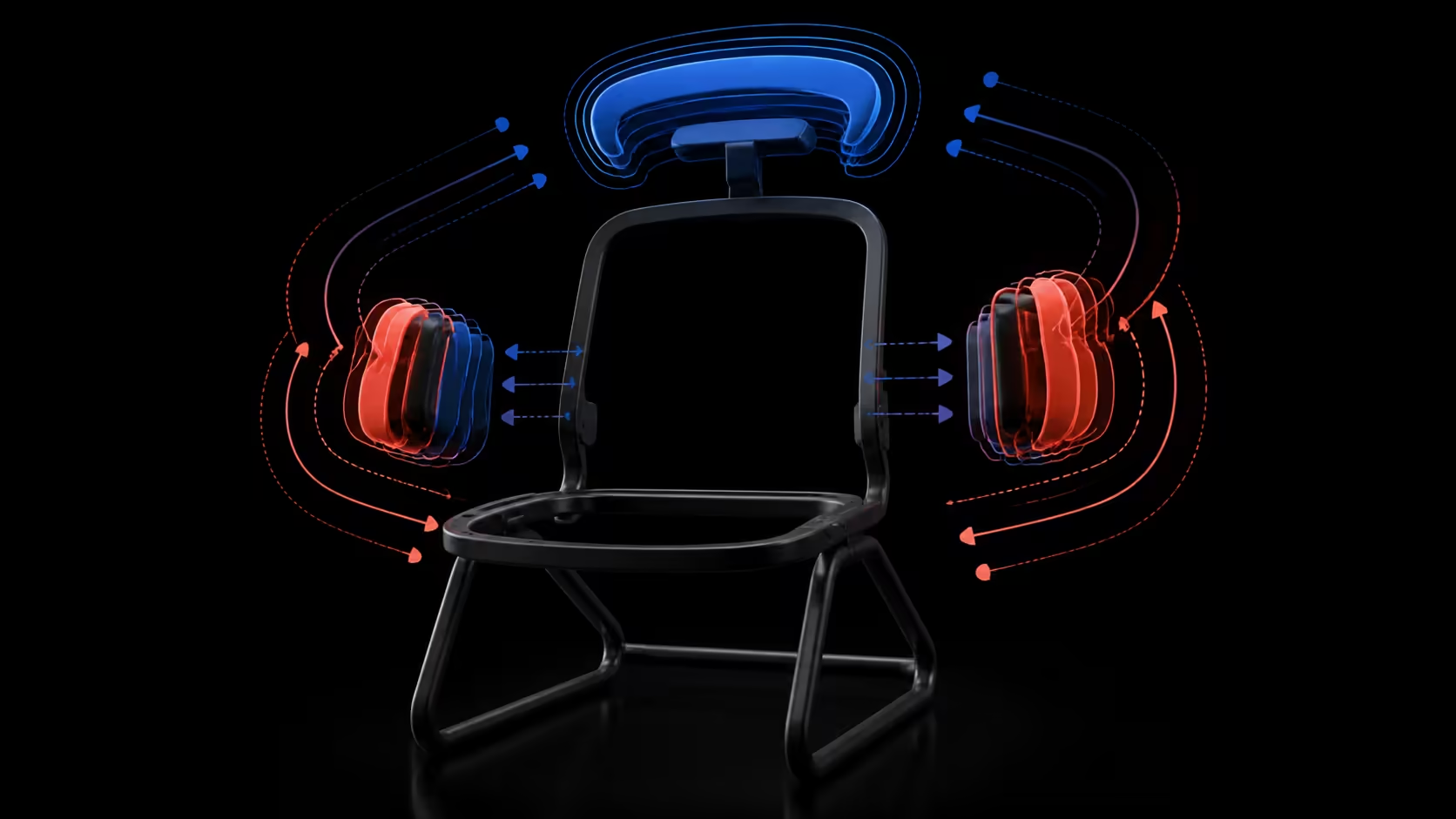
4D headrests and 6D armrests are best understood as model-specific movement systems, not standardised promises. Buyers should map the documented directions on each chair, then test whether the supports reach natural head and forearm positions.
Quick Answer
The E3 Ultra pairs a 4D headrest with five-way omni arms rather than a 6D armrest label.
Treat 4D and 6D as starting labels, then compare exact axes, range, controls and repeatability. Do not assume every manufacturer counts movement identically. At R9,599, the HBADA E3 Ultra pairs a 4D biaxial headrest with 720-degree omni armrests rather than a 6D description.
🔄 Decode headrest movement first
A 4D label usually signals several adjustment possibilities, but the number alone does not list them. Build the comparison from product-specific movement. For the E3 Ultra, the head support is biaxial and its rotation-and-tilt range covers 70 degrees.
Begin by placing the display for a natural gaze and sitting against the backrest. Move the headrest gradually toward gentle contact. It should neither lower the chin nor send the head forward or require the user to remain rigid.
Test more than one posture
Typing, reading and calls may use different head positions. The E3 Ultra reclines to 140 degrees, which changes the relationship between pad and screen. Retest support at every backrest angle you plan to use rather than assuming one setting follows the full range.
Compare headrest options through Evetech's HBADA office chair category, preserving the actual movement wording for each model.
🧮 Interpret 6D armrests cautiously
A 6D description suggests six counted dimensions, but the included directions can differ. Write down height, width, depth, angle or other documented movements and leave any unanswered control out of the score. Then identify which positions matter for the workstation.
Six dimensions are not automatically better than four. A smaller range that reaches relaxed typing and mouse positions may be more useful than a complex system that collides with the desk or is difficult to reset.
The E3 Ultra does not belong in the 6D column merely because its armrests move broadly. HBADA uses a 720-degree omni-adjustment description for this system; compare that capability directly.
🎯 Turn labels into task tests
For the headrest, observe contact while looking at the primary screen, reading and reclining. For armrests, test typing across the keyboard, pointer movement, handwriting and desk approach. Left and right supports may require different settings.
Check control access, unwanted movement and the ability to restore a preferred position. A large movement map loses value if the user cannot tell where a useful setting was.
Keep shoulders relaxed and wrists free. If support forces the chair away from the desk, revisit its position before accepting a forward lean.
⚖️ Compare complete-chair value
Head and arm systems must coexist with lumbar, recline, seat fit and structure. The E3 Ultra adds 8D lumbar adjustment and uses aluminium alloy for the five-star base as well as the support bar. Neither feature answers seat dimensions or load capacity, so obtain those independently.
At R9,599, value the chair according to how many required positions its actual controls reach. Do not award the E3 Ultra a 6D benefit; its armrests use 720-degree omni adjustment, and its headrest mechanics should stay within biaxial movement.
Use Evetech's office-chair range to create a model-by-model movement table. The disciplined shortlist separates marketing labels from functional evidence without dismissing range that genuinely serves the user's task.
Add reset and transition tests
A useful movement system should survive ordinary changes. Have the user move from typing to a call, enter modest recline and return to input work. Observe whether head and forearm positions can be restored without a long sequence or an accidental collision with the desk.
Shared users should complete the same transitions independently. Save each person's references through a private photo, visible alignment point or short note. Do not average settings, because a compromise position may hide the reason that adjustability was purchased.
Control access belongs in the score. A direction that the intended user struggles to reach may have limited practical value. Likewise, a support that drifts or is confusing to reset should not receive the same credit as one that repeatedly reaches the task position.
Observe the transition after standing and returning. If the saved arm or head reference disappears during ordinary entry, the restoration method needs to be part of the comparison.
Preserve sensible health claims
Head and arm adjustments can help a chair fit a preferred posture, but they do not guarantee comfort, correct posture or treatment. Screen placement, vision, input-device location, session length and movement remain part of the workstation.
If symptoms are severe, persistent or worrying, stop treating control range as the answer and obtain suitable professional advice. A feature comparison should stay within furniture fit and observable task behaviour.
At the final review, calculate value by frequent use. The 4D headrest may matter during reclined reading, while omni armrests may serve every input session. Give each control a weight based on the buyer's routine rather than on which label sounds more advanced.
Keep seat dimensions and load capacity as gating questions. Neither a 4D, 6D nor 720-degree description can establish that the base chair suits the intended person. A candidate that fails an essential measurement does not recover through extra movement.
Record desk clearance separately for the upright and reclined positions. Head support can feel well placed while the armrests collide with furniture, so the complete task sequence must pass before a setting is saved.
Where the chair is shared, ask users to identify the controls by purpose rather than dimension name. Clear operation matters more than memorising marketing terminology, and it reveals whether each movement is genuinely understood.
Recheck the selected positions after a normal break and a fresh return to the desk. Repeatable fit should survive a pause without another person's assistance or an extended search. Save only references that pass this return test.
Head support moves 1.8 inches vertically, 2.2 inches in depth and through 70-degree dual-axis rotation. Each arm supplies two full rotations, 1.97-inch height, 4.33-inch reach and 20-degree tilt. Compare those axes directly with any 6D alternative.
The seat can slide 1.97 inches, which should be set before arm and head positions are finalised. Four recline levels then create additional upper-body contexts for testing the axes, especially whether arm support and head contact remain useful away from upright.
Frequently Asked Questions
How should buyers decode a 4D headrest label?
It should prompt a request for the exact movement map, usable range and controls. The count itself does not standardise directions across every chair.
How should 6D armrests be assessed?
List all six documented dimensions for that precise system, then test task positions, desk clearance, control access and repeatability rather than assuming superiority.
Which headrest is on the E3 Ultra?
The chair uses a 4D biaxial headrest. Its rotation-and-tilt movement covers 70 degrees, which should anchor the comparison.
Does the E3 Ultra have 6D armrests?
Keep this model outside the 6D category. Its armrest capability is expressed as 720-degree omni adjustment and should retain that wording.
Why keep adjustment labels separate?
Different labels may count or describe movement in incompatible ways. Preserving them prevents an assumed direction from becoming a false product feature.
Can either system guarantee fit?
No. Body proportions, desk geometry, seat fit and task pattern decide whether the available positions are useful for an individual.
Ready to translate headrest and armrest labels into task positions?
Explore Evetech seating with an exact movement map and repeatable test prepared for every model on the shortlist.