



PCIe 5.0 vs PCIe 4.0 for Video editing in 4k in SA
PCIe 5.0 vs PCIe 4.0 for video editing in 4k is mainly about fit, features, compatibility, cost, and upgrade path, not one automatic winner. SA buyers should match the choice to the setup.
Read moreClean desk routing uses short surface runs, labelled drops and supported slack below. Start with the R5,099 Arozzi Arena's three cut-outs, then choose a cable net or other organiser around the adapters serving its 160x82cm equipment layout.
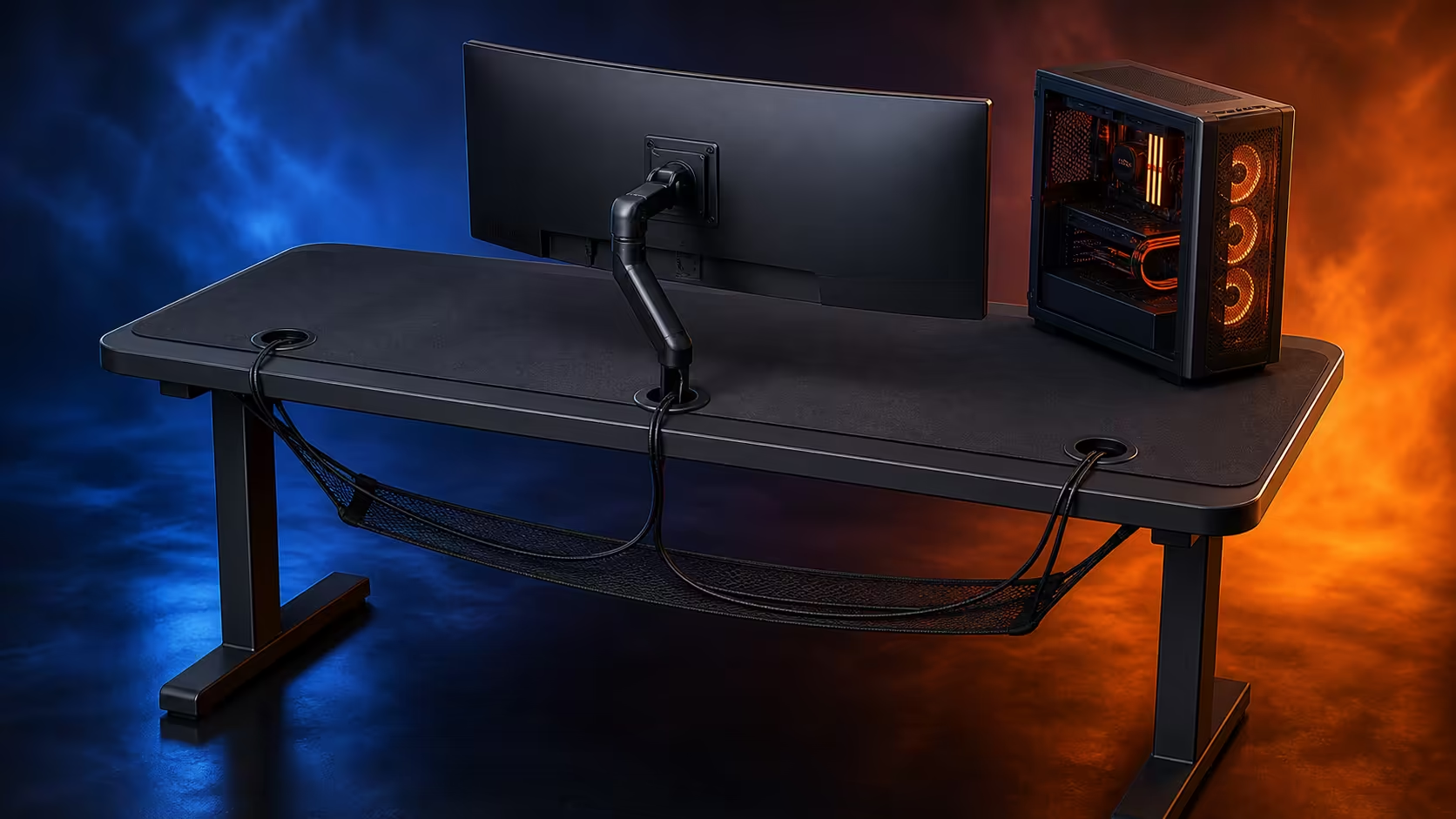
A clean desk route should make every cable shorter on the surface, supported below and identifiable at both ends. Gaming desk cable management with cut-outs cable nets and clean routing is an equipment map rather than a bundle of ties. The R5,099 Arozzi Arena contributes three cut-outs across its 160x82cm worktop for a disciplined starting point.
Position equipment before connecting it, assign each lead to the nearest useful cut-out and label both ends. Leave controlled service loops above, then place adapters and excess length in a correctly sized net, tray or other support beneath the desk. The Arena costs R5,099 and supplies the surface routes; the lower organiser must fit the actual plugs, underside clearance and height-adjustment movement.
List every powered and signal connection by device, port and destination. Include monitors, PC, keyboard, mouse, audio, network, charging and any creator hardware. Note which devices move during ordinary use.
Photograph existing connections before powering down. Disconnect safely, holding plugs rather than pulling cables. Remove abandoned, damaged or duplicate leads from the working area instead of hiding them in the next bundle.
Measure the route each active cable must take, including the drop below the top and travel to its destination. A straight-line distance can be too short once edges, service loops and safe bends are considered.
Group stable leads separately from chargers or temporary equipment. A frequently changed connection should not require opening the monitor and PC bundle every time.
Compare gaming desks with cable routes after counting connections. Opening positions are valuable only when they align with equipment groups.
Set the display, PC and input positions on the Arena first. Assign the closest suitable opening to each group, keeping visible runs out of the full-surface mouse area.
Three cut-outs allow distribution across 160cm. They do not need identical loads or a rigid cable-type rule. One can serve displays, another a desktop tower side and the third changeable peripherals when those are the natural positions.
Leave a small service loop for a wired mouse or moving monitor. Too little slack transfers force to a port; too much lies on the worktop or drops towards the user. Support the remainder below.
Label each end before feeding the lead through. Use names that identify device and destination, such as main display power, rather than a generic number stored nowhere.
Monitor attachment can change cable length and route. Complete any compatible display installation before dressing those leads tightly, and watch the complete arm movement for pinching.
Study Arozzi gaming station layouts for surface zoning, then place cut-out assignments on the specific 160x82cm plan.
A flexible net can hold mixed shapes and adapt to changing equipment. A rigid tray can organise aligned plugs and leads in a defined channel. Clips can guide smaller paths. Choose by the cable bundle rather than appearance.
Measure underside attachment space, knee clearance, frame positions and adjustment areas before selecting an organiser. The Arena's height setting must never bring hardware into a moving or occupied zone.
Place power bricks where support carries their weight. Do not suspend an adapter from a device cable or wrap warm hardware inside dense coils. Keep plug faces visible and accessible.
Avoid tight bends at ports and edges. Reusable fastening can help a changing setup, but it should not compress different cables into one rigid rope. Create lanes that let one lead be traced and removed.
Ask a second person to watch the underside during the first deliberate height change where practical. Stop if a loop tightens, a holder shifts or any cable enters leg space.
Keep power connections and signal paths understandable even when the same organiser supports them. Clean crossings are easier to maintain than repeated weaving.
Photograph the finished surface drops and underside. Save a cable list beside the desk plan. Future additions must name their port, route, service slack and organiser position before being connected.
Reserve one accessible path for likely temporary equipment. When that capacity is exhausted, remove unused leads or choose a more suitable organiser instead of compressing another adapter into the net.
Inspect after a room move, monitor change or extended period of use. Look for sag, dust, stressed connectors, rubbed insulation and loops moving towards chair wheels.
Clean the Arena's water-resistant, easy-clean pad without spraying liquid near openings or electronics. Lift equipment carefully and restore labelled routes only after the area is dry.
Test serviceability by disconnecting one non-critical lead using its labels, then returning it without disturbing another group. If this requires dismantling the whole underside, improve access.
Browse complete gaming setup combinations by counting every new connection. Clean routing lasts when the accessory list respects cable capacity.
Troubleshoot from the device towards its destination. If a monitor loses signal, follow its labelled lead through the cut-out and organiser without pulling neighbouring cables. Check accessible connections safely and change only one item before retesting.
Do not make the route visually straight at the cost of connector health. A gentle bend and visible service loop can be better than a cable stretched tightly along an edge. Clean routing describes control and support, not geometric perfection.
Plan power access for emergencies and maintenance. A plug that cannot be reached without crawling through a dense bundle is poorly located. Keep the safe isolation point known to every regular user of the setup.
For shared desks, distinguish personal chargers from permanent station connections. Give changeable leads an outer accessible lane, leaving stable PC, display and network paths protected from daily handling.
Review the route after a month with the chair occupied and the full equipment load active. Check that gravity has not moved loops, that labels remain readable and that no new accessory bypassed the three-drop plan.
Map equipment, inventory cables, position devices, assign surface drops, support slack below and test movement before closing bundles.
Use the opening nearest each device group so surface runs remain short and do not cross the active mouse area.
It can support compatible adapters, connections and excess length within its size and load guidance, clear of legs and movement.
Rest their weight in a suitable support and leave safe bend room instead of suspending them from attached leads.
Two labels identify a connection from either side and let one device be serviced without guessing or tugging.
Three openings distribute cable routes across the 160x82cm worktop.
It can change the route when compatible hardware is used, but arm movement still needs controlled slack.
The dark grey desk is priced at R5,099.
Ready to make every surface drop lead to an accessible labelled connection? Compare cable-ready desks at Evetech, inventory the whole station, and close the underside only after one cable can still be serviced alone.
Map equipment, inventory cables, position devices, assign surface drops, support slack below and test movement before closing bundles.
Use the opening nearest each device group so surface runs remain short and do not cross the active mouse area.
It can support compatible adapters, connections and excess length within its size and load guidance, clear of legs and movement.
Rest their weight in a suitable support and leave safe bend room instead of suspending them from attached leads.
Two labels identify a connection from either side and let one device be serviced without guessing or tugging.
Three openings distribute cable routes across the 160x82cm worktop.
It can change the route when compatible hardware is used, but arm movement still needs controlled slack.
The dark grey desk is priced at R5,099.
PCIe 5.0 vs PCIe 4.0 for video editing in 4k is mainly about fit, features, compatibility, cost, and upgrade path, not one automatic winner. SA buyers should match the choice to the setup.
Read more
Wi-Fi 7 vs Wi-Fi 6e for competitive esports comes down to router support, latency goals, device compatibility, and coverage. SA buyers should match the choice to the real network setup.
Read more
ATX 3.1 vs ATX 3.0 for mMO and live-service games buyers - what changes is mostly about compatibility, budget, upgrade path, and setup fit. SA buyers should check device support and real needs before expecting a clear win from either option.
Read more
LGA 1851 vs LGA 1700 can affect Twitch and YouTube streaming when gaming and encoding share CPU resources. For SA creators, the real-world difference depends on encoder choice, memory support, motherboard cost, thermals, and upgrade plans.
Read more
X870E vs X670E for aaa single-player gaming is mainly about fit, features, compatibility, cost, and upgrade path, not one automatic winner. SA buyers should match the choice to the setup.
Read more
Hall Effect switches vs Mechanical switches for mMO and live-service games is mostly about compatibility, budget, upgrade path, and setup fit. SA buyers should check device support and real needs before expecting a clear win from either option.
Read more
A fake 113GB GTA VI ISO reportedly used empty padding around a small malware payload. SA gamers should delete unofficial builds, keep Windows security active and wait for official channels.

Wi-Fi 6E vs Wi-Fi 6 matters for 4K video editing when files move across a network. The real-world difference between Wi-Fi 6E and Wi-Fi 6 for video editing in 4K depends on NAS access, cloud uploads, router range, and SA creator workflows.

The difference between PCIe 5.0 and PCIe 4.0 for SA gamers is mostly bandwidth headroom. Compare GPU slot needs, NVMe speed, motherboard support, and upgrade timing before paying extra for a newer platform.

Gaming PC stuck pixel checks in South Africa should confirm the monitor fault first. Use colour tests, screenshot comparison, cable swaps, display menu checks, and clear photos before deciding on support.

Shokz OpenFit Air 2 earbuds weigh 7.2g each and use a redesigned dual-driver open-ear layout. SA buyers should choose them for comfort and awareness, not maximum isolation.

AMD's current driver now lists a Radeon RX 9050 4GB, while product coverage details a narrowed memory system. SA buyers should weigh the low VRAM ceiling against current local Radeon options.

Samsung Display has demonstrated a 16-inch 2.5K OLED laptop panel running at 300Hz. SA buyers should wait for a named notebook, full panel specifications and a local price before planning an upgrade.

Microsoft says some Windows 11 game crashes after recent updates are linked to RGB-related drivers. Affected SA gamers should confirm the update and driver before using the published registry workaround.

RTX 5090 on a 650W PSU is a tight pairing with very limited headroom. For SA gaming PCs, focus on total system draw, PSU quality, connector support, CPU choice, and avoid OC plans unless the full build is carefully power-limited.
PCIe 5.0 vs PCIe 4.0 for video editing in 4k is mainly about fit, features, compatibility, cost, and upgrade path, not one automatic winner. SA buyers should match the choice to the setup.

850W PSU safety for RTX 5090 is plausible with a quality unit and balanced parts. In SA, confirm connector support, CPU power draw, case airflow, PSU age, and spare capacity before building around 850W.
Wi-Fi 7 vs Wi-Fi 6e for competitive esports comes down to router support, latency goals, device compatibility, and coverage. SA buyers should match the choice to the real network setup.