


RTX 4060 Ti Throttling Under Load: SA Temperature Guide
RTX 4060 Ti Throttling Under Load: Temperature. Everything you need to know with SA pricing, step-by-step instructions & expert recommendations.
Read more- Define the tech & benefits; - Compare performance & noise; - Install tips and buying advice Cableless case fans explain powering and controlling PC fans without traditional wiring, reducing clutter while keeping airflow and RGB control ✨🔌
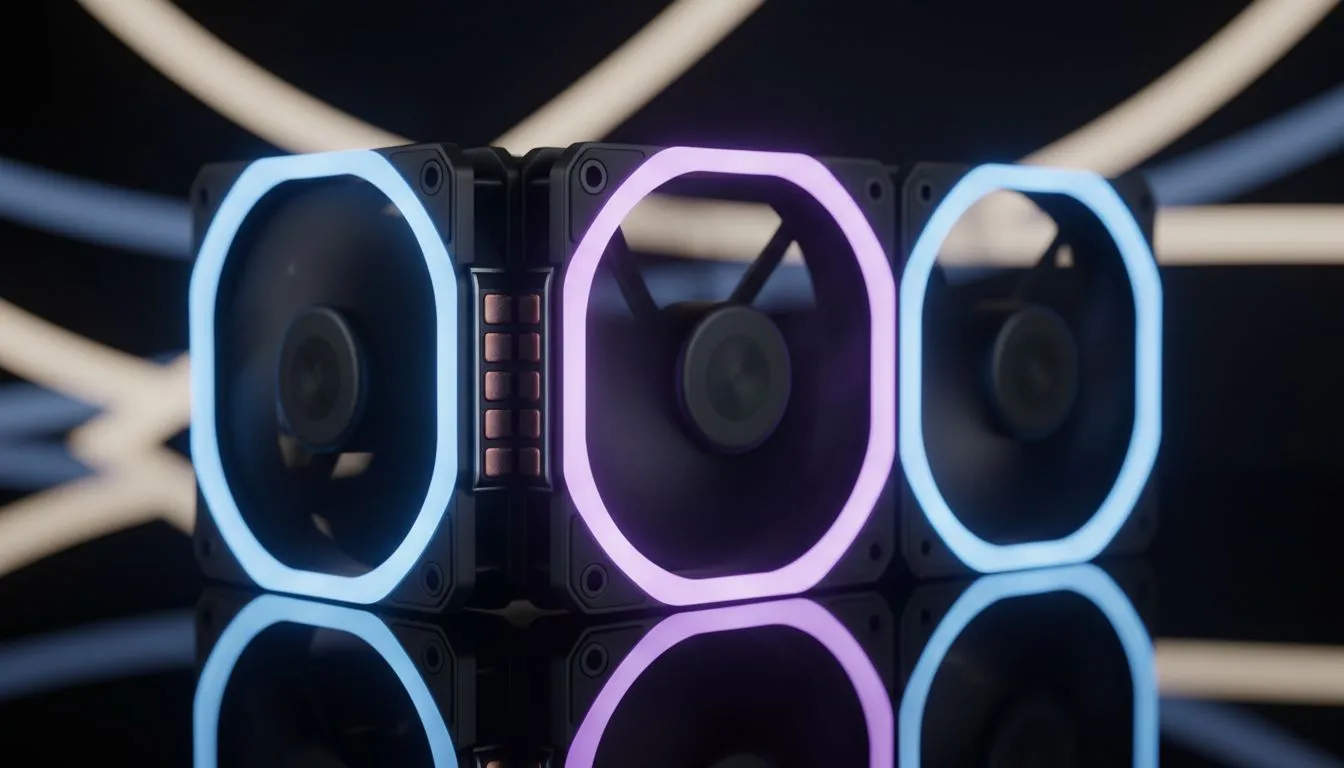
Tired of the "spaghetti monster" behind your PC back panel? Cableless case fans are the sleek solution South African builders have been waiting for. These modular fans snap together, cutting down the clutter and making your rig look like a professional studio build without the hours of cable management stress. ⚡ By removing the individual wires for every single fan, you create a cleaner, more efficient airflow path.
For years, adding three intake fans meant managing six different cables. It was a nightmare of zip ties and frustration. Cableless case fans... also known as modular or daisy-chain fans... change the rules of the game. Instead of every fan having its own long wire, these units feature proprietary interlocking mechanisms.
When you browse our massive selection of high-performance case fans, you will notice that these modular designs are becoming the new standard for premium builds. They use physical bridge connectors or magnetic pins to pass power and lighting signals from one fan to the next. This means a cluster of three fans only requires a single cable leading to your controller or motherboard.
The secret lies in the frame. Most manufacturers build "pogo pins" or contact pads into the sides of the fan housing. When you slide two fans together, these pins complete a circuit. This technology was pioneered by brands like CORSAIR with their iCUE LINK system, which has revolutionised how we think about component communication.
When snapping your fans together, ensure the contact pins are perfectly aligned before applying pressure. A slight misalignment can prevent the RGB or PWM signal from passing through the entire chain. Always test the connection before screwing the fans into your chassis to save time later.
Once connected, your software sees the entire chain as a single unit or a series of individual zones. This makes syncing RGB effects across your entire chassis incredibly simple. You no longer have to worry about one fan being slightly out of sync because of a loose header connection.
Building a PC in South Africa often means dealing with high ambient temperatures. Efficient airflow is non-negotiable. By eliminating the bulk of extra wires, you improve the "air hygiene" inside your case. Less cable clutter means fewer places for dust to settle and fewer obstructions for cool air reaching your GPU.
Whether you are looking for standard 120mm fans for a compact build or the larger 140mm fans for maximum silence and air volume, the cableless approach saves you time. We also see great budget-friendly options from Deepcool that bring this high-end convenience to more affordable price points.
For those who prefer a stealthier look, you can even find these modular designs in fans with no lighting, focusing purely on performance and clean aesthetics. It is about making the building process as enjoyable as the gaming itself. ✨
Ready to Clean Up Your Build? Cable management doesn't have to be a chore. Upgrade your cooling and aesthetics today with our latest modular technology. Explore our massive range of case fans and find the perfect kit to make your PC shine.
Cableless case fans are PC fans designed to receive power or signals without traditional individual wiring, reducing cable clutter while keeping airflow and RGB.
Many cableless designs use magnetic coupling, wireless power transfer or integrated hub contacts. This is how cableless case fans deliver power and control.
They trade reduced cable clutter and cleaner routing for added dependency on hubs or magnetic mounts; assess cable-free case fan benefits versus your needs.
Yes—modern cableless RGB case fans can carry RGB control and tachometer signals through a hub or wireless protocol, enabling lighting and monitoring.
Installation varies: snap-on magnetic mounts or hub contacts are common. Follow the cableless fan installation guide for secure mounting and hub pairing.
Performance can match wired models, but design matters. Compare cableless fan performance specs for RPM, airflow (CFM) and dBA to judge impact.
Compatibility often relies on a central hub or controller, so check cableless fan compatibility with motherboards and supported connectors before buying.
RTX 4060 Ti Throttling Under Load: Temperature. Everything you need to know with SA pricing, step-by-step instructions & expert recommendations.
Read more
Apex Legends Max Settings on RTX 4080. Tested & verified settings for best FPS and visual quality on SA hardware budgets.
Read more
GPU Buying Guide. Everything you need to know with SA pricing, step-by-step instructions & expert recommendations.
Read more
GPU Terms Guide. Everything you need to know with SA pricing, step-by-step instructions & expert recommendations.
Read more
AMD Adrenalin Download & Setup Guide: GPU. Clear setup instructions with SA-specific considerations, troubleshooting tips & recommended components.
Read more
Back-to-School GPU Buying Guide. Everything you need to know with SA pricing, step-by-step instructions & expert recommendations.
Read more
Snapdragon X2 NPU Explained: How 80 TOPS Changes. Plain-English explanation of what it means, why it matters & how it affects your buying decisions in SA.

HBM? High Bandwidth Memory Used in GPUs and AI. Plain-English explanation of what it means, why it matters & how it affects your buying decisions in SA.

How much should you spend on sim racing accessories in South Africa for a realistic setup? We break down budgets by quality tiers, so you buy smart gear and avoid overspending 🎮💸

G-Sync and FreeSync? Variable Refresh Rate. Plain-English explanation of what it means, why it matters & how it affects your buying decisions in SA.

AMD Laptop: Value. SA-focused analysis with local pricing data, real-world insights & actionable buying advice.

How MacBook Neo Handles 30+ Chrome Tabs with Only. SA-focused analysis with local pricing data, real-world insights & actionable buying advice.

Why Apple Put 8GB RAM in MacBook Neo: The A18 Pro. SA-focused analysis with local pricing data, real-world insights & actionable buying advice.

Upgrade your work laptop with a New Motherboard. Step-by-step instructions with SA-specific tips, common pitfalls to avoid & expert recommendations.

Maintain wired headset — Checklist: • inspect cables • clean earpads • store properly 🔧🎧 Practical steps to preserve sound quality and avoid premature replacements.

Fix crackling headset fast: step-by-step checks for cables, connectors, drivers, and settings to remove static or distorted audio on wired headsets 🎧⚙️

Stereo vs mono headsets: learn which delivers clearer calls, better spatial music, or simpler mono voice performance — pick the right headset for meetings, music, or gaming 🎧💬

- Compare gaming headset vs studio headphones; - Assess comfort, mic and sound; - Recommend best daily picks. Gaming headset vs studio headphones: learn which suits work, music and casual gaming. 🎧⚖️