



PCIe 5.0 vs PCIe 4.0 for Video editing in 4k in SA
PCIe 5.0 vs PCIe 4.0 for video editing in 4k is mainly about fit, features, compatibility, cost, and upgrade path, not one automatic winner. SA buyers should match the choice to the setup.
Read moreCharge Cool One Cable simplifies an X3 Pro setup by routing charging and integrated cooling around one cable. The R1,199 controller still needs suitable power, and phone workload determines whether incoming energy exceeds gaming demand.
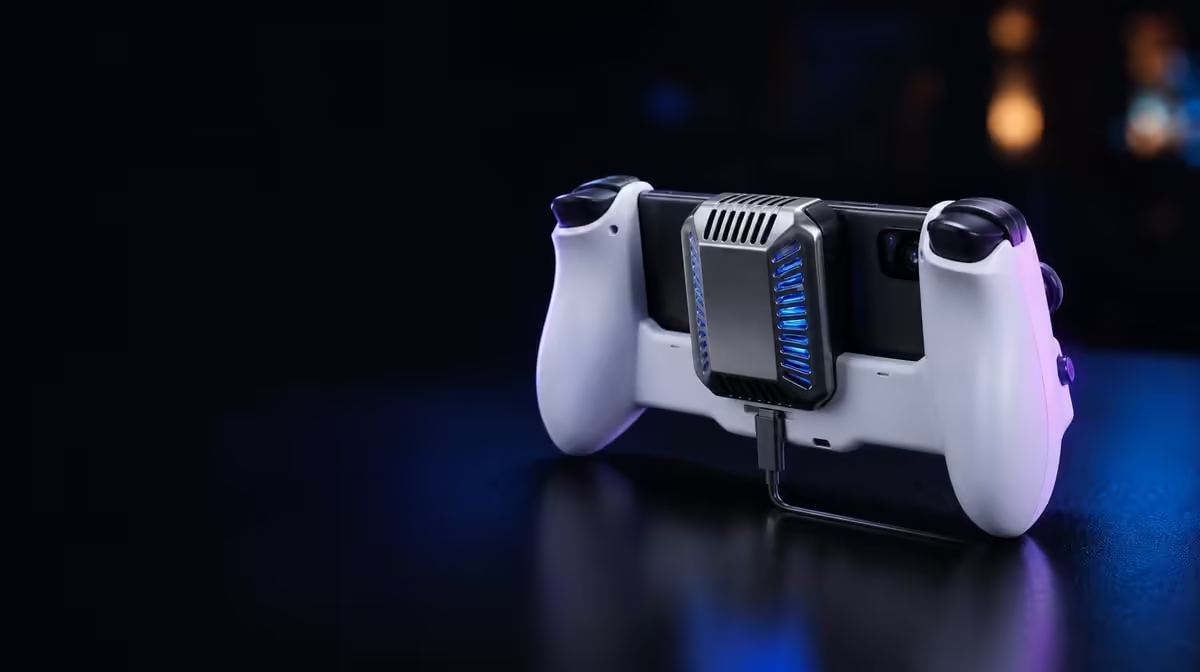
One cable can make a busy phone rig easier to hold, but it does not make power behaviour disappear. Charge Cool One Cable technology simplifies routing around the X3 Pro's charging and integrated cooling functions. The controller costs R1,199, and its cleaner path is useful only when the source, connectors and phone workload remain suitable.
Charge Cool One Cable reduces cable clutter by organising charging and cooling around one physical route in the GameSir X3 Pro setup. At R1,199, the controller still needs appropriate power and relaxed connector placement; the phone battery can fall during demanding play if consumption exceeds incoming energy.
A controller with cooling can otherwise leave the player managing separate lines around both hands. Consolidating that arrangement gives fewer opportunities for cables to cross the grips, interfere with trigger fingers or resist gyro movement.
The benefit is physical organisation, not wireless operation. An external power source and a suitable cable arrangement remain necessary for the intended functions. Place the source where its weight cannot drag the line across the controller.
Evetech's gaming controller selection gives buyers a place to compare the X3 Pro's integrated body with other current formats. Count the complete route from source to phone rather than focusing on the connector nearest the hand.
Form a gentle loop near the controller so normal grip changes do not pull the USB-C plug. Excess cable should be placed away from the cooler's airflow rather than wound tightly against the phone.
The cooler moves heat away from a suitable phone surface. Charging supplies energy. One-cable routing places them into a cleaner arrangement, but it does not merge their performance into a single guarantee.
A demanding game may consume more power than the phone receives. Record battery percentage at the start and after a fixed interval. A declining number can reflect workload or the chosen source even if the cooler is operating.
Charging itself can contribute heat. Begin tests at a similar battery state, use the same game section and keep room conditions stable. Stop if the phone raises a temperature warning or a connector becomes unusually warm.
The X3 Pro's integrated cooler still needs even contact and open air. A tidy cable is not useful if it blocks an intake or pulls the handset away from the cooling surface.
Fit the phone first and check that the USB-C connection sits straight. Then connect the intended cable while watching for frame movement. Route it along a side that stays clear of the micro-switch triggers and the fingers operating them.
For desk use, support the line so its weight does not hang from the controller. On a sofa, keep it away from cushions that can trap heat. During travel, avoid laying a trailing cable across a shared walkway.
Evetech's gaming accessories department can help plan supporting pieces around the one-cable arrangement. Each addition should solve strain, protection or placement without creating another obstruction.
Choose a twenty- or thirty-minute game segment and record starting battery percentage, display settings and room conditions. Check whether the cable remains relaxed, whether the cooler stays clear and whether the phone shifts as the controls are used.
Repeat with the same workload after making only one adjustment, such as lowering an unnecessary graphics option. Do not swap the power source and settings together or the result becomes difficult to interpret.
Use gyro and dual rumble during the final trial. Both change physical movement in the hands and can reveal a cable route that looked acceptable during a static check. A line should follow those motions rather than steering the controller.
The accessories best-seller page provides a view of popular setup ideas. Keep the X3 Pro assessment centred on its specific R1,199 combination of control, cooling and organised power.
Charge Cool One Cable is therefore a convenience technology with a practical mechanical benefit. It reduces loose routing, while careful fit, power measurement and thermal testing still determine whether the full arrangement works.
Create two routing plans if the controller moves between desk and sofa. A desk can support the cable's weight and keep excess length away from the cooler. A sofa needs protection against cushions, feet and a line slipping into the player's lap.
Mark the direction of the successful route with a photo. This makes repeated setup faster and reduces the chance of accidentally crossing an air opening. Inspect the connector angle in the image as carefully as cable neatness.
Add a movement trial after the static check. Rotate the X3 Pro through the largest gyro correction used in play, press both triggers and shift the grip. The cable should follow without steering the controller or lifting one end of the phone.
Measure power behaviour at three points rather than only the end. A battery percentage that holds initially and declines later may reflect increasing game load or thermal conditions. Note the time beside every reading.
Disassemble in a controlled order: close the game, disconnect power, let the phone settle and then remove it without levering USB-C. A convenient route should make both setup and removal predictable.
At R1,199, the X3 Pro uses its one-cable design to support a broader integrated concept. It is most valuable to players who would otherwise manage separate cooling and charging lines around full mobile controls, not to those who treat the phrase as a promise of unlimited power.
Keep the successful cable with the controller or label it clearly. Swapping to an unknown line before a long session changes the power and strain conditions established during testing.
Inspect both connector ends after travel. Bent relief, grit or looseness should be addressed before the phone is installed. One-cable convenience depends on that single route remaining dependable.
The technology's value is easiest to state plainly: fewer lines around the hands, with the same responsibility to measure power and protect USB-C. That is a practical benefit within the R1,199 package.
Test the route in low light, since evening couch play can make a dark cable harder to see. It should stay clear through good placement rather than relying on constant visual attention.
For travel, disconnect before packing and coil the line loosely in its own compartment. A tight bend at either plug can undo the care taken during use.
One-cable convenience continues after play when the same known line can be stored, inspected and redeployed without sorting several routes.
No. It describes a simplified route around charging and cooling, not the absence of a suitable power source.
The game and phone can consume energy faster than the arrangement delivers it during a heavy workload.
Confirm connector alignment, cooler airflow, hand clearance and enough slack for gyro or grip movement.
The GameSir X3 Pro costs R1,199 with Charge Cool One Cable and its integrated controller cooler.
Ready to remove cable clutter without adding strain? Browse Evetech's mobile controllers and map the complete power route around your grip, airflow and playing position.
No. It describes a simplified route around charging and cooling, not the absence of a suitable power source.
The game and phone can consume energy faster than the arrangement delivers it during a heavy workload.
Confirm connector alignment, cooler airflow, hand clearance and enough slack for gyro or grip movement.
The GameSir X3 Pro costs R1,199 with Charge Cool One Cable and its integrated controller cooler.
PCIe 5.0 vs PCIe 4.0 for video editing in 4k is mainly about fit, features, compatibility, cost, and upgrade path, not one automatic winner. SA buyers should match the choice to the setup.
Read more
Wi-Fi 7 vs Wi-Fi 6e for competitive esports comes down to router support, latency goals, device compatibility, and coverage. SA buyers should match the choice to the real network setup.
Read more
ATX 3.1 vs ATX 3.0 for mMO and live-service games buyers - what changes is mostly about compatibility, budget, upgrade path, and setup fit. SA buyers should check device support and real needs before expecting a clear win from either option.
Read more
LGA 1851 vs LGA 1700 can affect Twitch and YouTube streaming when gaming and encoding share CPU resources. For SA creators, the real-world difference depends on encoder choice, memory support, motherboard cost, thermals, and upgrade plans.
Read more
X870E vs X670E for aaa single-player gaming is mainly about fit, features, compatibility, cost, and upgrade path, not one automatic winner. SA buyers should match the choice to the setup.
Read more
Hall Effect switches vs Mechanical switches for mMO and live-service games is mostly about compatibility, budget, upgrade path, and setup fit. SA buyers should check device support and real needs before expecting a clear win from either option.
Read more
A fake 113GB GTA VI ISO reportedly used empty padding around a small malware payload. SA gamers should delete unofficial builds, keep Windows security active and wait for official channels.

Wi-Fi 6E vs Wi-Fi 6 matters for 4K video editing when files move across a network. The real-world difference between Wi-Fi 6E and Wi-Fi 6 for video editing in 4K depends on NAS access, cloud uploads, router range, and SA creator workflows.

The difference between PCIe 5.0 and PCIe 4.0 for SA gamers is mostly bandwidth headroom. Compare GPU slot needs, NVMe speed, motherboard support, and upgrade timing before paying extra for a newer platform.

Gaming PC stuck pixel checks in South Africa should confirm the monitor fault first. Use colour tests, screenshot comparison, cable swaps, display menu checks, and clear photos before deciding on support.

Shokz OpenFit Air 2 earbuds weigh 7.2g each and use a redesigned dual-driver open-ear layout. SA buyers should choose them for comfort and awareness, not maximum isolation.

AMD's current driver now lists a Radeon RX 9050 4GB, while product coverage details a narrowed memory system. SA buyers should weigh the low VRAM ceiling against current local Radeon options.

Samsung Display has demonstrated a 16-inch 2.5K OLED laptop panel running at 300Hz. SA buyers should wait for a named notebook, full panel specifications and a local price before planning an upgrade.

Microsoft says some Windows 11 game crashes after recent updates are linked to RGB-related drivers. Affected SA gamers should confirm the update and driver before using the published registry workaround.

RTX 5090 on a 650W PSU is a tight pairing with very limited headroom. For SA gaming PCs, focus on total system draw, PSU quality, connector support, CPU choice, and avoid OC plans unless the full build is carefully power-limited.
PCIe 5.0 vs PCIe 4.0 for video editing in 4k is mainly about fit, features, compatibility, cost, and upgrade path, not one automatic winner. SA buyers should match the choice to the setup.

850W PSU safety for RTX 5090 is plausible with a quality unit and balanced parts. In SA, confirm connector support, CPU power draw, case airflow, PSU age, and spare capacity before building around 850W.
Wi-Fi 7 vs Wi-Fi 6e for competitive esports comes down to router support, latency goals, device compatibility, and coverage. SA buyers should match the choice to the real network setup.