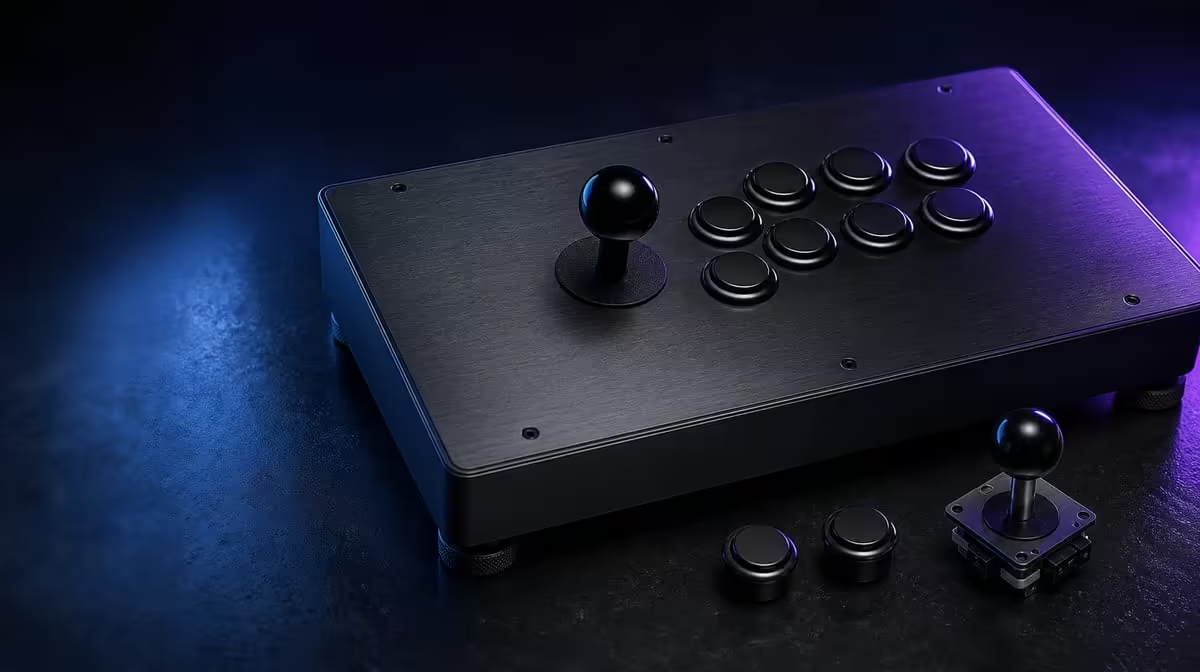
The C2's layout is more than a lever beside a row of buttons. A complete GameSir C2 arcade layout includes the Sanwa Denshi control surface, the way direction mode is selected, the functions protected by Key Lock, the artwork-ready faceplate and the two consoles explicitly named for use.
Quick Answer
The R1,799 GameSir C2 combines Sanwa Denshi arcade controls, a multi-functional directional toggle, Key Lock and customisable artwork in one PS4 and Xbox One fightstick. Learn the physical layout first, then document the mode, lock state and game mapping so the same setup can be reproduced.
🕹️ The control surface divides movement and action
The joystick gives one hand responsibility for cardinal directions, diagonals and neutral return. The other hand works across separate arcade buttons. This division is the defining physical difference from a compact pad, and it asks the player to coordinate wrist, forearm and individual fingers.
Sanwa Denshi controls provide a named hardware baseline. Test each button for one visible response, then alternate between nearby and distant pairs. For the lever, hold each cardinal, reach all four corners and watch the return to neutral in a training display.
Button spacing has to be assessed from the actual seated position. Check whether outer controls can be reached without twisting the wrist or raising the shoulder. A broad panel can feel comfortable on a deep desk and awkward on a narrow table, even though the hardware is unchanged.
Base stability completes the physical layout. Route the cable without pull, place the C2 where forceful movements do not slide it and repeat the same character drill after fatigue appears. Component quality is most useful when the surrounding posture lets it remain consistent.
Use a neutral hand reset between attempts. The lever hand should return without gripping harder after a miss, and the action fingers should hover rather than carry body weight. That repeatable starting pose turns the layout into something that can be measured.
🧭 The switches define operating state
The direction switch lets a compatible game or host receive the joystick's commands in a chosen format. It does not physically alter the joystick. Record its starting position, test eight directions, move it once and repeat the identical sequence.
The Key Lock protects selected functions from accidental activation. Establish normal operation before enabling it, then deliberately try one protected action and every active control required during play. A lock that is not understood can make a healthy function look dead.
Keep toggle and lock jobs separate in the setup note. Direction mode belongs beside the game name; lock state belongs in the match routine. Combining both into one vague switch label makes later troubleshooting needlessly difficult.
After transport, cleaning or shared use, read both states before connection. A physical switch can move while the controller remains undamaged. The shortest dependable launch sequence is host recognition, direction check, lock boundary and one normal action.
If the states differ by title, keep separate records. A single universal note may be convenient but wrong. Mark each entry with console, game and date so old mappings do not quietly override a newer working arrangement.
🎮 Support determines where the layout works
PS4 and Xbox One form the C2's stated console pair. On either system, begin in a menu and prove recognition before opening the intended title. Then check the full map, directions and any game-specific mode requirement.
Do not extend that list to computers or other consoles without exact evidence. The Sanwa Denshi layout and direction toggle cannot create protocol support. Put every additional host in a separate check column.
Evetech's gaming controller selection lets buyers compare complete formats and named platforms. Remove incompatible devices first, then compare hand layout and features among the surviving options.
Related desk and transport needs can be explored in Evetech's gaming accessories department. No surrounding item should be counted as a compatibility solution unless its role is specifically established.
The layout should also pass a storage test. Choose a position where nothing presses the lever or buttons, keep the cable from sharp bends and cover exposed controls from dust. A complete guide includes the hours between sessions, not only play.
🎨 The faceplate adds a visual layer
Customisable artwork lets the C2 reflect a character, team colour or personal theme. Obtain the correct template or measurements, print a paper draft and place it beneath the control positions before committing to a final design.
Plan around the lever opening, button caps and hands. Important details near those areas may vanish in use, while strong contrast can make labels harder to read. A design for the physical panel should be judged on the assembled object rather than only on a monitor.
Follow appropriate removal and reassembly guidance. Keep fasteners organised, protect the faceplate surface and stop if construction differs from the expected steps. Artwork customisation is not proof that every internal arcade part is casually replaceable.
At R1,799, the complete package should be valued in layers: physical controls, supported consoles, useful configuration, match protection and personal appearance. Check current availability through Evetech's accessory best sellers, then give weight only to layers you will actually use.
Review those layers after several weeks. A feature that never appears in the routine should not carry the same value as a direction mode used daily. The most useful layout is the one whose hardware and settings remain understandable after novelty fades.
Keep the review beside the original scorecard so the ownership decision can be traced.
Add a full-session layout test to that review. Early accuracy can hide a shoulder that rises over time or outer buttons that become difficult once the action hand tires. Record comfort at the start, midpoint and end rather than compressing the whole session into one impression.
Create a small map of the physical surface. Mark the lever, active game buttons and switches that matter for the current title. This is useful when custom artwork changes the visual field or another player needs to understand the arrangement quickly.
Check the complete layout after ordinary storage. Read both switch states, inspect the cable route and confirm that the faceplate sits flat before connecting. Ownership between matches is part of the system, because pressure on controls or an unexplained state can undermine an otherwise good practice routine.
Finally, compare the C2 layout with the player's established controller through the same tasks. The arcade surface does not need to replace every device, but it should show a repeatable advantage or a clear personal preference in the fighting-game work that justified R1,799.
Frequently Asked Questions
What defines the C2 arcade layout?
It uses a separate joystick-and-button arrangement with Sanwa Denshi controls. Hand position, enclosure stability and game mapping complete the experience.
What does the directional toggle change?
It changes command presentation for a supported setup, not the physical mechanism. Test every position through the same eight-point drill.
How does Key Lock protect a match?
It can guard selected functions after normal inputs have been confirmed. Active buttons still need careful hand placement.
Which consoles are named?
The C2 explicitly supports PS4 and Xbox One. Other devices and individual games require exact checks.
What can be changed visually?
The faceplate is customisable. Use the correct template and removal guidance so artwork fits around the controls.
What price includes the complete package?
The GameSir C2 costs R1,799. The figure covers the controller's combined hardware, configuration and visual features.
Ready to understand the whole arcade surface before buying?
Compare Evetech's gaming controllers by platform and layout, then document every C2 switch state that enters your regular games.