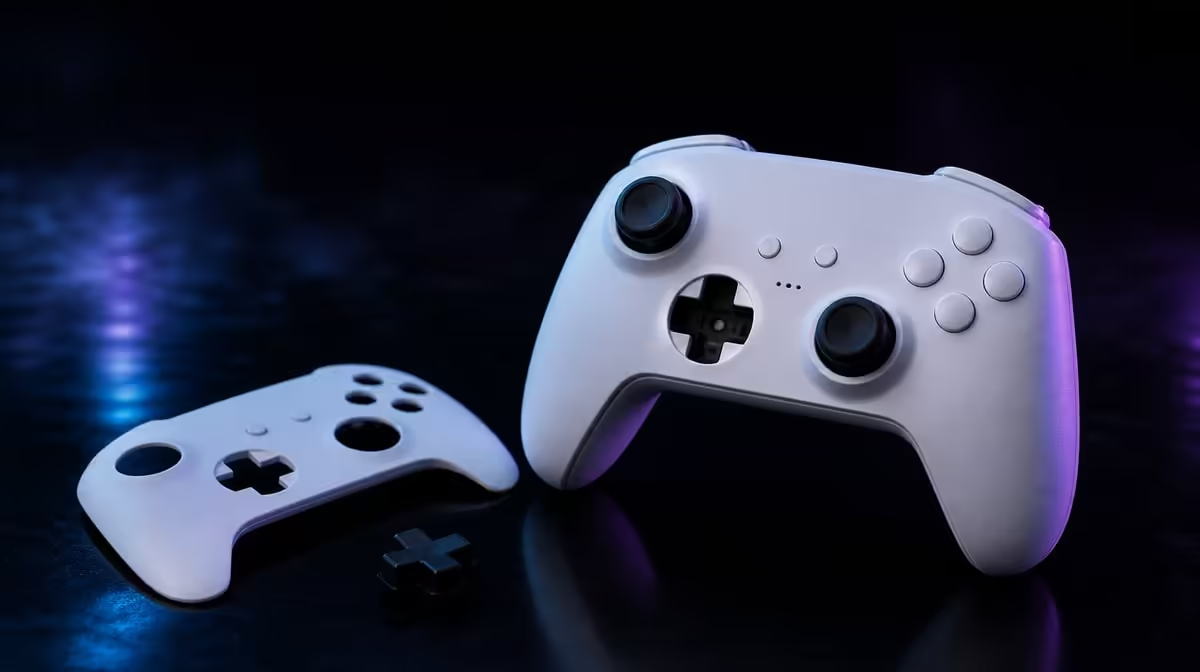
Custom controller parts can change appearance or the surface under a thumb without changing the electronics beneath them. Swappable faceplates and D-pads on the GameSir G7 Pro serve different preferences, so they should be installed and judged independently.
Quick Answer
The R1,499 GameSir G7 Pro supports a swappable faceplate and interchangeable D-pad. The faceplate changes the visible shell, while the D-pad changes the directional contact surface; neither part adds a connection mode or guarantees better inputs.
🎨 Give the faceplate an honest job
A faceplate changes the controller's exterior. It can support a preferred look or make a personal controller easier to recognise in a shared setup.
Appearance can matter to ownership without becoming a performance claim. Changing the shell does not increase the G7 Pro's 1000Hz PC polling, alter its Mag-Res TMR sensing or add wireless Xbox play.
Inspect how the part sits before playing. It should be installed carefully, lie as intended and leave controls unobstructed. Stop if alignment feels wrong rather than forcing the exterior into place.
After fitting it, press the face buttons, move both sticks and check the D-pad around its complete direction set. The purpose is to confirm that cosmetic work has not interfered with ordinary control access.
Inspect the edges during a normal grip. A part can appear aligned on a table while creating an uncomfortable seam under the palm. Play a short familiar sequence before accepting the installation.
Keep the original part nearby for the first week. Reversibility is part of the value, and a direct return to the baseline is more informative than trying to remember how the controller used to feel.
Take a photograph of the default exterior and note the removal sequence. A visual reference is useful when returning the controller to its original state or helping another owner.
Evetech's gaming controller range provides context for models with different approaches to personalisation.
➕ Treat the D-pad as an input surface
The D-pad handles directional presses rather than exterior styling alone. An interchangeable option can present another contact shape under the thumb, which may suit menus, movement or fighting-game sequences differently.
Do not promise better fighting inputs from the swap itself. Thumb size, technique, game interpretation and the particular sequence all matter. The useful question is whether the alternative surface improves deliberate direction changes for this player.
Start with a neutral input test. Press up, down, left and right individually, then test diagonals where the game uses them. Repeat the same sequence with the alternative D-pad.
Use a fighting-game training mode or menu sequence for consistency. Count missed directions and unintended diagonals. A preference based only on appearance does not establish control accuracy.
Test repeated quarter-circle, double-tap and direction-change motions only when the game uses them. Record the inputs shown by the training display rather than judging from whether one attack happened to succeed.
Try the D-pad in a non-fighting context as well. Menu navigation, platform movement or item selection can reveal whether the surface stays comfortable during slower, repeated presses.
Try longer play after the technical check. Surface shape can affect comfort and thumb movement over time. Record whether the player slides, rolls or lifts the thumb and which option supports that method.
Browse Evetech's gaming accessories section once the desired directional style is known.
🧰 Swap parts without mixing the results
Change one component at a time. Fit the faceplate, run the control check and return to the baseline before changing the D-pad. This isolates a cosmetic installation issue from a directional preference.
Work on a clean, stable surface with enough light to see alignment. Keep removed pieces together and avoid placing force on sticks, triggers or buttons while handling the exterior.
Once the D-pad is fitted, check all inputs again. Include the four macro buttons, Hall Effect triggers, sticks and 3.5mm audio routine if those are part of the normal setup.
Do not change a macro profile during the part comparison. A new command layout can improve or harm the same drill independently, making the D-pad result impossible to isolate.
If another player uses the pad, let them perform the default directional sequence without being told which part they should prefer. Different thumb size and technique can produce another reasonable choice.
Test on the primary platform first. Xbox uses a wire, PC can use cable or 2.4GHz, and Android connects over Bluetooth. A custom part does not change that map, but game-level directional behaviour can vary.
Save a part profile with the chosen D-pad, game, input sequence and result. If multiple people share the controller, include who prefers which surface and how to restore it.
The included dock remains a charging and storage point. Confirm that the chosen exterior arrangement returns to the normal ownership routine without confusing the next setup.
⚖️ Decide whether customisation earns value
The faceplate earns value through appearance and identification. The D-pad earns value only if its alternate surface improves comfort or directional execution in the games played.
At R1,499, these parts sit beside core performance and compatibility features. A buyer may prioritise TMR sticks, adjustable triggers or PC polling first and treat customisation as a welcome extra.
Create two scores: visible preference and control preference. This prevents a striking faceplate from being counted as proof of a better D-pad, or a useful directional surface from becoming an internal-performance claim.
Add installation effort and reversibility to the scorecard. A part used only for occasional events may still be worthwhile when changes are straightforward and the original configuration is easy to restore.
Platform hours should also shape the decision. A fighting-game PC player may use the D-pad intensively, while an Android player using mostly analog movement can treat it as a minor extra. The same R1,499 package serves different priorities.
Run a one-week test with the chosen parts, then restore the defaults for one session. Compare comfort, errors and setup effort. A reversible feature is most useful when the owner understands both positions.
Store removed pieces where they will not be lost or damaged. The ability to swap later has little practical value if the alternate part disappears after the first change.
Write the final reason precisely: the faceplate was chosen for appearance or identification; the D-pad was chosen for a named directional result. Two clear sentences preserve the boundary between style and control.
Recheck both choices after the controller returns from its dock. The preferred parts should remain comfortable in an ordinary start, not only during a customisation session.
Use Evetech's accessory best-seller collection after writing the exact change each part is expected to provide.
Frequently Asked Questions
What does a swappable faceplate change?
It changes the controller's visible exterior and can support personal styling or identification.
How is a swappable D-pad different?
It changes the directional surface used by the thumb rather than the overall shell.
Which custom parts does the G7 Pro support?
It supports a swappable faceplate and D-pad.
Do swappable parts change controller connectivity?
No. Exterior parts leave the cabled Xbox, dual-route PC and Bluetooth Android map unchanged.
Can a D-pad swap guarantee better fighting-game inputs?
No. It offers another surface, while player technique, game behaviour and practice determine the result.
Why should parts be installed carefully?
Correct alignment protects normal control access and makes the change easier to reverse.
Does a faceplate change internal performance?
No performance change follows from altering the visible shell.
Ready to separate personal style from directional control?
Explore Evetech's gaming controllers and test the G7 Pro faceplate and D-pad as two independent customisation choices.