


RTX 4060 Ti Throttling Under Load: SA Temperature Guide
RTX 4060 Ti Throttling Under Load: Temperature. Everything you need to know with SA pricing, step-by-step instructions & expert recommendations.
Read more- Outline ergonomic steps - Show height, angle and placement - Pair with keyboard & mouse Folding laptop stand posture: step-by-step guide to align screen, external keyboard and mouse for neutral neck, back and wrist alignment. 🧑💻👍
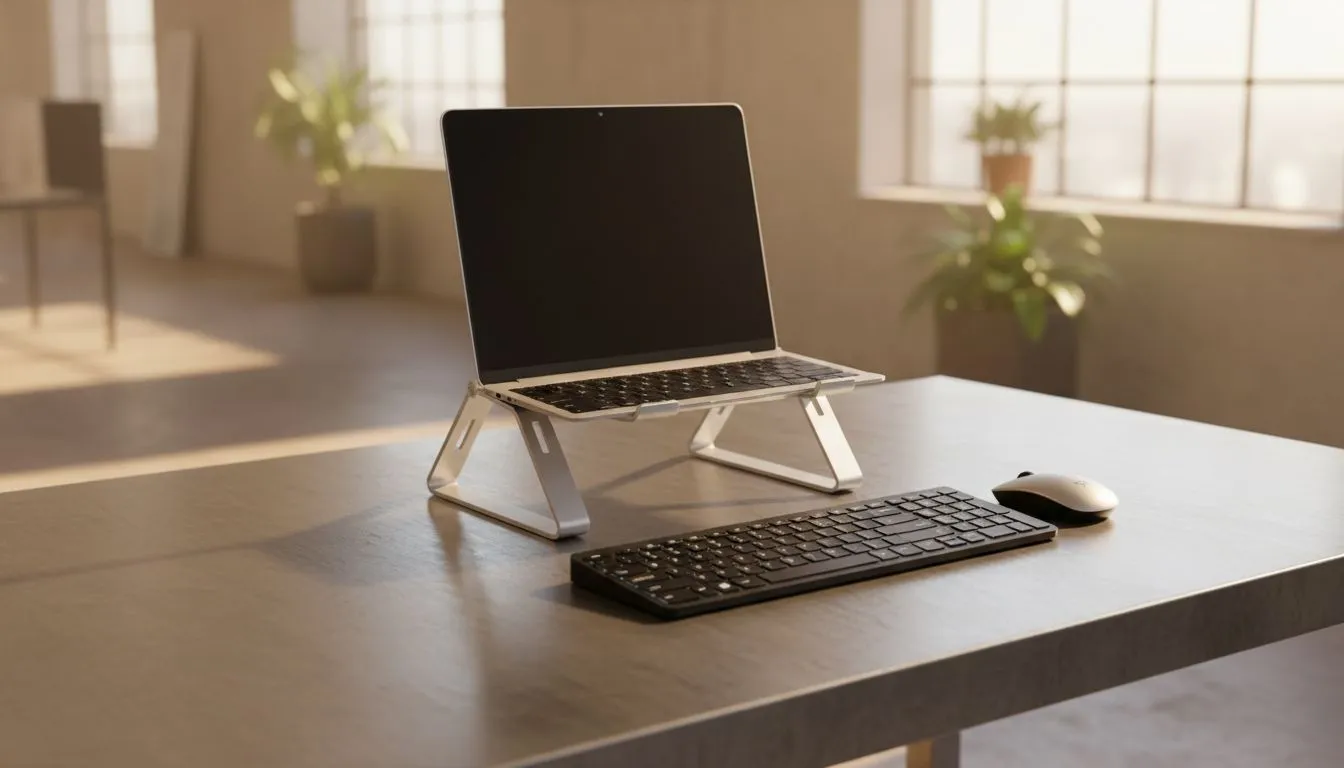
Hunched over your laptop for hours is a recipe for chronic neck pain. Whether you are grinding in Apex Legends or finishing a remote work report... perfect folding laptop stand posture starts with elevation. Most South African desk setups are too low... forcing your spine into an awkward curve. By lifting the screen to eye level... you instantly reduce the strain on your upper back and neck 🔧.
You cannot achieve ergonomic bliss using the built-in laptop keyboard while it is on a stand. Your arms would be angled upwards... causing wrist fatigue. The secret is to treat your laptop like a monitor. Once the screen is elevated... you need a dedicated peripheral setup.
Using Orico laptop stands allows you to position the device perfectly. This setup frees up desk space for a full-sized mechanical keyboard and a high-DPI mouse. This configuration mimics a desktop experience... giving you the best of both worlds.
Always position your external keyboard so your elbows are at a 90-degree angle. Your wrists should remain neutral and flat... not tilted upwards. This small adjustment prevents long-term strain and keeps your reaction times sharp during intense gaming sessions.
Laptops generate immense heat under load... especially in our South African summers. Elevating your device does more than just fix your back. It opens up the intake vents on the bottom of the chassis. To further protect your hardware... browse the massive range of laptop cooling pads available at Evetech.
Better airflow means your CPU and GPU can maintain higher clock speeds for longer. This prevents thermal throttling... which is vital when you are in the final circles of a battle royale 🚀.
Not all stands are built the same. If you move between a home office and a coffee shop... portability is key. Many Promate cooling solutions offer slim profiles that fit easily into a backpack.
For those with heavy 17-inch gaming rigs... stability is the priority. You need a frame that won't wobble when the fans are at full blast. Investing in high-performance cooling stands ensures your premium hardware stays secure and chilled ✨.
Once your stand is in place... check your eye line. The top third of your screen should be at eye level. This prevents you from tilting your head down or up. If your stand isn't high enough... use a few sturdy books as a temporary base. However... a dedicated adjustable stand is always the superior long-term choice for your spine health and gaming performance.
Ready to Find Your Perfect Match? The Mac vs Windows debate is complex, but for maximum power, choice, and value in South Africa, Windows is hard to beat. Explore our massive range of laptop specials and find the perfect machine to conquer your world.
Set the screen so the top is at eye level and position the external keyboard at elbow height for neutral wrists—part of an ergonomic folding laptop stand setup.
Yes. A wireless keyboard and mouse pair well with a folding laptop stand—ensure stable placement and correct distance to maintain good posture.
Yes. Raising the screen to eye level with folding laptop stand posture reduces neck flexion and eases strain when paired with an external keyboard.
Keep the keyboard at elbow height with elbows near 90°, place the mouse close to avoid reaching, and follow external keyboard and mouse posture tips for neutral wrists.
Many models are stable when locked and used on a solid surface—choose a sturdy folding laptop stand with non-slip feet for confident typing with an external keyboard.
Start with a modest tilt (about 10–20°) for viewing comfort; adjust as needed. Angle adjustments are part of an ergonomic folding laptop stand setup to reduce wrist strain.
Yes. Raise the stand so the screen stays at eye level and set the external keyboard and mouse at standing elbow height for proper standing posture.
RTX 4060 Ti Throttling Under Load: Temperature. Everything you need to know with SA pricing, step-by-step instructions & expert recommendations.
Read more
Apex Legends Max Settings on RTX 4080. Tested & verified settings for best FPS and visual quality on SA hardware budgets.
Read more
GPU Buying Guide. Everything you need to know with SA pricing, step-by-step instructions & expert recommendations.
Read more
GPU Terms Guide. Everything you need to know with SA pricing, step-by-step instructions & expert recommendations.
Read more
AMD Adrenalin Download & Setup Guide: GPU. Clear setup instructions with SA-specific considerations, troubleshooting tips & recommended components.
Read more
Back-to-School GPU Buying Guide. Everything you need to know with SA pricing, step-by-step instructions & expert recommendations.
Read more
Snapdragon X2 NPU Explained: How 80 TOPS Changes. Plain-English explanation of what it means, why it matters & how it affects your buying decisions in SA.

HBM? High Bandwidth Memory Used in GPUs and AI. Plain-English explanation of what it means, why it matters & how it affects your buying decisions in SA.

How much should you spend on sim racing accessories in South Africa for a realistic setup? We break down budgets by quality tiers, so you buy smart gear and avoid overspending 🎮💸

G-Sync and FreeSync? Variable Refresh Rate. Plain-English explanation of what it means, why it matters & how it affects your buying decisions in SA.

AMD Laptop: Value. SA-focused analysis with local pricing data, real-world insights & actionable buying advice.

How MacBook Neo Handles 30+ Chrome Tabs with Only. SA-focused analysis with local pricing data, real-world insights & actionable buying advice.

Why Apple Put 8GB RAM in MacBook Neo: The A18 Pro. SA-focused analysis with local pricing data, real-world insights & actionable buying advice.

Upgrade your work laptop with a New Motherboard. Step-by-step instructions with SA-specific tips, common pitfalls to avoid & expert recommendations.

Maintain wired headset — Checklist: • inspect cables • clean earpads • store properly 🔧🎧 Practical steps to preserve sound quality and avoid premature replacements.

Fix crackling headset fast: step-by-step checks for cables, connectors, drivers, and settings to remove static or distorted audio on wired headsets 🎧⚙️

Stereo vs mono headsets: learn which delivers clearer calls, better spatial music, or simpler mono voice performance — pick the right headset for meetings, music, or gaming 🎧💬

- Compare gaming headset vs studio headphones; - Assess comfort, mic and sound; - Recommend best daily picks. Gaming headset vs studio headphones: learn which suits work, music and casual gaming. 🎧⚖️