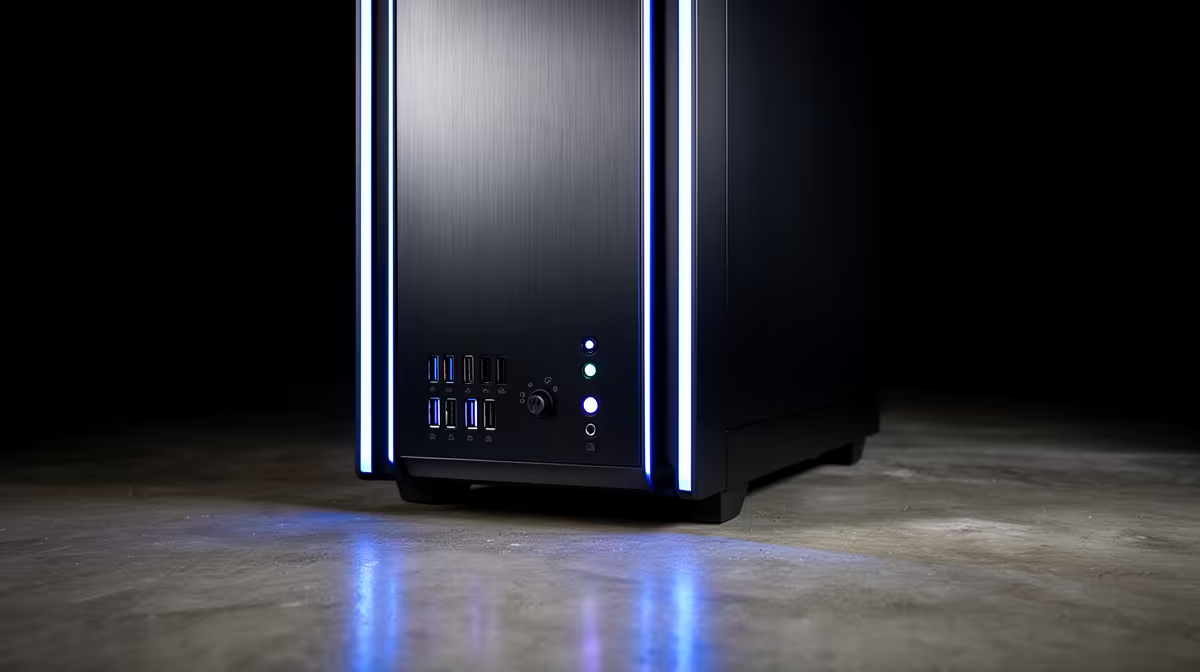
A front panel gets touched constantly, far more than the rear I/O cluster ever does, so the ports sitting behind that small door carry more daily weight than most spec sheets suggest. An atx mid-tower case with a missing or awkwardly placed front port turns a quick flash-drive swap into a crawl behind the desk, which is precisely the friction good front-panel design is meant to remove.
Quick Answer
Solid front-panel connectivity at this level means at least one fast USB port for large transfers, a legacy USB port for everyday peripherals, a combined jack for a headset, and a dedicated lighting toggle. The Antec NX410 covers exactly that set at R1,199, handling daily-use tasks without sending you around to the motherboard's rear cluster.
🔌 Fast USB and Legacy USB: Why Both Earn a Spot
A fast front-panel USB port handles the transfers that genuinely benefit from extra bandwidth: external drives, memory cards, and large files moved between machines. A slower legacy port sits alongside it because plenty of everyday peripherals, mice, keyboards, simple flash drives, never come close to needing that bandwidth anyway, and keeping the fast port free for devices that actually use it keeps the whole setup organised.
Having one of each on this case's front panel means you are never choosing between quick storage access and a spare port for a keyboard dongle. Both stay available at the same time, right at desk height, without reaching around to the board's own rear ports.
🎧 The Headset Shortcut
A combined audio jack on the front panel pairs a headset's microphone and output through a single connection, wired to the motherboard's front audio header. This matters most for anyone plugging and unplugging a headset repeatedly through the day rather than leaving it connected permanently, since front access skips the fumble around the back of the case.
Wiring the Header Correctly
Front audio only works once the case's audio cable connects to the matching header on the board, usually labelled AAFP or HD_AUDIO. Getting this wrong, or leaving it unplugged, is one of the more common reasons a front headset jack stays silent on a freshly finished build, so it is worth confirming during assembly rather than after the side panel goes back on.
💡 A Lighting Toggle Without Needing Software
A dedicated lighting control button lets you cycle through modes or colours without opening any application, which suits anyone happy to set a look once and move on. This is a genuinely useful inclusion rather than a gimmick, since it keeps ARGB lighting adjustable even before the operating system or any lighting software is installed.
Cycling through the available modes at first boot, before drivers are even loaded, confirms the pre-installed ARGB fans are wired correctly and gives an early read on how the finished build will look on a desk.
Once Software Takes Over
After motherboard lighting software is installed, the front button typically still works as a manual override, handy for switching quickly to a static colour during a video call or stream without opening an app.
Keeping the Ports Working Over Time
Front-panel ports sit lower and more exposed than rear ones, which means dust and pocket lint find their way in more easily over months of use. A quick check with compressed air every so often keeps both the fast and legacy USB ports making solid contact, since a partially blocked port is a common, easily missed cause of an intermittent connection that gets blamed on a cable or device instead. The same applies to the audio jack, where dust build-up can occasionally cause static or a loose-feeling connection even when the header wiring itself is correct.
🖥 Front-Panel Ports Versus the Rear Cluster
Rear motherboard ports handle the permanent connections, keyboard, mouse, network cable, and anything that rarely needs to move once a desk is set up. Front-panel ports exist for the temporary ones instead: a friend's flash drive, a controller charging cable, or a headset that only comes out for a call. Splitting these two roles between front and rear is why a case's front-panel selection matters even though the rear cluster usually carries far more ports overall.
Positioning plays a role spec sheets rarely mention too. A fast USB port at desk height gets used simply because it beats crouching to find a rear port behind a desk, so a case with a sensibly placed front port sees genuinely more use than one where the same ports exist but sit awkwardly on the panel.
Full connectivity details for this case sit alongside the rest of its spec sheet on the Antec NX410 white listing. Anyone comparing port layouts across models can look through the wider Antec lineup, and filling out the six available fan positions is easiest via the case fan selection to match the lighting already running through the front panel.
Frequently Asked Questions
What ports does the Antec NX410's front panel include?
A fast USB port, a legacy USB port, a combined audio jack, and a lighting control button, covering fast storage, everyday peripherals, headset use and lighting control without touching the rear panel.
Why does a case need both a fast and a slower USB port up front?
The fast port handles devices that benefit from higher transfer speeds, while the slower one covers everyday peripherals that never need the extra bandwidth, so neither port sits idle or gets tied up unnecessarily.
Why doesn't my front headset jack work after a fresh build?
The front audio cable usually needs connecting to the board's own front-panel audio header, commonly labelled AAFP or HD_AUDIO, and a missed connection is the most common reason a front jack stays silent.
Does the lighting toggle need software to work?
No, it works independently of any lighting software, letting you cycle through preset modes immediately after the first boot.
Can the lighting button override software-controlled lighting later?
Typically yes, the front button still acts as a manual override for quick changes even once motherboard software has taken over day-to-day control.
Is front-panel USB as fast as a rear motherboard USB port of the same spec?
Speeds are effectively identical, since both connect back to the same board controller, though front cabling adds a negligible amount of resistance compared with a direct rear connection.
Does the front connector bundle need attention during the build?
Yes, the USB, audio and power switch headers all need matching to the correct board pins during assembly, and skipping this leaves the front ports completely inactive.
Can a controller or phone charge from front USB while the PC is off?
That comes down to the motherboard's own sleep-state charging support rather than the case, so check the board's specifications for USB charging while powered down.
Ready to see what the front I/O offers?
Add to cart the NX410, Antec's case on Evetech's catalogue priced at a flat R1,199. USB, audio jacks and an LED button all sit within reach.