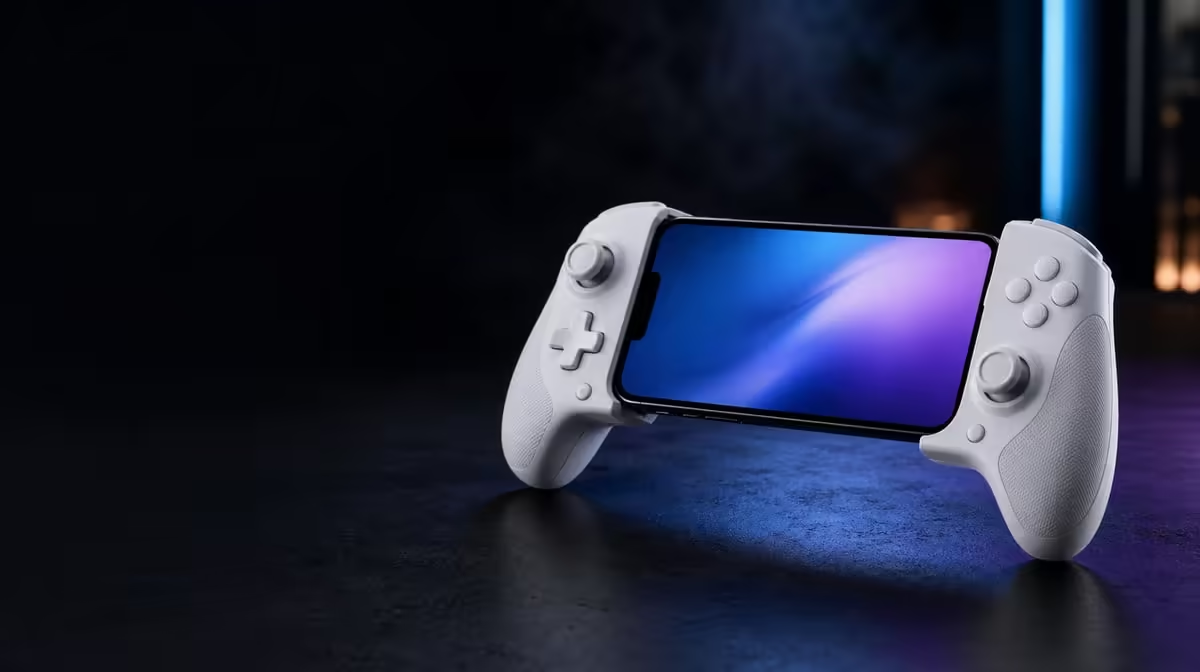
Long mobile sessions expose every small compromise in a controller. The X3 Pro for extended play can work well when the phone fits securely, the cooler meets it properly and the control layout remains relaxed in the hands. GameSir prices this combined cooling and input package at R1,199, but endurance depends on the full phone-and-player system.
Quick Answer
The X3 Pro is suitable for long sessions if its stretchable frame suits the handset, the integrated cooler has clear contact and airflow, and the grips do not create strain. Its R1,199 price includes Hall sticks, micro-switch triggers, gyro, dual rumble and one-cable routing, while game workload and personal comfort still set practical limits.
🤲 Comfort must survive more than a first impression
Fit the phone and hold the controller in the posture used for real play. Reach each face button, trace full circles with both sticks and press the triggers repeatedly. If the wrists bend sharply or the little fingers carry most of the phone's weight, discomfort is likely to grow over an hour.
Balance matters as much as grip shape. A secure handset can still make the controller feel top-heavy. Try the same position seated upright and leaning back, because couch play changes arm support. Loosen the grip rather than squeezing to control weight.
Use Evetech's mobile gaming controller selection to compare layouts, then judge them with the phone installed. Product photos without the buyer's handset cannot reveal the final centre of mass.
Take planned hand breaks
Pause every thirty to forty-five minutes, release the controller and move the fingers and wrists gently. A cooler can support the phone; it cannot remove fatigue from a fixed posture.
❄️ Cooling depends on sustained contact
Remove the case for the first thermal fit and inspect whether the camera island creates a gap. Seat the phone evenly against the cooler and identify the airflow route. Hands, clothing and soft furniture should remain away from the openings through the entire session.
Compare one demanding game section under consistent settings at several time points. The initial five minutes show little about sustained behaviour. Note any handset warning, battery change or performance shift, and stop when the phone requests it.
Ambient temperature and charging affect heat. The X3 Pro's cooler can support the thermal arrangement but cannot guarantee identical results across phones or games. A long-session assessment should be repeated on more than one day.
Charge Cool One Cable reduces clutter around the charging and cooler path. Route it with a relaxed bend and enough slack that gyro movement or grip changes do not tug at USB-C.
🎮 Tune controls for lower effort
Hall sticks sense direction magnetically, supporting fine input without depending on a rubbing contact track. Start with a neutral check, then adjust deadzone and sensitivity in small steps. An overly fast profile demands constant correction and can tire the thumb.
Micro-switch triggers can reduce unnecessary finger travel for digital-style actions. Press only to the actuation point and release cleanly. Their crisp response does not make partial-pressure control available in a game that expects graduated input.
Dual rumble adds physical cues where supported, but full-strength vibration may become tiring. Set it according to the session rather than leaving it high by habit. Six-axis gyro can reduce tiny thumb corrections, though an aggressive motion setting may create more wrist work.
🔋 Plan the complete endurance setup
Record starting battery percentage and note the result after a typical session. Incoming energy may not always exceed the game's workload, and charging can add thermal load. Treat battery behaviour and cooling as related measurements, not the same claim.
Close unnecessary apps and use a sensible graphics profile before deciding that hardware alone should solve heat. The gaming accessories range can help organise cable or desk needs, while a simpler layout often makes long use more comfortable.
Protect the controller between sessions. Keep dust away from the stick bases and avoid packing weight on the caps. Detachable replaceable components should be handled only through their intended removal method and stored carefully.
Evetech's accessories best-seller page offers context for supporting kit. The best addition is one that removes a real long-session problem without blocking cooler airflow or adding connector strain.
The final test is not whether the X3 Pro can be held for ten minutes. It is whether the handset stays secure, input remains predictable and both player and phone complete the intended session without warning signs.
Build endurance gradually. Start with a thirty-minute run, move to forty-five minutes on another day and only then attempt the full intended block. This gives the player time to notice wrist position and lets the phone's behaviour be compared without turning the first trial into a test of personal tolerance.
Use a simple session card with five observations: phone movement, hand tension, cooler airflow, battery change and game consistency. Record them at each break. Numbers are useful where available, but a precise note such as "right little finger carries the phone after forty minutes" can lead directly to a grip correction.
Change one comfort setting per session. Lower vibration first, then consider sensitivity or gyro range later. If several variables move together, the owner cannot identify which adjustment eased the strain.
Check the phone after removing it. The USB-C port should not show side pressure and the case, if reinstalled, should not be warm from being left near blocked airflow. Give both handset and player a normal recovery period.
Long-session value also depends on repetition. A setup that works beautifully once but requires awkward realignment every evening will be abandoned. Practise seating, cable routing and profile loading until the routine is predictable.
The R1,199 X3 Pro has the right ingredients for extended mobile play: integrated cooling, low-travel trigger actuation, magnetic sticks and flexible motion settings. Its success comes from tuning those parts down to a sustainable level, not running every feature at maximum.
Review the session card after a week and look for timing. If discomfort appears consistently at forty minutes, schedule the break before that point rather than waiting for strain. If battery decline accelerates late in the run, reconsider workload and power together.
Long sessions also need an end routine. Close the game, disconnect power, let the phone settle and remove it without levering the USB-C plug. Clean accessible grip surfaces before storage.
Sustainable use is a pattern of preparation, play, pause and recovery. The X3 Pro supports the phone and hands during the middle stage; the player must still protect the other three.
Frequently Asked Questions
What usually determines comfort after an hour?
Grip angle, phone balance, button reach, vibration strength and the amount of tension in the hands all contribute.
Can the integrated cooler make session length unlimited?
No. Phone workload, room temperature, battery behaviour and device warnings remain practical limits.
Why might micro-switch triggers reduce effort?
They provide a distinct actuation without requiring the player to manage a long digital press, provided the finger also releases consistently.
What is the long-session X3 Pro price?
The GameSir X3 Pro is R1,199 with its cooling and control systems included in the stretchable frame.
Ready to judge a controller over the hours you actually play?
Explore Evetech's controller range and test comfort, cooling and input settings as one long-session plan.