


Maintain Wired Headset: Tips to Extend Lifespan
Maintain wired headset — Checklist: • inspect cables • clean earpads • store properly 🔧🎧 Practical steps to preserve sound quality and avoid premature replacements.
Read moreGraphics card with built-in display — I will: •Explain how it works •Show benefits and use cases •Offer troubleshooting tips 🔍💡 Learn why an integrated GPU screen matters for builders and streamers.
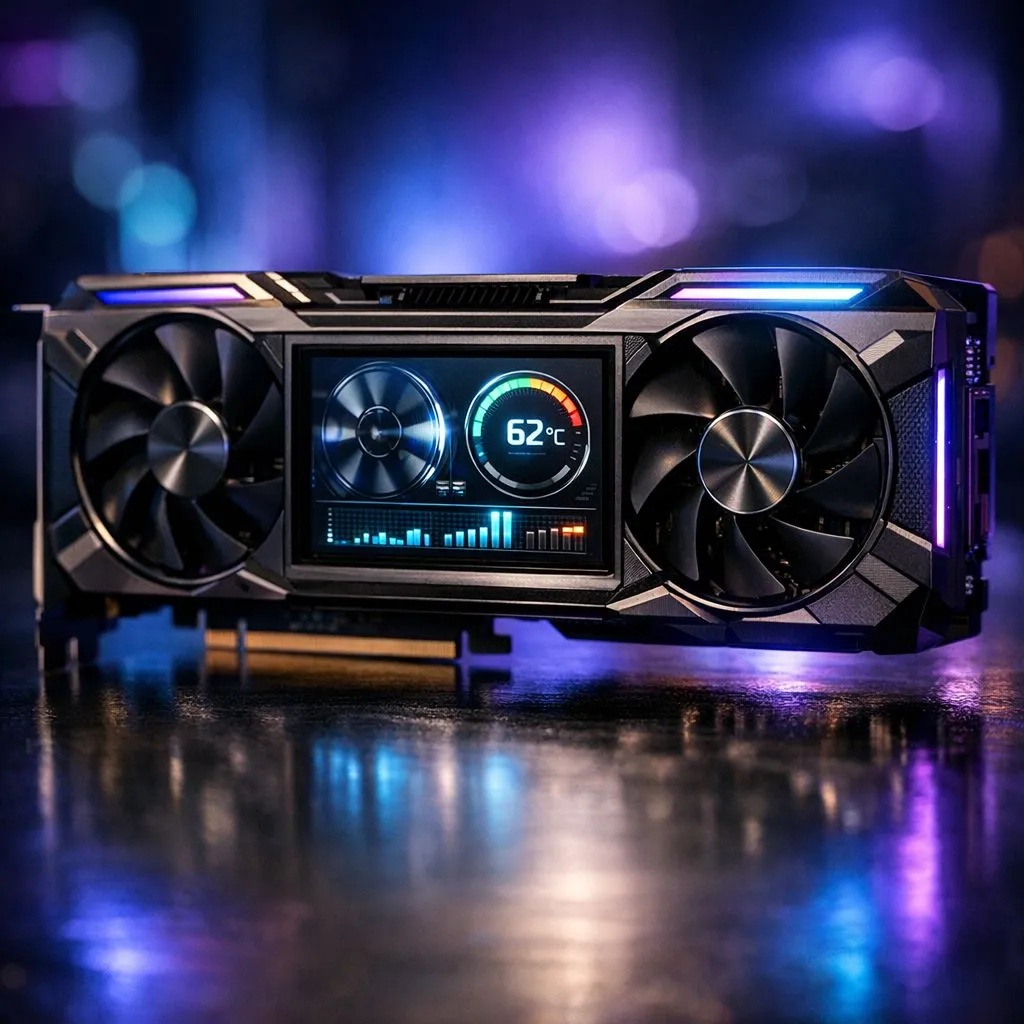
If you’ve ever wrestled with cables while swapping GPUs or wished for a simple way to test a card outside a PC, a graphics card with a built‑in display can feel like magic. Local gamers and system builders in South Africa get clearer debug info, faster BIOS tweaks, and neat display outputs for test benches — without lugging a monitor around. Ready to see how it works? 🔧✨
A graphics card with a built‑in display embeds a small diagnostic output or integrated screen into the GPU PCB or bracket. It’s not a full gaming monitor; think status readouts, POST codes, and sometimes a tiny HDMI/DP passthrough that makes troubleshooting instant. For practical buying options, browse Evetech’s GeForce selection to compare models and features: https://www.evetech.co.za/components/nvidia-ati-graphics-cards-21?category=GeForce+Graphics+Cards
When a new build won’t POST, you don’t always have spare peripherals. A built‑in display can show error codes or let you confirm POST video without connecting a full monitor. That saves time and frustration during firmware updates, GPU swaps, or BIOS flashes. Evetech’s general GPU catalogue helps you check compatibility before purchase: https://www.evetech.co.za/components/nvidia-ati-graphics-cards-21
There are a few flavours:
If you build test benches for review or repair, a built‑in display card speeds up diagnosis. Local LAN organisers and streamers also love the quick-check convenience when travelling between venues. For Radeon alternatives and to weigh AMD options, see Evetech’s Radeon range: https://www.evetech.co.za/components/nvidia-ati-graphics-cards-21?category=Radeon+Graphics+Cards
Use a card with a diagnostic display to confirm POST before installing into a case. It helps isolate PSU or motherboard issues fast, saving time when you’re troubleshooting or swapping GPUs in a tournament setting.
Look for clear diagnostics, simple passthroughs, and whether the display interferes with airflow or fits your case. MSI and other brands offer models with convenient features and robust warranties; browse MSI-compatible options at Evetech to find a model that fits your build: https://www.evetech.co.za/components/nvidia-ati-graphics-cards-21?brands=MSI
A small micro-story: I once tested a friend’s dead system at a café and used a card with a tiny bracket display to discover a faulty RAM slot in minutes. No bulky monitor, no fuss. That’s the everyday value many local builders appreciate. 🚀
If you value fast diagnostics, frequent GPU swaps, or run a local repair service, a built‑in display on a graphics card can be a practical investment. It’s a specialised feature, not essential for every gamer, but for the right workflows it’s worth considering.
Ready to Find Your Perfect Match? The Mac vs Windows debate is complex, but for maximum power, choice, and value in South Africa, Windows is hard to beat. Explore our massive range of laptop specials and find the perfect machine to conquer your world.
A graphics card with a built-in display (or GPU with built-in display) includes a small screen or connector that shows diagnostics, status, or video output directly on the card.
An integrated screen taps the GPU's video pipeline or firmware to show output or debug info; some use internal HDMI/DisplayPort routing or onboard controllers.
Benefits include quick diagnostics, monitoring temps/BIOS info, compact system display, and local preview for capture or headless builds.
Usually no for daily use; an on-card display is for status, diagnostics, or previews. It complements monitors rather than replacing them.
Most mainstream GPUs don't ship with large LCDs; a few boutique or workstation cards add small diagnostic displays or connectors for embedded screens.
Yes. A graphics card with built-in display can show POST codes, driver errors, or signal status, speeding up diagnosis on headless or test rigs.
Streamers can use on-card previews for capture checks, monitoring overlays, or low-latency feeds without tying up main monitors.
Maintain wired headset — Checklist: • inspect cables • clean earpads • store properly 🔧🎧 Practical steps to preserve sound quality and avoid premature replacements.
Read more
Fix crackling headset fast: step-by-step checks for cables, connectors, drivers, and settings to remove static or distorted audio on wired headsets 🎧⚙️
Read more
Stereo vs mono headsets: learn which delivers clearer calls, better spatial music, or simpler mono voice performance — pick the right headset for meetings, music, or gaming 🎧💬
Read more
- Compare gaming headset vs studio headphones; - Assess comfort, mic and sound; - Recommend best daily picks. Gaming headset vs studio headphones: learn which suits work, music and casual gaming. 🎧⚖️
Read more
- Check pressure points - Compare earcup materials - Adjust clamp and fit Best gaming headsets for glasses: quick guide to reduce temple pressure, pick breathable memory foam earcups, and optimize fit for long sessions 🕹️👓
Read more
Gaming microphone noise reduction: Use beamforming mics, AI noise suppression, and hardware filters to cut background noise and boost in-game voice clarity. 🎧⚙️ Learn setups, settings, and top mic features.
Read more
Snapdragon X2 NPU Explained: How 80 TOPS Changes. Plain-English explanation of what it means, why it matters & how it affects your buying decisions in SA.

HBM? High Bandwidth Memory Used in GPUs and AI. Plain-English explanation of what it means, why it matters & how it affects your buying decisions in SA.

How much should you spend on sim racing accessories in South Africa for a realistic setup? We break down budgets by quality tiers, so you buy smart gear and avoid overspending 🎮💸

G-Sync and FreeSync? Variable Refresh Rate. Plain-English explanation of what it means, why it matters & how it affects your buying decisions in SA.

AMD Laptop: Value. SA-focused analysis with local pricing data, real-world insights & actionable buying advice.

How MacBook Neo Handles 30+ Chrome Tabs with Only. SA-focused analysis with local pricing data, real-world insights & actionable buying advice.

Why Apple Put 8GB RAM in MacBook Neo: The A18 Pro. SA-focused analysis with local pricing data, real-world insights & actionable buying advice.

Upgrade your work laptop with a New Motherboard. Step-by-step instructions with SA-specific tips, common pitfalls to avoid & expert recommendations.
Maintain wired headset — Checklist: • inspect cables • clean earpads • store properly 🔧🎧 Practical steps to preserve sound quality and avoid premature replacements.
Fix crackling headset fast: step-by-step checks for cables, connectors, drivers, and settings to remove static or distorted audio on wired headsets 🎧⚙️
Stereo vs mono headsets: learn which delivers clearer calls, better spatial music, or simpler mono voice performance — pick the right headset for meetings, music, or gaming 🎧💬
- Compare gaming headset vs studio headphones; - Assess comfort, mic and sound; - Recommend best daily picks. Gaming headset vs studio headphones: learn which suits work, music and casual gaming. 🎧⚖️