Understanding Your Display Connectivity
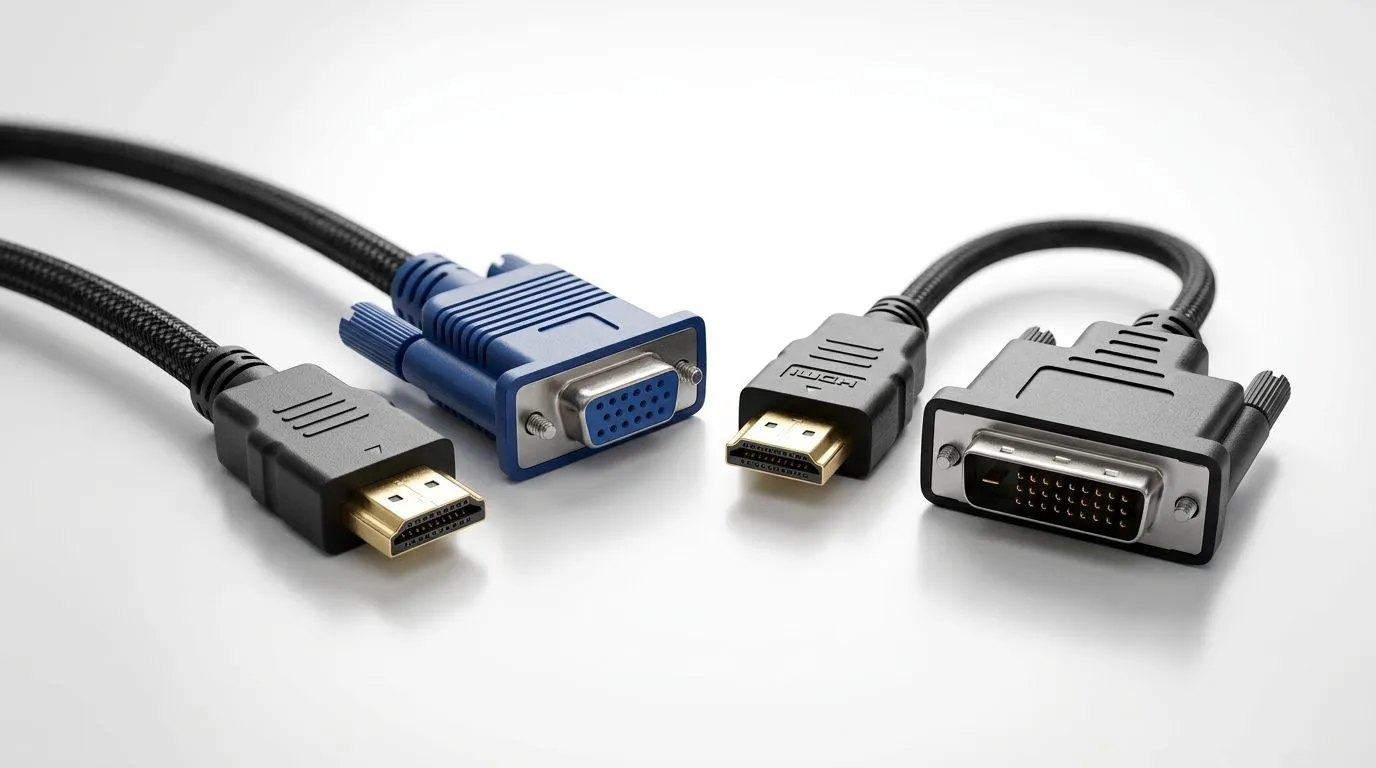
Staring at a shiny new graphics card only to realise your monitor has a VGA port from 2005? We have all been there. Whether you are repurposing an old office screen for a secondary discord feed or trying to connect a legacy projector, choosing the right converter is vital. The debate between HDMI to VGA vs HDMI to DVI often confuses buyers, but the choice usually comes down to one simple factor: signal type.
The Technical Breakdown: Analogue vs Digital
The core difference lies in how these signals travel. HDMI and DVI are both digital standards, meaning they share a common language. When you use an HDMI to DVI adapter, you are essentially just changing the physical shape of the plug. Because the signal remains digital, you typically avoid the quality loss associated with conversion.
On the other hand, VGA is an analogue signal. Using an HDMI to VGA adapter requires an active chip to convert that digital stream into an analogue one. This can sometimes introduce slight blurriness or colour fringing, especially at higher resolutions. If you are looking to upgrade your setup, check out our latest gaming accessories to see if a native digital monitor might be a better long-term investment for your desk. 🔧
Compatibility Pro Tip ⚡
Always check if your converter is 'Active' or 'Passive'. Most HDMI to VGA adapters must be 'Active' to work correctly because they need to power the signal translation process. Passive cables often fail to display any image at all on modern GPUs.
Making the Right Choice for Your Setup
If your monitor supports DVI, it should always be your first choice. It maintains a crisp, native digital image that is far superior for text clarity and gaming. However, if you are stuck with a legacy VGA display, an active adapter will get the job done for basic tasks. For those hunting for the best value, browse our current gaming accessory deals to find affordable solutions that keep your older hardware functional without breaking the bank. 🚀
It is worth noting that VGA cannot carry audio signals, whereas DVI-D (in some configurations) and HDMI can. If you are relying on your monitor's built-in speakers, HDMI to DVI might offer you a cleaner signal path, though you will still need a separate 3.5mm cable for audio if your monitor lacks an HDMI input. ✨
Future-Proofing Your Gaming Station
While adapters are great stop-gap measures, they are not permanent solutions. If you find yourself constantly battling cable compatibility, it might be time to look at upgrading your peripherals. Modern displays offer higher refresh rates and better colour accuracy, which will truly let your high-end graphics card shine. ⚡
Ready to Find Your Perfect Match?
Don't let a missing port hold your frame rates back. Whether you need a simple cable or a complete monitor upgrade, we have the gear to keep you in the game. Explore our massive range of gaming accessories and find the perfect hardware to level up your setup today.