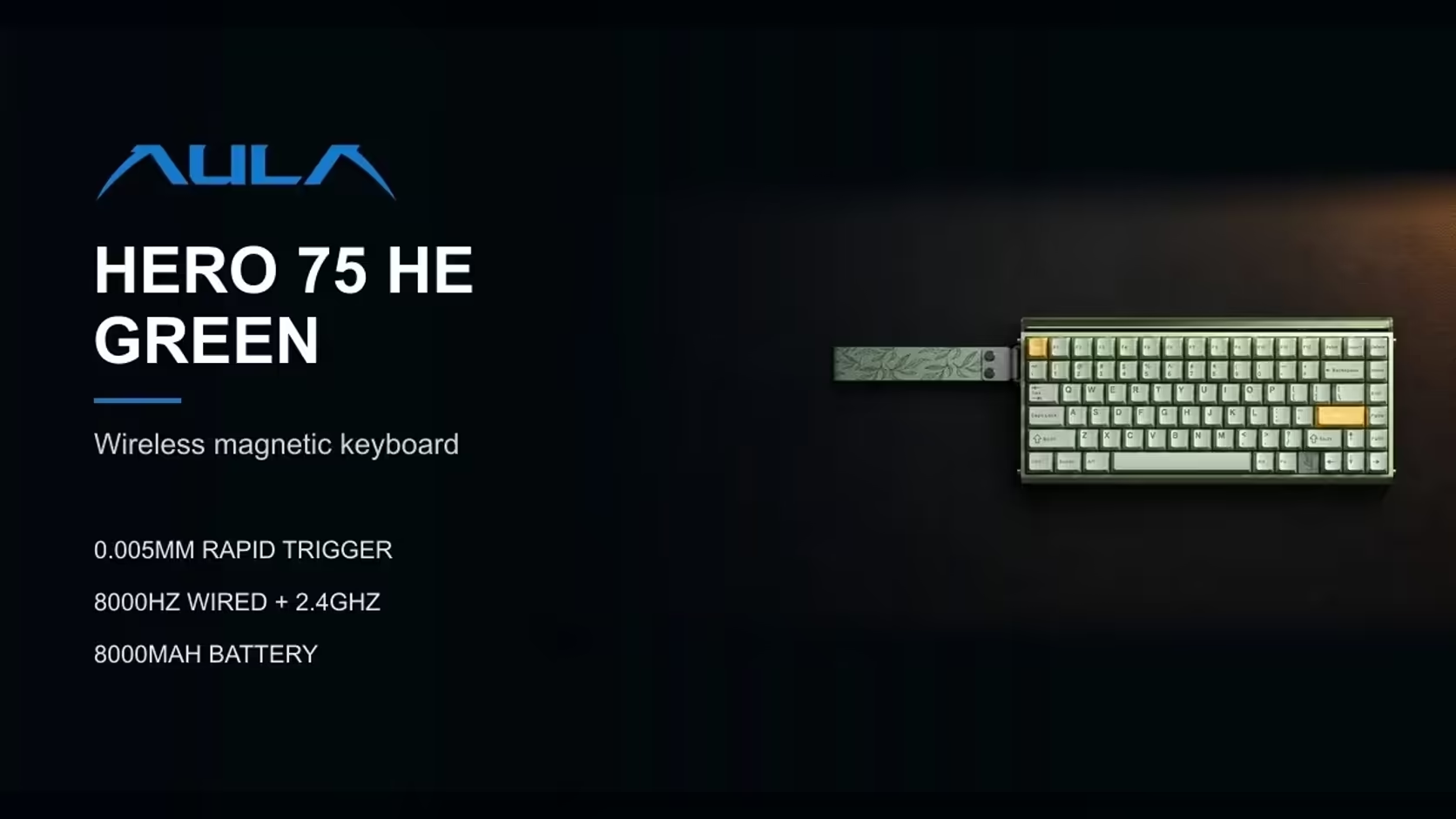
Two AULA keyboards cover the same ground on paper. Both are 75% boards, both connect three ways, both run on an 8000mAh battery. Then they split in completely different directions. The HERO 75 HE puts its effort under the keys with magnetic switches and 8000Hz polling. The L99 puts it beside the keys, with a 3.98-inch touchscreen built into the board. Choosing between the HERO 75 HE or L99 is really a choice about what you want your keyboard to do beyond typing.
Quick Answer
Choose the AULA HERO 75 HE for magnetic switches, Rapid Trigger and 8000Hz polling, or the AULA L99 for a 3.98-inch touchscreen that handles settings, a numpad, a calculator and your own animations. The L99 uses linear mechanical switches at 1000Hz. Both are tri-mode 75% boards with 8000mAh batteries, but their warranties differ. Evetech prices the HERO 75 HE at R899 and the L99 at R1,099.
🎮 Speed and switches: where the HERO pulls ahead
The HERO 75 HE is the competitive board of the pair. Its Hall Effect switches (the black model uses Stormrise, the two brighter colours use Spiritcloud) report their position continuously. That enables:
- Adjustable actuation between 0.1mm and 3.4mm, tuned in 0.005mm steps.
- Rapid Trigger, which resets a key as soon as it starts to lift.
- A dead zone that can be removed entirely.
- A deep list of advanced modes, SOCD and DKS among them.
It also polls at 8000Hz over both its USB-C cable and its 2.4GHz receiver.
The L99 uses factory-lubed linear mechanical switches: Raindrop on the grey, white and blue edition and Caramel Latte on the red and black one. AULA quotes both at about 45gf of initial force, rising to around 55gf at the bottom. They fire at a fixed depth and cannot be tuned per key, and the L99 polls at 1000Hz in wired and 2.4GHz modes, with full N-key rollover.
For fast shooters and anyone who wants to tweak how keys respond, the HERO is clearly quicker. For typing, casual play and general use, 1000Hz and smooth linears are perfectly comfortable.
There is a feel difference too. A linear mechanical switch has one fixed trigger point partway down, so your fingers learn a single rhythm. A magnetic switch lets you move that point per key, which rewards players willing to experiment and can feel unfamiliar at the start. Neither is wrong; they suit different habits. If you have only ever used standard mechanical keyboards, the L99 will feel instantly familiar, while the HERO asks for a short settling-in period before its advantages show.
🖥️ What the L99's screen actually does
The L99's party piece is a 3.98-inch touchscreen on the right side of the board. It is more than decoration. AULA lists several jobs for it:
- Adjusting keyboard settings and lighting without opening software.
- Acting as a numpad, which a 75% layout otherwise lacks.
- Running a calculator.
- Simulating mouse functions.
- Showing your own GIF or JPG animations, and importing, exporting and sharing lighting effects.
- Displaying the battery level, so you know when to charge.
For people who miss a numpad on compact boards, the screen is a genuinely practical answer. For desk-setup fans, custom animations make it the more expressive board.
The HERO has no screen. Its visual flair comes from individually lit keys plus a 36-LED strip across the top edge, and its settings live in the AULA HUB web driver, where you can calibrate switches and watch each key's travel as you press.
📐 Size, layout and desk space
Both are called 75%, but the screen changes the footprint.
- HERO 75 HE: 313 x 139 x 43mm (the side panel adds about 9mm of width) and about 980g without the cable. It has 84 keys with a full function row and arrows.
- L99: 390.5 x 140.7 x 43.3mm. The extra width is the screen area on the right.
That is roughly 7cm more width for the L99, which pushes the mouse further out. On a tight desk, or for low-sensitivity players who need mouse room, the HERO is the easier fit. On a roomier desk, the L99's built-in numpad can mean you do not need a separate one, which may save space overall.
Both boards have Windows and Mac modes. The HERO switches with Fn and S for Mac and Fn and A for Windows. The L99's Bluetooth pairing makes moving between a PC, a MacBook and a tablet straightforward.
🔋 Wireless, batteries and ownership
The two boards are closely matched on wireless basics. Each connects over a USB-C cable, a 2.4GHz receiver or Bluetooth with up to three paired devices, and each carries an 8000mAh battery. The HERO keeps 8000Hz on its receiver and runs Bluetooth at 125Hz; the L99 runs at 1000Hz on cable and receiver. AULA does not publish runtime figures for the HERO, and the L99's screen shows its charge level.
Both are hot-swappable with mixed switch setups supported, but the switches are not interchangeable between them. The HERO takes magnetic switches; the L99 takes mechanical ones.
Cover differs. As one of AULA's magnetic boards, the HERO 75 HE sits under a 2 Years Local Warranty, while the L99 has a 1 Year Local Warranty; Evetech handles both locally. Current pricing for both is on their product pages at Evetech. See them side by side in the gaming keyboards category, or check the keyboard best-seller listing for more options.
The deciding question: do you want your keyboard to be faster, or to do more? It also helps to think about where you spend your hours. A player who lives in ranked matches will use the HERO's tuning every day. Someone who splits time between spreadsheets, streaming controls and relaxed gaming may get more from a screen that doubles as a numpad and a status display. Speed and tuning point to the HERO. A screen, a built-in numpad and custom animations point to the L99.
Frequently Asked Questions
Which board suits competitive play better?
The HERO 75 HE. Magnetic switches, Rapid Trigger and 8000Hz polling give it the edge in fast games.
What is the L99's screen for?
Settings and lighting, a numpad, a calculator, mouse simulation, your own GIF or JPG animations and the battery level.
Which linear switches sit under the L99 keycaps?
Factory-lubed linear mechanical switches: Raindrop on the grey, white and blue edition and Caramel Latte on the red and black one.
How much wider is the L99?
About 7cm. It measures 390.5mm across against the HERO's 313mm, because of the screen area.
How long is each board covered?
The HERO carries two years and the L99 one year, both handled locally through Evetech.
Can switches be swapped on both?
Yes, both are hot-swappable, but the HERO takes magnetic switches and the L99 takes mechanical ones.
Speed or screen: which do you want from your next keyboard?
Compare the HERO 75 HE and L99 in Evetech's gaming keyboard range and choose the 75% board that matches how you play.