Quick Answer
Mechanical mouse switches last 20 to 100 million clicks depending on type, but improper care shortens that life significantly. Keep the switch housing clean of dust and debris, address double-click jitter early with isopropyl alcohol, and store the mouse away from humid environments to prevent oxidation on switch contacts.
Cleaning Switch Contacts Without Disassembly 🔧
The most common cause of premature switch failure in SA is contact oxidation, which causes double-clicking before the rated click count is reached. Apply a small amount of 99% isopropyl alcohol (available from SA electronics suppliers or Builders Warehouse) to a cotton bud and press it into the gap around the switch button while rapidly clicking. The alcohol dissolves oxidation layers on contact points and evaporates quickly without leaving residue. Repeat every three to six months depending on gaming intensity. In humid coastal environments like Cape Town or Durban, quarterly cleaning is preferable.
Preventing Dust and Debris Accumulation ⚙️
Dust entering through primary button gaps is the second leading cause of switch degradation. Use compressed air to blow out the shell interior every four to six weeks, aiming at the seam between the left button and shell body at a 45-degree angle. Avoid eating over your desk during gaming sessions: food particles trapped under buttons create physical obstructions that strain the switch mechanism. A microfibre cloth wipe-down after each extended session removes skin oils from the button surface and prevents buildup that works into the switch housing over time.
Knowing When a Switch Needs Replacement 🛠️
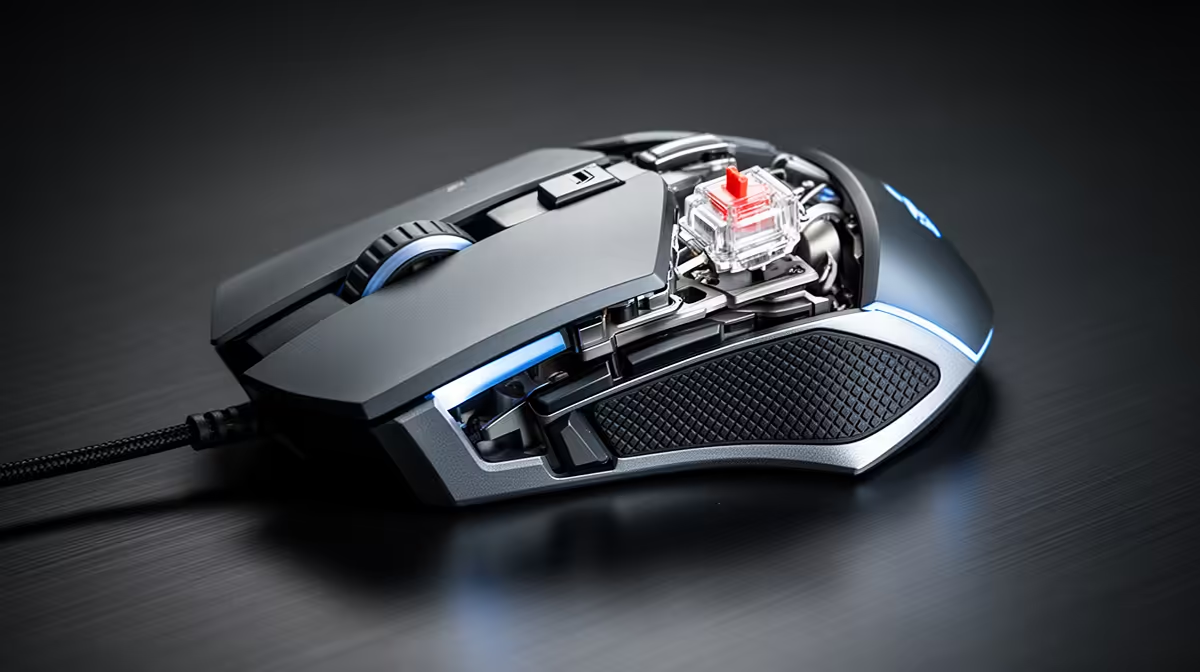
The most common failure mode is double-clicking, where a single press registers two inputs. Test by opening a text editor and clicking once: if two characters appear, the switch is failing. Omron D2FC-F-7N switches in many entry-level gaming mice are user-replaceable with a basic soldering iron. Optical switches in higher-end mice (such as Razer's) are also swappable but require model-specific replacements. Replacement switches cost R15 to R80 each, making self-repair practical compared to buying a new mouse in the South African market.
Avoid Heavy Grip Pressure on Buttons ⚡
Gripping a mouse with excessive force during intense sessions compresses the switch mechanism beyond its natural actuation depth, wearing the internal spring faster. Consciously relax your grip between clicks. Most mechanical switches are rated for light to medium actuation force, and sustained heavy pressure shortens lifespan regardless of the rated click count.
FAQ
Can I use WD-40 to clean mouse switches?
No. WD-40 leaves an oily residue that attracts dust and can insulate contact points, worsening the problem. Use only 99% isopropyl alcohol, which evaporates cleanly without leaving residue on switch contacts.
How do I know if my switch is optical or mechanical?
Check the product listing or manufacturer's spec sheet. Optical switches use a light beam to detect actuation and have no physical metal contacts, making them immune to the double-click oxidation issues that affect mechanical switches.
Is it worth repairing an entry-level gaming mouse switch?
Yes, if the mouse body and sensor are otherwise in good condition. Replacing a Omron or Kailh switch costs under R50 in parts and takes about twenty minutes with basic soldering skills, making it strong economic sense for a mouse originally priced at R600 or more.
Time to upgrade rather than repair?
Browse gaming mice with rated optical switches and long-life mechanical options currently stocked at Evetech for extended daily use.