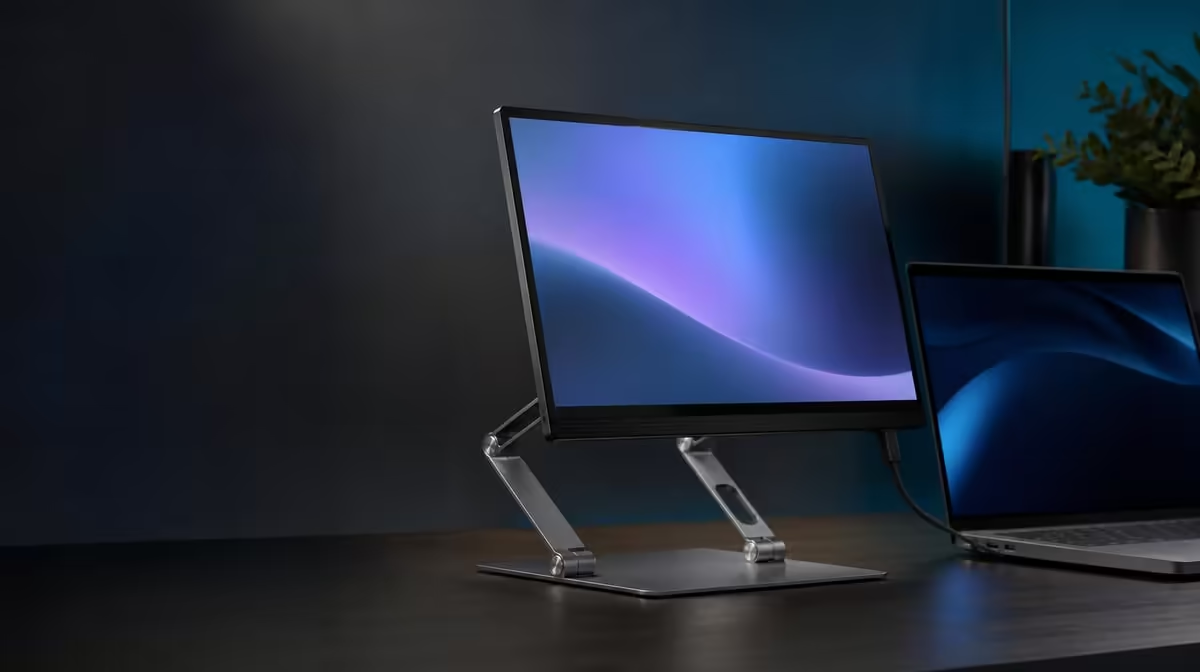
A portable stand has to solve two opposing jobs: hold a screen securely and disappear neatly when the setup moves. Knowing what to look for in a portable monitor stand starts with the device, then moves through support geometry, useful adjustment, cable access and folded shape. The R599 UPERFECT UStand provides a concrete 7-15.6-inch example.
Quick Answer
Choose a portable monitor stand by confirming the exact screen's size, weight, thickness, case and ports, then testing centring and balance at the angles you will use. The R599 UStand adds heavy-duty aluminium, all-around anti-slip rubber, 360-degree rotation, a 135-degree arm, tripod conversion and flat folding. Those features matter only after fit and stability pass.
📏 Begin with compatibility, not features
The UStand's stated size range is 7-15.6 inches. That places many portable displays, tablets and other suitably shaped devices within the first boundary, but diagonal measurement does not describe the complete physical match.
Find the device's weight through its own documentation and check it against current UStand load guidance before mounting. Check thickness, corner shape and any protective case. A case can move the device away from the support or alter how a lip meets the anti-slip rubber.
Port position is another compatibility dimension. Place the screen on the unloaded stand and look for blocked charging, display and audio connectors. Allow space for the plug body and a gentle cable bend rather than counting an exposed socket as sufficient access.
The device should meet the support evenly without pressing controls or concentrating force along one narrow edge. Hold it during the first release and remove it if the arm settles, contact shifts or the base starts to lift.
The Evetech monitor accessories category is the useful starting point for comparing support formats after these dimensions are recorded.
⚖️ Test support at real working angles
Open the base fully on the desk where the stand will be used. A level, firm surface gives the anti-slip contact a fair test; a flexible table or cloth can introduce movement before the screen is mounted.
Begin with the arm close to the footprint and the screen centred. Release hand pressure gradually, then type, use the mouse and make a light movement elsewhere on the desk. Observe whether vibration comes through the furniture or the stand itself changes position.
Extend the 135-degree arm only as far as the viewing position requires. Greater reach increases leverage. A stand that is stable close to its base needs another check after height, tilt or reach changes.
Rotate the screen with one hand taking its weight. Portrait orientation can alter how much device sits above or beside the support, so recheck contact and base edges after using the 360-degree joint.
Add power and video leads last. Support cable weight near each connector and preserve slack through the tested angle. A taut lead can pull a sound mechanical setup off-centre.
🔄 Pay for adjustments you can name
Rotation is useful when portrait and landscape both appear in the workflow. A folding arm earns its place when screen height, reach or tilt must change between seats, tasks or locations. Movement for its own sake adds complexity without improving the setup.
Tripod conversion can create a freestanding position away from a desk edge. It should be configured without the screen attached, tested on its own support points and kept clear of foot traffic.
Selfie-stick mode is a separate handheld job. It changes leverage and makes the user's grip part of the support. Use it only when the fitted device can be controlled confidently at a conservative extension.
Remove the device and all fixed cables before switching modes. A stable desktop setup does not prove the converted footprint, so build and test each role independently.
Portable-screen options can be viewed through Evetech's portable monitor selection, with exact dimensions and connection needs checked against the stand.
🧳 Inspect charging access and travel shape
Charge-while-mounted design means the power port can stay reachable; the stand does not supply or regulate power. Use the equipment intended for the display and keep the adapter on its own stable surface.
Follow the cable path through every planned orientation. Do not bind a lead across a folding joint or assume full rotation remains available when connected. Stop before a plug angles or a service loop becomes taut.
For travel, remove the device and fold the UStand flat. Check how the closed shape fits the intended bag and protect rubber contact areas from grit or sharp objects. A stand that packs neatly but takes too long to rebuild may still be a poor match for a short daily commute.
Rehearse one complete cycle: unpack, open, mount, position, connect, work, disconnect, remove and fold. The exercise reveals whether every claimed feature becomes a practical step.
At R599, the UStand's value lies in how many of those needs it covers without compromising the basic hold. Evetech's accessory best-seller page can provide surrounding setup ideas once the stand passes.
Include rejection conditions in the buying checklist. A device that remains off-centre, presses against its connector, causes a base edge to lift or cannot be handled securely during adjustment should not be forced into the stand.
For the upper end of the 7-15.6-inch range, use extra caution. A 15.6-inch diagonal is confirmed as a size boundary, not a weight guarantee. Keep the arm closer to the base during the first assessment and obtain the screen's weight from its own documentation.
Check repeatability by folding the empty stand and rebuilding the preferred position. A travel accessory needs to return to a safe arrangement without trial-and-error pressure on the mounted screen.
Finally, compare current availability rather than assuming a listing remains unchanged. The product can be a strong R599 reference while the live page remains the source for the buying moment.
Create a one-page pass record for the exact pairing. Note the device, case, screen orientation, arm reach, desk surface and cable direction. That record turns a broad compatibility claim into a repeatable setup and gives another user a known starting point.
Review the record when a new case or cable is introduced. Small physical changes can alter contact or connector clearance even though the diagonal size stays the same.
Frequently Asked Questions
What compatibility check comes first?
Confirm the device is within 7-15.6 inches, then check its weight, thickness, case, ports and contact shape separately.
How can stability be judged before daily use?
Test the stand on the actual surface, mount the screen centrally and observe normal desk movement before adding cables.
Which adjustments are useful?
The useful ones solve a named need such as portrait viewing, better height, shorter reach or a freestanding presentation position.
Why should charging access be inspected?
An exposed port still needs room for the plug and a gentle bend. Cable tension can upset both the connector and stand.
What makes a stand travel-friendly?
It should fold into a practical shape, protect its contact areas and rebuild predictably at another surface.
When does tripod conversion matter?
It matters when the screen needs a freestanding position that a normal desk edge cannot provide safely.
Why is anti-slip rubber valuable?
It improves grip and cushions contact, while a stable base and centred device remain essential.
What price anchors this checklist?
The UPERFECT UStand costs R599 and includes the adjustments and conversion modes described here.
Ready to turn a stand feature list into a physical fit test?
Explore Evetech monitor accessories, measure your device and judge the R599 UStand through support, movement, cables and travel.