



PCIe 5.0 vs PCIe 4.0 for Video editing in 4k in SA
PCIe 5.0 vs PCIe 4.0 for video editing in 4k is mainly about fit, features, compatibility, cost, and upgrade path, not one automatic winner. SA buyers should match the choice to the setup.
Read moreA 98% keyboard compresses the navigation cluster around a retained number pad, trading separation for a narrower footprint than many full-size boards. It suits gamers who need numeric entry but want more mouse room than a traditional layout allows.
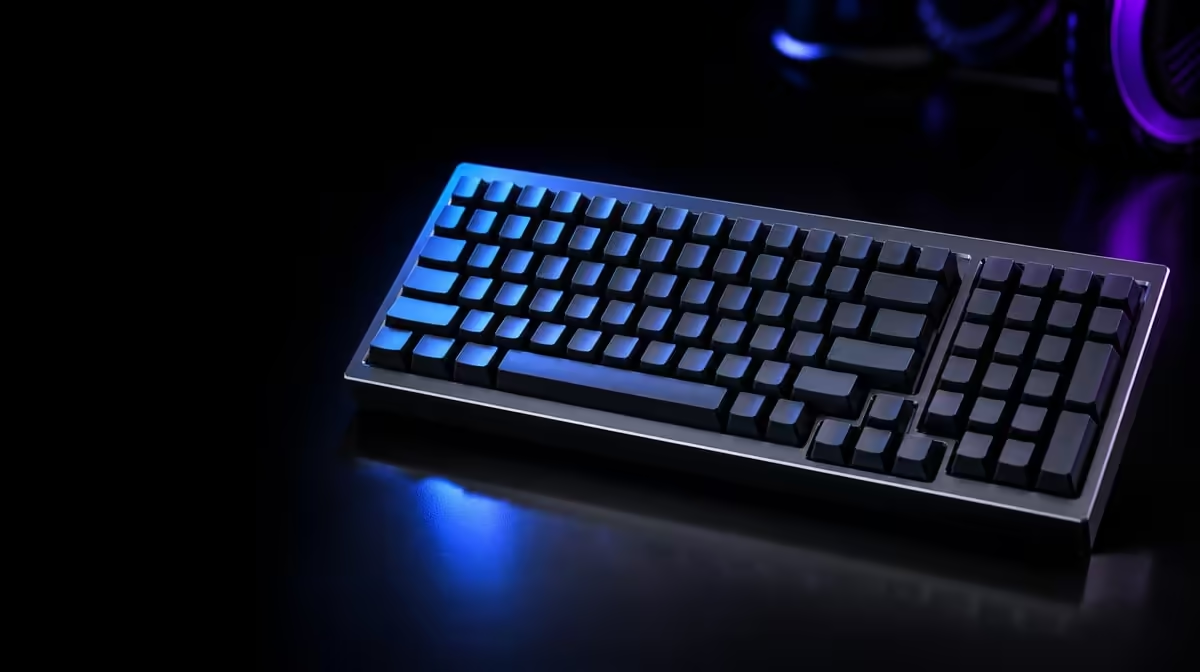
Keyboard width changes both the key map and the room left for the mouse. Comparing 98%, full-size and TKL gaming keyboards is therefore a question of numeric-entry needs, navigation habits, desk measurements and the player's normal sweep.
A 98% layout keeps a number pad while compressing the navigation area, making it narrower than many full-size boards. TKL removes the number pad for still more mouse room, whereas full-size preserves familiar separation; choose the smallest layout that retains every key you use often.
Full-size boards typically separate the main typing area, navigation cluster and number pad. That familiar spacing helps users find keys by feel, especially when work involves frequent arrows, editing controls or numeric entry.
A 98% keyboard keeps most of those functions but pulls clusters closer together. The gain is width. The cost is a denser map in which navigation keys may move or lose the gaps used as tactile landmarks.
TKL, or tenkeyless, removes the number pad while retaining a more recognisable main and navigation arrangement. It can be the cleaner gaming choice for someone who rarely enters numbers but still wants dedicated arrows and nearby editing keys.
Percentage labels are guides, not universal blueprints. Two 98% boards can arrange navigation and function keys differently. Compare photographs, layout diagrams and exact dimensions for the individual keyboard.
Key count also does not describe spacing. A compressed zero key, narrow right Shift or unusual placement beside the number pad can matter more than the percentage. Trace the specific keys used in work and games.
Check whether media controls, volume access or profile keys move behind a function layer. Those commands may be optional, but a daily shortcut hidden in a chord changes the practical layout.
Use Evetech's Logitech gaming-keyboard section to study how real layouts organise their controls.
Measure the usable desk width between the keyboard's left edge and the point where the mouse sweep becomes restricted. Include speakers, a microphone base, notebooks and the monitor stand rather than measuring an empty surface.
Players using broad, low-sensitivity movements can benefit noticeably from a narrower board. A 98% model preserves the number pad while recovering some horizontal room; TKL can recover more.
Keyboard position matters too. Place the alphanumeric section in front of the typing shoulder instead of centring the entire case automatically. A full-size board centred by its outside edges can push the mouse hand farther away.
Test the intended posture through a full session. Desk width saved is not useful if compressed keys cause repeated errors or the board has to be angled uncomfortably.
Consider depth as well as width. A wrist rest, thick front edge or large cable route can affect reach even when the percentage layout is compact.
Measure from the seated shoulder position. A narrower keyboard can move the mouse inward, reducing reach, but only if the case is placed around the alphanumeric section rather than an arbitrary desk centre.
Include the mouse pad. A large pad beneath both devices may constrain where the keyboard feet sit, while a separate pad can make the recovered width more obvious.
Rehearse a 180-degree mouse turn or the broadest ordinary sweep. Mark the desk boundary with removable tape and see whether each candidate footprint leaves enough room without striking the board.
Browse Evetech's gaming-keyboard category with your desk measurements beside every candidate.
Numeric entry can be a daily work requirement, an occasional convenience or unused hardware. Count actual spreadsheet, finance, command or game-binding sessions rather than assuming every mixed-use PC needs a pad.
A 98% layout suits someone who wants those keys but dislikes full-size width. It can also provide extra bindings for games, although the value depends on the title and personal control scheme.
TKL is stronger when mouse movement has priority and numeric entry is rare. A separate number pad can be considered for occasional desk work, but that adds another device and storage routine.
Full-size remains practical when clear cluster separation improves speed and confidence. Familiarity can outweigh a modest footprint reduction for users who move repeatedly among navigation, typing and numbers.
Workload switching deserves its own test. Someone who games at night and enters figures all day may accept a denser 98% map, while a gaming-only user can view the retained pad as unnecessary width.
Accessibility and learned movement also matter. A user relying on fixed landmarks can prefer the spaces of full-size; another may value bringing every key closer. The layout should reduce effort for the specific hands using it.
Map five common tasks and mark which keys each uses. If none needs the pad, TKL deserves serious consideration. If numeric entry appears every day, 98% can be a useful compromise.
Print or display the proposed 98% layout and mimic common actions. Locate Delete, Home, End, Page keys, arrows and zero on the number pad without searching visually for long periods.
Check function layers. Some compact arrangements move less-used commands behind combinations. That may be acceptable for occasional use but frustrating for shortcuts pressed continually.
Write the layer commands on a small card during the first week. If a frequently used action never becomes comfortable, remap it through supported software or reconsider the layout rather than accepting repeated interruption.
Give the layout several working sessions before judging. Muscle memory built around full-size gaps needs time to adapt to adjacent clusters.
Track errors by key instead of using a general impression. Repeated misses on Delete or a compressed zero reveal a placement issue; random typing mistakes may simply reflect early adjustment.
Create separate game and work profiles only after the physical map feels reliable. Software assignments can improve access, but they should not hide a layout mismatch.
Keep essential commands consistent across profiles. Changing the same key's meaning for every title can create more cognitive work than the narrower board saves.
The final decision should name the retained benefit and accepted trade: number pad with less width, maximum mouse room without numeric keys, or familiar cluster separation. A clear sentence is stronger than a percentage badge.
Check the accessories best-seller selection once the layout choice is clear and review current availability.
It generally retains a number pad and most full-size functions while compressing the navigation area, although exact arrangements vary.
A 98% board reduces gaps and may reposition navigation keys to create a narrower case.
Its reduced width leaves more horizontal desk area for mouse movement than many traditional full-size designs.
TKL is often preferable when the number pad is rarely used and maximum mouse space matters more.
Often, yes. Closely grouped navigation keys and changed positions can challenge established muscle memory.
Users who enter numbers frequently or deliberately use those keys for game and application bindings gain the clearest value.
Review its exact key map, dimensions, function layers, software support and fit within the real desk.
Ready to choose the right amount of keyboard? Compare Evetech gaming keyboards with your number-pad habits and measured mouse area in front of you.
It generally retains a number pad and most full-size functions while compressing the navigation area, although exact arrangements vary.
A 98% board reduces gaps and may reposition navigation keys to create a narrower case.
Its reduced width leaves more horizontal desk area for mouse movement than many traditional full-size designs.
TKL is often preferable when the number pad is rarely used and maximum mouse space matters more.
Often, yes. Closely grouped navigation keys and changed positions can challenge established muscle memory.
Users who enter numbers frequently or deliberately use those keys for game and application bindings gain the clearest value.
Review its exact key map, dimensions, function layers, software support and fit within the real desk.
PCIe 5.0 vs PCIe 4.0 for video editing in 4k is mainly about fit, features, compatibility, cost, and upgrade path, not one automatic winner. SA buyers should match the choice to the setup.
Read more
Wi-Fi 7 vs Wi-Fi 6e for competitive esports comes down to router support, latency goals, device compatibility, and coverage. SA buyers should match the choice to the real network setup.
Read more
ATX 3.1 vs ATX 3.0 for mMO and live-service games buyers - what changes is mostly about compatibility, budget, upgrade path, and setup fit. SA buyers should check device support and real needs before expecting a clear win from either option.
Read more
LGA 1851 vs LGA 1700 can affect Twitch and YouTube streaming when gaming and encoding share CPU resources. For SA creators, the real-world difference depends on encoder choice, memory support, motherboard cost, thermals, and upgrade plans.
Read more
X870E vs X670E for aaa single-player gaming is mainly about fit, features, compatibility, cost, and upgrade path, not one automatic winner. SA buyers should match the choice to the setup.
Read more
Hall Effect switches vs Mechanical switches for mMO and live-service games is mostly about compatibility, budget, upgrade path, and setup fit. SA buyers should check device support and real needs before expecting a clear win from either option.
Read more
A fake 113GB GTA VI ISO reportedly used empty padding around a small malware payload. SA gamers should delete unofficial builds, keep Windows security active and wait for official channels.

Wi-Fi 6E vs Wi-Fi 6 matters for 4K video editing when files move across a network. The real-world difference between Wi-Fi 6E and Wi-Fi 6 for video editing in 4K depends on NAS access, cloud uploads, router range, and SA creator workflows.

The difference between PCIe 5.0 and PCIe 4.0 for SA gamers is mostly bandwidth headroom. Compare GPU slot needs, NVMe speed, motherboard support, and upgrade timing before paying extra for a newer platform.

Gaming PC stuck pixel checks in South Africa should confirm the monitor fault first. Use colour tests, screenshot comparison, cable swaps, display menu checks, and clear photos before deciding on support.

Shokz OpenFit Air 2 earbuds weigh 7.2g each and use a redesigned dual-driver open-ear layout. SA buyers should choose them for comfort and awareness, not maximum isolation.

AMD's current driver now lists a Radeon RX 9050 4GB, while product coverage details a narrowed memory system. SA buyers should weigh the low VRAM ceiling against current local Radeon options.

Samsung Display has demonstrated a 16-inch 2.5K OLED laptop panel running at 300Hz. SA buyers should wait for a named notebook, full panel specifications and a local price before planning an upgrade.

Microsoft says some Windows 11 game crashes after recent updates are linked to RGB-related drivers. Affected SA gamers should confirm the update and driver before using the published registry workaround.

RTX 5090 on a 650W PSU is a tight pairing with very limited headroom. For SA gaming PCs, focus on total system draw, PSU quality, connector support, CPU choice, and avoid OC plans unless the full build is carefully power-limited.
PCIe 5.0 vs PCIe 4.0 for video editing in 4k is mainly about fit, features, compatibility, cost, and upgrade path, not one automatic winner. SA buyers should match the choice to the setup.

850W PSU safety for RTX 5090 is plausible with a quality unit and balanced parts. In SA, confirm connector support, CPU power draw, case airflow, PSU age, and spare capacity before building around 850W.
Wi-Fi 7 vs Wi-Fi 6e for competitive esports comes down to router support, latency goals, device compatibility, and coverage. SA buyers should match the choice to the real network setup.