



PCIe 5.0 vs PCIe 4.0 for Video editing in 4k in SA
PCIe 5.0 vs PCIe 4.0 for video editing in 4k is mainly about fit, features, compatibility, cost, and upgrade path, not one automatic winner. SA buyers should match the choice to the setup.
Read moreBegin a mobile controller shortlist with phone fit and game support, then compare cooling, trigger type, gyro and cables. The R1,199 X3 Pro joins a stretchable cooled design with Hall sticks and micro-switch triggers for mobile buyers.
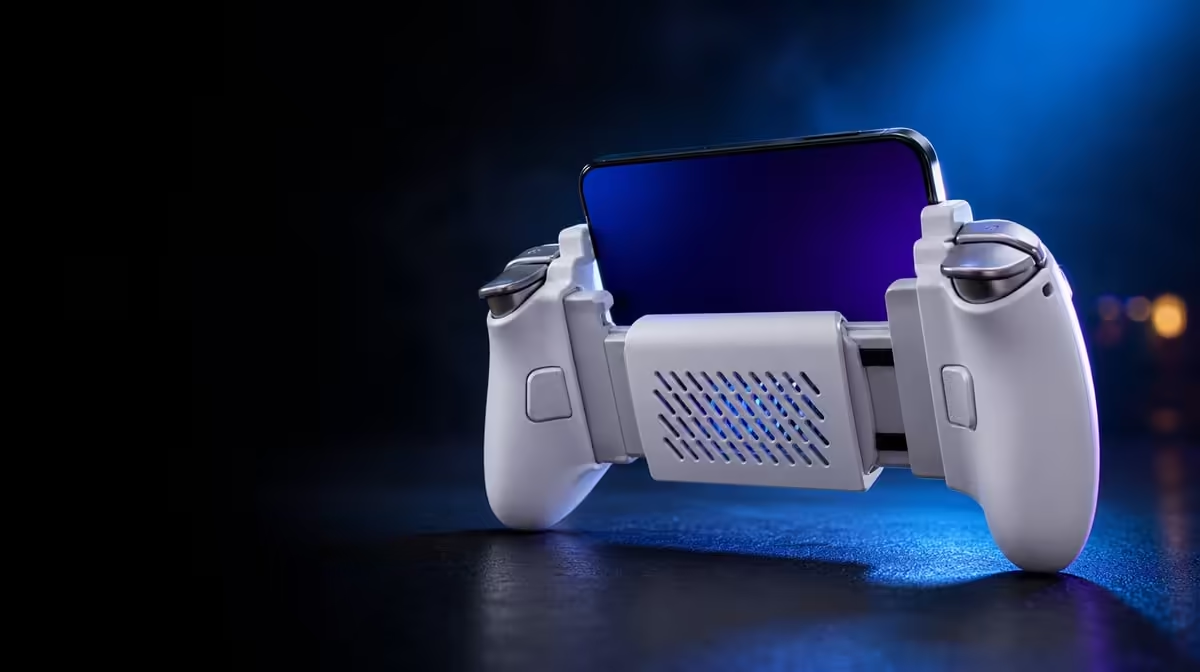
A mobile controller is a chain of physical decisions: the phone must fit, the cooler must meet it, inputs must work in the game and cables must stay out of the hands. This mobile controller guide to cooling, fit and controls uses the R1,199 GameSir X3 Pro to show how those decisions connect without allowing one attractive feature to conceal a weak match.
Shortlist a mobile controller by checking handset dimensions and game support first, then assess cooler contact, trigger type, stick sensing, gyro and cable routing. At R1,199, the X3 Pro combines all of those areas in one stretchable design, but exact phone and software compatibility remain buyer checks.
Measure the handset's full body, not just the display. Note thickness, camera-bump height, case dimensions and USB-C location. A controller can stretch far enough while still placing its plug or cooling surface badly.
Remove the phone case for the initial fit. Extend the controller evenly, align the USB-C connection and lower the other end without twisting. Once seated, inspect both edges for rocking or connector strain. Press the triggers and move the sticks in a normal grip to see whether the phone shifts.
The X3 Pro integrates cooling behind the handset, so rear alignment matters twice: it affects both stability and thermal contact. Buyers can review different formats in Evetech's mobile controller collection, then compare each shape with their own device measurements.
A secure fit can still create a tiring hand angle. Hold the assembled controller for ten minutes, reach every face button and rotate the sticks fully. Check whether weight distribution encourages a tight grip or makes one wrist support more of the phone.
An integrated cooler needs to meet a suitable area of the phone. A raised camera island or thick case may create a gap. Identify where air enters and exits, then make sure fingers, clothing and furniture remain clear in the intended playing position.
Room temperature affects the test. So do charging, display brightness, background activity and graphics settings. Choose one demanding game scene, keep those conditions stable and note handset behaviour at regular intervals. Stop at any device warning.
Charge Cool One Cable reduces cable clutter around charging and cooling, yet routing still needs slack. The cable should not tug the controller during gyro movement or lever the phone port. A clean line protects both thermal airflow and input comfort.
The gaming accessories section can help buyers account for supporting pieces. Add only items that solve a clear problem in the final layout.
Hall sticks in the X3 Pro use magnetic sensing, avoiding a rubbing position track that can contribute to drift. Start with a raw neutral and circular-travel test, then set deadzone and sensitivity in the chosen game. The technology supports consistency; it does not choose a useful profile.
E-Sports Micro Switch Triggers favour rapid digital-style commands with a defined actuation. They differ from analog triggers that can report partial travel. Check whether the player's racing or action titles need a crisp on-or-off response or graduated pressure.
Six-axis gyro can add motion correction in supported games. Calibrate it on a stable surface, start low and use the stick for broad turns. Dual rumble adds feedback when software sends vibration data, though reducing it may help during the first gyro trial.
Test every input in the priority games. A connected controller may navigate the operating system while a title maps only some buttons. Save distinct profiles when two games interpret the same stick movement differently.
For commuting, count the controller, phone, power arrangement and protective storage. The integrated cooler may reduce loose attachments, but it also adds hardware to the controller body. At home, cable clearance and airflow around a sofa or desk become more important.
Detachable replaceable components can aid personalisation or care where the intended part and removal method are known. Store small pieces safely and do not assume every visible component is designed to come off.
Evetech's popular accessories page provides another way to inspect current supporting options. The final decision should still pass four questions: does the phone sit correctly, can the cooler breathe, do the important games map the controls, and is the complete kit comfortable to handle?
At R1,199, the X3 Pro gives each of those questions a concrete feature to test. Its value comes from the combination working together, not from counting features in isolation.
Use a staged first-week plan if the controller is selected. On day one, focus only on physical seating, raw input and one game. On the next session, add the cooler and intended power route. Introduce gyro and stronger rumble later, once the baseline is stable.
This sequence makes failures easier to locate. If the phone shifts before cooling is enabled, the issue is mechanical. If a title ignores a trigger while the system input screen sees it, the game mapping deserves attention. If battery behaviour changes only under a heavier graphics profile, the workload belongs in the explanation.
Keep a short record for each game. Note stick sensitivity, deadzone, gyro value, vibration level and whether micro-switch triggers fit its actions. Separate profiles are more honest than a universal setting forced across different input systems.
Review comfort at the end of a full session rather than the opening minute. A balanced controller should not require an increasingly tight grip. Cable movement should remain independent of trigger fingers, and the cooler openings should stay clear as posture changes.
For maintenance, remove the phone, inspect the USB-C plug and wipe accessible surfaces with a soft dry material. Protect the sticks during storage. A well-chosen controller still depends on repeated handling that preserves its physical alignment.
The guide therefore becomes a loop rather than a one-time checklist: fit, test, record, adjust one variable and repeat. That method keeps the X3 Pro's broad R1,199 package understandable even when games and playing locations differ.
Add a quarterly inspection to that loop. Check the stretch mechanism, USB-C alignment, stick-centre record and cooler openings. Compare against the first-week notes instead of waiting for a clear failure.
When a game update changes behaviour, retest mapping before modifying hardware assumptions. When a new phone enters the setup, repeat the dimension and contact checks from the beginning. These events reset different parts of the guide.
A complete mobile controller decision stays complete only through maintenance. The X3 Pro offers the systems in one frame; the owner keeps fit, cooling and control evidence current.
Poor dimensions or USB-C alignment can undermine stability, cooler contact and safe cable routing before any control feature is used.
Inspect rear contact and airflow, then compare the same game workload under consistent conditions. Stop if the phone raises a warning.
Titles with rapid digital-style commands are the natural fit. Games relying on partial trigger depth require another mechanism check.
The GameSir X3 Pro costs R1,199, combining a cooled stretchable frame with Hall sticks, gyro and dual rumble.
Ready to evaluate the whole mobile control chain? Explore Evetech's controller category and test fit, cooling, inputs and cable routing as one connected setup.
Poor dimensions or USB-C alignment can undermine stability, cooler contact and safe cable routing before any control feature is used.
Inspect rear contact and airflow, then compare the same game workload under consistent conditions. Stop if the phone raises a warning.
Titles with rapid digital-style commands are the natural fit. Games relying on partial trigger depth require another mechanism check.
The GameSir X3 Pro costs R1,199, combining a cooled stretchable frame with Hall sticks, gyro and dual rumble.
PCIe 5.0 vs PCIe 4.0 for video editing in 4k is mainly about fit, features, compatibility, cost, and upgrade path, not one automatic winner. SA buyers should match the choice to the setup.
Read more
Wi-Fi 7 vs Wi-Fi 6e for competitive esports comes down to router support, latency goals, device compatibility, and coverage. SA buyers should match the choice to the real network setup.
Read more
ATX 3.1 vs ATX 3.0 for mMO and live-service games buyers - what changes is mostly about compatibility, budget, upgrade path, and setup fit. SA buyers should check device support and real needs before expecting a clear win from either option.
Read more
LGA 1851 vs LGA 1700 can affect Twitch and YouTube streaming when gaming and encoding share CPU resources. For SA creators, the real-world difference depends on encoder choice, memory support, motherboard cost, thermals, and upgrade plans.
Read more
X870E vs X670E for aaa single-player gaming is mainly about fit, features, compatibility, cost, and upgrade path, not one automatic winner. SA buyers should match the choice to the setup.
Read more
Hall Effect switches vs Mechanical switches for mMO and live-service games is mostly about compatibility, budget, upgrade path, and setup fit. SA buyers should check device support and real needs before expecting a clear win from either option.
Read more
A fake 113GB GTA VI ISO reportedly used empty padding around a small malware payload. SA gamers should delete unofficial builds, keep Windows security active and wait for official channels.

Wi-Fi 6E vs Wi-Fi 6 matters for 4K video editing when files move across a network. The real-world difference between Wi-Fi 6E and Wi-Fi 6 for video editing in 4K depends on NAS access, cloud uploads, router range, and SA creator workflows.

The difference between PCIe 5.0 and PCIe 4.0 for SA gamers is mostly bandwidth headroom. Compare GPU slot needs, NVMe speed, motherboard support, and upgrade timing before paying extra for a newer platform.

Gaming PC stuck pixel checks in South Africa should confirm the monitor fault first. Use colour tests, screenshot comparison, cable swaps, display menu checks, and clear photos before deciding on support.

Shokz OpenFit Air 2 earbuds weigh 7.2g each and use a redesigned dual-driver open-ear layout. SA buyers should choose them for comfort and awareness, not maximum isolation.

AMD's current driver now lists a Radeon RX 9050 4GB, while product coverage details a narrowed memory system. SA buyers should weigh the low VRAM ceiling against current local Radeon options.

Samsung Display has demonstrated a 16-inch 2.5K OLED laptop panel running at 300Hz. SA buyers should wait for a named notebook, full panel specifications and a local price before planning an upgrade.

Microsoft says some Windows 11 game crashes after recent updates are linked to RGB-related drivers. Affected SA gamers should confirm the update and driver before using the published registry workaround.

RTX 5090 on a 650W PSU is a tight pairing with very limited headroom. For SA gaming PCs, focus on total system draw, PSU quality, connector support, CPU choice, and avoid OC plans unless the full build is carefully power-limited.
PCIe 5.0 vs PCIe 4.0 for video editing in 4k is mainly about fit, features, compatibility, cost, and upgrade path, not one automatic winner. SA buyers should match the choice to the setup.

850W PSU safety for RTX 5090 is plausible with a quality unit and balanced parts. In SA, confirm connector support, CPU power draw, case airflow, PSU age, and spare capacity before building around 850W.
Wi-Fi 7 vs Wi-Fi 6e for competitive esports comes down to router support, latency goals, device compatibility, and coverage. SA buyers should match the choice to the real network setup.