Ever sat in a quiet room at 2 AM trying to clutch a 1v1 in CS2... only to have your PC sound like a coffee grinder? That whirring and clicking isn't just annoying. It is the sound of mechanical parts working overtime. If you want to optimise your setup for focus, understanding SSD vs HDD noise is the first step toward a stealthy, high-performance rig. ⚡
The Mechanical Reality of HDD Noise
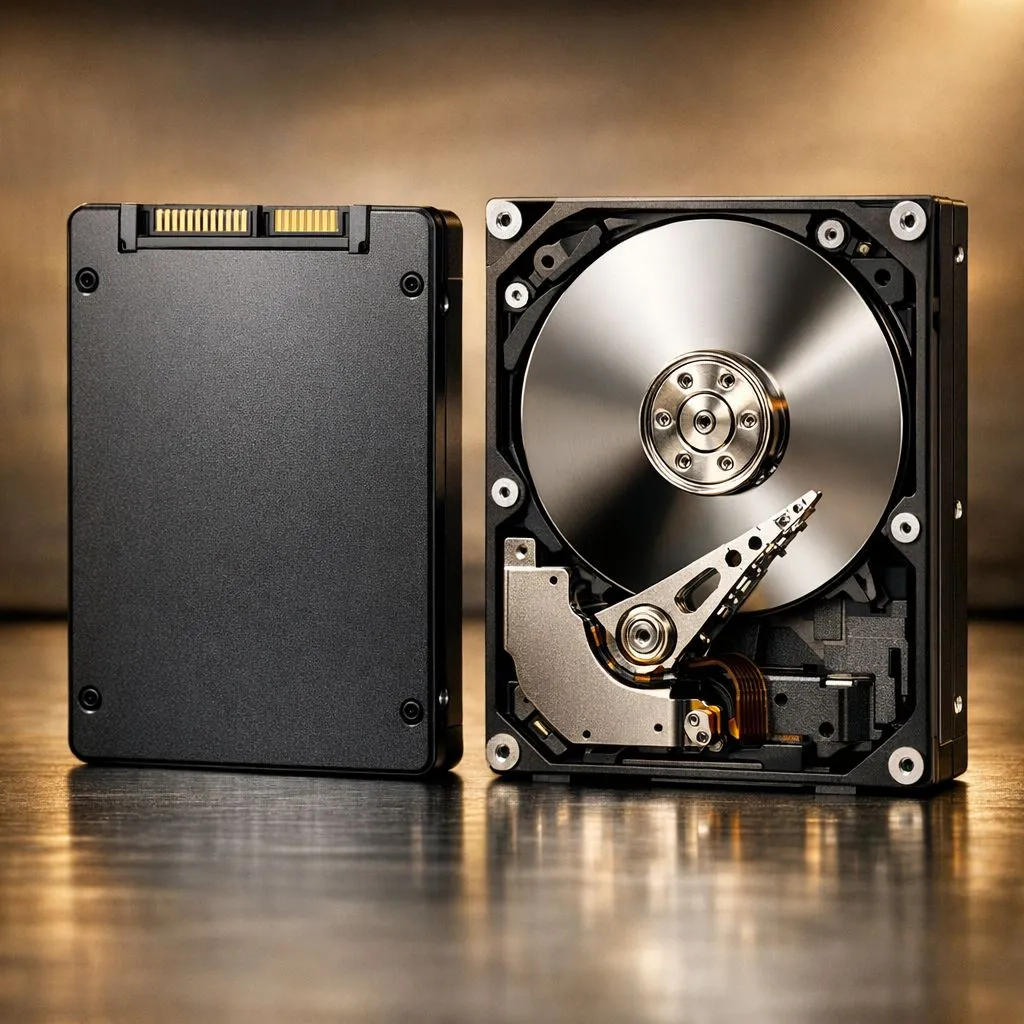
Hard Disk Drives are marvels of engineering, but they are loud by design. Inside the casing, platters spin at thousands of revolutions per minute. An actuator arm moves across these platters to read data... much like a record player. This physical movement creates two types of noise: a constant hum from the motor and a "chatter" or clicking sound during heavy data access.
In a quiet South African study or bedroom, this vibration can echo through your PC case. While modern HDDs have improved their drive acoustics, they can never be truly silent. If you are still running your OS or games off a mechanical drive, you are dealing with unnecessary decibels.
Why SSDs Offer Silent Operation
The shift to solid state drives changed everything for noise-sensitive gamers. SSDs have no moving parts. They use flash memory to store data... which means there is zero friction, zero vibration, and zero noise.
When we talk about silent operation, SSDs are the gold standard. Whether you are rendering a 4K video or loading into a heavy open-world game, the drive remains completely mute. This is particularly beneficial for content creators in South Africa who need to record clean audio without the background drone of a spinning disk.
Performance Without the Acoustic Penalty
You don't have to sacrifice speed to get a quiet system. In fact, the quietest drives are often the fastest. If you are looking for top-tier performance, moving to Gen 5 NVMe storage provides blistering speeds without adding a single decibel to your room.
Reliable brands like ADATA offer fantastic options for those looking to silence their rigs. Similarly, Western Digital provides a range of drives that focus on both longevity and quiet performance. By removing the mechanical bottleneck, you reduce heat and noise simultaneously. 🚀
Silent Rig Pro Tip ⚡
If you still use an HDD for bulk storage, try using rubber anti-vibration mounts in your case. However, for the best results, migrating your active "Work" and "Play" folders to an SSD is the only way to guaranteed silent operation during intensive tasks.
Noise Considerations for External Storage
The SSD vs HDD noise debate isn't limited to the inside of your PC. Many South African gamers use external drives for their consoles or laptops. A mechanical external drive sitting on a wooden desk can act like a resonator... amplifying every click and spin.
Switching to an external SSD eliminates this issue entirely. These drives are not only silent but also much more durable since there are no delicate moving heads to crash if the drive is bumped. Choosing a drive with an External form factor ensures you have a portable, rugged, and—most importantly—whisper-quiet storage solution for your data. ✨
Improving your drive acoustics is one of the most underrated upgrades you can make. It transforms your PC from a noisy machine into a sleek, silent powerhouse.
Ready to Silence Your Setup?
Don't let a noisy hard drive ruin your immersion or your focus. Whether you need internal speed or portable silence, we have the right tech for you. Explore our massive range of SSD specials and enjoy the peace and quiet of modern storage today.