


Maintain Wired Headset: Tips to Extend Lifespan
Maintain wired headset — Checklist: • inspect cables • clean earpads • store properly 🔧🎧 Practical steps to preserve sound quality and avoid premature replacements.
Read moreUSB microphone mounting options explained: stable bases, tilt adjustment, and mounting threads for secure installs. Get less wobble, better angles, and a cleaner desk setup 🎙️✅
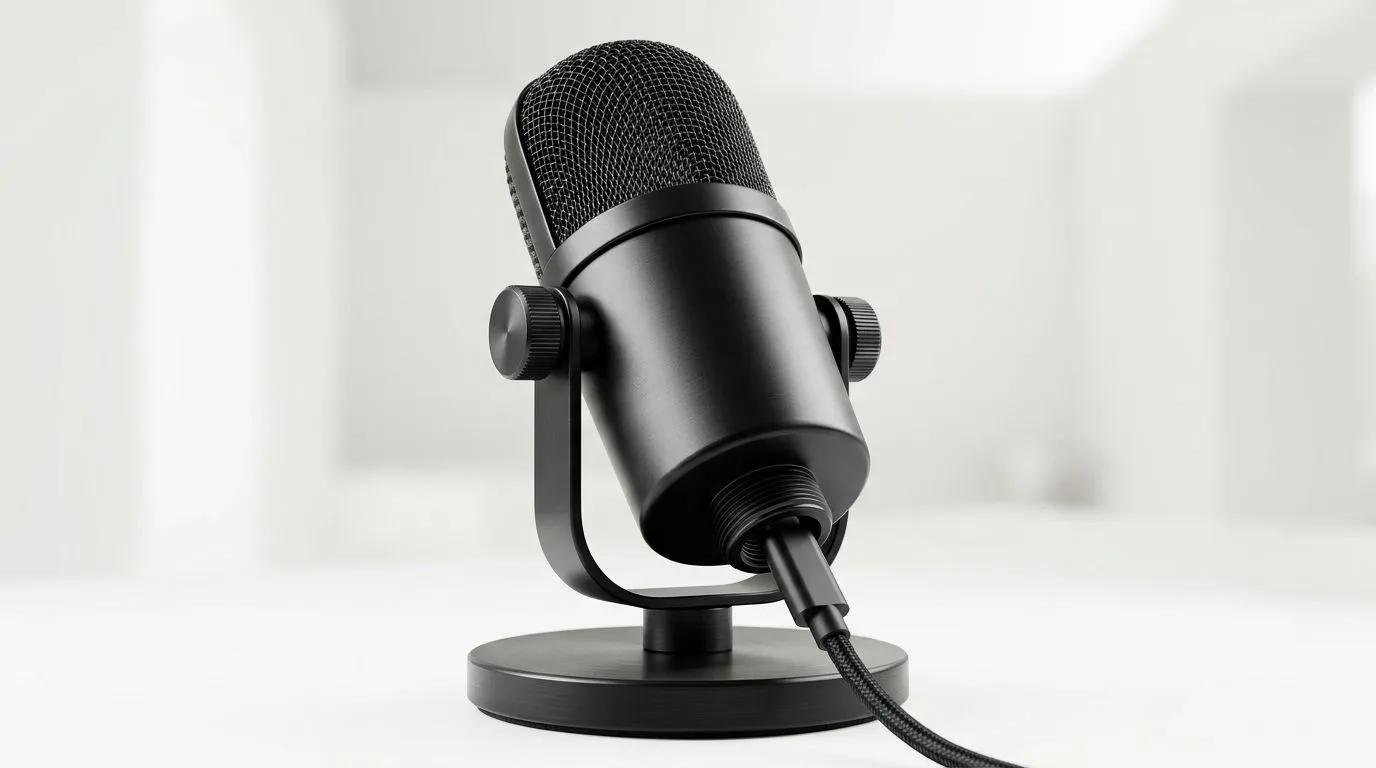
If your mic keeps wobbling during a clutch call, the problem is probably not your voice. It is the mount. A solid USB microphone setup can cut desk noise, reduce rattle, and keep your frame clean for streams, Discord chats, and late-night ranked grinds. For South African gamers, that matters... especially when your desk is also a homework station, a work setup, and a snack zone 🔧
A good mount is about more than looks. It affects placement, stability, and how easily you can move the mic out of the way when you need mouse space. Let’s break down the most practical mounting options, what each one does best, and how to choose the right fit for your setup.
Most USB microphones land in one of three camps: a fixed base, a tilt-enabled stand, or a threaded mount. Each has a different feel, and each suits a different kind of user.
A stable base is the simplest option. It sits on the desk and usually gives you a small footprint. This is ideal if you want quick setup and minimal fuss. It is also the safest choice for tighter desks, where a boom arm would feel like overkill.
A tilting stand gives you more control over angle. That matters if your mic sits a bit low, or if you want to point the capsule toward your mouth without stacking books under it. Small adjustments can make a noticeable difference to clarity, especially in echo-prone rooms.
A threaded mount is the most flexible. If your microphone uses a standard thread size, you can often swap between desk stands, boom arms, and shock mounts more easily. That flexibility is useful if you plan to upgrade later rather than replacing the whole setup at once.
For a broader look at creator-friendly accessories, browse Evetech’s streaming essentials selection. It is a good starting point if you are building a cleaner desk setup from scratch.
If you prefer a polished setup with matched accessories, it helps to look at brands that already think about the full desk picture. CORSAIR accessories often appeal to streamers who want tidy cable management, strong build quality, and a consistent aesthetic.
That is why it can be worth checking CORSAIR streaming essentials if you are trying to keep your microphone, lighting, and desk gear visually aligned. Even if you are not buying everything at once, starting with a brand ecosystem can save time later.
A practical example: if your mic stand feels too light, you will keep reaching for it between matches. That becomes annoying fast. A more solid base, or a better-designed mounting system, helps your desk feel calm instead of cluttered. And calm setups are easier to use on long gaming sessions.
Microphone placement is only half the story. If you stream or record facecam clips, your mic should not block your webcam framing. A better mount can free up space in front of your monitor and help your camera view stay clean.
That is where a webcam-friendly desk layout becomes useful. If you are planning a full creator corner, it makes sense to compare webcams for your setup alongside your mic mounting choice. One decision affects the other more than people expect.
For example, a bulky fixed-base mic may sit right in front of a camera, while a tilted or threaded mount may let you shift the mic lower or off to the side. That small change can improve both sound and video composition without costing extra.
Space is a real factor in many local homes and flatshares. Not everyone has a wide streamer desk. Some of us are balancing a keyboard, mouse, phone charger, and maybe a console controller too. In that case, compact mounting matters.
Here is a simple way to think about it:
If you are buying on a budget, think in rand value rather than just price. A mount that lasts longer and works with future gear often saves more than the cheapest option upfront.
Keep the microphone just off-axis from your mouth. It helps reduce plosives, those harsh bursts on P and B sounds, without needing to speak softer.
Before you hit checkout, check four things.
Not all microphone mounts use the same thread. Check your mic manual or product page before assuming a boom arm or stand will fit.
If your desk shakes when you type, a heavier base may help. If the desk is sturdy, you can prioritise flexibility instead.
Small tilt adjustments can make a big difference in voice pickup. If your chair height changes often, this matters even more.
A smart mount should not trap your USB cable or leave it dangling across your desk. Clean routing makes the whole setup feel more premium.
The goal is not to build the fanciest rig. It is to build one that feels effortless every day. That is what keeps people using their gear properly instead of letting it sit awkwardly on the side.
If you only game occasionally, a simple base is probably enough. If you stream, record, or spend long hours in calls, a tilting or threaded setup can be worth it. The best choice is the one that suits your room, your habits, and your upgrade path.
Think of it this way... your microphone should disappear into the background when it is working well. You should hear clear audio, not notice the hardware fighting your desk space. That is the sweet spot.
For South African buyers, it also helps to compare gear that is actually available locally, with pricing in ZAR and support that makes sense after purchase. Evetech’s streaming and webcam categories make that easier to do in one place.
Ready to Find Your Perfect Match? The Mac vs Windows debate is complex, but for maximum power, choice, and value in South Africa, Windows is hard to beat. Explore our massive range of laptop specials and find the perfect machine to conquer your world.
A weighted desk base or sturdy mic arm with proper clamps helps reduce wobble. Pair it with a shock mount for extra vibration control.
Loosen the tilt knob, set your mic angle toward your mouth, then tighten evenly. Tilt adjustment improves placement for clearer capture.
Many mounts use standard thread sizes like 3/8-inch or 5/8-inch, often requiring adapters. Check your mic and stand specs before buying.
Often yes. If your mic mount and stand use different thread sizes, a thread adapter bridges them so your mount stays secure.
Yes if your setup causes desk vibrations. A shock mount reduces mechanical noise, improving consistency in speech and streaming.
Use a heavier base, tighten the arm joints, confirm thread compatibility, and avoid over-torquing adapters that can loosen over time.
Choose a desk base for quick stable placement, and a boom or articulated arm for flexible positioning, tilt control, and cleaner cable routing.
Confirm thread size, clamp diameter, load capacity, tilt range, and whether the mount supports your USB mic model and accessories.
Maintain wired headset — Checklist: • inspect cables • clean earpads • store properly 🔧🎧 Practical steps to preserve sound quality and avoid premature replacements.
Read more
Fix crackling headset fast: step-by-step checks for cables, connectors, drivers, and settings to remove static or distorted audio on wired headsets 🎧⚙️
Read more
Stereo vs mono headsets: learn which delivers clearer calls, better spatial music, or simpler mono voice performance — pick the right headset for meetings, music, or gaming 🎧💬
Read more
- Compare gaming headset vs studio headphones; - Assess comfort, mic and sound; - Recommend best daily picks. Gaming headset vs studio headphones: learn which suits work, music and casual gaming. 🎧⚖️
Read more
- Check pressure points - Compare earcup materials - Adjust clamp and fit Best gaming headsets for glasses: quick guide to reduce temple pressure, pick breathable memory foam earcups, and optimize fit for long sessions 🕹️👓
Read more
Gaming microphone noise reduction: Use beamforming mics, AI noise suppression, and hardware filters to cut background noise and boost in-game voice clarity. 🎧⚙️ Learn setups, settings, and top mic features.
Read more
Snapdragon X2 NPU Explained: How 80 TOPS Changes. Plain-English explanation of what it means, why it matters & how it affects your buying decisions in SA.

HBM? High Bandwidth Memory Used in GPUs and AI. Plain-English explanation of what it means, why it matters & how it affects your buying decisions in SA.

How much should you spend on sim racing accessories in South Africa for a realistic setup? We break down budgets by quality tiers, so you buy smart gear and avoid overspending 🎮💸

G-Sync and FreeSync? Variable Refresh Rate. Plain-English explanation of what it means, why it matters & how it affects your buying decisions in SA.

AMD Laptop: Value. SA-focused analysis with local pricing data, real-world insights & actionable buying advice.

How MacBook Neo Handles 30+ Chrome Tabs with Only. SA-focused analysis with local pricing data, real-world insights & actionable buying advice.

Why Apple Put 8GB RAM in MacBook Neo: The A18 Pro. SA-focused analysis with local pricing data, real-world insights & actionable buying advice.

Upgrade your work laptop with a New Motherboard. Step-by-step instructions with SA-specific tips, common pitfalls to avoid & expert recommendations.
Maintain wired headset — Checklist: • inspect cables • clean earpads • store properly 🔧🎧 Practical steps to preserve sound quality and avoid premature replacements.
Fix crackling headset fast: step-by-step checks for cables, connectors, drivers, and settings to remove static or distorted audio on wired headsets 🎧⚙️
Stereo vs mono headsets: learn which delivers clearer calls, better spatial music, or simpler mono voice performance — pick the right headset for meetings, music, or gaming 🎧💬
- Compare gaming headset vs studio headphones; - Assess comfort, mic and sound; - Recommend best daily picks. Gaming headset vs studio headphones: learn which suits work, music and casual gaming. 🎧⚖️