


Maintain Wired Headset: Tips to Extend Lifespan
Maintain wired headset — Checklist: • inspect cables • clean earpads • store properly 🔧🎧 Practical steps to preserve sound quality and avoid premature replacements.
Read moreWebcam privacy shutter protects you from unseen spying—learn why every device needs one, how to choose and install it, and quick safety tips. 🔒🛡️
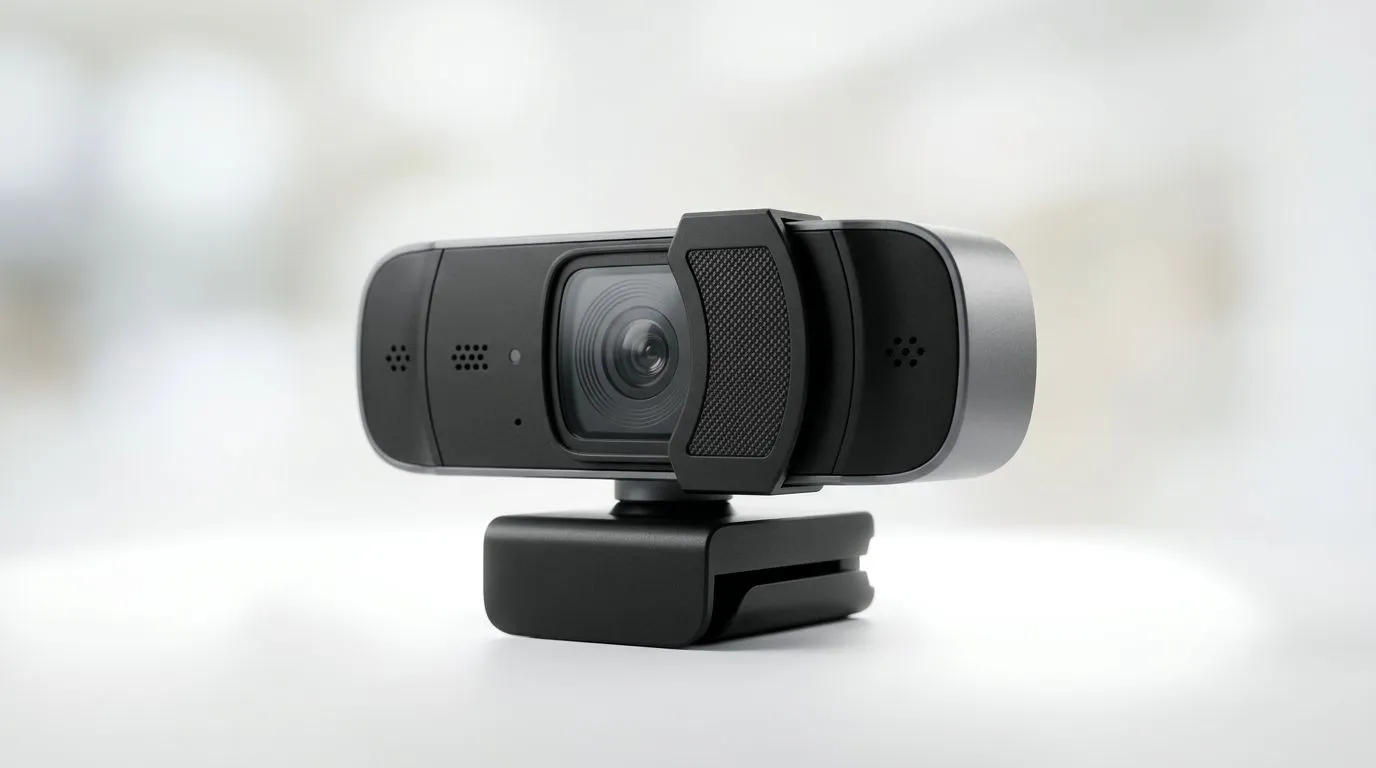
Think your camera is only active when the light is on? South African streamers, freelancers and parents are seeing otherwise. A webcam privacy shutter is the simplest physical defence: slide it closed and the lens is blocked, even if malware or a rogue app tries to stream video. Small change, big peace of mind 🔒✨
Software permissions and indicator lights help, but they can be bypassed. A mechanical shutter removes doubt because it physically occludes the lens. That’s why many users prefer webcams with an integrated cover rather than relying on apps or drivers alone. If you want to browse our full range of webcams and compare models with shutters, start with Evetech’s main webcam selection: browse webcams at Evetech.
Buying a webcam is both a security and value decision. For tight budgets, there are solid options under R1,000 that include shutters or attachable covers. Check the entry-level selection to find affordable, reliable units that suit study rooms and casual streaming: webcams under R1,000. Prices in ZAR make it easy to compare real cost against features like shutter build and low-light performance.
If you stream, attend frequent video meetings, or want improved optics, mid-range webcams up to R2,000 and premium units up to R3,000 often add better sensors, autofocus and sturdier shutters. Compare the mid-range picks here: mid-range webcams up to R2,000, and if you want top-tier glass and robust privacy covers, see the higher-end list: premium webcams up to R3,000. These Evetech listings help you match specs to real-world needs.
When you set up a webcam for the first time, take a photo with it open and another with the shutter closed. Save both images to check for lens smudges, alignment issues and to confirm the physical shutter blocks the full frame.
A Cape Town content creator I spoke with once found a background app had accessed his webcam without his knowledge. He started using a slider cover and never worried about surprise recordings again. It’s a simple habit that saved him stress and kept his streams authentic.
A webcam privacy shutter is low-cost insurance for your privacy. For many South African users, a physical cover paired with sensible security routines offers the best balance of convenience, performance and protection. Browse choices, compare features and pick a webcam that feels good on day one and safe every day.
Ready to Find Your Perfect Match? The Mac vs Windows debate is complex, but for maximum power, choice, and value in South Africa, Windows is hard to beat. Explore our massive range of laptop specials and find the perfect machine to conquer your world.
A physical cover that blocks the camera lens when not in use, preventing accidental video exposure and unwanted spying.
Yes. A physical webcam privacy shutter blocks the lens even if malware activates the camera, adding a strong hardware layer of defense.
Most slide-on or adhesive shutters attach without tools. Follow manufacturer instructions — search 'how to install webcam shutter' for guides.
Built-in shutters outperform software alone. For best safety combine a hardware cover with software permission controls.
Pick a slim, opaque cover that fits your device. Look up 'best webcam shutter for laptop' and check adhesive quality and thickness.
No. A privacy shutter only covers the lens when closed and does not degrade image quality while open.
Yes. Many thin, low-profile options exist — search 'physical webcam cover for macbook' for compatible models and designs.
Maintain wired headset — Checklist: • inspect cables • clean earpads • store properly 🔧🎧 Practical steps to preserve sound quality and avoid premature replacements.
Read more
Fix crackling headset fast: step-by-step checks for cables, connectors, drivers, and settings to remove static or distorted audio on wired headsets 🎧⚙️
Read more
Stereo vs mono headsets: learn which delivers clearer calls, better spatial music, or simpler mono voice performance — pick the right headset for meetings, music, or gaming 🎧💬
Read more
- Compare gaming headset vs studio headphones; - Assess comfort, mic and sound; - Recommend best daily picks. Gaming headset vs studio headphones: learn which suits work, music and casual gaming. 🎧⚖️
Read more
- Check pressure points - Compare earcup materials - Adjust clamp and fit Best gaming headsets for glasses: quick guide to reduce temple pressure, pick breathable memory foam earcups, and optimize fit for long sessions 🕹️👓
Read more
Gaming microphone noise reduction: Use beamforming mics, AI noise suppression, and hardware filters to cut background noise and boost in-game voice clarity. 🎧⚙️ Learn setups, settings, and top mic features.
Read more
Snapdragon X2 NPU Explained: How 80 TOPS Changes. Plain-English explanation of what it means, why it matters & how it affects your buying decisions in SA.

HBM? High Bandwidth Memory Used in GPUs and AI. Plain-English explanation of what it means, why it matters & how it affects your buying decisions in SA.

How much should you spend on sim racing accessories in South Africa for a realistic setup? We break down budgets by quality tiers, so you buy smart gear and avoid overspending 🎮💸

G-Sync and FreeSync? Variable Refresh Rate. Plain-English explanation of what it means, why it matters & how it affects your buying decisions in SA.

AMD Laptop: Value. SA-focused analysis with local pricing data, real-world insights & actionable buying advice.

How MacBook Neo Handles 30+ Chrome Tabs with Only. SA-focused analysis with local pricing data, real-world insights & actionable buying advice.

Why Apple Put 8GB RAM in MacBook Neo: The A18 Pro. SA-focused analysis with local pricing data, real-world insights & actionable buying advice.

Upgrade your work laptop with a New Motherboard. Step-by-step instructions with SA-specific tips, common pitfalls to avoid & expert recommendations.
Maintain wired headset — Checklist: • inspect cables • clean earpads • store properly 🔧🎧 Practical steps to preserve sound quality and avoid premature replacements.
Fix crackling headset fast: step-by-step checks for cables, connectors, drivers, and settings to remove static or distorted audio on wired headsets 🎧⚙️
Stereo vs mono headsets: learn which delivers clearer calls, better spatial music, or simpler mono voice performance — pick the right headset for meetings, music, or gaming 🎧💬
- Compare gaming headset vs studio headphones; - Assess comfort, mic and sound; - Recommend best daily picks. Gaming headset vs studio headphones: learn which suits work, music and casual gaming. 🎧⚖️