4K 240Hz Gaming Requirements: Is Your PC Powerful Enough?
Wondering if your setup handles 4K 240Hz gaming? We analyze the hardware needed to push ultra-high pixels at extreme frame rates. 🚀 Discover the GPU power and CPU speeds required for the ultimate visual experience. 🎮
|
Loading tags...

Ah, the holy grail of PC gaming... 4K resolution at a buttery-smooth 240Hz refresh rate. It’s the pinnacle of visual fidelity and responsiveness, a dream setup for any serious South African gamer. But before you splash out on that glorious new screen, there’s a crucial question: is your rig actually up to the task? The 4K 240Hz gaming requirements are no joke, demanding serious hardware. Let's find out if your PC is powerful enough. 🚀
The Pixel-Pushing Power Required for 4K 240Hz Gaming
Let's get one thing straight: this isn't just a small step up. A 4K display (3840x2160) packs over 8.2 million pixels. To hit 240Hz, your PC needs to render all 8.2 million of those pixels... 240 times every single second. That's nearly 2 billion pixels per second. It's a monumental task that requires a perfectly balanced, high-end system where every component pulls its weight. This is a significant leap from the standard PC monitors most of us are used to, demanding top-tier performance across the board.
The Graphics Card: The Heart of Your 4K 240Hz Setup
Your Graphics Processing Unit (GPU) is the undisputed champion here. It handles the immense workload of rendering the game world in ultra-high detail. If you're serious about meeting the requirements for 4K 240Hz gaming, you need to be looking at the very top of the performance stack.
GPU Recommendations
For a smooth experience, you'll need one of the following, at a minimum:
- NVIDIA: GeForce RTX 4080 Super or the mighty RTX 4090.
- AMD: Radeon RX 7900 XTX.
These cards have the raw horsepower, and crucially, the VRAM (16GB or more) needed to handle 4K textures without stuttering. They also support technologies like NVIDIA's DLSS and AMD's FSR, which use AI to upscale the image, giving you a massive performance boost. Without these features, hitting a stable 240 FPS in graphically intense titles is nearly impossible. These powerhouse GPUs are the perfect match for the latest and greatest in all gaming monitors available today.
CPU & RAM: The Supporting Cast You Can't Ignore
While the GPU does the heavy lifting, a weak processor will create a bottleneck, holding your graphics card back from its full potential. You need a Central Processing Unit (CPU) that can feed the GPU a constant stream of data without breaking a sweat.
Think of modern processors like the Intel Core i7/i9 (13th or 14th Gen) or the AMD Ryzen 7/9 (7000 Series and up). These CPUs have the high clock speeds and core counts necessary to keep up. For RAM, 16GB is the absolute floor, but 32GB of fast DDR5 memory is the smart choice to ensure your system runs without a hitch. This level of system synergy is what makes gaming so incredible, especially on immersive curved monitors that pull you right into the action. ✨
TIP FOR YOU
Check Your Cables! 🔧
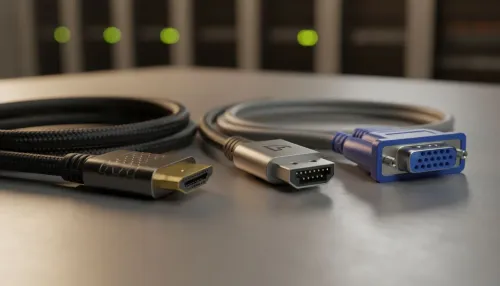
To get a 4K 240Hz signal from your PC to your monitor, you need the right cable. A standard HDMI or older DisplayPort cable won't cut it. You absolutely need a certified DisplayPort 1.4 (with Display Stream Compression) or an HDMI 2.1 cable. Using the wrong one will limit your refresh rate, and you won't get the performance you paid for!
Choosing Your Window to New Worlds
Of course, the monitor itself is a key part of the equation. You're not just buying a spec sheet; you're investing in the panel technology that brings your games to life. The latest OLED and Mini-LED screens offer incredible contrast and colour accuracy. When you're browsing the top-end 5K & 4K monitors, pay attention to features like G-Sync or FreeSync Premium Pro, which eliminate screen tearing for a flawless experience. The performance standard is rising so quickly that you can even find high-refresh-rate portable monitors for those who need a top-tier gaming experience on the go.
The Big Question: Is It Worth It for YOU?
So, are the extreme 4K 240Hz gaming requirements worth the investment? It depends on what you play.
For competitive shooters like Valorant or Counter-Strike 2, the ultra-high refresh rate provides a tangible competitive edge, making enemy movements smoother and easier to track. For stunning single-player epics like Cyberpunk 2077 or Alan Wake 2, the combination of 4K detail and high refresh rates is breathtakingly immersive. However, be prepared to tweak in-game settings and lean on upscaling tech to maintain that silky-smooth frame rate. A great setup also needs great ergonomics, so don't forget essential monitor accessories like a quality stand or VESA mount to perfect your battle station.
Ultimately, achieving this gaming pinnacle is a balancing act between budget, performance, and personal preference. But for those who want the absolute best, there's nothing else quite like it.
Ready to Build Your 4K 240Hz Beast? Meeting the demands of 4K 240Hz gaming is a serious challenge, but the payoff is an unparalleled visual experience. Whether you're upgrading your GPU or building from scratch, Evetech has the hardware to make it happen. Explore our range of elite gaming PCs and find the perfect machine to conquer new worlds in stunning detail.
To achieve 4K 240Hz gaming reliably, you need a top-tier card like the NVIDIA RTX 4090 or RX 7900 XTX, often utilizing upscaling tech like DLSS or FSR.
Yes, you must use DisplayPort 2.1 or high-bandwidth HDMI 2.1 cables to support the massive data transfer rates required for 4K 240Hz signals.
Absolutely. While 4K is GPU-bound, pushing 240 frames requires a modern, high-frequency CPU to prevent bottlenecks and ensure smooth frame times.
Generally, no. Older GPUs lack the processing power and the necessary video output ports (like HDMI 2.1) to handle 4K resolution at such high refresh rates.
DLSS 3 uses AI frame generation to insert frames between rendered ones, significantly boosting FPS to help hit the 240Hz target without overloading the GPU.
For enthusiasts seeking the sharpest visuals and smoothest motion in competitive titles, 4K 240Hz gaming is the pinnacle, but it requires a massive budget.
Related Articles