

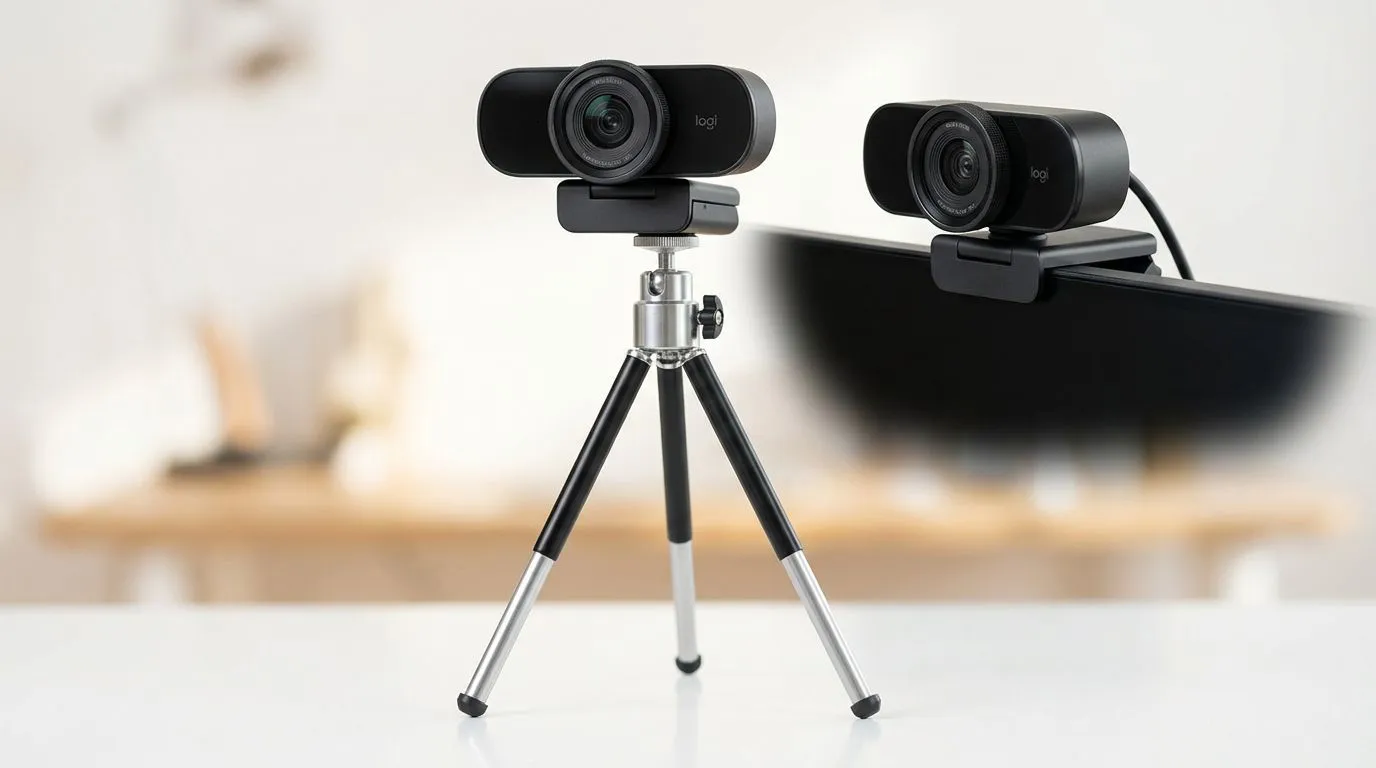
Tripod vs Monitor Webcams: Best Streaming Setup for SA Creators (That Actually Looks Clean) 🎮✨
If you’ve ever watched your own stream back and thought, “Why does my picture look… off?” you’re not alone. In South Africa, where loadshedding, Wi-Fi, and tight budgets are real-life constraints, your camera setup needs to be practical and repeatable.
The big question for SA creators is simple: Tripod vs monitor webcams: best streaming setup for SA creators… which one gets you steadier framing, less hassle, and better results for your viewers? Let’s break it down properly, with real buying guidance and a workflow you can copy today. 🚀
Tripod vs Monitor Webcams: Best Streaming Setup for SA Creators (What Changes in Your Footage) 🔧
Before you spend, understand what your viewers actually notice:
- Stability: micro-movements make you look less “present”.
- Angle consistency: head height and tilt affect skin tones and eye contact.
- Cable management: chaotic cables = frequent disconnects and delays.
- Quick adjustments: you’ll tweak framing mid-session if it’s easy.
Monitor webcams: the “fast and clean” option
A monitor webcam is usually more convenient: it sits close to your eye line, and it’s typically quicker to set up. But it depends heavily on:
- whether your monitor has enough space for mounting,
- how firmly the webcam is attached,
- and whether your desk lighting causes glare on the screen.
If your monitor base shakes when you type or when you swivel in your chair, you’ll feel it in the picture.
Tripod webcams: the “repeatable and flexible” option
A tripod webcam is great when you want consistent framing for longer sessions. You can set height and distance once, then stop thinking about it. The upside is especially useful for creators who:
- alternate between streaming and recording,
- switch camera positions often (e.g., facecam + tabletop B-roll),
- or want a “set it and forget it” setup for YouTube too.
The downside? More parts. More setup. And if you don’t manage cables, you’ll eventually trip over them during a clutch ranked match.
Tripod vs Monitor Webcams: Best Streaming Setup for SA Creators (Angle, Lighting, and Desk Reality) ⚡
Here’s a practical rule that works across setups:
- Put the lens at or slightly above eye level.
- Keep your camera facing you, not angled downward.
- Use lighting in front of you, not behind your monitor.
In SA homes, daylight is unpredictable. So if you’re streaming during the day, your room lighting can swing fast. That means mounting consistency matters even more.
Quick micro-test (takes 3 minutes)
Record a 30-second clip with your current camera:
- Play it back at normal volume.
- Pause when your face is centered.
- Check: Is your forehead too dominant? Are your eyes looking up? Is the image wobbly?
If you see motion blur or frequent repositioning, you’ll feel the same on live viewers. That’s usually a mounting problem.
Productivity Pro Tip ⚡
On Windows, use the PowerToys FancyZones utility to create custom snap layouts for your streaming software (OBS Streamlabs) and your chat alerts. Keep your webcam preview in one fixed zone and your control panel in another, so you adjust your framing consistently without hunting window positions mid-session.
Tripod vs Monitor Webcams: Best Streaming Setup for SA Creators (Buying Guidance in South African Terms) ✨
If you’re shopping in SA, you’re likely balancing frame quality with a real budget. That’s smart. Start with stable positioning, then upgrade later.
Where a monitor mount makes sense
Choose the monitor approach if:
- your desk setup is tight,
- you want quick start times,
- and your screen placement already puts you at a good camera height.
Where a tripod wins
Choose the tripod approach if:
- you stream regularly and want the same framing every time,
- you record guides, reviews, or tutorials,
- or you frequently change camera distance for different content.
A good “starter” buying path (Evetech webcam options)
If you want to browse webcams that fit different budgets, start here:
- Under R1000: webcams up to R1000
- Under R2000: webcams up to R2000
- Under R3000: webcams up to R3000 And if you want to compare the broader selection: browse Evetech webcams
Tripod vs Monitor Webcams: Best Streaming Setup for SA Creators (The Setup I’d Recommend for Most SA Streamers) 🚀
If you’re unsure, here’s the most reliable “default” setup choice:
- Tripod if you can spare the desk space and you want repeatable framing.
- Monitor mount if speed matters and your monitor position is already consistent.
Then, whichever route you pick, apply the same finishing moves:
- Lock your framing before you go live.
- Check glare by tilting your webcam slightly left or right.
- Manage cables so you’re not tugging the webcam when you reach for your mic or headphones.
- Do one test with OBS running (or your streaming software open). Sometimes app overlays change perceived colour and contrast.
That’s how you get a stream that feels professional without burning money.
Tripod vs Monitor Webcams: Best Streaming Setup for SA Creators (Your Next Step)
If you want a quick win, decide based on your behaviour:
- Do you often adjust during streams? Tripod usually reduces that.
- Do you want instant setup for “just going live”? Monitor mount usually wins.
Now match the camera and mounting style to your budget. Then lock your lighting and angle. That’s the formula.
Ready to Find Your Perfect Match? The Mac vs Windows debate is complex, but for maximum power, choice, and value in South Africa, Windows is hard to beat. Explore our massive range of laptop specials and find the perfect machine to conquer your world.











