


A 700W RTX 5090 makes a dramatic benchmark headline, but the useful number is the gain beside it. Early user testing of new software controls reported only about 10 extra frames per second at best while drawing more than 200W above an efficient profile. That is a poor trade on a daily gaming PC, especially when the local card itself can cost more than a complete high-end system.
Quick Answer
Do not copy the 700W profile on a daily PC. The 24 August catalogue check found in-stock RTX 5080 cards from R26,999 and RTX 5090 cards from R73,599, rising to R109,999, so a small benchmark gain is not worth risking the card, connector, power supply or warranty.
⚡ What the new control actually changes
The reported mVolt+ v0.36 update exposes separate power-channel limits for the graphics core and memory, plus voltage controls for several internal domains. That can let some boards move past the total power limit stored in their VBIOS without a physical shunt modification.
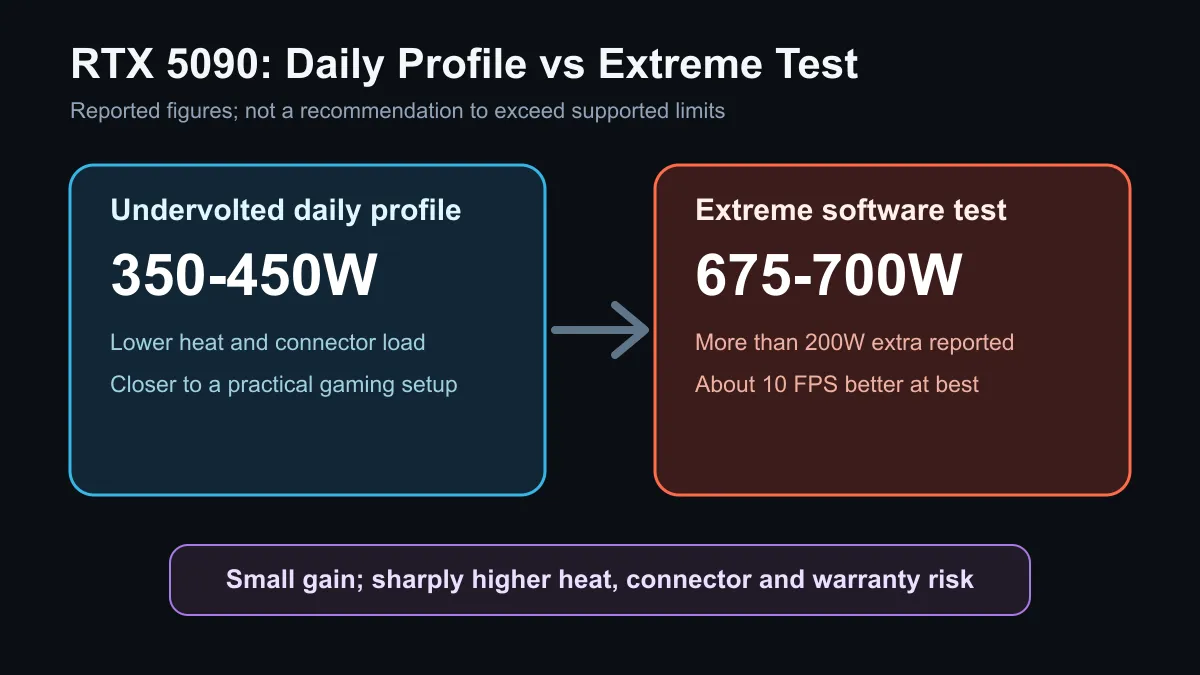
One water-cooled RTX 5080 report exceeded 680W in a stress test. An RTX 5090 user reported about 700W in testing and roughly 675W during gaming. Those are enthusiast results, not a new supported specification for every card. Different boards, cooling systems and power stages can react differently.
The sensible starting point remains a supported card from the current graphics card range, run at its normal limits with a stable driver and clean power delivery.
🌡️ Why more watts do not scale into equal speed
Silicon efficiency falls as frequency and voltage rise. Near the top of a GPU's curve, each extra step usually needs disproportionately more power and cooling. The user who reported the 700W result said the high-power profile gave around 10 FPS more at best than an undervolted setup while consuming over 200W extra.
That extra draw becomes heat in the room and load on the radiator, fans, board and connector. It can also increase noise. A screenshot from a short benchmark does not prove that the same setting is stable through long gaming sessions, hot SA afternoons or a wide range of titles.
For a normal upgrade, compare supported NVIDIA graphics card options on price, cooling size, warranty and measured performance instead of chasing one peak clock.
🔌 The power path is the real limit
Software cannot remove the electrical limits of the board, connector or cable. A fully seated direct cable, gentle routing and a suitable modern power supply matter before any tuning begins. Check the card maker's recommended capacity and the exact cable arrangement for the chosen model.
A 700W GPU does not leave much room for the processor, pump, fans, drives and transient spikes. Even a high-rated unit can be the wrong choice if it lacks the correct native cable, is old, or is operating near its continuous limit. The power supplies above 700W page is a comparison starting point, not permission to match the GPU figure to the number on the PSU box.
Never bypass protection, reuse questionable adapters or assume that water cooling makes the connector safe. Cooling the chip does not cool every contact in the power path.
🛡️ A better daily tuning order
Start with stock settings and record temperature, noise, power and performance in the games you actually play. If the card is stable, a modest supported undervolt can reduce heat and noise without sacrificing meaningful speed. Save one change at a time so the cause of any crash remains clear.
Extreme power tools belong on dedicated benchmarking systems with experienced supervision and a willingness to accept hardware loss. They should not be installed casually on a work PC, family machine or expensive new build.
Frequently Asked Questions
Does mVolt+ make every RTX 5090 run at 700W?
No. The figure comes from user testing on specific hardware. Board design, cooling, firmware and silicon quality all change the result.
Is 700W faster than the normal profile?
It can be faster in a benchmark, but the reported gaming gain was small beside the extra power. Efficiency and stability matter more for daily use.
Can a larger power supply make extreme tuning safe?
No. Capacity is only one part of the path. The card, cable, connector, board cooling and warranty still impose limits.
Should I undervolt instead?
A careful supported undervolt is usually the more useful daily experiment because it targets lower heat and noise. Test stability after each small change.
What should I check before buying an RTX 5080 or RTX 5090?
Check card dimensions, case airflow, native cable support, power-supply capacity, warranty and the performance you need at your monitor resolution.
Ready to plan a high-end graphics upgrade? Compare current cards and compatible power supplies, then keep the final build inside supported electrical and thermal limits.











