



550W PSU Planning for RTX 5080 Super Builds in SA
550W for RTX 5080 Super needs a full-build check, not a simple yes. Review GPU guidance, CPU draw, transient load, connectors, PSU quality, and upgrade plans before deciding.
Read moreA 98% keyboard compresses most full-size functions into less width, while a traditional full-size board keeps clearer separation between clusters. Gaming mouse space favours the narrower layout; frequent navigation and familiar typing may favour the larger one.
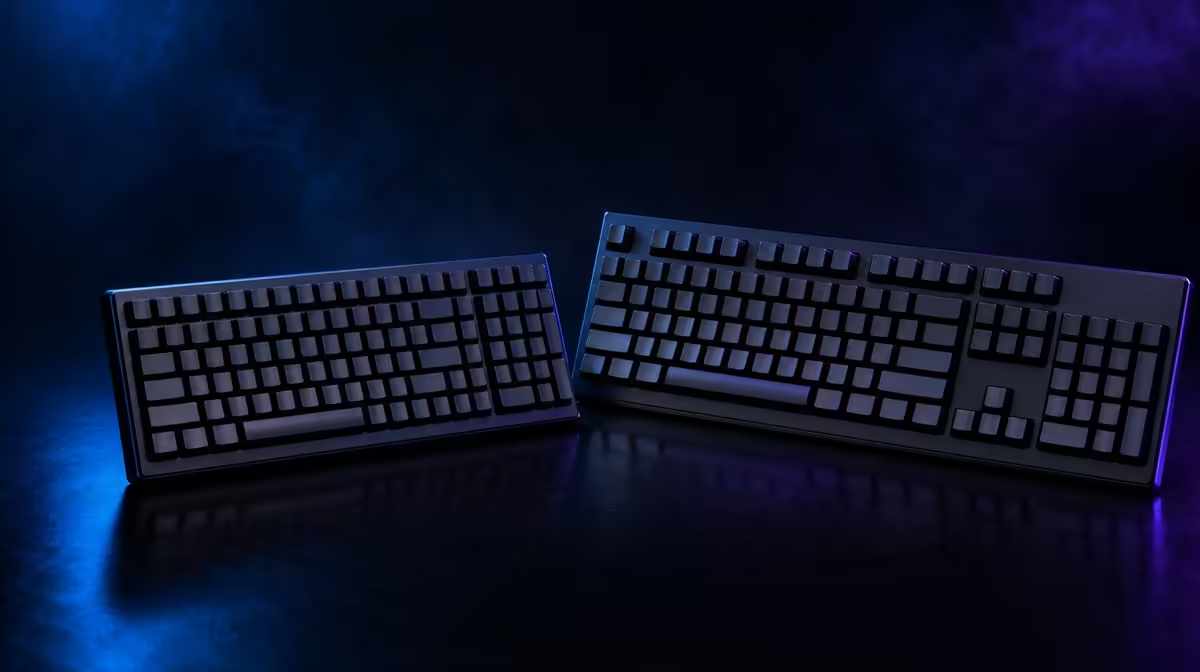
Saving keyboard width can improve mouse freedom while reducing the gaps that guide touch. 98% versus full-size keyboards for games and work is a choice between a condensed number-pad layout and a traditional map with clearer cluster separation.
Choose 98% when the number pad remains useful but the mouse needs more horizontal room. Keep full-size when separated navigation, familiar shortcuts and an unchanged typing map matter more than a narrower case; exact key positions and dimensions still vary by model.
A 98% board generally retains alphanumeric keys, function row, arrows and number pad while compressing navigation and empty space. Full-size keeps these groups more visibly separated.
Check Delete, Home, End, Page keys, number-pad zero and secondary layers on the actual layout. Percentage names do not define one universal arrangement.
Check key widths and stabilised positions too. A shortened Shift or zero can affect muscle memory and replacement-cap compatibility.
Find out where media, Print Screen and navigation commands live. A daily control hidden behind a layer can outweigh modest width savings.
Compact right-side keys can require relearning and may affect replacement-cap fit. Photograph the current map and mark commands used every day.
Study real arrangements in Evetech's Logitech gaming-keyboard range.
Place a paper footprint on the occupied desk with the mouse pad, monitor stand and accessories present. Rehearse broad mouse movement and typing posture.
Measure depth as well as width. Wrist support, cable exit and a tall front edge can change reach despite the compact case.
Align the alphanumeric section with the shoulder. Centring a full case can push the mouse outward, while rotating a compact board can reduce the saved space.
Mark the full-size edge on the desk and compare actual collisions. The narrower layout should create a visible improvement rather than a theoretical measurement.
Log number-pad work and mouse collisions for a week. Frequent numeric entry favours retention; constant mouse strikes strengthen the 98% case.
Include shortcut use and navigation. A number pad may stay important while dense editing keys slow work, creating a more complex trade than width alone.
Compare Evetech's gaming-keyboard category with measured width and key use beside the shortlist.
Keep a key-map reference visible and practise navigation in a safe document. Track repeated misses instead of treating every early error as a permanent flaw.
Time ordinary numeric entry and editing after several days. Accuracy should improve before a compact layout is judged fully.
Test full gaming and work sessions. The narrower board wins only when mouse freedom improves without creating persistent shortcut friction.
Check shoulder position and wrist angle after the system warms into ordinary use. A layout can feel spacious while still pushing the typing hand off-centre.
Repeat the broadest mouse move with the keyboard at the preferred play angle. Do not measure the board square and then rotate it into the recovered space.
Use the normal keyboard angle. A compact board rotated steeply can return its right edge to the mouse path and weaken the benefit.
Use supported remaps sparingly and preserve a clear default for other PC users.
Write any changed command on the reference card. A hidden personal mapping can make a shared machine difficult to use.
Revisit the decision after two weeks: 98% should retain useful numeric access and reduce mouse crowding, while full-size should justify itself through faster familiar navigation.
Keep the desk outline and error notes. They provide a faster starting point if the next choice is between 98% and TKL.
Let another regular user try the condensed map before settling on it. A shared workstation needs navigation and number entry that remain understandable without one person's private remap habits.
Round out the desk comparison on Evetech's accessory best-seller page, checking availability when the layout decision is ready.
It generally keeps a number pad and most main functions while compressing gaps and navigation positions.
Its narrower width can leave more space for broad mouse sweeps.
Distinct clusters can make navigation and numeric keys easier to locate through established muscle memory.
Users relying on familiar gaps or dedicated navigation positions may need more adjustment.
No. Key positions, widths and layers differ, so the exact model map must be checked.
Measure the desk, count number-pad use and compare mouse freedom against navigation accuracy over full sessions.
Balancing numeric work with gaming mouse room? Compare Evetech gaming keyboards by exact maps and measured desk fit before choosing 98% or full-size.
It generally keeps a number pad and most main functions while compressing gaps and navigation positions.
Its narrower width can leave more space for broad mouse sweeps.
Distinct clusters can make navigation and numeric keys easier to locate through established muscle memory.
Users relying on familiar gaps or dedicated navigation positions may need more adjustment.
No. Key positions, widths and layers differ, so the exact model map must be checked.
Measure the desk, count number-pad use and compare mouse freedom against navigation accuracy over full sessions.
550W for RTX 5080 Super needs a full-build check, not a simple yes. Review GPU guidance, CPU draw, transient load, connectors, PSU quality, and upgrade plans before deciding.
Read more
8000Hz polling is overrated for most SA gamers because gains can be tiny next to battery drain and monitor limits. Mbombela players should weigh mouse feel, game support, and system stability before chasing the number.
Read more
Magnetic switches are taking over SA gaming keyboards because actuation can be tuned. For Sandton gamers, rapid trigger, reset control, and profile depth can help, but layout, key feel, and software quality still matter.
Read more
Polokwane oled monitor value questions need cautious SA context because pricing can move with availability, exchange rates, specs, and warranty support. Treat the trend as a planning signal, not a fixed price promise.
Read more
Arc B580 budget builds for Midrand gamers can shift with exchange rates, supply, specs, and model tier. Treat the title as a buying prompt, then compare SA warranty, timing, and build priorities.
Read more
ROG Ally X may beat the LCD Steam Deck for SA gamers who value stronger handheld performance, more memory, and Windows flexibility. Compare battery life, controls, game libraries, and Polokwane support needs before deciding.
Read more
Minisforum's M2 Pro pairs Core Ultra X7, Arc B390 graphics and 32GB onboard memory in 1.8 litres. SA buyers should weigh its fixed memory and $1,439 launch offer against local mini PCs.

Lenovo says Legion Go failures linked to BIOS N3CN42WW are not user error. Affected SA owners should stop retrying the update, preserve proof and open a support case.

Smart monitors can add apps and convenience, but they also add privacy settings and unwanted-software risk. SA buyers should audit the operating system before paying for extras.

A fake 113GB GTA VI ISO reportedly used empty padding around a small malware payload. SA gamers should delete unofficial builds, keep Windows security active and wait for official channels.

ASUS calls the ROG GT-BN98 the first Wi-Fi 8 gaming router. SA buyers should fix coverage and client limits before paying for a future wireless standard.

Apple's M6 Mac mini adds faster AI, graphics and networking in the same compact format. SA buyers should wait for a rand listing before comparing value.

The Vulcan II XP adds hot-swappable switches, sound damping and gaming controls to a full-size wired board. SA buyers should compare feel before features.

Microsoft says Windows on Arm now has over 7,000 verified apps and games. SA buyers should still check each driver, game and work tool before switching.

Xbox Insiders can test disc-to-digital from 31 August 2026. Supported Xbox One and Series X discs gain a digital entitlement, but older discs, regions and title coverage still need exact checks.

ViewSonic's XG2738 pairs QHD QD-OLED with 240Hz and automatic panel care. SA buyers should compare warranty, brightness, ports and burn-in protection against today's R9,999-plus OLED shelf.

NVIDIA's final Windows 10 Game Ready driver is due in October 2026. SA gamers can keep using their GPU, but new game optimisations move on while critical security fixes continue quarterly.

JBL's new Quantum 520, 520X and 120 headsets cover wireless, Xbox-certified and wired use. SA buyers should compare connection, comfort and microphone needs before paying for a new badge.