



550W PSU Planning for RTX 5080 Super Builds in SA
550W for RTX 5080 Super needs a full-build check, not a simple yes. Review GPU guidance, CPU draw, transient load, connectors, PSU quality, and upgrade plans before deciding.
Read moreA 4D dual-axis headrest can improve adjustability when its positioning helps align the chair with a desk setup. The E3 Air provides this feature; buyers can test each movement against their normal seated working view.

A headrest becomes valuable when it follows the seated position instead of dictating it. A 4D dual-axis headrest offers several ways to align upper support with the desk view, although the label alone cannot show whether those movements suit a particular person. This design is part of the R7,399 E3 Air.
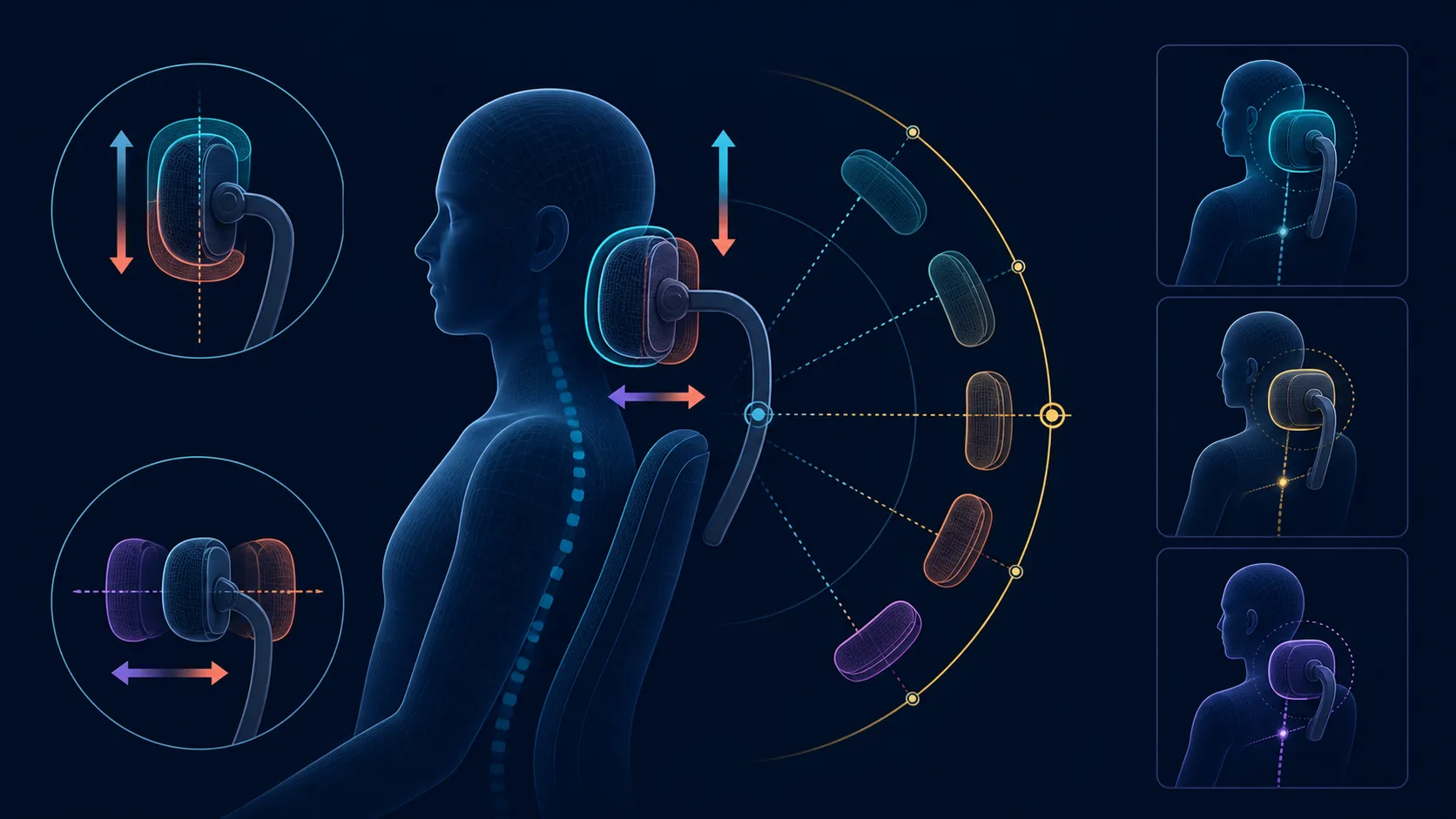
The E3 Air 4D headrest moves 40mm vertically, 70mm in depth and rotates on two axes through 70 degrees each.
Yes, a 4D dual-axis headrest can improve office-chair adjustability by adding more positioning choices around the head and upper seated posture. On the R7,399 E3 Air, it should be assessed after the desk, screen and main sitting position are established. Extra movement only helps when the final position supports the actual task without pushing the user forward.
Arrange the screen before touching the headrest. Set its height and distance for the normal working view, then sit back naturally. If the monitor changes later, the chair adjustment no longer answers the same setup. This order prevents the headrest from becoming a workaround for a poorly placed display.
The 4D and dual-axis terms signal broad adjustability, but they do not provide a universal movement sequence. Explore the available travel gently and learn the controls on the chair itself. Stop at a position where the head can remain neutral during reading, typing or calls instead of reaching backward to find the support.
Evetech's HBADA chair selection gives a useful category comparison once screen position and user height are written down. Compare the motion that matters to the workstation, not the number of adjustment labels.
A simple test is to work for a short period without consciously holding the head against anything. Notice whether the headrest is available when wanted and unobtrusive when not. If it presses the chin forward or encourages the shoulders to lift, revise its position before changing another part of the chair.
The E3 Air's three-zone lumbar system wraps through 80 degrees, so lower-back contact can affect the way the upper body meets the headrest. Set lumbar contact first, then the headrest. Finish with the 360-degree omni-motion mech-armrests, keeping the keyboard and mouse fixed while each side is positioned.
A desk day rarely contains one posture. Upright writing, a video meeting and a reading break can place the head differently. The chair also reaches a 140-degree recline, which creates another back angle to evaluate. The maximum does not explain locks, intermediate positions or control behaviour, so learn those separately before relying on a reclined setup.
Keep the original working position easy to recover. A small note of the screen and support relationship is more useful than chasing a perfect setting after every movement. If another household member uses the chair, each person should make an independent fit check rather than inheriting one arrangement.
Browse the broader Evetech office-chair category with that reset routine in mind. At this price, adjustability should reduce friction across familiar activities, not create a collection of controls that never get used.
Set the desk and screen first, then use height to meet the head, depth to close the gap and dual rotation to follow upright or reclined posture. These numeric ranges answer the adjustment question directly rather than leaving 4D as an undefined label.
The chair has a 4D dual-axis adjustable headrest. Those terms indicate multiple positioning options, but the exact useful position depends on the user's seated geometry and screen arrangement.
It should provide appropriate contact without driving the chin forward, lifting the shoulders or changing the working view. Evaluate the result during normal concentration rather than a posed test.
Use the chair's own controls gently, change one position at a time and return to the same desk task after each move. That sequence reveals which adjustment caused the difference.
The screen and input positions define where the user needs to look and place the arms. Setting the headrest first can disguise a desk alignment problem instead of solving it.
Yes. The E3 Air uses mech-armrests with 360-degree omni-motion, giving the arms a separate directional adjustment around the keyboard-and-mouse position.
Its backrest reaches a 140-degree maximum recline. Check the controls and surrounding clearance before changing angle; no particular lock positions or mechanism should be assumed.
This example is the 2026 Edition in Cloud White at R7,399. Colour and price identify the model, while fit must still be assessed at the intended workstation.
Ready to align the chair with your screen instead of guessing? Compare Evetech office seating after mapping the viewing position, main posture and adjustments you will actually reset.
The chair has a 4D dual-axis adjustable headrest. Those terms indicate multiple positioning options, but the exact useful position depends on the user's seated geometry and screen arrangement.
It should provide appropriate contact without driving the chin forward, lifting the shoulders or changing the working view. Evaluate the result during normal concentration rather than a posed test.
Use the chair's own controls gently, change one position at a time and return to the same desk task after each move. That sequence reveals which adjustment caused the difference.
The screen and input positions define where the user needs to look and place the arms. Setting the headrest first can disguise a desk alignment problem instead of solving it.
Yes. The E3 Air uses mech-armrests with 360-degree omni-motion, giving the arms a separate directional adjustment around the keyboard-and-mouse position.
Its backrest reaches a 140-degree maximum recline. Check the controls and surrounding clearance before changing angle; no particular lock positions or mechanism should be assumed.
This example is the 2026 Edition in Cloud White at R7,399. Colour and price identify the model, while fit must still be assessed at the intended workstation.
550W for RTX 5080 Super needs a full-build check, not a simple yes. Review GPU guidance, CPU draw, transient load, connectors, PSU quality, and upgrade plans before deciding.
Read more
8000Hz polling is overrated for most SA gamers because gains can be tiny next to battery drain and monitor limits. Mbombela players should weigh mouse feel, game support, and system stability before chasing the number.
Read more
Magnetic switches are taking over SA gaming keyboards because actuation can be tuned. For Sandton gamers, rapid trigger, reset control, and profile depth can help, but layout, key feel, and software quality still matter.
Read more
Polokwane oled monitor value questions need cautious SA context because pricing can move with availability, exchange rates, specs, and warranty support. Treat the trend as a planning signal, not a fixed price promise.
Read more
Arc B580 budget builds for Midrand gamers can shift with exchange rates, supply, specs, and model tier. Treat the title as a buying prompt, then compare SA warranty, timing, and build priorities.
Read more
ROG Ally X may beat the LCD Steam Deck for SA gamers who value stronger handheld performance, more memory, and Windows flexibility. Compare battery life, controls, game libraries, and Polokwane support needs before deciding.
Read more
Minisforum's M2 Pro pairs Core Ultra X7, Arc B390 graphics and 32GB onboard memory in 1.8 litres. SA buyers should weigh its fixed memory and $1,439 launch offer against local mini PCs.

Lenovo says Legion Go failures linked to BIOS N3CN42WW are not user error. Affected SA owners should stop retrying the update, preserve proof and open a support case.

Smart monitors can add apps and convenience, but they also add privacy settings and unwanted-software risk. SA buyers should audit the operating system before paying for extras.

A fake 113GB GTA VI ISO reportedly used empty padding around a small malware payload. SA gamers should delete unofficial builds, keep Windows security active and wait for official channels.

ASUS calls the ROG GT-BN98 the first Wi-Fi 8 gaming router. SA buyers should fix coverage and client limits before paying for a future wireless standard.

Apple's M6 Mac mini adds faster AI, graphics and networking in the same compact format. SA buyers should wait for a rand listing before comparing value.

The Vulcan II XP adds hot-swappable switches, sound damping and gaming controls to a full-size wired board. SA buyers should compare feel before features.

Microsoft says Windows on Arm now has over 7,000 verified apps and games. SA buyers should still check each driver, game and work tool before switching.

Xbox Insiders can test disc-to-digital from 31 August 2026. Supported Xbox One and Series X discs gain a digital entitlement, but older discs, regions and title coverage still need exact checks.

ViewSonic's XG2738 pairs QHD QD-OLED with 240Hz and automatic panel care. SA buyers should compare warranty, brightness, ports and burn-in protection against today's R9,999-plus OLED shelf.

NVIDIA's final Windows 10 Game Ready driver is due in October 2026. SA gamers can keep using their GPU, but new game optimisations move on while critical security fixes continue quarterly.

JBL's new Quantum 520, 520X and 120 headsets cover wireless, Xbox-certified and wired use. SA buyers should compare connection, comfort and microphone needs before paying for a new badge.