



550W PSU Planning for RTX 5080 Super Builds in SA
550W for RTX 5080 Super needs a full-build check, not a simple yes. Review GPU guidance, CPU draw, transient load, connectors, PSU quality, and upgrade plans before deciding.
Read moreDynamic lumbar follows changes in the seated position, while fixed support remains in one relationship to the chair. The AutoFull M6 Pro+ 2.0 uses dynamic lumbar at R16,599, giving long-session comparisons a movement-responsive example.
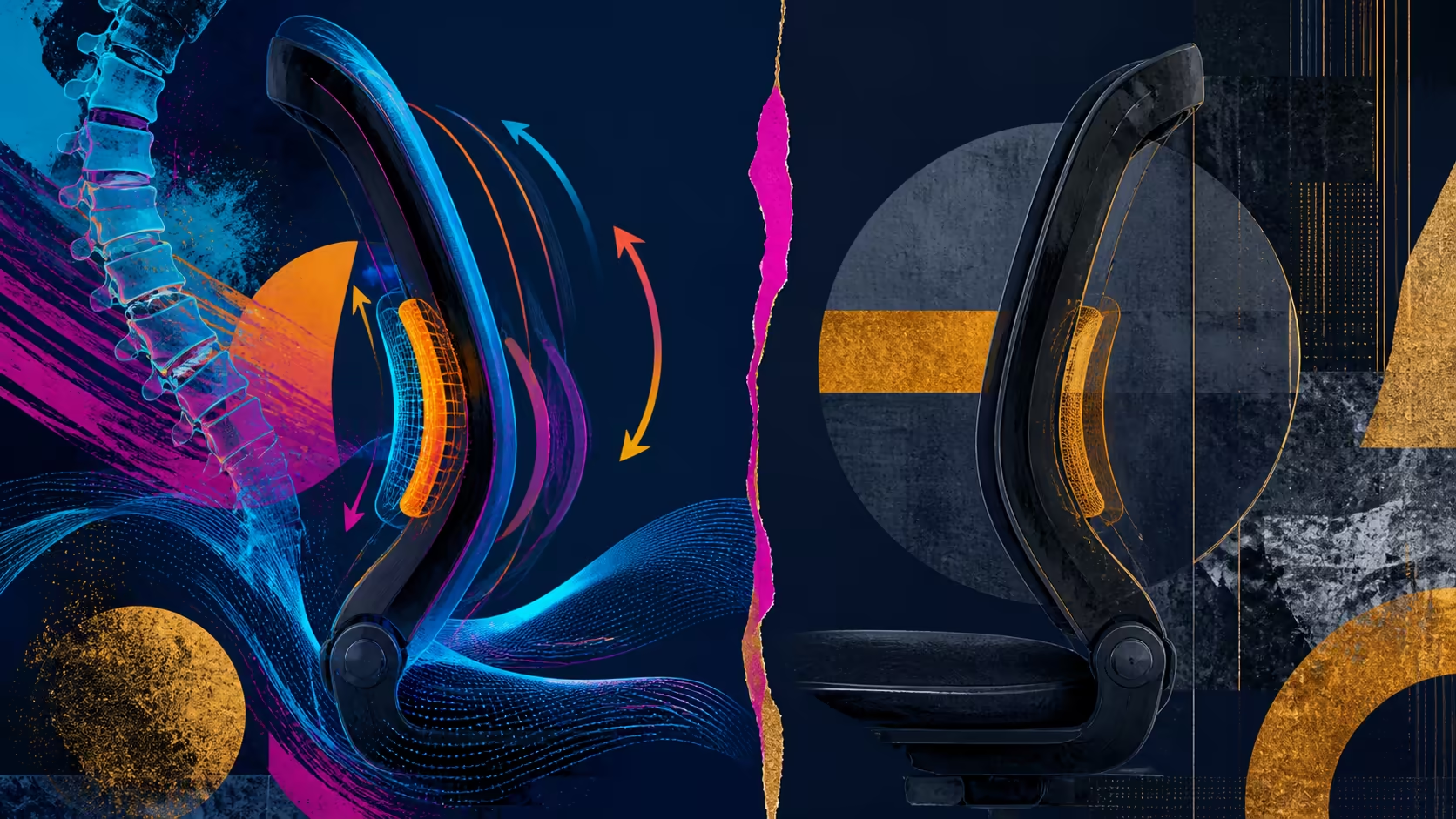
Long sessions reveal whether lower-back contact still works through ordinary shifts. Dynamic vs fixed lumbar support deserves a comparison based on fit, movement and task transitions instead of one frozen pose.
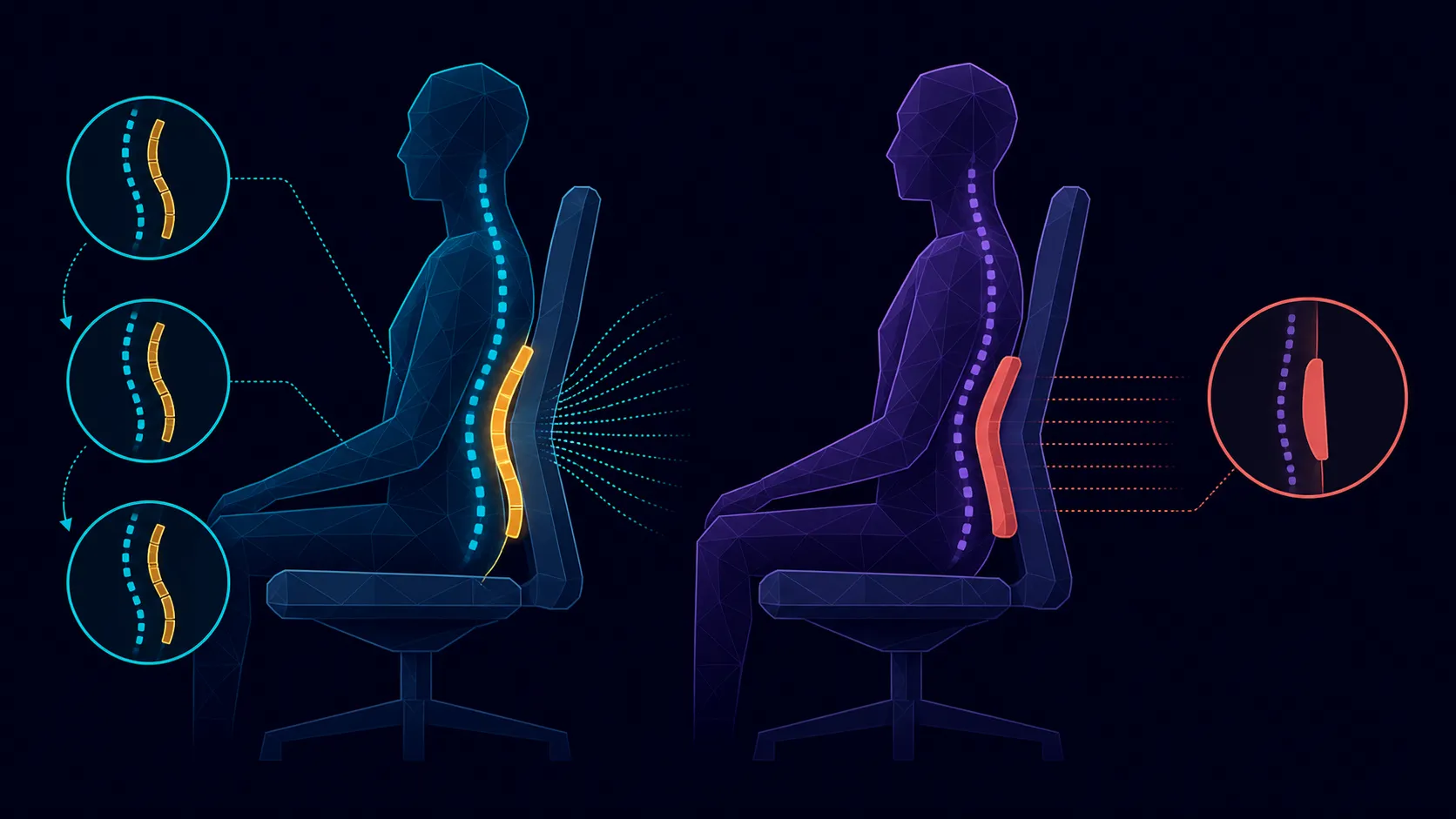
The dynamic approach responds to sitter movement; fixed lumbar preserves its shape relative to the chair. AutoFull uses the first method on the R16,599 M6 Pro+ 2.0. It creates another fit option without guaranteeing greater comfort or preventing back problems.
Use the same desk and task sequence for both support types. Observe lower-back contact during typing, controller use, small shifts and a break position. Matching the scenario makes the support difference clearer.
Define the representative torso movements before reviewing Evetech's AutoFull chair selection.
Set the chair-to-desk relationship and arm position before judging lumbar. Body and chair dimensions still matter; movement-responsive support cannot correct every fit mismatch.
Capacity tops out at 150kg on the M6 Pro+, without answering seat size or fit for a particular height.
The backrest reaches 160 degrees, creating several positions for testing dynamic contact. The 3D ErgoCloud neck pillow supports the upper area and should be reassessed as recline changes.
Keep lumbar inside the complete support picture across Evetech's local gaming-chair selection.
Repeat ordinary sessions and note which support relationship the user prefers. A dynamic system is not automatically superior to a well-fitting fixed one.
Neither option is medical treatment or a guarantee against discomfort. At R16,599, value the M6 Pro+ through its movement-responsive support and wider climate and adjustment package.
Set up a fair comparison by choosing one ordinary task and holding the desk arrangement constant. Note lower-back contact at the beginning, after a forward reach and following a small recline. A fixed support should be judged on how well its chosen shape fits those moments; a dynamic design should be judged on whether its changing contact remains useful rather than distracting.
Run the exercise separately for every regular user. Torso dimensions, preferred posture and chair height can change the result, so one person's strong preference does not establish a universal winner. Record any reset needed when the chair changes hands. A support system loses practical value if nobody restores the setting that made it work.
Keep the climate seat and armrest positions unchanged during the lumbar comparison. After choosing the preferred lower-back relationship, reintroduce the other adjustments one at a time and check the complete seated arrangement. This order distinguishes a genuine lumbar preference from warmth, forearm position or neck-pillow placement. Stop if the trial aggravates pain and obtain appropriate advice rather than treating further adjustment as care.
Revisit the notes after several normal sessions. A dynamic response that first felt novel may become helpful, neutral or distracting once the user stops concentrating on it. The fixed comparison deserves the same time. Keep the task sequence consistent and record only observable contact and preference. This longer view makes the choice less dependent on a short demonstration.
Include a reset check at the end of each trial. Return the chair to the first working position and confirm that the preferred relationship can be found again without several unrelated changes. Repeatability strengthens the result; an elusive favourable moment should carry less weight in a purchase decision.
Dynamic support follows seated movement; fixed support remains in one chair relationship until another adjustment changes it.
The AutoFull M6 Pro+ 2.0 includes dynamic lumbar support.
No. Personal body fit, desk setup and movement preferences determine the response.
Use matching tasks and positions across representative sessions rather than relying on one first impression.
No chair support can promise prevention, diagnosis or treatment of a medical condition.
The M6 Pro+ adds a 3D ErgoCloud neck pillow above its lumbar area.
Ready to compare lumbar contact through real movements? Browse Evetech's gaming chairs after mapping your task positions and the body-fit checks that remain constant.
Dynamic support follows seated movement; fixed support remains in one chair relationship until another adjustment changes it.
The AutoFull M6 Pro+ 2.0 includes dynamic lumbar support.
No. Personal body fit, desk setup and movement preferences determine the response.
Use matching tasks and positions across representative sessions rather than relying on one first impression.
No chair support can promise prevention, diagnosis or treatment of a medical condition.
The M6 Pro+ adds a 3D ErgoCloud neck pillow above its lumbar area.
550W for RTX 5080 Super needs a full-build check, not a simple yes. Review GPU guidance, CPU draw, transient load, connectors, PSU quality, and upgrade plans before deciding.
Read more
8000Hz polling is overrated for most SA gamers because gains can be tiny next to battery drain and monitor limits. Mbombela players should weigh mouse feel, game support, and system stability before chasing the number.
Read more
Magnetic switches are taking over SA gaming keyboards because actuation can be tuned. For Sandton gamers, rapid trigger, reset control, and profile depth can help, but layout, key feel, and software quality still matter.
Read more
Polokwane oled monitor value questions need cautious SA context because pricing can move with availability, exchange rates, specs, and warranty support. Treat the trend as a planning signal, not a fixed price promise.
Read more
Arc B580 budget builds for Midrand gamers can shift with exchange rates, supply, specs, and model tier. Treat the title as a buying prompt, then compare SA warranty, timing, and build priorities.
Read more
ROG Ally X may beat the LCD Steam Deck for SA gamers who value stronger handheld performance, more memory, and Windows flexibility. Compare battery life, controls, game libraries, and Polokwane support needs before deciding.
Read more
Minisforum's M2 Pro pairs Core Ultra X7, Arc B390 graphics and 32GB onboard memory in 1.8 litres. SA buyers should weigh its fixed memory and $1,439 launch offer against local mini PCs.

Lenovo says Legion Go failures linked to BIOS N3CN42WW are not user error. Affected SA owners should stop retrying the update, preserve proof and open a support case.

Smart monitors can add apps and convenience, but they also add privacy settings and unwanted-software risk. SA buyers should audit the operating system before paying for extras.

A fake 113GB GTA VI ISO reportedly used empty padding around a small malware payload. SA gamers should delete unofficial builds, keep Windows security active and wait for official channels.

ASUS calls the ROG GT-BN98 the first Wi-Fi 8 gaming router. SA buyers should fix coverage and client limits before paying for a future wireless standard.

Apple's M6 Mac mini adds faster AI, graphics and networking in the same compact format. SA buyers should wait for a rand listing before comparing value.

The Vulcan II XP adds hot-swappable switches, sound damping and gaming controls to a full-size wired board. SA buyers should compare feel before features.

Microsoft says Windows on Arm now has over 7,000 verified apps and games. SA buyers should still check each driver, game and work tool before switching.

Xbox Insiders can test disc-to-digital from 31 August 2026. Supported Xbox One and Series X discs gain a digital entitlement, but older discs, regions and title coverage still need exact checks.

ViewSonic's XG2738 pairs QHD QD-OLED with 240Hz and automatic panel care. SA buyers should compare warranty, brightness, ports and burn-in protection against today's R9,999-plus OLED shelf.

NVIDIA's final Windows 10 Game Ready driver is due in October 2026. SA gamers can keep using their GPU, but new game optimisations move on while critical security fixes continue quarterly.

JBL's new Quantum 520, 520X and 120 headsets cover wireless, Xbox-certified and wired use. SA buyers should compare connection, comfort and microphone needs before paying for a new badge.