



550W PSU Planning for RTX 5080 Super Builds in SA
550W for RTX 5080 Super needs a full-build check, not a simple yes. Review GPU guidance, CPU draw, transient load, connectors, PSU quality, and upgrade plans before deciding.
Read moreA three-zone lumbar chair divides support across areas, but usefulness depends on individual fit and control. The E3 Ultra uses 8D adjustable lumbar support; compare any required multi-zone design independently.
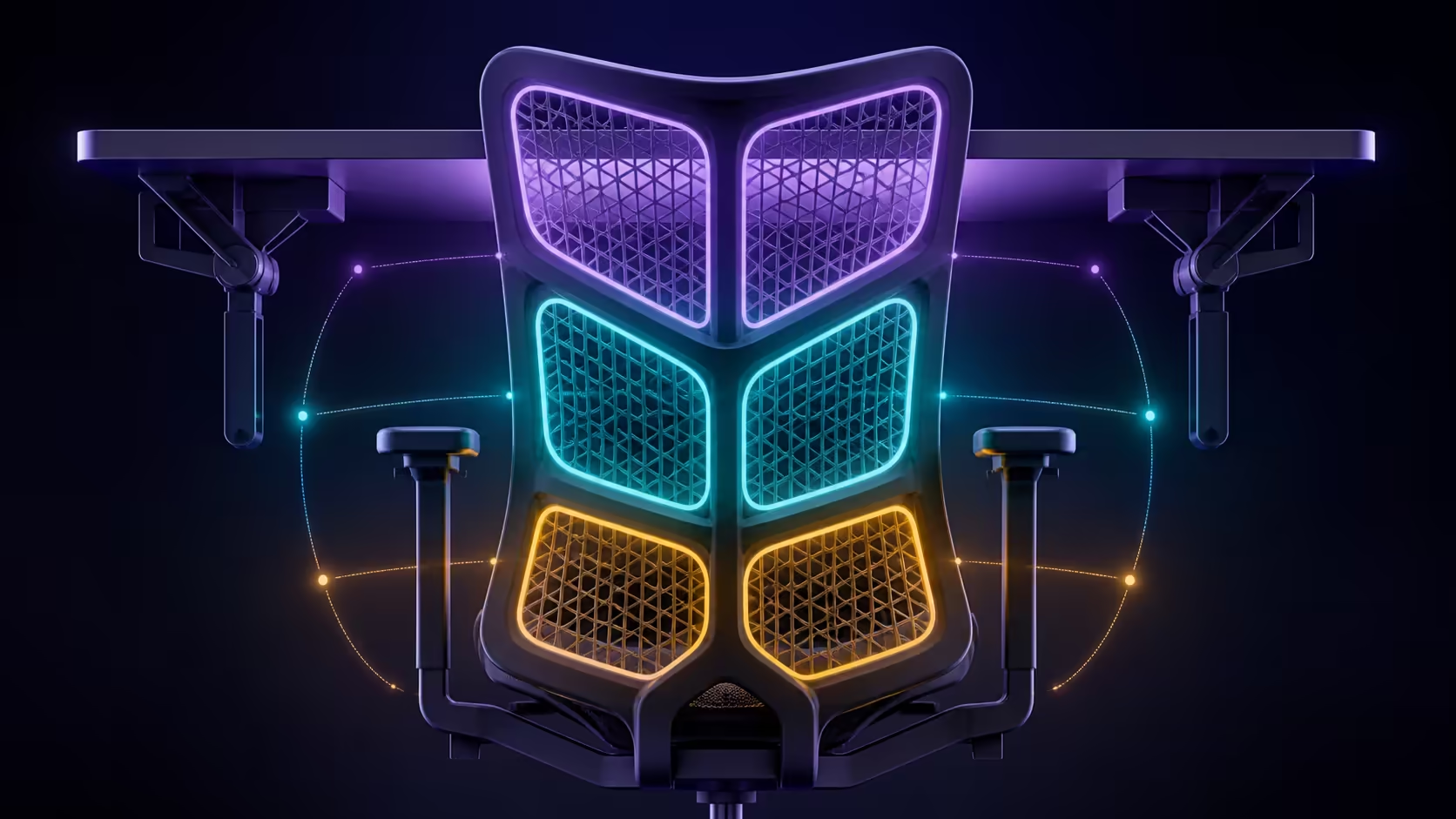
A three-zone lumbar chair setup should begin by finding where each intended support area meets the body, then balancing contact instead of maximising it. The category describes an approach, not a universal mechanism shared by every adjustable chair.
The E3 Ultra does use three-zone elastic lumbar support, with floating wings rotating 40 degrees, 14-degree dynamic support and eight-way adjustment.
Arrange the workstation neutrally, then test the E3 Ultra's three elastic lumbar zones one at a time. Its R9,599 system combines 8D movement with floating wings, 40-degree rotation, adjustable depth and height, and dynamic support.
Multi-zone designs may divide lower-back contact into regions, but the names, positions and controls can vary. Learn which part of the chair influences each area and whether one movement affects another before trying to balance the system.
Do not apply force based on a generic diagram. Use the chair's own controls and instructions, starting from a position that lets the backrest support the torso naturally.
Sit fully back and check whether support meets the intended areas without pushing the pelvis forward. Change the least comfortable region first, then work for several minutes before touching another zone.
When comparing with Evetech's HBADA office chairs, keep design labels exact. The E3 Ultra is both an 8D and three-zone elastic lumbar chair.
If the keyboard is distant, the user will leave the backrest regardless of zone quality. Bring input devices within reach, align the screen with a relaxed gaze and support the feet. Then repeat the lumbar test.
The E3 Ultra's omni armrests span a 720-degree range. Set them so the shoulders stay relaxed and the chair can approach the desk; this protects the lumbar setup from a competing posture.
Multi-zone support can offer more local tuning, but it cannot promise all-day comfort or a medical result. Value it when the contacts remain useful across the intended work and are simple enough to reset.
Evetech's wider office chair range supports a side-by-side fit trial. Compare contact location, control clarity and desk integration rather than treating the number of zones as a winner.
Use a simple body map when comparing zoned systems. Mark where each intended region should contact, where the user actually feels it and whether the torso remains relaxed. This keeps vague descriptions such as "more supportive" from replacing a precise fit observation.
Repeat the map in the upright work posture and the limited recline used for reading. A zone that aligns in one backrest position may meet the body differently elsewhere.
Shared users should complete the map independently. A zone arrangement that matches one person may miss another, and an 8D system can produce a different solution without being the same mechanism. Keep personal results attached to the user rather than averaging them into a false universal setting.
If the comparison chair uses linked zones, note any change outside the area being adjusted. Interaction is part of the actual design and should be observed rather than predicted from terminology.
Set the wrapping wings after the lumbar height and depth are comfortable. The large waist-surrounding design targets broad lower-back contact rather than one hard point. Recheck it while leaning forward, sitting upright and using the gravity-sensing recline.
If the wrap feels tight, reduce the wing angle before moving the central depth setting.
Use the one-inch depth and 1.6-inch height ranges to create a repeatable lower-back reference for that desk.
It generally divides lower-back support into three intended regions. The actual surfaces, controls and interaction between zones depend on the particular chair.
Begin in a neutral seated posture and judge each region separately. Look for balanced contact that does not force the pelvis or torso away from natural alignment.
Treat that construction as a separate model check. An 8D adjustable lumbar-support system serves the E3 Ultra's lower back.
HBADA equips this white E3 Ultra with 8D adjustable lumbar support. Learn the detailed movement and control operation directly from the chair.
A distant keyboard or poorly placed display pulls the torso away from support. Correct reach and gaze before deciding that a lumbar zone is misplaced.
No. Fit, tasks, movement, personal preference and the rest of the workstation remain important, and no adjustment label promises a health outcome.
Ready to compare lumbar zones without blurring different systems? Browse Evetech chairs with each candidate's exact support design, task fit and desk relationship recorded separately.
It generally divides lower-back support into three intended regions. The actual surfaces, controls and interaction between zones depend on the particular chair.
Begin in a neutral seated posture and judge each region separately. Look for balanced contact that does not force the pelvis or torso away from natural alignment.
Treat that construction as a separate model check. An 8D adjustable lumbar-support system serves the E3 Ultra's lower back.
HBADA equips this white E3 Ultra with 8D adjustable lumbar support. Learn the detailed movement and control operation directly from the chair.
A distant keyboard or poorly placed display pulls the torso away from support. Correct reach and gaze before deciding that a lumbar zone is misplaced.
No. Fit, tasks, movement, personal preference and the rest of the workstation remain important, and no adjustment label promises a health outcome.
550W for RTX 5080 Super needs a full-build check, not a simple yes. Review GPU guidance, CPU draw, transient load, connectors, PSU quality, and upgrade plans before deciding.
Read more
8000Hz polling is overrated for most SA gamers because gains can be tiny next to battery drain and monitor limits. Mbombela players should weigh mouse feel, game support, and system stability before chasing the number.
Read more
Magnetic switches are taking over SA gaming keyboards because actuation can be tuned. For Sandton gamers, rapid trigger, reset control, and profile depth can help, but layout, key feel, and software quality still matter.
Read more
Polokwane oled monitor value questions need cautious SA context because pricing can move with availability, exchange rates, specs, and warranty support. Treat the trend as a planning signal, not a fixed price promise.
Read more
Arc B580 budget builds for Midrand gamers can shift with exchange rates, supply, specs, and model tier. Treat the title as a buying prompt, then compare SA warranty, timing, and build priorities.
Read more
ROG Ally X may beat the LCD Steam Deck for SA gamers who value stronger handheld performance, more memory, and Windows flexibility. Compare battery life, controls, game libraries, and Polokwane support needs before deciding.
Read more
Minisforum's M2 Pro pairs Core Ultra X7, Arc B390 graphics and 32GB onboard memory in 1.8 litres. SA buyers should weigh its fixed memory and $1,439 launch offer against local mini PCs.

Lenovo says Legion Go failures linked to BIOS N3CN42WW are not user error. Affected SA owners should stop retrying the update, preserve proof and open a support case.

Smart monitors can add apps and convenience, but they also add privacy settings and unwanted-software risk. SA buyers should audit the operating system before paying for extras.

A fake 113GB GTA VI ISO reportedly used empty padding around a small malware payload. SA gamers should delete unofficial builds, keep Windows security active and wait for official channels.

ASUS calls the ROG GT-BN98 the first Wi-Fi 8 gaming router. SA buyers should fix coverage and client limits before paying for a future wireless standard.

Apple's M6 Mac mini adds faster AI, graphics and networking in the same compact format. SA buyers should wait for a rand listing before comparing value.

The Vulcan II XP adds hot-swappable switches, sound damping and gaming controls to a full-size wired board. SA buyers should compare feel before features.

Microsoft says Windows on Arm now has over 7,000 verified apps and games. SA buyers should still check each driver, game and work tool before switching.

Xbox Insiders can test disc-to-digital from 31 August 2026. Supported Xbox One and Series X discs gain a digital entitlement, but older discs, regions and title coverage still need exact checks.

ViewSonic's XG2738 pairs QHD QD-OLED with 240Hz and automatic panel care. SA buyers should compare warranty, brightness, ports and burn-in protection against today's R9,999-plus OLED shelf.

NVIDIA's final Windows 10 Game Ready driver is due in October 2026. SA gamers can keep using their GPU, but new game optimisations move on while critical security fixes continue quarterly.

JBL's new Quantum 520, 520X and 120 headsets cover wireless, Xbox-certified and wired use. SA buyers should compare connection, comfort and microphone needs before paying for a new badge.