



550W PSU Planning for RTX 5080 Super Builds in SA
550W for RTX 5080 Super needs a full-build check, not a simple yes. Review GPU guidance, CPU draw, transient load, connectors, PSU quality, and upgrade plans before deciding.
Read moreSet up the 4D dual-axis headrest after arranging desk height, screen view and the user's normal seated position. On the E3 Air, this adjustable upper support can then be aligned with those desk decisions.

A headrest should follow the viewing setup, not compete with it. To set up a 4D dual-axis headrest for desk work, establish where the screen and body need to be before moving upper support. The E3 Air includes this adjustable design at R7,399, together with separate lumbar and arm positioning.
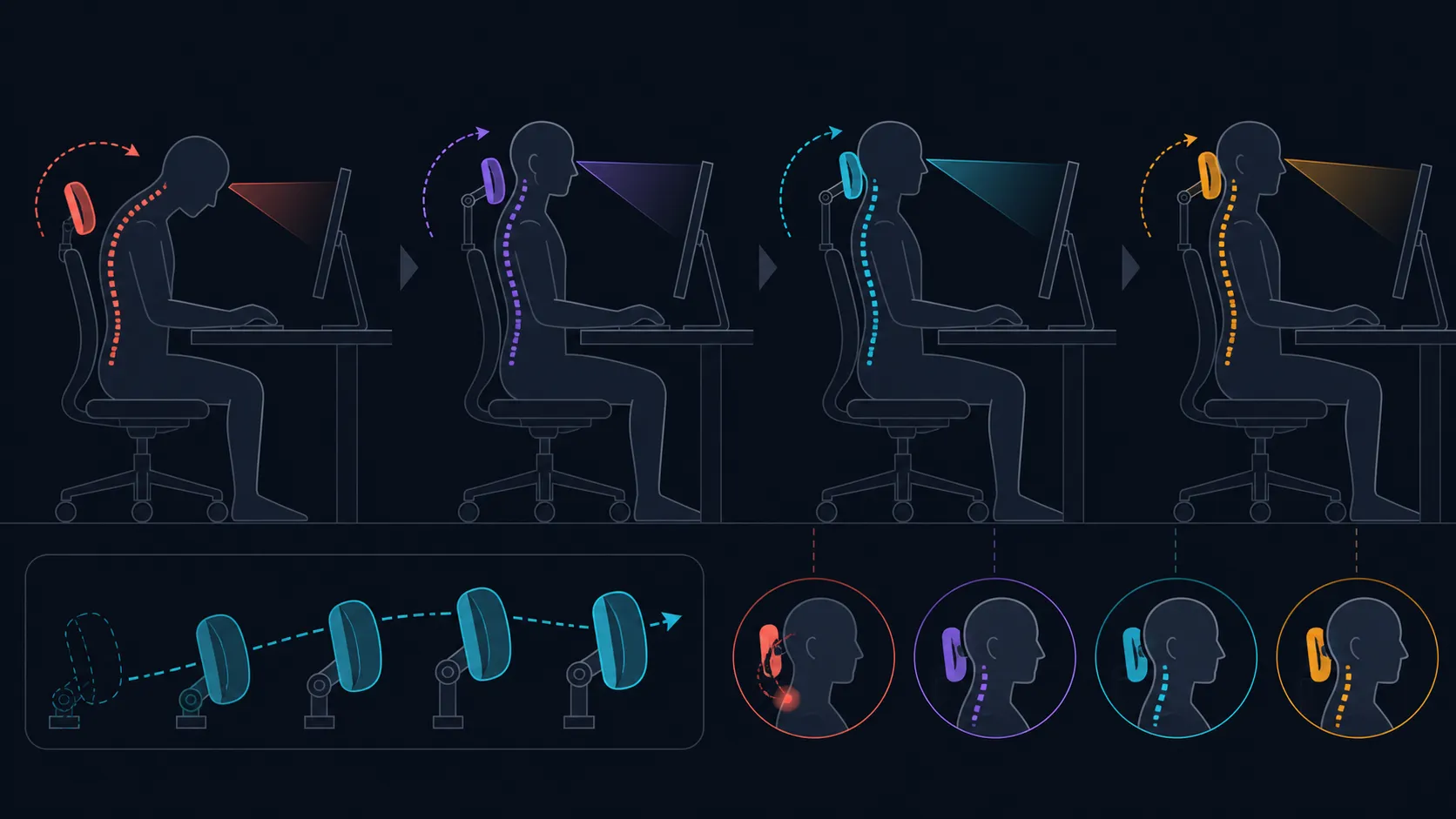
The E3 Air headrest setup has three measurable steps: 40mm of height, 70mm of depth and 70-degree rotation at both pad and stem.
Arrange the screen, desk distance and normal seated posture first, then explore the E3 Air's 40mm height, 70mm depth and dual 70-degree headrest rotations one at a time. Keep a position only if it remains useful during actual viewing and work.
Sit where the keyboard and mouse can be used without reaching, then set the display for the working view. Allow the head to rest naturally before bringing the support toward it. If the chin moves forward or the shoulders rise, the headrest position is changing the posture rather than simply supporting it.
Test with content that resembles the real day: a document, call window or reading page. Do not decide from a brief backward lean. The support should make sense when attention is on the screen and small natural movements occur.
Use Evetech's HBADA office-chair selection after writing down the viewing distance and main seated activity. That context is more useful than comparing adjustment labels alone.
The 4D headrest changes height and depth while its pad and stem each rotate. Change one available movement, repeat the same viewing task and note whether contact improves without disturbing the lower posture. Return to the previous state before trying another direction.
The E3 Air's lumbar area uses an 80-degree auto-wrap design across three zones. Establish that lower-back contact before refining the headrest, because a change below can alter where the upper body meets support.
Once the working position is stable, note a visible reference so it can be restored. This is particularly helpful when the chair is shared. Then, if useful, learn the recline controls and assess head contact at another back angle. The chair reaches 140 degrees, yet the endpoint does not describe locks or mechanism behaviour.
Place the 360-degree omni-motion mech-armrests last, around the already positioned inputs. Changing head and arm supports together makes the cause of a different posture difficult to identify.
Browse more office chairs from Evetech with the same screen-first sequence. A good 4D headrest setting is easy to recover, remains unobtrusive when not needed and supports the task without claiming a medical result.
Include a task where constant head contact is not wanted. An unobtrusive position can be more useful during active typing than a support that keeps pushing the user toward one point. A second regular user should create a separate screen and headrest baseline rather than copying the first arrangement. Different seated heights can change which movement proves helpful, even at the same desk.
Align height behind the head, adjust depth without pushing the chin forward, then split rotation between the two axes for the working gaze. Recheck at the 115-125-degree flow range if that posture is part of the day.
The correct position should remain gentle during both reading and screen-focused tasks.
Record separate upright and reclined references when both viewing postures form part of the normal workday.
Set the chair-to-desk distance, screen and normal seated posture first. Those choices define the viewing relationship the upper support must serve.
It has a 4D dual-axis headrest with 40mm height, 70mm depth and 70-degree rotation at both pad and stem.
Change one direction, return to the same screen task and observe the chin, shoulders and upper contact. Reset before exploring the next movement.
It preserves cause and effect. If the display, lumbar area and headrest all move, the user cannot identify which change improved or harmed the result.
No. An adjustable support can alter positioning, but it cannot diagnose or guarantee relief from symptoms. Persistent discomfort needs appropriate advice.
The chair uses three lumbar zones with an 80-degree auto-wrap design. Set that contact before making the final headrest decision.
The E3 Air reaches a maximum of 140 degrees. Check control operation and task suitability independently from the headrest setup.
Ready to make the headrest follow your screen position? Explore Evetech office chairs after defining your viewing baseline and a simple reset reference.
Set the chair-to-desk distance, screen and normal seated posture first. Those choices define the viewing relationship the upper support must serve.
It has a 4D dual-axis headrest with 40mm height, 70mm depth and 70-degree rotation at both pad and stem.
Change one direction, return to the same screen task and observe the chin, shoulders and upper contact. Reset before exploring the next movement.
It preserves cause and effect. If the display, lumbar area and headrest all move, the user cannot identify which change improved or harmed the result.
No. An adjustable support can alter positioning, but it cannot diagnose or guarantee relief from symptoms. Persistent discomfort needs appropriate advice.
The chair uses three lumbar zones with an 80-degree auto-wrap design. Set that contact before making the final headrest decision.
The E3 Air reaches a maximum of 140 degrees. Check control operation and task suitability independently from the headrest setup.
550W for RTX 5080 Super needs a full-build check, not a simple yes. Review GPU guidance, CPU draw, transient load, connectors, PSU quality, and upgrade plans before deciding.
Read more
8000Hz polling is overrated for most SA gamers because gains can be tiny next to battery drain and monitor limits. Mbombela players should weigh mouse feel, game support, and system stability before chasing the number.
Read more
Magnetic switches are taking over SA gaming keyboards because actuation can be tuned. For Sandton gamers, rapid trigger, reset control, and profile depth can help, but layout, key feel, and software quality still matter.
Read more
Polokwane oled monitor value questions need cautious SA context because pricing can move with availability, exchange rates, specs, and warranty support. Treat the trend as a planning signal, not a fixed price promise.
Read more
Arc B580 budget builds for Midrand gamers can shift with exchange rates, supply, specs, and model tier. Treat the title as a buying prompt, then compare SA warranty, timing, and build priorities.
Read more
ROG Ally X may beat the LCD Steam Deck for SA gamers who value stronger handheld performance, more memory, and Windows flexibility. Compare battery life, controls, game libraries, and Polokwane support needs before deciding.
Read more
Minisforum's M2 Pro pairs Core Ultra X7, Arc B390 graphics and 32GB onboard memory in 1.8 litres. SA buyers should weigh its fixed memory and $1,439 launch offer against local mini PCs.

Lenovo says Legion Go failures linked to BIOS N3CN42WW are not user error. Affected SA owners should stop retrying the update, preserve proof and open a support case.

Smart monitors can add apps and convenience, but they also add privacy settings and unwanted-software risk. SA buyers should audit the operating system before paying for extras.

A fake 113GB GTA VI ISO reportedly used empty padding around a small malware payload. SA gamers should delete unofficial builds, keep Windows security active and wait for official channels.

ASUS calls the ROG GT-BN98 the first Wi-Fi 8 gaming router. SA buyers should fix coverage and client limits before paying for a future wireless standard.

Apple's M6 Mac mini adds faster AI, graphics and networking in the same compact format. SA buyers should wait for a rand listing before comparing value.

The Vulcan II XP adds hot-swappable switches, sound damping and gaming controls to a full-size wired board. SA buyers should compare feel before features.

Microsoft says Windows on Arm now has over 7,000 verified apps and games. SA buyers should still check each driver, game and work tool before switching.

Xbox Insiders can test disc-to-digital from 31 August 2026. Supported Xbox One and Series X discs gain a digital entitlement, but older discs, regions and title coverage still need exact checks.

ViewSonic's XG2738 pairs QHD QD-OLED with 240Hz and automatic panel care. SA buyers should compare warranty, brightness, ports and burn-in protection against today's R9,999-plus OLED shelf.

NVIDIA's final Windows 10 Game Ready driver is due in October 2026. SA gamers can keep using their GPU, but new game optimisations move on while critical security fixes continue quarterly.

JBL's new Quantum 520, 520X and 120 headsets cover wireless, Xbox-certified and wired use. SA buyers should compare connection, comfort and microphone needs before paying for a new badge.