



550W PSU Planning for RTX 5080 Super Builds in SA
550W for RTX 5080 Super needs a full-build check, not a simple yes. Review GPU guidance, CPU draw, transient load, connectors, PSU quality, and upgrade plans before deciding.
Read moreUse a fightstick directional toggle by selecting the intended input function, then checking all directions in a menu. The GameSir C2 includes a multi-functional directional toggle alongside its Sanwa Denshi arcade controls at R1,799.

A toggle is useful only when the player knows what changed. With an arcade fightstick directional toggle, the practical method is to choose one intended function, observe all four directions and preserve that result long enough to evaluate it in play.
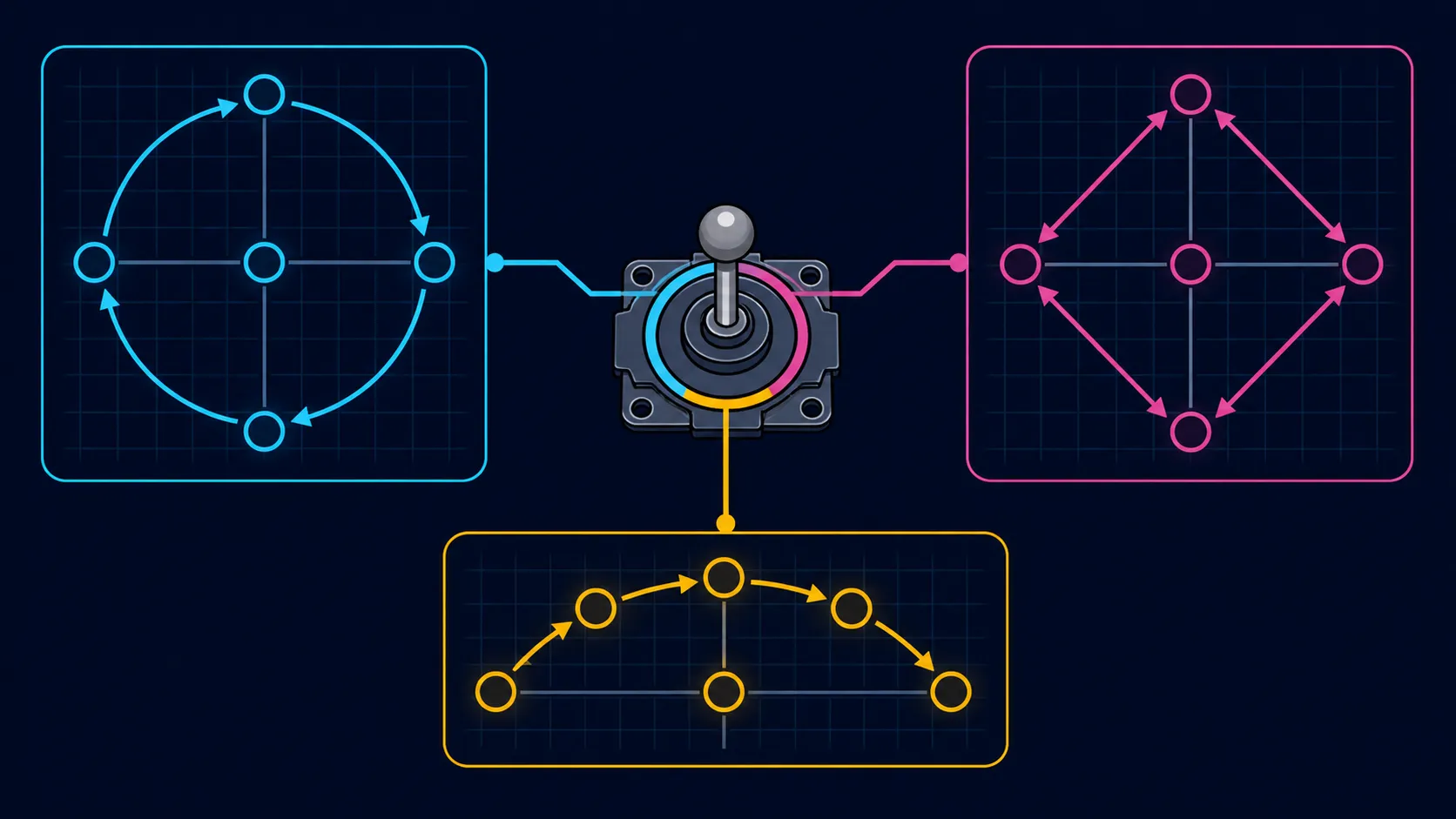
The C2's physical directional toggle changes how the lever's input is interpreted without requiring an in-game remap.
Use the GameSir C2 directional toggle by selecting the function you intend to test and checking up, down, left and right in a visible menu. The C2 includes a multi-functional toggle and is priced at R1,799. Its precise modes should come from the product instructions, not a generic fightstick assumption.
Begin with a plain question: what response should the game or platform show after the change? That expectation is more useful than cycling through positions without a test. Because the C2 supports six hosts across console, Switch and PC use, carry out the check on the system that will actually be used for the session.
Do not attach familiar labels to the toggle until those labels are confirmed for this model. Fightsticks can use directional selectors for different input functions, but names, positions and behaviour are not universal. Following the correct C2 instructions prevents a general mechanism from becoming a false product-specific rule.
Players comparing this kind of control with other formats can review Evetech's gaming controllers by layout and intended platform.
Choose a menu where each direction moves a cursor or highlights an item. Test up once, return to centre, then repeat for right, down and left. A consistent order makes a missed or reversed response easier to notice than random lever movement.
If one direction is unexpected, pause. Return the toggle to the last understood position and run the same sequence again. Changing a game mapping, platform option and hardware selector together destroys the evidence needed to identify which change mattered.
Once the menu check passes, move into practice mode and use a short movement pattern relevant to the chosen fighting game. The toggle can help organise different control approaches because it offers more than one directional function, yet it cannot promise cleaner execution. Familiarity, timing and the title's own input handling remain part of the result.
Keep the Sanwa Denshi arcade controls constant during this comparison. That isolates the directional selection instead of turning the exercise into a broad judgement about component feel, durability or speed, none of which is established merely by the maker name.
For a broader setup that includes storage, desk routing or replacement controller choices, the gaming-accessory category provides context without changing the directional test itself.
After a successful practice sequence, write down the platform, game and confirmed toggle position in your own setup note. That reference is especially helpful when the C2 moves between its supported systems. It also prevents a future troubleshooting session from beginning with an uncertain selector.
Recheck after transport or a platform change. The aim is not constant adjustment; it is a small verification that protects an already understood control scheme.
Use the switch between matches, then test all four directions in a menu or practice mode. Exact position names still belong to the model instructions, but the benefit is concrete: changing interpretation takes a moment at the controller instead of reopening a software settings screen.
Write down the chosen switch position so the working configuration can be restored quickly at the next session.
A system menu or fighting-game practice screen gives immediate visual feedback without risking a match. Pick an area where each directional response can be seen separately.
No exact mode labels or position map should be assumed. Use the GameSir C2 instructions, then confirm the chosen function through an input test.
Recentering separates one direction from the next and reduces ambiguous diagonal movement. It makes the four-part observation easier to repeat.
That depends on the player's method and the game's handling. Evaluate the selected function in the particular title rather than declaring a universal winner.
It does not expand the named compatibility list. The C2 already handles Switch and PC, both PS4 and PS5, plus Xbox One and Series X/S, regardless of which directional function is selected.
The fightstick example is R1,799. Consider the toggle together with the arcade layout and supported systems, not as an isolated reason to spend.
Ready to compare directional control choices? Explore Evetech's gaming-controller selection with your platform and preferred movement method already defined.
A system menu or fighting-game practice screen gives immediate visual feedback without risking a match. Pick an area where each directional response can be seen separately.
No exact mode labels or position map should be assumed. Use the GameSir C2 instructions, then confirm the chosen function through an input test.
Recentering separates one direction from the next and reduces ambiguous diagonal movement. It makes the four-part observation easier to repeat.
That depends on the player's method and the game's handling. Evaluate the selected function in the particular title rather than declaring a universal winner.
It does not expand the named compatibility list. The C2 already handles Switch and PC, both PS4 and PS5, plus Xbox One and Series X/S, regardless of which directional function is selected.
The fightstick example is R1,799. Consider the toggle together with the arcade layout and supported systems, not as an isolated reason to spend.
550W for RTX 5080 Super needs a full-build check, not a simple yes. Review GPU guidance, CPU draw, transient load, connectors, PSU quality, and upgrade plans before deciding.
Read more
8000Hz polling is overrated for most SA gamers because gains can be tiny next to battery drain and monitor limits. Mbombela players should weigh mouse feel, game support, and system stability before chasing the number.
Read more
Magnetic switches are taking over SA gaming keyboards because actuation can be tuned. For Sandton gamers, rapid trigger, reset control, and profile depth can help, but layout, key feel, and software quality still matter.
Read more
Polokwane oled monitor value questions need cautious SA context because pricing can move with availability, exchange rates, specs, and warranty support. Treat the trend as a planning signal, not a fixed price promise.
Read more
Arc B580 budget builds for Midrand gamers can shift with exchange rates, supply, specs, and model tier. Treat the title as a buying prompt, then compare SA warranty, timing, and build priorities.
Read more
ROG Ally X may beat the LCD Steam Deck for SA gamers who value stronger handheld performance, more memory, and Windows flexibility. Compare battery life, controls, game libraries, and Polokwane support needs before deciding.
Read more
Minisforum's M2 Pro pairs Core Ultra X7, Arc B390 graphics and 32GB onboard memory in 1.8 litres. SA buyers should weigh its fixed memory and $1,439 launch offer against local mini PCs.

Lenovo says Legion Go failures linked to BIOS N3CN42WW are not user error. Affected SA owners should stop retrying the update, preserve proof and open a support case.

Smart monitors can add apps and convenience, but they also add privacy settings and unwanted-software risk. SA buyers should audit the operating system before paying for extras.

A fake 113GB GTA VI ISO reportedly used empty padding around a small malware payload. SA gamers should delete unofficial builds, keep Windows security active and wait for official channels.

ASUS calls the ROG GT-BN98 the first Wi-Fi 8 gaming router. SA buyers should fix coverage and client limits before paying for a future wireless standard.

Apple's M6 Mac mini adds faster AI, graphics and networking in the same compact format. SA buyers should wait for a rand listing before comparing value.

The Vulcan II XP adds hot-swappable switches, sound damping and gaming controls to a full-size wired board. SA buyers should compare feel before features.

Microsoft says Windows on Arm now has over 7,000 verified apps and games. SA buyers should still check each driver, game and work tool before switching.

Xbox Insiders can test disc-to-digital from 31 August 2026. Supported Xbox One and Series X discs gain a digital entitlement, but older discs, regions and title coverage still need exact checks.

ViewSonic's XG2738 pairs QHD QD-OLED with 240Hz and automatic panel care. SA buyers should compare warranty, brightness, ports and burn-in protection against today's R9,999-plus OLED shelf.

NVIDIA's final Windows 10 Game Ready driver is due in October 2026. SA gamers can keep using their GPU, but new game optimisations move on while critical security fixes continue quarterly.

JBL's new Quantum 520, 520X and 120 headsets cover wireless, Xbox-certified and wired use. SA buyers should compare connection, comfort and microphone needs before paying for a new badge.