One graphics processor can be the cleanest answer for a modest screen group, while a larger visual surface may need several GPUs to act in concert. Choosing between single GPU and multi-GPU display synchronization starts with outputs, workload distribution and the boundaries across which motion must remain coordinated.
Quick Answer
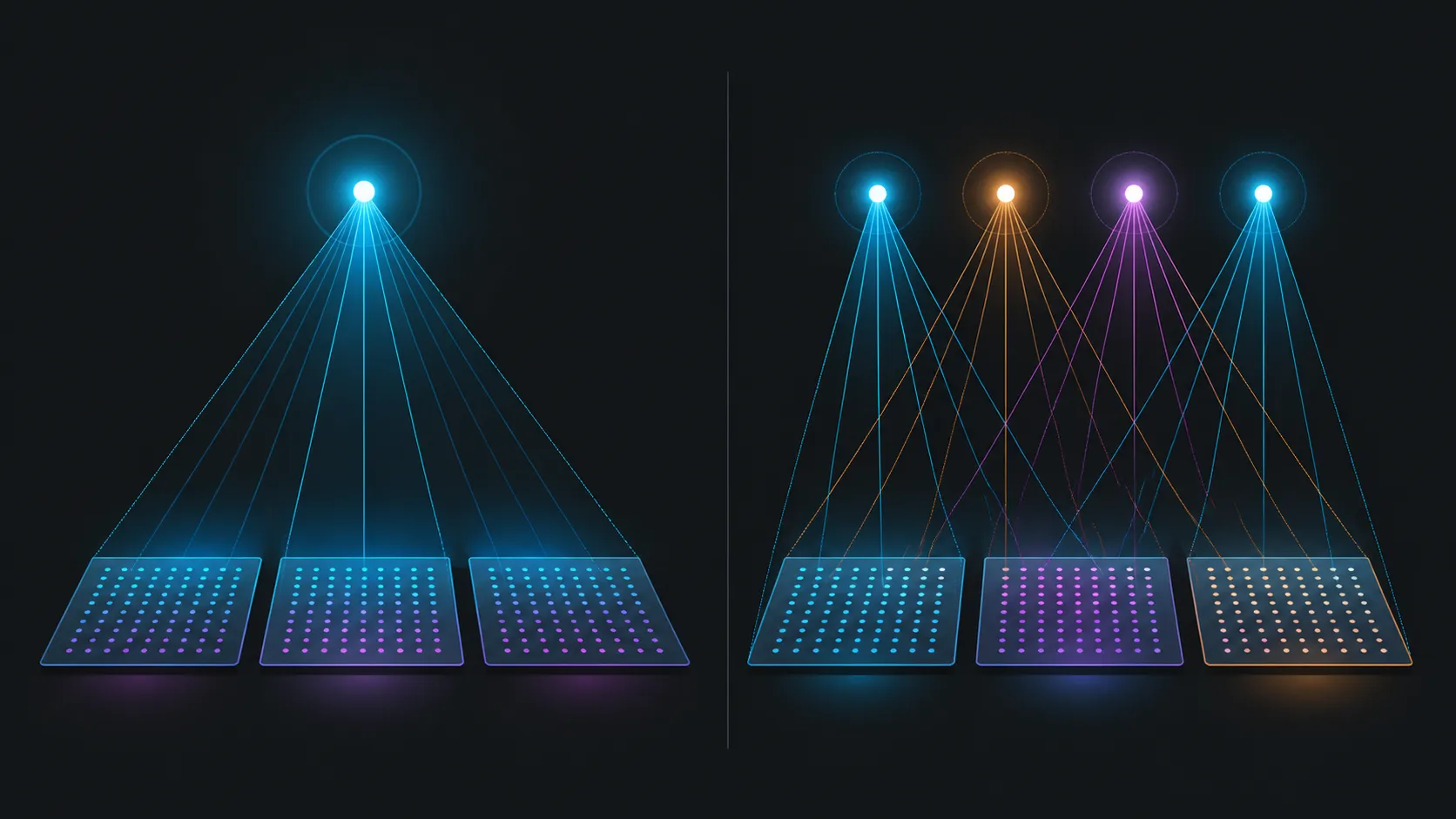
Use RTX PRO Sync when a display project must coordinate outputs across multiple professional NVIDIA GPUs; its architecture scales to eight GPUs and two sync cards.
Keep the project on one GPU when that processor can own the workload and every required output. If the design genuinely has to span graphics processors, PNY RTX Pro Sync coordinates a maximum of eight NVIDIA RTX Pro GPUs and 32 synchronised displays for R19,599. Its available tools are Genlock, Frame Lock and Mosaic.
📐 Size the smaller option honestly
A single-GPU layout has fewer graphics boundaries to manage. That can make it appropriate for a compact workstation or a limited display group, provided the processor can handle the intended application and outputs. Do not add synchronization hardware merely to make the parts list look professional.
Create an output table with one row per panel. Assign every row to the proposed GPU and check the intended content workload. Evetech's workstation graphics card selection is useful once that table defines what the processor must do.
🔗 Know when several GPUs change the problem
A multi-GPU plan introduces boundaries between graphics processors. When frames must remain coordinated across those boundaries, Frame Lock becomes relevant. Genlock covers alignment to a timing reference, while NVIDIA Mosaic supports the arranged display canvas.
The PNY NVIDIA RTX Pro Sync card combines those functions for R19,599. Its architecture may contain as many as eight RTX Pro GPUs, but the right count is the smallest one that satisfies the validated workload and output plan.
🖥️ Check screens against both designs
The card's upper display boundary is 32 synchronised screens. That does not mean every multi-GPU installation should approach 32, or that a single GPU can be assigned an arbitrary share. Let the output map drive the arrangement and compare panels through Evetech's monitor category.
Test the one-GPU and multi-GPU proposals with the same representative content. Observe motion across display edges, application behaviour and the transitions that matter to the user. A direct comparison is more useful than assuming the larger architecture will automatically feel better.
💰 Compare total designs, not one part
R19,599 is the sync-card line in a multi-GPU budget. The processors, monitors and installation requirements remain separate. If the single-GPU design meets every acceptance condition, it avoids a component whose capabilities would not be used.
If multiple processors are necessary, add the synchronization card deliberately and then review graphics card accessories around the approved architecture. This preserves a clear reason for every cost.
Compare operational complexity
The parts total is not the only difference between the two designs. A multi-GPU system needs a clear ownership map, boundary tests and a baseline that can be restored after maintenance. A one-GPU plan may have fewer coordination relationships, although it must still pass the same application and display tests.
Ask the team that will operate the installation to review both proposals. If the larger design adds recovery steps or specialist dependencies, write those into the decision alongside its extra capacity. The winning architecture should meet the visual brief and remain understandable to the people responsible for it.
That multi-GPU system can operate up to 32 displays or projectors through Mosaic. A smaller installation that fits one processor may avoid the added synchronisation layer, while an immersive wall can distribute graphics work across the larger allowance. The included 12-inch and 24-inch cables support internal card-to-card planning, and Windows 10, Windows 11 and Linux are all supported platforms.
Frequently Asked Questions
When does multi-GPU synchronization become relevant?
It becomes relevant when one coordinated visual system is distributed across graphics processors and frames or timing must remain aligned between them.
Must an RTX Pro Sync system use eight GPUs?
No. Eight is the supported maximum, not a required quantity. A smaller design can use fewer participating RTX Pro GPUs.
How many displays can the card serve?
The ceiling is 32 synchronised displays, subject to the system also remaining within the eight-GPU limit.
What should the value comparison include?
Compare the complete one-GPU and multi-GPU designs, including the R19,599 synchronization component only where its functions are necessary.
How can the team compare both architectures fairly?
Give each proposal the same display map, application workload, content sequence and pass conditions. Record the number of processors, the boundaries under observation and the operating steps needed to restore a working state. This reveals whether the multi-GPU design earns its additional complexity through a requirement the single processor cannot meet.
Ready to choose the leaner display architecture?
Compare Evetech's professional GPUs, screens and supporting parts against the same output map before committing to one or several processors.