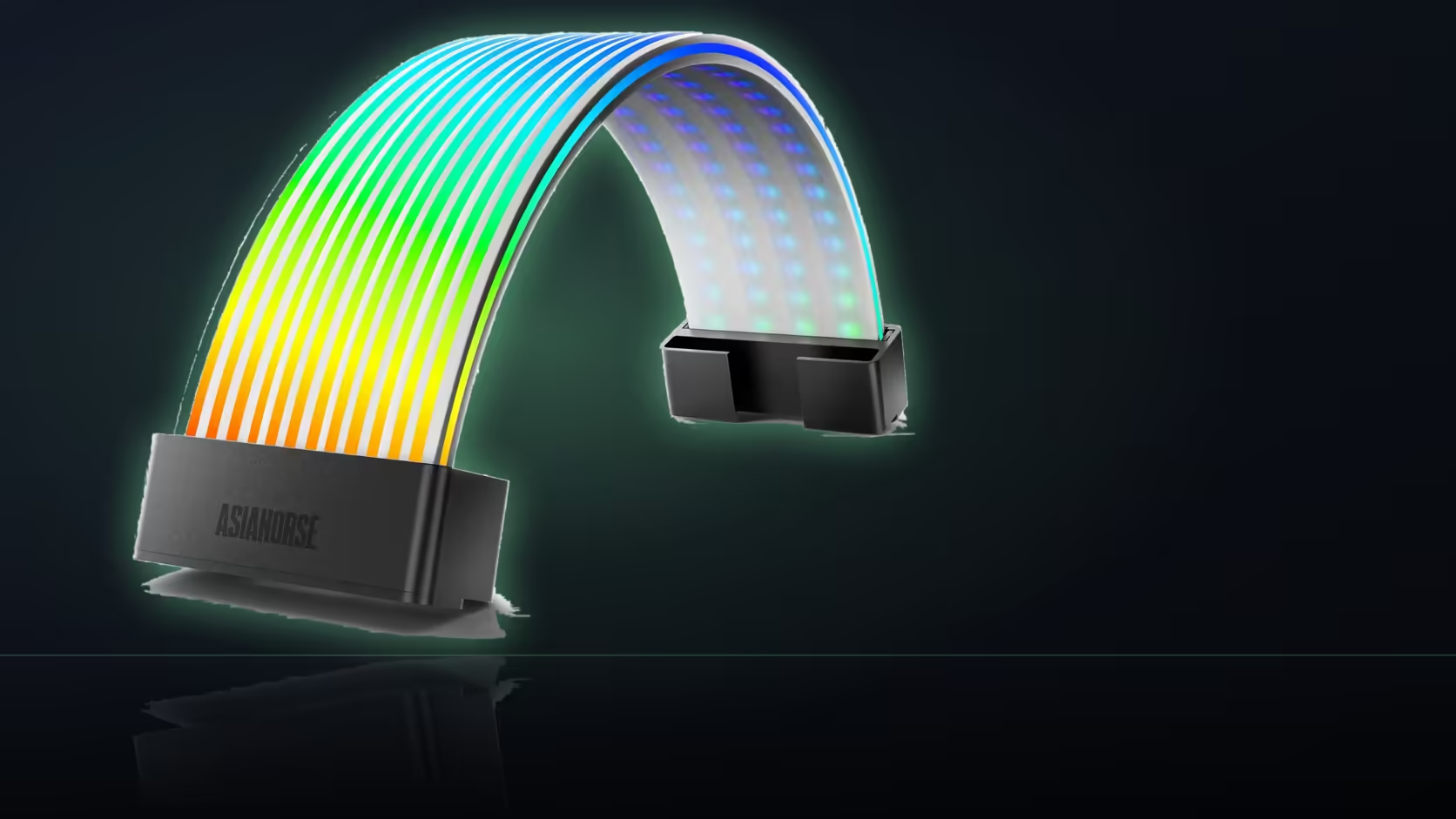
A build that already has drives, fans and a cooler wired in can quietly run out of SATA connectors long before you notice, and that is exactly the moment an Aurora Learn ARGB PSU Cable Cover shows up needing one more. Working through what to do when every lead looks taken is worth doing before you assume the install is blocked.
Quick Answer
The Aurora Learn controller needs SATA power to run its 108 LEDs, so a build with every SATA connector already in use has a problem to solve before the cover can be fitted, though the fix is usually simpler than it first appears. Most power supplies provide several connectors along each SATA lead, not just one, so what looks like a fully committed cable often still has a spare position. Checking what is genuinely free, rather than what is currently plugged in, is the right first step.
🔎 Why the controller needs its own power
The Learn controller is driving 108 addressable LEDs at 60 FPS through a supplied remote and a library of 124 or more presets, which is a heavier job than a simple board header connection is typically asked to carry in a lighter design. SATA power gives it a dedicated, steady feed independent of anything happening on the motherboard side of the build.
🔌 Finding a connector you did not know you had
Count the positions on each lead
A single SATA cable from your power supply commonly carries three or four connectors spaced along its length. A lead that looks fully used at a glance may still have a spare connector further down, simply hidden behind the drives already plugged into the earlier positions.
Check the accessory box for a spare lead
On a modular supply, an unused SATA lead is often still sitting in the box of cables that shipped with it. Adding that lead is usually the simplest fix when every currently connected cable really is full.
Share a lead with an existing drive
Connectors on the same SATA lead are independent positions, so a spare connector sitting beside a drive's own connection is perfectly usable for the controller without disturbing that drive's setup.
⚡ What the controller is actually asking for
Addressable lighting draws relatively little compared with a hard drive or SSD, so the real concern here is having a physical connector available rather than worrying about the supply's overall capacity. If your supply genuinely has none free anywhere along any lead, that points to needing an additional SATA cable rather than a capacity upgrade.
🔀 Does switching to board sync solve this instead?
Moving the cover to 5V 3-pin motherboard sync changes where the lighting instructions come from, but the controller itself still sits in the circuit and still needs its own power connection. Sync is not a way around the SATA requirement, only a different route for control, so a build genuinely out of SATA capacity still needs that resolved regardless of which control mode ends up chosen.
🧰 Planning the install alongside the rest of your case lighting
Before committing to a SATA lead for the controller, it is worth glancing at what else draws power in the same area, particularly if a case lighting purchase is also going in around the same time. A build going through a full lighting refresh often finds it easier to map every connector, both SATA and addressable, in one pass rather than discovering a shortage part-way through fitting each part in turn. That single check at the planning stage is usually quicker than working backward from a cover that will not light once everything else is already installed.
Frequently Asked Questions
Why does the controller specifically need SATA power?
It powers the 108 LEDs inside the cover, which is a heavier job than a board header arrangement is typically designed to carry in this setup.
How many connectors does a typical SATA lead carry?
Commonly three or four spaced along its length, so a lead that looks fully used may still have a spare connector further along it.
What if every visible connector really is full?
A modular supply may have an additional SATA lead sitting unused in its accessory box, which is usually the simplest available fix.
Can the controller share a lead with a connected drive?
Yes, connectors along the same SATA lead are independent, so a spare position beside a drive connection is fine to use.
Does the controller draw much power?
Addressable lighting is a light load next to a drive, so the real question is connector availability rather than the supply's overall capacity.
Is board sync a way to avoid the SATA requirement?
No. Sync changes where control comes from, but the controller still sits in the path and still needs its own power connection.
Should this be checked before ordering the cover?
It is worth confirming beforehand, since a build with genuinely no free SATA position needs that resolved before the cover can light up.
Should SATA capacity be checked alongside other lighting purchases?
Yes, particularly if additional lit parts are going into the build at the same time, since mapping every connector in one pass avoids discovering a shortage partway through the install.
Not sure if your supply has a spare SATA connector?
Check Evetech's power supply range for options with extra SATA leads before your Aurora Learn install.