


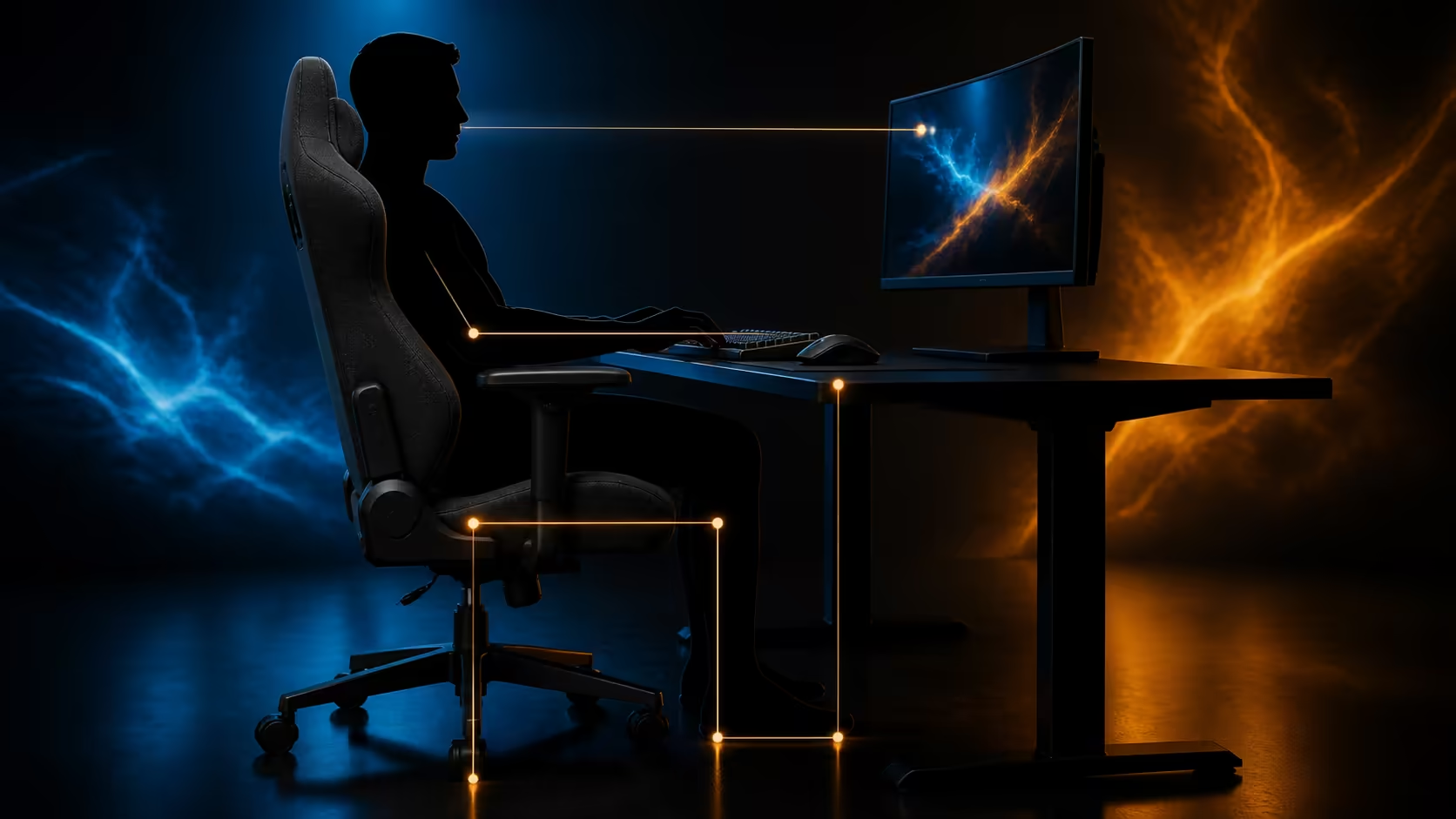
A fabric gaming chair setup succeeds when feet, seat, pillows, armrests and desk are adjusted in that order. Soft upholstery may feel welcoming immediately, but lasting work and gaming comfort comes from matching the chair to the user's body and input positions, then verifying the chain during real use.
Quick Answer
Start with stable feet and a seat height that places the knees comfortably, then position the two supportive pillows and tune the 3D armrests around the keyboard, mouse or controller. The black Arozzi Torretta Super Soft Upholstery Fabric Gaming Chair costs R4,299 and adds breathable fluid-repellent fabric to an adjustable-height ergonomic office-chair design. Recheck every setting after a full work or gaming block.
🪑 Build the foundation from the floor
Place the chair on its normal floor surface and sit fully against the backrest. Adjust height until both feet are planted, or use an appropriate footrest when desk height requires the seat to rise. Keep comfortable clearance behind the knees and distribute pressure across the thighs rather than perching on the front edge.
Measure the desk opening before rolling closer. The seat should approach the inputs without the thighs touching a drawer or frame. Compare current dimensions and designs through the gaming chair collection.
🦴 Place the pillows after seat height
Use the lower pillow to meet the inward curve of the lower back without pushing the pelvis forward. The upper pillow should support a relaxed head or neck position only when it matches the user's torso length and chosen backrest posture. Move or remove either pillow if it creates a pressure point.
Make one change at a time and sit for at least 15 minutes before deciding. A pillow that seems comfortable during a brief lean can become intrusive during focused keyboard work.
🎯 Align the 3D armrests with each input
Set armrest height so the shoulders drop naturally. Use depth travel to support the forearms without blocking desk access, then pivot the pads towards the keyboard or outwards for a controller posture. The Torretta's 3D design should be evaluated by where the pads actually meet the user, not by the adjustment label alone.
Mouse users need enough freedom for elbow movement. If a pad catches the forearm during a large sweep, move it backwards or reduce contact on that side. Keep wrists free of hard pad edges.
🌡️ Manage fabric comfort and room heat
Breathable fabric can help air and moisture move at the body-chair interface, but clothing, room temperature and posture still matter. Use ordinary workwear during the setup test and stand regularly. Avoid covering the seat with a non-breathable layer that changes pressure and airflow.
The Torretta's fluid-repellent upholstery gives time to respond to a small spill; it does not remove the need for prompt blotting and suitable cleaning. Keep drinks away from seams and controls where practical.
🔁 Save work and gaming profiles
Write down seat height, pillow placement and armrest positions for desk work. Create a second profile for controller use only if the elbows or torso genuinely move. A shared chair needs separate settings for every regular user.
At R4,299, compare the complete Torretta package with gaming chairs above R4,000, considering fit before colour or matching accessories. The Arozzi setup range can support room coordination after the chair passes its posture test.
Revisit the setup after one week. Tighten accessible fasteners according to the instructions, inspect upholstery contact areas and confirm that the chosen positions still support relaxed shoulders and steady lumbar contact.
🖥️ Bring the monitor into the same posture
Once the chair is stable, move the monitor rather than leaning the body towards it. Position the main viewing area so the head remains balanced over the torso and text can be read without craning. A laptop used by itself may sit too low, so a suitable stand plus separate keyboard and mouse can preserve the chair posture.
Check reach to the keyboard's far keys and the mouse's full movement area. If the shoulder leaves the backrest repeatedly, move the input closer before changing the lumbar pillow. Route cables beyond the wheel path and leave enough slack for the chair to roll during entry and exit.
🧑🧑🧒 Configure a shared chair deliberately
Mark the height reference and note both pillow attachment positions for each regular user. Armrest depth and pivot often change more than expected between a close typing posture and a wider gaming stance, so photograph the final settings without capturing private room details.
Do not average two users' measurements into one uncomfortable compromise. The shorter person still needs stable feet, while the taller person needs adequate thigh support and desk clearance. Reset the chair fully at every handover until both profiles become familiar.
⏰ Add movement to the setup plan
Even a well-adjusted chair is not a reason to remain still all day. Schedule short standing or walking breaks, change focus distance for the eyes and return to the saved neutral posture. Small posture variation is useful, but repeated forward collapse signals that the desk, screen or task position needs correction.
At the end of a long session, note which region tired first. One observation per day is more useful than changing every control at once. Adjust only the earliest problem, then repeat the same type of session before deciding whether the revision worked.
Frequently Asked Questions
Which chair adjustment comes first?
Set height and foot support first because pillow and armrest positions depend on the resulting seated posture.
Should both pillows always remain fitted?
No. Each pillow should stay only when it creates broad, comfortable support for that user's proportions.
How should the mouse-side armrest be positioned?
Support the forearm lightly while preserving free elbow travel and keeping the pad away from the wrist.
Does fluid-repellent fabric need cleaning?
Yes. Blot spills promptly and use a gentle method suitable for the upholstery.
Does the Torretta include movable support pillows?
Yes. The black R4,299 Torretta includes two supportive pillows that should be tested independently.
How often should a saved setup be reviewed?
Review it after the first week and whenever the desk, monitor, inputs, floor or regular user changes.
Can chair adjustment replace standing breaks?
No. Use the chair to support seated tasks and still leave the desk regularly for movement.
Ready to turn one fabric chair into two repeatable comfort profiles? Establish the seated foundation, tune each pillow and arm pad, then compare current Evetech chair options around the desk you actually use.











