An MMO asks you to keep a dozen abilities within reach while you move, target and watch cooldowns. A spreadsheet asks something similar with copy, paste, undo and a handful of formulas. The AULA SC620 Contour can serve both through its programmable mouse buttons, including a dedicated Fire key, and this build guide shows how to split them sensibly between a raid night and a working day.
Quick Answer
Use AULA's Windows driver to remap the SC620 Contour's programmable buttons and record macros, then put your most-used skill or shortcut on the Fire key. The driver also sets DPI, polling rate, sleep time and lighting. Setup happens with the dongle or USB lead attached, since the software cannot reach the mouse over Bluetooth. Evetech's price on the SC620 Contour is R349.
🗡️ Planning the layout for an MMO
Start with what you press most
Before opening the driver, play a session and note which abilities you use every fight, not just the flashy ones. A heal, a mobility skill, an interrupt and a defensive cooldown usually top the list. Those belong on buttons your thumb reaches without shifting grip.
Where the Fire key fits
The Fire button is built to run one mapped command per press. In an MMO that makes it a natural home for the single ability you spam most, or for a short macro that chains two inputs. AULA's examples are a burst of clicks or an app shortcut, and the principle carries over: one press, one job.
About full rotations
The driver records macros, so it is technically possible to save a sequence. Whether you should is a different question. Many online games have rules about automated inputs, and those rules differ from title to title. Read your game's terms before mapping anything longer than a single action, and keep rotations in your own hands if in doubt.
🧮 A work layout that saves real time
Office bindings pay off because you use them hundreds of times a day. Good candidates:
- Undo and redo on the side buttons, so fixing a mistake never needs the keyboard.
- Copy and paste for moving data between sheets or documents.
- A screenshot tool on the Fire key for reports and support tickets.
- Switch windows for jumping between email and the spreadsheet you are building.
Keep the layout predictable. If the forward button is paste at work, avoid making it a combat skill at night unless you enjoy surprises. Many people keep navigation on the side buttons and treat the Fire key as the one that changes role.
🎚️ DPI levels as a second layer
Remapping handles what each button does. DPI decides how the cursor behaves while you do it. The SC620 Contour's PAW3311 sensor has six levels: 800, 1600, 3200, 4800, 8000 and 12,000.
For an MMO, a middle setting such as 1600 or 3200 is comfortable for clicking targets and dragging the camera. For spreadsheets on a large or high-resolution monitor, a higher step moves the pointer across wide sheets with less arm travel. Setting two favourite steps you can switch between is often more useful than hunting for one perfect number.
Polling runs at 1000Hz, set in the same driver, which is plenty for both jobs.
🔌 Getting the setup right, then choosing a colour
Plug in before you configure
AULA says the software needs a dongle or lead connection on Windows; a Bluetooth 5.3 pairing will not show up. If the software shows no device, the mouse is almost certainly on Bluetooth. Connect the receiver or the cable, finish your mapping, and only then pair it with another device if you need to.
What about a Mac?
The SC620 Contour itself, as Evetech lists it, works with Windows, macOS, Linux and Android. AULA describes its driver for Windows, though, so plan to do your button setup on a Windows PC and check AULA's notes before relying on custom mappings anywhere else.
Lighting and sleep time
While you are in the driver, set a sleep time and a lighting level that suit your day. The mouse runs on a 400mAh battery, and a shorter sleep timer with dimmer RGB are the settings you control that affect how often you reach for the cable.
Black or white
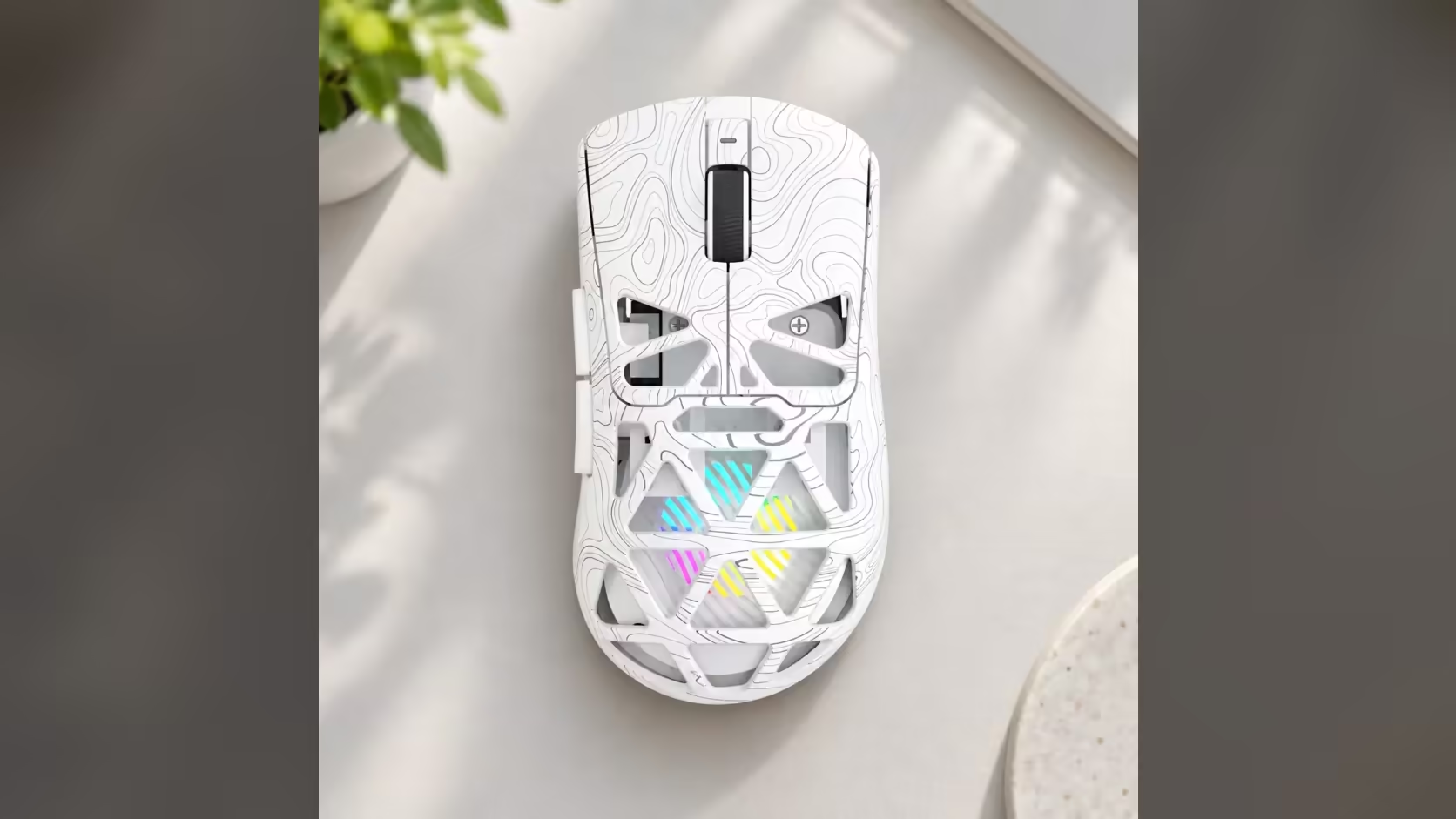
Evetech carries both colourways, black and white, with the same honeycomb shell, 67g weight and feature set. To compare the SC620 Contour with other mice built for extra bindings, browse the gaming mice category, or filter to cable-free designs on the wireless mouse page. Each colour is sold with a 1 Year Local Warranty.
Frequently Asked Questions
During a raid, which buttons should hold skills?
Put your most frequent ability on the Fire key and the next most important ones on the side buttons your thumb reaches easily.
Can one press run a whole rotation?
The driver can record a macro, but many games restrict automated inputs. Check your game's rules before mapping more than a single action.
What shortcuts help most in spreadsheets?
Undo, copy, paste and a window switch cover most of a working day. A screenshot tool on the Fire key suits reporting work.
Can the driver run on macOS?
AULA describes the driver for Windows. The mouse works with macOS, but plan your button setup on a Windows PC.
Why does the driver say no device is connected?
The mouse is probably on Bluetooth. Plug in the 2.4GHz receiver or the cable and reopen the driver.
Is one DPI setting enough for both gaming and work?
Usually not. Keep a middle step for games and a higher step for wide screens, then switch as needed.
Need a mouse that works as hard at your desk as it does in a raid?
Look through Evetech's gaming mouse range for programmable options, including the SC620 Contour in black and white.