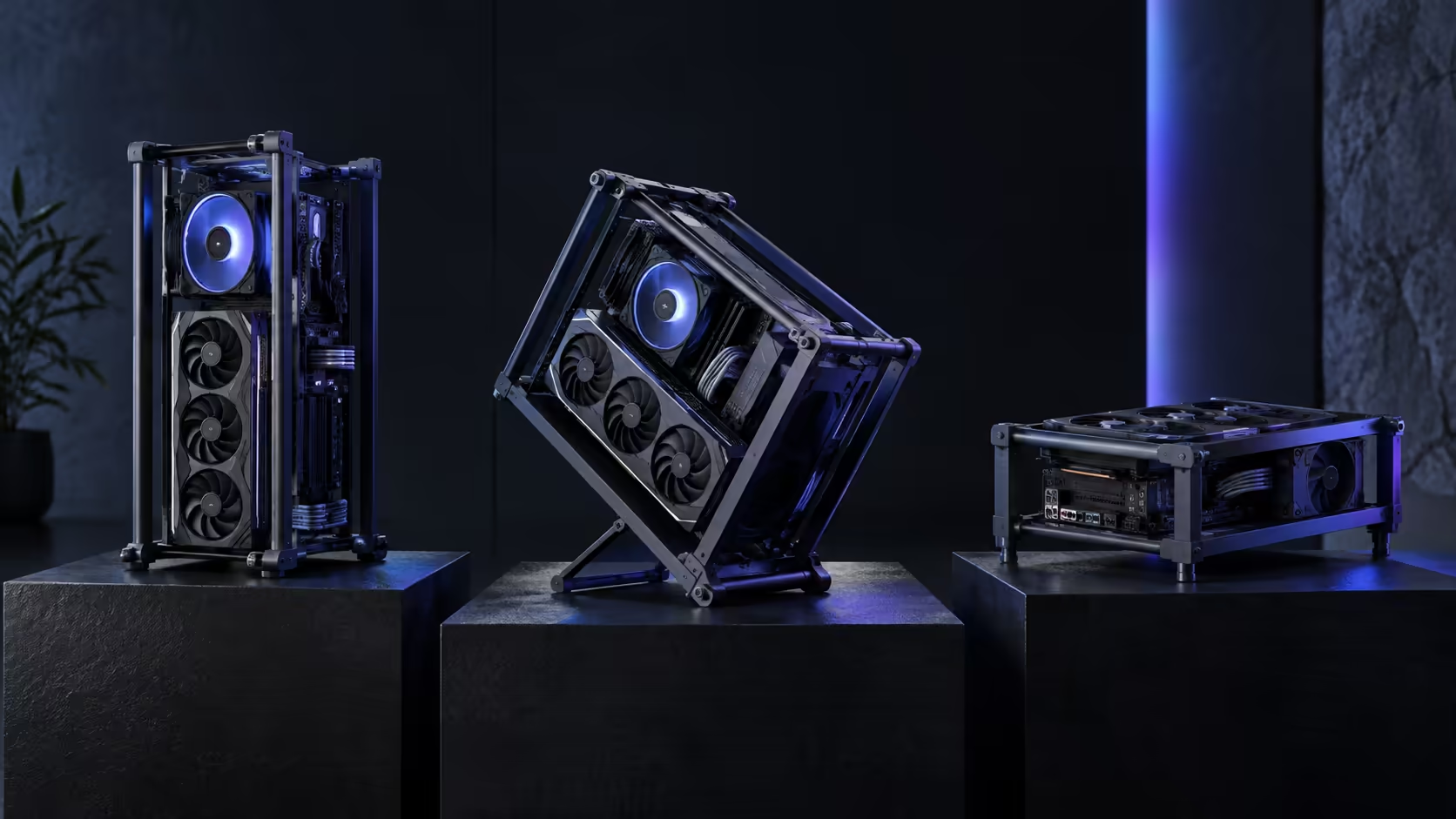
A courier box for an EATX open frame arrives about the size of a bar fridge, and the floor is the last place that box should be opened. Lift it straight onto the desk or the spot it will live in, because an open-frame PC case is heaviest and most awkward in the ten minutes between unboxing and its first screw going in. The ROG GR20 Edition 20 gives you three legal stances from that point on, and which one you pick first saves you from redoing cable work later.
Quick Answer
Vertical suits a normal desk footprint and keeps cables running the way a tower always has. Angled turns the frame into a display piece and needs a stand or a wall behind it for stability. Horizontal drops the centre of gravity to almost nothing, which matters most with a heavy card or a household with small hands nearby. The R15,999 GR20 Edition 20 supports all three from the same frame.
📐 Vertical: the setup that needs the least new thinking
Vertical is the stance to default to if you are converting cable habits from a normal tower rather than starting fresh. Cables still run down from the board to the power supply at the base, the radiator still sits above the CPU block, and the desk footprint stays close to what a tower would take.
The measurement that matters here is depth behind the machine, not width. A radiator mounted in the roof needs clear air above it to exhaust into, so do not push the frame flush against a shelf or a low ceiling recess. Leave at least 100mm of open space over the top fans and the exhaust does its job properly instead of recirculating warm air straight back into the intake.
Vertical is also the stance that makes an EATX board's extra width least noticeable, because you are looking at the frame edge-on rather than face-on. If board size was the deciding factor in buying this chassis over a smaller one, vertical hides that decision rather than showing it off.
🎨 Angled: the stance you build for looking at, not just using
Angled is a deliberate choice, and it changes what "stable" means. On a desk, an angled frame wants either a dedicated stand at the correct rake or something solid behind it to lean against, because an unsupported lean under the weight of a full build and a 360mm radiator is not something to improvise with tape.
This is the stance where a proper gaming desk earns its keep rather than a repurposed dining table. A desk built for the load distributes weight evenly and gives you a surface rated for something heavier than a laptop and a mug. Pair it with a desk mat sized to run under both the machine and your keyboard, and dropped screws or a spilled drink during the build stay off the desk finish rather than soaking into it.
Cable length becomes the practical catch. An angled frame sits the power supply and the rear I/O at a rake rather than straight down, so a cable set measured for a vertical tower can come up short by exactly the amount of the tilt. Measure with the frame already at its final angle, not lying flat on the bench.
🛏️ Horizontal: the stance for a heavy card and a busy household
Horizontal is the stance to choose when either the graphics card or the people around the desk make vertical a risk.
On the hardware side, a card approaching the frame's 368mm clearance carries real weight, and lying the frame flat means that weight rests on the slot the way the engineers intended rather than hanging off it. There is no better fix for card sag than removing gravity's angle on the problem, and horizontal does that for free.
On the household side, this is the stance to pick if a toddler, a curious pet, or simply a busy room means the machine needs to sit low and solid rather than perched and reachable. A flat frame at the back of a desk or on a low shelf has nothing for small hands to tip and nothing exposed at grabbing height the way an angled or vertical build does. It is also the stance least likely to be knocked during a chair being pushed back, which matters more in a shared room than a dedicated office.
The trade is desk area. Horizontal takes up more surface footprint than either other stance, so measure your actual desk before committing, not the desk you plan to buy eventually.
🔧 Deciding before the build, not during it
Pick the stance before the motherboard goes in, because a filled frame with a routed 360mm radiator is not something you want to tip onto its side to test a different angle. Dry-fit the board and the radiator in the stance you intend to keep, check the cable runs at that angle, and only then commit to final screws.
If you are still comparing chassis rather than committed to this one, the wider case range is the place to check which frames actually offer more than one stance, because most cases at any price only support one.
Frequently Asked Questions
Which stance is easiest for a first-time open-frame build?
Vertical, because cable routing and radiator placement follow the same logic as a normal tower. Save angled and horizontal for once you have built inside an open frame at least once.
Does an angled frame need a wall behind it?
Not strictly, but a dedicated stand or something solid to lean against removes the risk of the frame creeping forward under vibration over months of use.
Is horizontal the safest stance around children or pets?
It is the lowest and least reachable of the three, with nothing exposed at grabbing height, which makes it the sensible default in a shared household room.
Can I change stance after the build is finished?
Yes, but treat it as a mini rebuild. Recheck radiator tube routing and cable slack at the new angle before you tip the frame, not after.
Does the stance affect which motherboard sizes fit?
No. All three stances use the same mounting plate, so board compatibility does not change with orientation, only the visual and practical trade-offs do.
Ready to pick a stance and build without redoing your cables twice?
Dry-fit the board and radiator in your chosen orientation first, then commit to final screws.