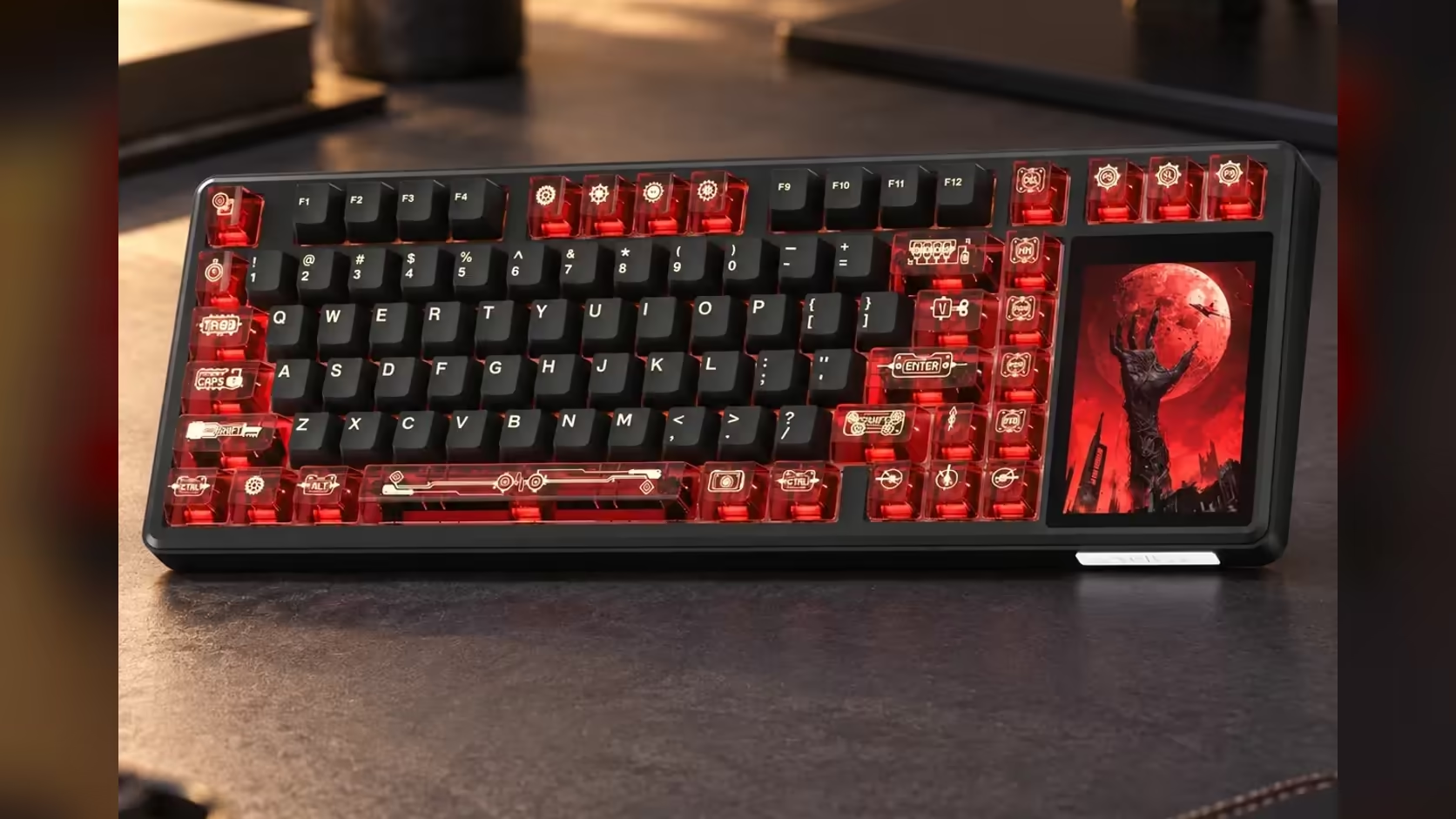
Every 75% board makes the same trade: you win back desk width for your mouse arm and lose the block of digits on the right. The AULA L99 softens that trade with a touchscreen numpad mode on its built-in 3.98-inch panel. Tap into it and the glass beside your arrow keys becomes a grid of numbers, so invoice totals, spreadsheet columns and long reference codes stop being a trip along the top row.
Quick Answer
Switch the L99's panel to its numpad mode and the 320 x 480 touchscreen on the right of the board shows a tappable number grid. It restores the digits a 75% layout leaves out without adding a separate keypad to the desk. The panel also carries a calculator, lighting controls and settings, and the board comes with a 1 Year Local Warranty from Evetech, where it costs R1,099.
🔢 Why compact boards shed the numbers
A full-size keyboard spends roughly a fifth of its width on the number block. Drop it and the mouse can sit closer to your shoulder line, which is why so many gamers and small-desk users move to 75% and tenkeyless layouts. The catch shows up the moment you type a column of figures: the top-row digits are fine for the odd number, but slow for anything in bulk.
Most people solve that with a USB keypad that lives in a drawer until it is needed. The L99 builds the answer into the board instead. Its screen sits in a dedicated display area on the right, and the numpad is one of the modes that area can run. The result is a keyboard 390.5mm across, wider than a plain 75% board but still narrower than a full-size one with a physical number block.
🧮 Setting up the number grid for real work
Bring the panel into numpad mode from the touchscreen itself, the same way you reach its lighting and settings menus. Before you commit a whole afternoon of figures to it, spend two minutes entering a test column into a blank sheet to get used to the spacing.
Get the angle right
A touch grid is easier to hit when you can see it without craning. The L99 has two-stage adjustable feet, so try the steeper setting if your eyes sit well above the desk. Pull the board slightly left on the desk so your right hand reaches the panel with the wrist straight.
Type with your eyes, not your fingers
Glass has no key edges to find by feel, which is the honest difference between this and a mechanical keypad. Expect to glance at the grid as you enter figures. For a short run of numbers that is no problem; for hours of data entry, a physical keypad will still be quicker because touch typists rely on the raised dot and key travel.
Keep the rest of the panel in reach
The same display carries the calculator, the lighting menu and the settings. If a job needs a quick sum rather than raw digits, the calculator mode saves a copy-and-paste step. When you are done with numbers, the panel returns to lighting or your own GIF or JPG files.
⚡ Wireless habits that keep the grid alive
The L99 runs on an 8000mAh battery over 2.4GHz and Bluetooth, and a lit touchscreen draws power on top of the per-key RGB. AULA does not rate the board in hours, so the useful habit is reading the battery level, which the screen shows, before a long session of spreadsheet work.
If you are working at a desk with the PC right there, the USB-C cable removes the question completely. Wired and 2.4GHz both poll at 1000Hz, and Bluetooth pairs with up to three devices, so the same board can handle a laptop for work and a desktop for play. Windows and Mac modes are both built in.
✅ Who the touch numpad suits best
It fits the person who types numbers some of the time: a student entering marks, someone who pays accounts online once a week, a streamer adjusting values in a settings screen. It suits gaming desks especially, where a full-size board would push the mouse too far out.
Heavy data-entry roles are a different case. If digits are most of your day, compare the L99 with full-size boards in Evetech's gaming keyboard category before deciding, and check which layouts are moving fastest on the keyboard best sellers page.
Frequently Asked Questions
What does a 75% layout remove besides the numpad?
It compresses the navigation cluster and trims space between key groups, keeping the function row and arrow keys in a shorter body.
Is tapping numbers on the panel as fast as pressing keys?
For short entries it is close, but glass gives no tactile feedback, so long runs of figures are slower than on a physical keypad.
Can the panel go back to the lighting menu afterwards?
Yes. The numpad is one mode among several, alongside lighting, settings, a calculator, mouse simulation and custom animations.
Should spreadsheet-heavy users still buy a separate keypad?
If numbers fill most of the working day, a mechanical keypad is worth keeping. For occasional totals, the L99's grid covers the job.
Where exactly does the number grid appear?
On the touchscreen at the right-hand end of the board, in the display area beside the 75% key block.
How do I know when to recharge before a long session?
Check the battery level on the touchscreen, and plug in the USB-C cable if it is low, since wired use also removes the drain.
Ready to get your numbers back on a compact board?
Explore Evetech's gaming keyboards and weigh the L99's touch numpad against full-size layouts for your desk.