


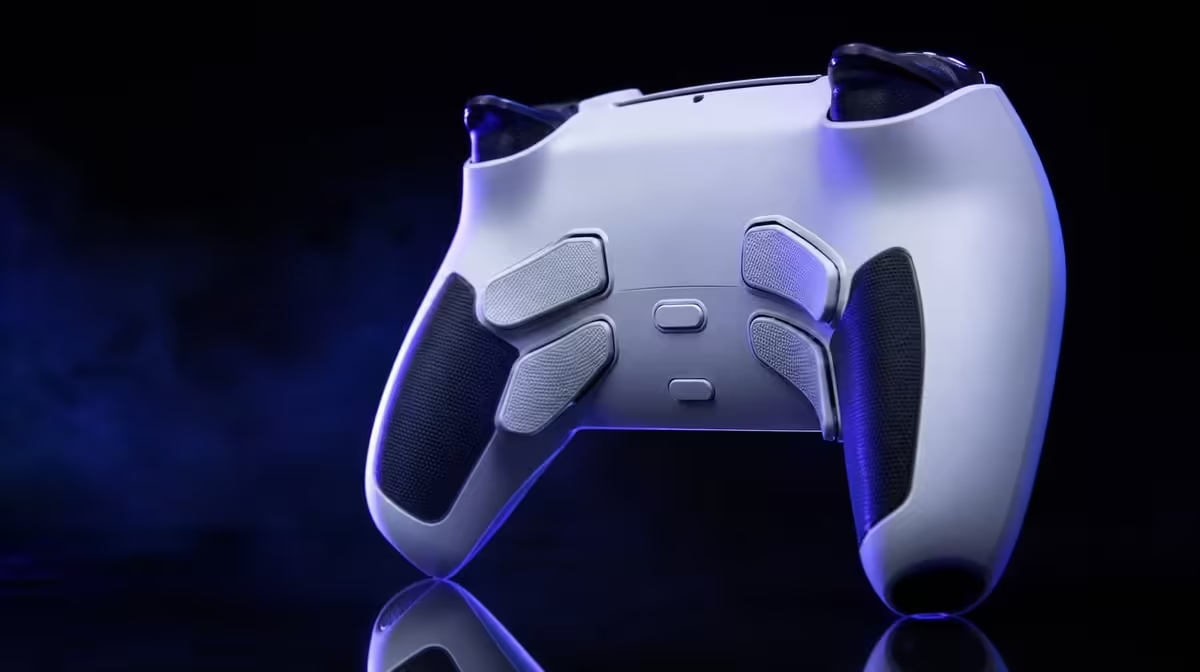
Macro buttons work best when they remove one awkward reach and disappear into muscle memory. Use controller macro buttons effectively by mapping a small number of named actions, testing grip pressure and practising before adding complexity.
Quick Answer
The R1,499 GameSir G7 Pro has four programmable macro buttons. Start with one frequent action that forces a thumb off movement or aim, map it to a comfortable spare finger, then keep or remove it based on errors and access.
🧭 Choose a useful first command
Watch a normal game sequence and identify where the player changes grip or releases a stick to reach a button.
Pick one allowed single action with a clear purpose. Avoid filling all four positions simply because they are available.
Good candidates occur often enough to learn and currently force an awkward reach. Reload, crouch, interact, sprint or a utility command may fit depending on the game and permitted mapping.
Poor candidates change meaning constantly or are used so rarely that the new location cannot become familiar. Keep those on their original buttons.
Check current competition rules before using custom mappings in organised play. Single remaps and automated sequences can be treated differently.
Write the planned function in plain language before programming it. This creates a quick rules and practice reference and stops a vague "macro advantage" from replacing the actual action.
Browse Evetech's gaming controller category with extra input access as a defined need.
✋ Map for the hand, not the menu
Assign the action beneath a finger that can rest without squeezing. Test movement, aim and both triggers while the finger stays near the macro.
Try the position from the relaxed grip used at the start of a session and the firmer grip that appears during action. A button that fires only under pressure may be too easy to activate accidentally.
Check whether reaching it shifts the index finger away from a trigger or changes stick control. Extra access should not solve one movement by breaking another.
Count accidental presses. A position that works in a menu can fire unexpectedly during a tense grip.
Keep the default command familiar during training. Extra access should not become a single point of failure.
Run a comparison set using the original button and another using the macro. Count thumb departures from the stick, command errors and hesitation.
If the new position improves access but feels unfamiliar, give it several short practice sessions before deciding. If accidental presses persist, change the map rather than forcing it.
Use Evetech's gaming accessories range for the surrounding setup once the map is chosen.
🧪 Build the layout one position at a time
Practise the mapped action alone, combine it with movement, then add a realistic combat or traversal sequence.
Start every drill from a neutral game state. Repeating only the successful moment can hide difficulty locating the macro during ordinary play.
Alternate left and right-hand demands. A rear button may feel different when the opposite hand is steering, using another macro or holding a trigger.
Record missed inputs, hesitation and accidental activations. Keep the map only when it improves repeatability.
Add a second button after the first remains stable. Stop before the layout becomes difficult to recall.
Give each added position a distinct role. Two similar commands placed too close can cause confusion, while a clear defensive and utility split may be easier to remember.
Leave an unused position unmapped if fingers rest on it heavily. Empty is a valid safety choice.
For single-player games, move awkward combinations or frequent utility actions. Macros do not play a difficult section automatically.
🗂️ Save, review and reset
Write the game, platform, connection and each macro assignment. Include a default reset profile.
Add the current competition rule reference where relevant. If the event changes or the controller moves into casual play, the owner can see why the layout was restricted.
Save separate profiles for single-player and competitive titles rather than stretching one map across unrelated games.
Run a longer session to expose fatigue-related grip changes. Remove mappings that become unreliable.
Review after a week. Classify each position as essential, useful, unused or error-prone. Keep only the first two groups.
Run the final map from a cold start. Connect to the intended platform, load the profile and identify every assigned input before the action begins. A useful layout should not depend on remembering which experiment was last active.
Ask another player to restore the default profile. The reset routine protects shared ownership and helps the original user recover after a game update or mapping mistake.
At R1,499, four macro positions add value when one or more enter regular play. Empty slots can be the disciplined result.
The G7 Pro's TMR sticks, trigger stops and platform routes remain separate benefits. A macro can improve access without changing sensing, polling or compatibility.
Use the included dock as the end point for the routine, then repeat the mapped drill on another day. At R1,499, macro value comes from dependable access over time rather than the number of available buttons.
Review Evetech's accessory best sellers after the final map survives practice.
Frequently Asked Questions
Which actions make good macro-button candidates?
Frequent, allowed commands that require an awkward reach are strong candidates.
How many macro buttons are on the G7 Pro?
It provides four programmable positions.
Should all four buttons be mapped immediately?
No. Begin with one and add another only after it becomes reliable.
Can macro buttons automate any sequence in competition?
Do not assume so. Check the current game and event rules.
How do extra buttons help in single-player games?
They can move utility actions or awkward combinations beneath spare fingers.
What causes accidental macro presses?
Grip pressure, poor finger placement and crowded mappings can trigger unintended inputs.
When should a mapping be removed?
Remove it when errors, confusion or discomfort outweigh easier access.
Does macro use improve mechanical skill automatically?
No. It changes command location while practice and decisions remain the player's job.
Ready to make one awkward command easier to reach? Explore Evetech's controller range, map a single G7 Pro macro and keep it only after a full-pressure practice test.











