


The Nintendo Switch 2 docked VRR update closes an important gap between handheld and TV play. System version 23.0.0 adds variable refresh rate in TV mode, but the console update alone is not enough. The dock needs its own update, the connected display input must support VRR, and the running software must be compatible.
Quick Answer
Update the Nintendo Switch 2 to system version 23.0.0, then install the separate Nintendo Switch 2 dock update. Open the display settings and confirm that VRR is available for the connected TV or monitor. Nintendo says the refresh output adjusts only when both the software and the display support the feature. If the option remains unavailable, check the dock firmware, the selected HDMI input, the display's VRR setting and the game's support before replacing hardware.
Update the console and dock separately
Start with the console. Open System Settings from the HOME Menu, scroll to System and choose System Update. The latest version should show 23.0.0 after installation. Keeping the console connected to the internet normally starts the download automatically, but the version page gives you a direct check.
The dock is a second device with its own firmware. Place the console in the dock, keep the dock connected to power and the display, then use the dock-update option in System Settings. Nintendo's patch notes state that this update is required for TV-mode VRR. A console on version 23.0.0 can therefore still show no usable docked VRR when the dock step was missed.
Version 23.0.0 also renames Dock Output Information to Video Output Information. That screen now exposes details about the connected output and adds VRR settings. Use it as the first place to confirm what the console sees from the display.
Why the whole signal chain matters
Variable refresh rate lets the display refresh closer to the moment each frame is ready. When frame delivery varies, that can reduce visible tearing and make uneven performance feel smoother. It cannot create missing frames, raise a game's frame-rate cap or repair a slow display response.
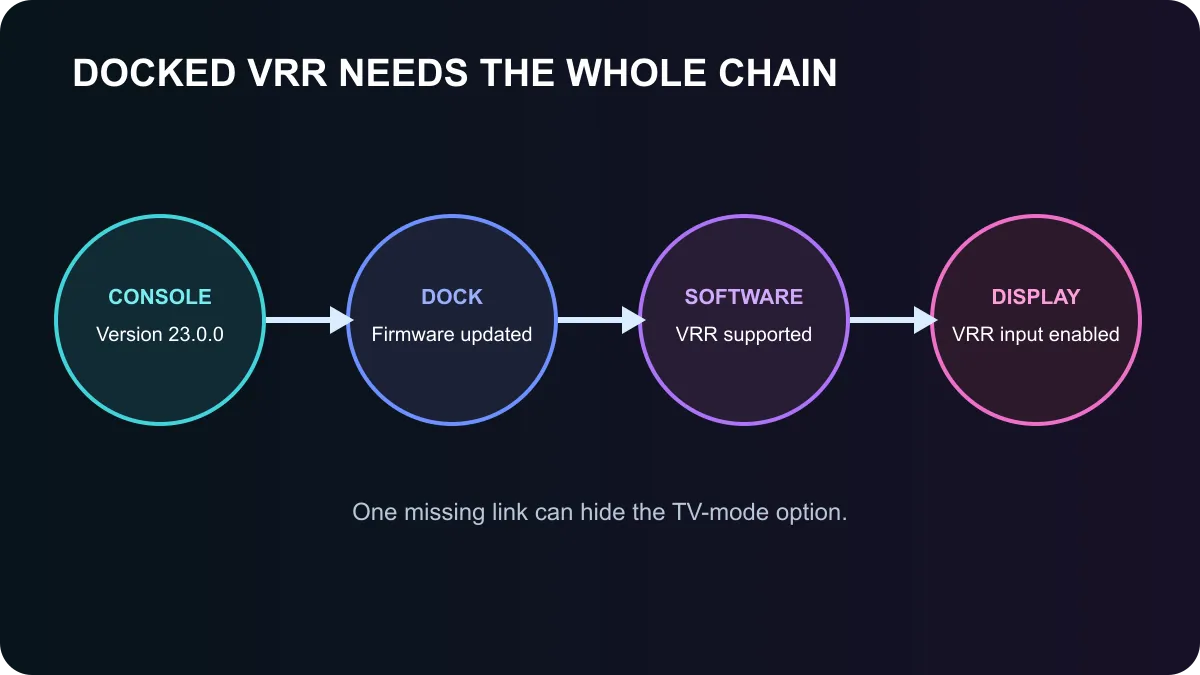
Four conditions need to line up: system version 23.0.0, current dock firmware, compatible software and a VRR-capable display input. HDMI ports on the same television can expose different features, especially when one is reserved for enhanced bandwidth. The television may also require a game or enhanced-input mode before VRR becomes available.
If the picture drops out after enabling the feature, test a known-good HDMI cable, disable extra signal processing and confirm the display's input mode. Change one item at a time. That makes it easier to identify whether the fault follows the cable, dock, input or software.
Choosing a gaming monitor for docked play
The update does not make every monitor a better match for the console. Check that the chosen HDMI input supports variable refresh rate at the resolutions and refresh rates you expect to use. Also weigh panel size, viewing distance, speakers, HDR capability and warranty. A high maximum refresh number is less useful than reliable support for the console's actual output range.
Browse all gaming monitors to compare current specifications, then review the monitor best sellers for wider price context. Confirm VRR support on the exact model page and in the manufacturer's manual before purchase.
What version 23.0.0 does not promise
Nintendo does not say that every title gains variable refresh automatically. The patch notes explicitly require software and display support. A game with a fixed frame-rate presentation may show little change, while a title with variable delivery can benefit more.
The update also adds system-transfer, accessibility, audio and GameChat changes, but those do not alter the VRR checklist. For display troubleshooting, stay focused on the four-part chain. That is faster than changing every picture option or assuming the monitor is faulty.
Frequently Asked Questions
Which system version adds docked VRR?
Nintendo Switch 2 version 23.0.0, released on 10 September 2026, adds VRR support in TV mode.
Why is a dock update required?
The dock handles the TV output path, and Nintendo explicitly requires its firmware update before the new feature can be enabled.
Will every game become smoother?
No. The software and display must both support VRR, and the feature cannot raise a game's performance on its own.
Compare a prospective display through the gaming-monitor range, then verify the exact HDMI VRR mode.
Treat VRR as a four-part signal chain. Update the console and dock, verify software support, then confirm the chosen display input.











