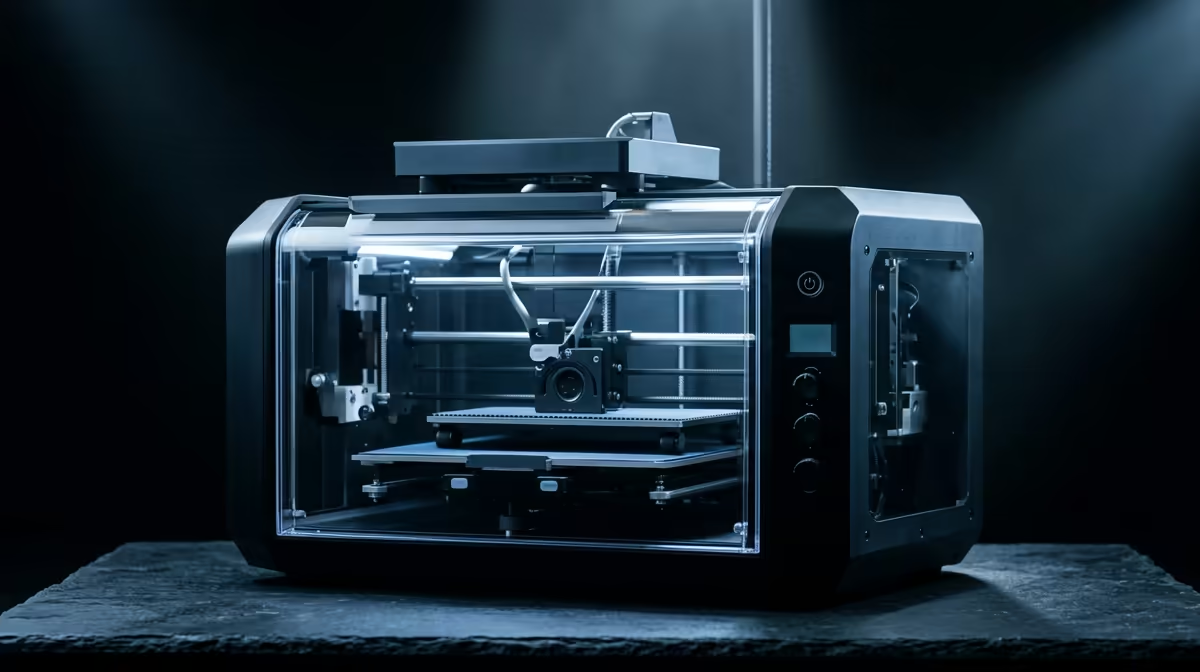
Tolerance is where most desktop 3D printers quietly fail. A bracket that measures 0.4 mm oversized will not seat onto a shaft, a snap-fit lid will refuse to click, and a press-fit bearing pocket either crushes the bearing or lets it spin loose. The best 3D printer for dimensional accuracy in South Africa is the one that holds its quoted numbers across the whole build plate, not just on a 20 mm test cube in the centre, and the Bambu Lab X2D currently leads that pack at around R16,499.
Quick Answer
For fit-critical parts, the Bambu Lab X2D at roughly R16,499 is the strongest desktop FDM pick in SA right now, holding accuracy near 0.1 mm across its full 256 x 256 x 256 mm build volume thanks to active vibration compensation and a rigid CoreXY frame. If your parts have to mate with other components on the first try, that combination of stiff motion and per-print calibration matters more than headline print speed.
What "dimensional accuracy" actually means on a desktop printer
Accuracy and precision are not the same thing, and the difference decides whether your parts work. Precision is repeatability: print the same part five times and they all come out within a few hundredths of a millimetre of each other. Accuracy is how close those parts land to the dimension you drew in CAD. A printer can be precise and still inaccurate, churning out five identical parts that are all 0.3 mm too wide.
For engineering work the number you care about is the deviation between the modelled dimension and the measured part, ideally checked with digital calipers on an X, Y and Z feature. A well-tuned consumer machine drifts around 0.2 to 0.5 mm. A genuinely accurate machine, properly calibrated, pulls that into the 0.1 to 0.2 mm band consistently. The current generation of 3D printers stocked at Evetech sits across that whole spread, so the model you choose decides which band you land in.
Why frame rigidity and motion system decide the result
The single biggest driver of dimensional accuracy is how much the printhead moves where it should not. Every sharp direction change throws a small mechanical wobble into the system, and that wobble prints as ringing or as slightly bulged corners that push dimensions out.
CoreXY versus bedslinger geometry
A bedslinger drives the platform forwards and backwards along the Y axis. As the part grows taller and heavier, that moving mass shifts its own inertia into every layer, and tall thin parts lean or skew. A CoreXY design restricts the bed to vertical Z travel only while two belts drive a lightweight gantry in X and Y. Less moving mass means less overshoot, which is why the accuracy-focused machines, the X2D included, almost all use CoreXY.
Vibration compensation and input shaping
Even a stiff frame rings at speed. Input shaping, marketed by Bambu as its motion-compensation system, measures the printer's own resonance and then times the motor moves to cancel that resonance out. The practical payoff is that you keep speed without the corners blowing out of spec. On the X2D this runs automatically before prints, so the calibration is not a one-off you forget to redo.
Material behaviour: the part of accuracy you cannot buy your way out of
Even a perfect machine cannot fully beat thermoplastic shrinkage. As filament cools it contracts, and the contraction differs by material. PLA is the most dimensionally stable and the right default for fit-critical prototyping. PETG shrinks a little more and tends to swell slightly at corners. ABS and ASA shrink the most and warp if the chamber is not warm, which is why a heated enclosure helps accuracy as much as it helps strength.
The fix is a flow and shrinkage calibration per material. You print a calibration object, measure it, and feed the real numbers back into the slicer so it scales compensation correctly. The accurate machines make this quick, but the discipline is on you. Skip it and even the X2D will hand you parts that are repeatably the wrong size.
Tuning your own dimensional accuracy
Buying the right hardware gets you most of the way, and a short calibration routine gets you the rest. Run these in order:
- Calibrate the X and Y steps and the extrusion flow rate so a measured 20 mm feature reads 20 mm.
- Tune your wall and hole horizontal expansion. Printed holes almost always come out undersized, so most engineers add a small negative horizontal-expansion value to open them up.
- Use digital calipers, not a ruler, and measure the same feature on every test print.
- Lock in one filament brand per material. Switching brands changes shrinkage and undoes your tuning.
Slow down the outer walls only. Inner infill speed barely affects final dimensions, so there is no accuracy reason to crawl through the whole print.
Who should buy for accuracy, and who should not
If you design enclosures, jigs, mechanical prototypes, drone frames or anything that has to bolt to existing parts, accuracy is the spec that saves you reprints, and the X2D earns its price. If you mostly print decorative models, cosplay props or terrain, raw accuracy matters far less than build volume and surface finish, and a cheaper bedslinger will serve you better for the money. Match the machine to the work rather than buying the most expensive option by reflex. The current 3D printer lineup at Evetech spans both ends, and the accessory side of the catalogue, including calipers and replacement nozzles, sits within the wider hardware accessories best sellers if you want to kit out a calibration workflow alongside the printer. For the printers themselves, the full 3D printer range carried by Evetech lays out the options from entry bedslingers up to the precision CoreXY machines.
Frequently Asked Questions
How accurate is the Bambu Lab X2D in real terms?
With proper per-material calibration it holds dimensional deviation in roughly the 0.1 mm band across its full build plate. That is tight enough for press-fits and threaded inserts on the first print, where a typical uncalibrated consumer printer drifts two to four times further out.
Does a heated enclosure improve accuracy?
Yes, for warp-prone materials like ABS and ASA. A warm, stable chamber slows uneven cooling, which reduces the contraction and lifting that pulls those parts out of spec. For PLA the benefit is marginal.
Why do my printed holes always come out too small?
Filament shrinks as it cools and the inner wall pulls inward slightly, so holes print undersized by default. Add a small negative horizontal-expansion value in your slicer, or design holes a fraction oversized, then measure and adjust until they fit.
Is PLA or PETG better for accurate parts?
PLA. It shrinks the least and stays the most dimensionally stable, which makes it the safest default for fit-critical prototyping. PETG is tougher but shrinks more and bulges slightly at corners, so it needs extra calibration to match PLA's accuracy.
Do I still need to calibrate an accurate printer?
Yes. Hardware sets the ceiling, but flow, shrinkage and horizontal-expansion tuning per filament is what lets you reach it. A great machine with default settings still hands you repeatably wrong dimensions until you run the calibration once.
Ready to print parts that fit on the first attempt? Compare the precision-focused machines in Evetech's 3D printer range and pair one with a set of digital calipers so you can calibrate from day one.