



PCIe 5.0 vs PCIe 4.0 for Video editing in 4k in SA
PCIe 5.0 vs PCIe 4.0 for video editing in 4k is mainly about fit, features, compatibility, cost, and upgrade path, not one automatic winner. SA buyers should match the choice to the setup.
Read moreDJI shrank its wireless mic line down for the Mic Mini, trading battery life and internal storage for a lighter, cheaper package that undercuts the Mic 2. Evetech's microphone lineup stocks comparable entry-level wireless options for creators on a tighter budget.
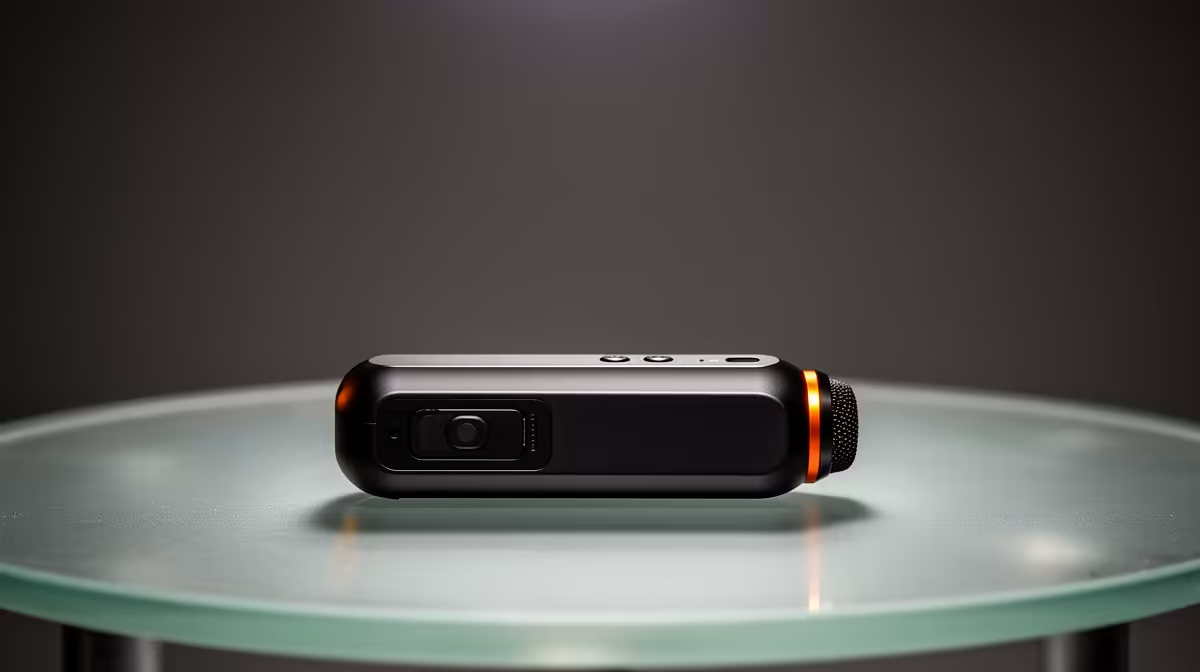
The Mic Mini aims to make wireless voice capture lighter and less expensive, which also means you must check which Mic 2 features were left out. The DJI Mic Mini price in South Africa is useful only beside the exact bundle, host adapters and recording safeguards. Check current local listings rather than treating the name as one fixed kit.
DJI Mic Mini is a compact wireless microphone system whose transmitter count, receiver and accessories depend on the selected package. Local availability and Rand pricing can change with shipments, so use Evetech's current streaming essentials category to compare entry wireless microphones. Confirm internal recording, weather protection and battery claims from the exact current specification before buying.
The Mic Mini name can appear in one-transmitter, two-transmitter and charging-case bundles. Record the full product code and written box contents.
Confirm receiver, phone connectors, camera cable, windscreens and charging equipment. Product photos may show a larger kit than the listing.
Compare with Mic 2 feature by feature. Check internal storage, onboard recording, display controls, timecode or noise functions only where the current documentation states them.
Do not assume a smaller transmitter has the same water or dust protection as another DJI product. Read the precise environmental rating and usage limits.
Choose one transmitter for solo vlogging and two for interviews or a backup unit. Price the package you will use, not the cheapest headline.
A lighter transmitter can pull less on clothing. Clip security, cable rub and wind protection still affect the recording.
Place the transmitter near the upper chest without touching a necklace, collar or hair. Record normal movement and turn the head.
Fit the supported windscreen outside. A loose windscreen can disappear during a take and create handling noise.
Set gain from loud speech. Leave headroom at the receiver and camera. A clipped wireless signal cannot be fixed through editing.
Record clean room tone and traffic noise before enabling cancellation. Compare voice consonants and breath. Strong processing may sound useful and artificial.
If the Mini lacks internal backup in the chosen mode, monitor the link and record a second path where the workflow permits it. Confirm from the current manual rather than assuming.
Use a visible clap at the start of important takes. It helps align camera and a separate recorder if the primary track fails.
Check the exact phone connector and operating-system support. A USB-C plug does not guarantee every Android camera app receives external audio.
Record through the actual phone app, lock the screen once and reconnect. Play back through headphones to prove the saved file contains the Mic Mini track.
For a camera, use the supported cable and set camera input from a test recording. Avoid pushing receiver output and camera gain high together.
For a computer, test meeting and recording apps apart. Confirm sample rate, selected input and whether monitoring creates delay.
Wireless range should be tested in the real venue. Walk behind the camera, turn the transmitter away and pass through the farthest framing point.
Evetech's webcam range gives a local camera comparison for desktop creator setups where a fixed USB microphone may be simpler.
Check DJI's current transmitter, receiver and case runtime figures for the exact bundle. Treat them as reference conditions and run your own shoot-length test.
Charge every component through approved equipment. Verify contact in the case and inspect the percentage before leaving.
Cold, heat, recording mode and battery age can change runtime. Leave a safe reserve and carry a supported cable or power source.
Compare the Mic Mini with another local entry wireless kit. Use transmitter count, backup recording, adapters, receiver controls, wind protection and warranty wording.
For YouTube vlogging, it is good enough when voice remains clear through your locations and the host device records it. Run a full sample from setup to uploaded video.
For a used Mic Mini kit, test each transmitter and every connector separately. Record until batteries fall low, then charge them in the case.
Create a labelled test file from each transmitter. Use normal speech, a loud phrase and ten seconds of room tone. Compare channel level and noise rather than assuming a paired indicator proves matched microphones.
Inspect clips, windscreens, ports and charging contacts. Pair from a clean state and confirm the receiver identifies each transmitter.
Test phone, camera and computer connections that the exact kit supports. Record a minute on each host, disconnect once and reconnect. Confirm that every saved file uses the external microphone.
Walk the real shooting route with the transmitter facing toward and away from the receiver. Listen to the complete recording for short dropouts. Repeat with Wi-Fi and other crew devices active.
Measure discharge at fixed intervals on both transmitters and the receiver. A kit can end a shoot when one smaller component reaches empty before the others.
Check the case after a full charge cycle. It should recognise each piece without pressure or wiggling. Keep the contacts dry and clean them only through DJI's supported method.
Create a backup plan for a receiver or wireless failure. A wired lavalier or phone placed close to the speaker can preserve understandable speech when the main kit stops.
Ask how a failed transmitter, receiver or case is handled. Keep serial images, invoice and the fitted packaging.
Compare the current specifications for internal recording, controls, battery, bundle and processing. Do not rely on a family summary.
Check DJI's exact environmental rating and limits for the model. Never infer waterproofing from its outdoor use or small size.
Internal recording is a model and mode-specific feature. Verify the current Mic Mini manual before planning a receiver-free backup.
Use the current rating as a starting point and test your settings, wireless link and shoot duration with reserve.
It can be when the bundle connects to your camera or phone and voice stays clear in your locations. Test a complete video workflow.
Software support changes by product and host. Check the current Mic Mini setup instructions and supported app route.
Evetech's live streaming-essentials category shows current local microphone options and bundles.
Ready to compare compact wireless microphone kits? Browse Evetech's current streaming range and match transmitter count, host adapters and backup features to your shoots.
Compare the current specifications for internal recording, controls, battery, bundle and processing. Do not rely on a family summary.
Check DJI's exact environmental rating and limits for the model. Never infer waterproofing from its outdoor use or small size.
Internal recording is a model and mode-specific feature. Verify the current Mic Mini manual before planning a receiver-free backup.
Use the current rating as a starting point and test your settings, wireless link and shoot duration with reserve.
It can be when the bundle connects to your camera or phone and voice stays clear in your locations. Test a complete video workflow.
Software support changes by product and host. Check the current Mic Mini setup instructions and supported app route.
Evetech's live streaming-essentials category shows current local microphone options and bundles.
PCIe 5.0 vs PCIe 4.0 for video editing in 4k is mainly about fit, features, compatibility, cost, and upgrade path, not one automatic winner. SA buyers should match the choice to the setup.
Read more
Wi-Fi 7 vs Wi-Fi 6e for competitive esports comes down to router support, latency goals, device compatibility, and coverage. SA buyers should match the choice to the real network setup.
Read more
ATX 3.1 vs ATX 3.0 for mMO and live-service games buyers - what changes is mostly about compatibility, budget, upgrade path, and setup fit. SA buyers should check device support and real needs before expecting a clear win from either option.
Read more
LGA 1851 vs LGA 1700 can affect Twitch and YouTube streaming when gaming and encoding share CPU resources. For SA creators, the real-world difference depends on encoder choice, memory support, motherboard cost, thermals, and upgrade plans.
Read more
X870E vs X670E for aaa single-player gaming is mainly about fit, features, compatibility, cost, and upgrade path, not one automatic winner. SA buyers should match the choice to the setup.
Read more
Hall Effect switches vs Mechanical switches for mMO and live-service games is mostly about compatibility, budget, upgrade path, and setup fit. SA buyers should check device support and real needs before expecting a clear win from either option.
Read more
A fake 113GB GTA VI ISO reportedly used empty padding around a small malware payload. SA gamers should delete unofficial builds, keep Windows security active and wait for official channels.

Wi-Fi 6E vs Wi-Fi 6 matters for 4K video editing when files move across a network. The real-world difference between Wi-Fi 6E and Wi-Fi 6 for video editing in 4K depends on NAS access, cloud uploads, router range, and SA creator workflows.

The difference between PCIe 5.0 and PCIe 4.0 for SA gamers is mostly bandwidth headroom. Compare GPU slot needs, NVMe speed, motherboard support, and upgrade timing before paying extra for a newer platform.

Gaming PC stuck pixel checks in South Africa should confirm the monitor fault first. Use colour tests, screenshot comparison, cable swaps, display menu checks, and clear photos before deciding on support.

Shokz OpenFit Air 2 earbuds weigh 7.2g each and use a redesigned dual-driver open-ear layout. SA buyers should choose them for comfort and awareness, not maximum isolation.

AMD's current driver now lists a Radeon RX 9050 4GB, while product coverage details a narrowed memory system. SA buyers should weigh the low VRAM ceiling against current local Radeon options.

Samsung Display has demonstrated a 16-inch 2.5K OLED laptop panel running at 300Hz. SA buyers should wait for a named notebook, full panel specifications and a local price before planning an upgrade.

Microsoft says some Windows 11 game crashes after recent updates are linked to RGB-related drivers. Affected SA gamers should confirm the update and driver before using the published registry workaround.

RTX 5090 on a 650W PSU is a tight pairing with very limited headroom. For SA gaming PCs, focus on total system draw, PSU quality, connector support, CPU choice, and avoid OC plans unless the full build is carefully power-limited.
PCIe 5.0 vs PCIe 4.0 for video editing in 4k is mainly about fit, features, compatibility, cost, and upgrade path, not one automatic winner. SA buyers should match the choice to the setup.

850W PSU safety for RTX 5090 is plausible with a quality unit and balanced parts. In SA, confirm connector support, CPU power draw, case airflow, PSU age, and spare capacity before building around 850W.
Wi-Fi 7 vs Wi-Fi 6e for competitive esports comes down to router support, latency goals, device compatibility, and coverage. SA buyers should match the choice to the real network setup.