


Humidity Damage to PC Components: Recovery Guide
Humidity Damage to PC Components: Recovery Guide. Everything you need to know with SA pricing, step-by-step instructions & expert recommendations.
Read moredual ring rgb fans offer layered lighting and different airflow than single ring fans. This guide compares noise, brightness, control, and price to help your PC build choice. 🔧✨
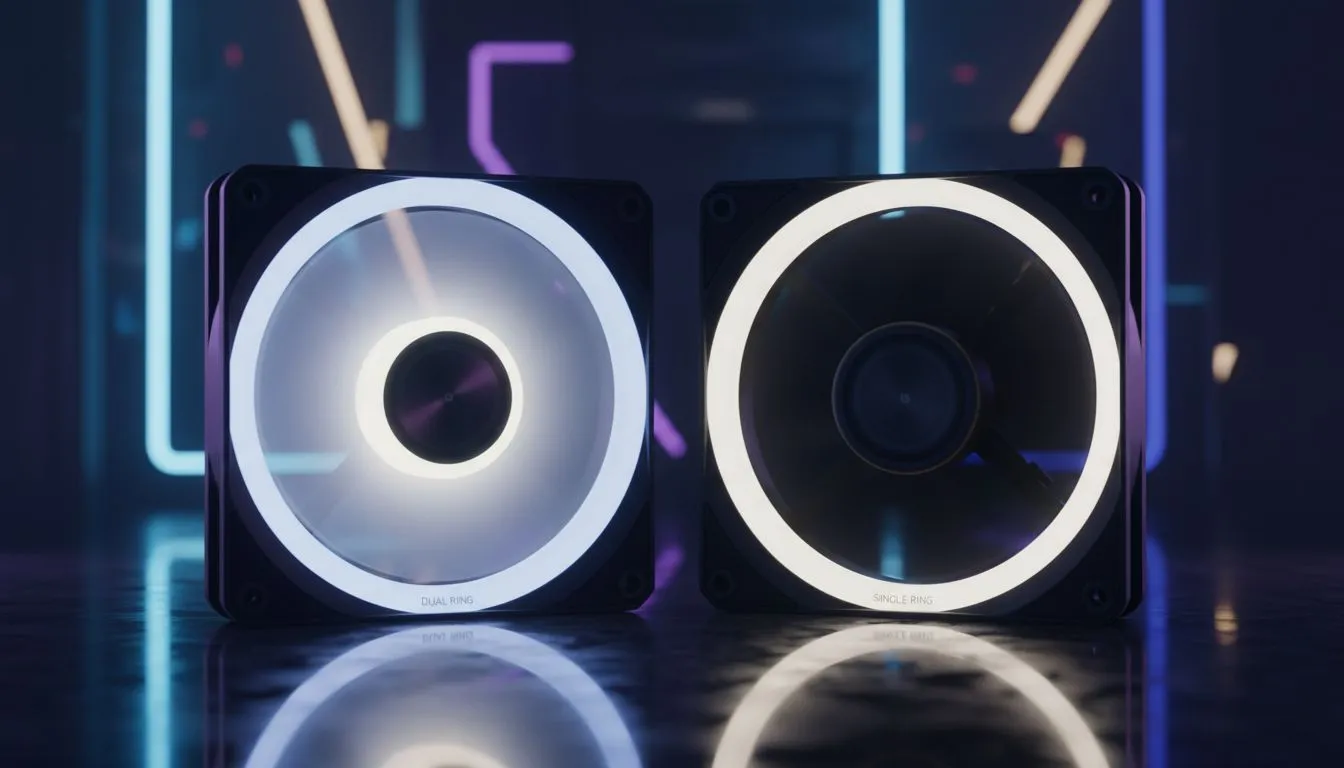
Building a new PC in South Africa is an art. You've picked the perfect CPU and a beastly graphics card, but what about the vibe? The personality? That's where RGB lighting comes in, and the choice between single and dual ring RGB fans can make or break your rig's aesthetic. It’s more than just a glow... it’s about creating a masterpiece. So, what’s the real difference, and which one is right for your build? Let's dive in.
At its core, a single ring RGB fan is exactly what it sounds like. The LEDs are housed in a single ring, typically around the outer frame of the fan. This creates a distinct, clean "halo" effect that outlines the fan's shape. It’s a classic look that adds a splash of colour without being overwhelming.
For years, this was the standard for builders looking to add some flair. They are fantastic for highlighting the components inside many modern PC cases, providing excellent ambient light that makes your hardware pop. They are often more budget-friendly, giving you that custom look without breaking the bank.
So, how do dual ring RGB fans level up the light show? ✨ The key difference is the addition of a second set of LEDs. You get the same outer ring of light as a single ring fan, but you also get another ring around the central fan motor hub.
This seemingly small change has a massive impact. Suddenly, you have two independent zones of light, allowing for more complex, dynamic, and vibrant lighting effects. The entire fan blade gets illuminated from the centre, creating a much richer and more saturated colour effect that looks incredible, especially from both the front and back. This makes them perfect for builds using premium showpiece cases where fans are visible from multiple angles.
| Feature | Single Ring Fans | Dual Ring RGB Fans |
|---|---|---|
| Aesthetics | Subtle, clean halo effect | Intense, multi-zone colour |
| Lighting Zones | One (outer frame) | Two (outer frame + inner hub) |
| Best For | Minimalist builds, budget-conscious rigs | Maximum visual impact, showpiece PCs |
| Cost | Generally more affordable | Typically a bit more expensive |
The choice often comes down to personal preference and budget. While single ring fans offer a tasteful glow, the visual depth from dual ring RGB fans is undeniable. They simply fill your case with more light and offer more customisation potential for stunning effects.
Most modern motherboards come with RGB software (like ASUS Aura Sync, MSI Mystic Light, or Gigabyte RGB Fusion). Before buying, check if your fans are compatible with your board's 3-pin ARGB or 4-pin RGB header. This lets you synchronise all your lighting—from your RAM to your fans—for a perfectly coordinated look without extra controllers.
Deciding between the two really depends on your goal. Are you building a sleeper PC with just a hint of personality, or an all-out RGB beast that lights up the room? 🚀
Go for single ring fans if:
Choose dual ring RGB fans if:
Ultimately, both options will cool your PC effectively. The difference lies in the artistry. You can find many gaming chassis options that come bundled with either type, and there are even great value cases under R1500 that give you a fantastic starting point for your RGB journey.
Ready to Light Up Your Build? Whether you're after a subtle glow or a full-blown light show, the right fans bring your PC to life. Explore our huge range of computer cases and find the perfect canvas for your next RGB masterpiece.
Dual ring rgb fans have two concentric LED rings for layered lighting and more complex effects compared to single ring rgb fans.
Airflow depends on blade design and motor; dual ring rgb fan airflow can match single ring fans, but lighting features don't inherently boost airflow.
Noise depends on bearing and RPM. Some dual ring rgb fans have similar noise levels; check specific dual ring rgb fan noise levels when comparing.
Dual ring setups often appear brighter and offer layered effects, making dual ring rgb fan lighting more vivid in many builds.
Yes, dual ring rgb fans usually cost more due to extra LEDs and control features—compare best dual ring rgb fans for value.
Most dual ring fans use ARGB headers or hub controllers; verify motherboard addressable RGB support for dual ring rgb fan compatibility.
Pick dual ring rgb fans for advanced lighting and style; choose single ring fans to save money while maintaining solid airflow and low noise.
Humidity Damage to PC Components: Recovery Guide. Everything you need to know with SA pricing, step-by-step instructions & expert recommendations.
Read more
Gamer Spending Trends April : Complete Setups. Clear setup instructions with SA-specific considerations, troubleshooting tips & recommended components.
Read more
Setting Up DDR5 32GB Kit. Tested & verified settings for best FPS and visual quality on SA hardware budgets.
Read more
Tech Setup Guide for SPU Res Students. Clear setup instructions with SA-specific considerations, troubleshooting tips & recommended components.
Read more
Monster Hunter Wilds Ultrawide Support: 21:9 and. Clear setup instructions with SA-specific considerations, troubleshooting tips & recommended components.
Read more
Apple iPad Durability Guide: Cases, Screen. Practical breakdown of costs, regulations & whether it makes financial sense for SA buyers.
Read more
AMD RX 9050 XT: Rumoured Specs, Price & Release. SA-focused analysis with local pricing data, real-world insights & actionable buying advice.

Can RTX 4080 Super Run AI Workloads for SA Developers Detailed answer with SA data, expert analysis & practical recommendations for local buyers.

Can RTX 4090 Run AI Workloads for SA Developers Detailed answer with SA data, expert analysis & practical recommendations for local buyers.

Top Settings for Intel Arc B580 at Ultrawide 1440p picks evaluated on performance, value & SA availability with current Rand pricing from Evetech.

RTX 4060 CS2 Low Settings at 1080p: FPS Results. Real-world benchmark data, FPS numbers & performance analysis. What SA gamers can actually expect.

Visual Artifacts: Possible GPU Issue Issue #1. Diagnosis steps, proven fixes & when to seek professional help. SA-specific support info included.

Can the RTX 4090 Handle 1440p 144Hz Gaming. Performance testing verdict with real data & practical recommendations for SA buyers.

Top ASUS GPU Under R15000 picks evaluated on performance, value & SA availability with current Rand pricing from Evetech.

GTA 6 Max Settings on RTX 5070. Tested & verified settings for best FPS and visual quality on SA hardware budgets.

Cyberpunk 2077 Max Settings on RTX 5080. Tested & verified settings for best FPS and visual quality on SA hardware budgets.

Starfield Max Settings on RTX 5070 Ti. Tested & verified settings for best FPS and visual quality on SA hardware budgets.

Top RTX 5090 Under R5000 picks evaluated on performance, value & SA availability with current Rand pricing from Evetech.