Lower-back support does not operate in isolation from seat position, arms or recline. This dynamic lumbar support guide explains how movement-responsive contact differs from fixed support and how to assess the R16,599 AutoFull M6 Pro+ 2.0 without making medical promises.
Quick Answer
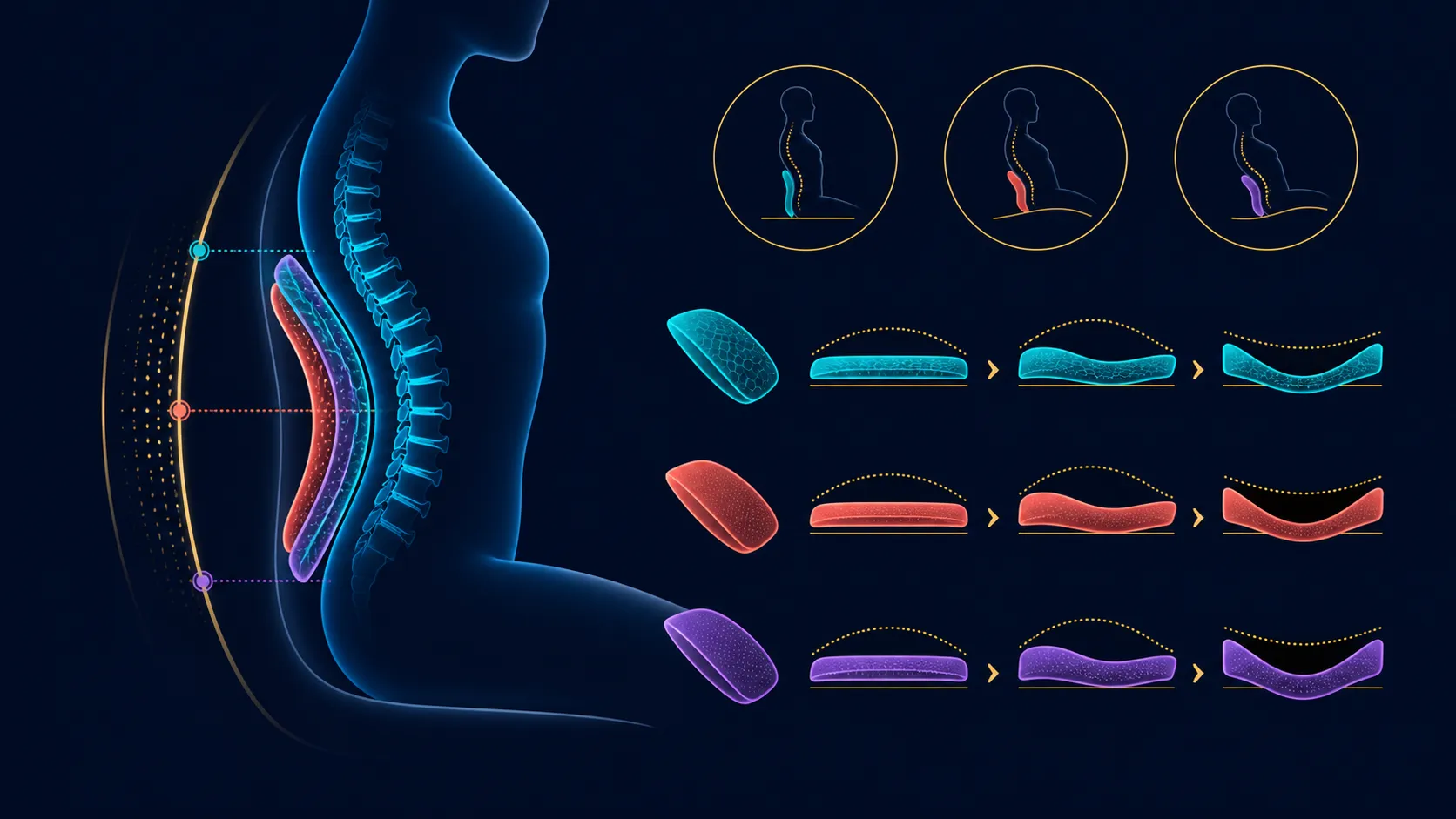
Fixed lumbar holds one chair relationship; dynamic support responds as the seated position changes. The M6 Pro+ takes the latter approach, then adds a neck pillow and backrest travel to 160 degrees. Test personal fit without turning the mechanism into a comfort guarantee or pain remedy.
↔️ Compare moving and fixed contact
Fixed lumbar support keeps its position relative to the backrest unless the user adjusts another part. Dynamic support responds as the seated relationship changes. This can help preserve contact during transitions, although movement alone does not prove that the shape suits every back.
Begin with ordinary desk tasks. Note how the lower-back area feels during typing, controller use and small posture shifts. Then compare a deeper break position. The useful question is whether support remains appropriate across the positions the owner actually uses.
Do not change chair height, arms, recline and desk distance simultaneously. One-variable testing makes it easier to understand which part improved or worsened the fit.
Browse Evetech's AutoFull gaming chairs after mapping the positions that a lumbar system needs to accommodate.
🧭 Establish the surrounding fit
Set the chair and desk relationship first. The feet, seat, forearms and controls should form a workable arrangement before the lower-back feature is judged. Exact body and chair dimensions remain important even when support moves dynamically.
The M6 Pro+ carries a 150kg maximum load, but capacity cannot identify seat depth, width or backrest height. Measure those fit requirements separately. A user within the limit can still need different chair geometry.
The 6D foldable armrests adjust through 360 degrees. Use their real movements to reduce unnecessary reaching, without assuming six named axes from the label. Arm position can change the upper body's relationship with lumbar contact.
🪑 Test recline and neck support
The backrest reaches 160 degrees. Start nearer the task position and move gradually, checking whether dynamic lumbar remains useful at each step. The deepest endpoint may suit a break but need not suit gaming or typing.
A 3D ErgoCloud pillow supports the neck area. Coordinate it with the chosen backrest angle instead of using the pillow to compensate for a poor overall setup. Exact 3D movements should follow this model's design rather than a generic pillow description.
Armrests may also need a new position during recline. Recheck forearm support instead of leaving the gaming setting unchanged. This complete transition gives a better assessment than pressing the lower back into one static pose.
Compare lumbar behaviour inside complete designs through Evetech's South African range of gaming chairs.
✅ Evaluate comfort responsibly
Repeat the test during representative sessions and record the positions that work. A short first impression may not show how the support feels after repeated movement. Personal preference remains central.
Keep medical language out of the chair score. Dynamic lumbar cannot diagnose a condition, correct an injury or promise pain prevention. A health concern belongs with an appropriate professional, while the chair comparison remains about fit and adjustment.
The R16,599 package brings both heating and ventilation to the seat. Keep those climate modes in another score column so their sensation is not mistaken for lumbar response.
When comparing dynamic and fixed alternatives, use the same desk, controls and task sequence where possible. Matching the scenario prevents a favourable environment from being mistaken for superior support technology.
Build the comparison from positions rather than adjectives. Label one row focused typing, another controller use and a third selected break angle. Note whether lumbar contact remains present, moves noticeably or feels unsuitable to the individual. This produces more useful evidence than calling support firm or ergonomic without context.
If more than one person uses the chair, complete a separate row set for each. Dynamic movement can interact differently with body shape and preferred recline. A shared chair needs reproducible adjustments, not one person's successful test copied to another.
Keep climate functions stable during the lumbar comparison. Ventilation or heating may change the overall sitting sensation, so introduce those modes only after the positional support test is understood. The chair's systems solve different problems.
Review the armrests at every chosen task. Forearm position can influence shoulder and trunk behaviour, which may then change how the lower back meets the chair. The 360-degree range offers options, but the exact useful direction should be demonstrated rather than named from 6D.
Use the recline endpoint responsibly. A 160-degree limit widens the test range, yet most useful lumbar observations may occur at smaller changes. Record the angles the owner expects to revisit, not every theoretical position.
Retain the notes when the desk or controls change. A different keyboard height or controller location can alter the seated relationship even though the lumbar system remains the same.
Movement-responsive support still has to work for each person who regularly occupies the chair. Create an individual reference for the desk position, preferred backrest zone and useful lower-back contact. Do not average two users into a single compromise arrangement, because their torso proportions and task habits may differ even when both fit within the chair's other limits.
Record the steps needed to move from one person's arrangement to the next. Include armrests and neck-pillow placement, since changes higher on the chair can affect how the torso meets the backrest. A quick photo or written control map can make restoration more consistent without assuming electronic profiles or automatic memory.
After each reset, repeat one familiar task before accepting the position. Note contact and reach in ordinary language rather than medical terms. If discomfort persists, the chair experiment should stop and appropriate guidance should take over. The purpose of the log is to improve reproducibility in a shared workstation, not to diagnose or treat a condition.
Frequently Asked Questions
How does dynamic lumbar differ from fixed support?
The dynamic approach responds to sitter movement; a fixed design preserves its chair-relative shape until something else is adjusted.
Does movement guarantee a perfect fit?
No. Support shape, body dimensions, desk setup and individual preference still determine the result.
Can lumbar support treat a medical condition?
No chair feature replaces diagnosis, treatment or professional health advice.
What recline range works beside the support?
The M6 Pro+ backrest moves as far as 160 degrees, creating several positions for a lumbar test.
Which neck feature completes the upper support?
Upper support is handled by the chair's 3D ErgoCloud neck pillow.
How should the lumbar function be tested?
Begin from a neutral desk arrangement, alter only one setting, and watch contact during movements that represent normal use.
Ready to compare lumbar systems through actual task changes?
Review Evetech's gaming chairs after defining your body-fit checks, desk relationship and most common seated transitions.