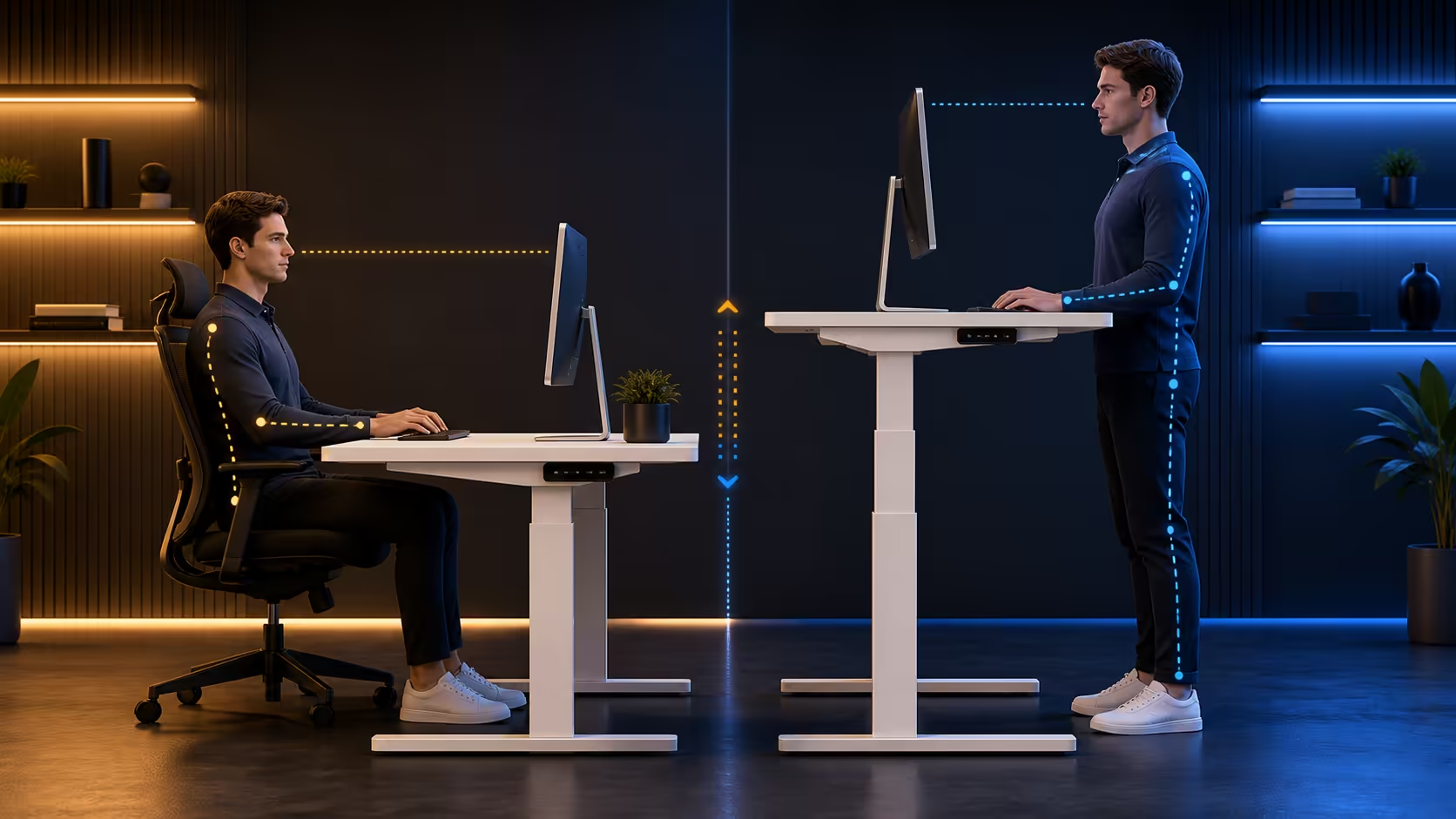
A useful desk height starts at the body and ends at the task. Numbers on a controller only become meaningful after the chair, feet, hands and screen are aligned. This standing desk height guide explains each decision using the R4,999 AROZZI Arena Nordico, whose electric 71-115cm range can store chosen positions through an LED memory control.
Quick Answer
Find seated height after setting the chair, then find standing height with balanced feet and relaxed arms; use the monitor support to solve viewing separately. The R4,999 Arena Nordico provides 71-115cm of travel, and its memory presets can preserve the two values once real work confirms them.
🪑 Seated height is a chain of relationships
Settle the pelvis against the backrest and place both feet securely. The seat should support the thighs without pressing behind the knees. Chair height establishes the lower-body base, so changing the desk first can hide a poor seat position.
Move the worktop until the upper arms can stay near the torso. Forearms should reach the keyboard without shoulder lift, and the wrists should remain close to straight. Type enough to reveal whether the body creeps towards the front edge.
If the chair must rise for the hands, restore foot contact with a suitable support. If chair arms hit the desktop, adjust them or reconsider their use. Rolling away to create clearance increases reach and changes the very posture being measured.
Desk depth matters. Bring the chair close enough for the mouse to remain within an easy forearm zone while leaving knee clearance beneath. Measure to the top of the keys, not to an unused section of desktop.
The 71cm lower limit of the Arena Nordico is a boundary, not a recommendation. Compare gaming desks at Evetech according to whether they contain the actual seated requirement.
🧍 Standing height should support movement, not leaning
Stand at the distance normally used for work, with weight shared across both feet. Raise the top towards the hands. A good candidate lets the shoulders remain relaxed and does not require resting body weight on the front edge.
Test typing and mouse movement. A broad gaming sweep may expose reach that a short sentence does not. If the forearms keep searching for support, check both worktop level and screen distance before making a large change.
Footwear alters the floor-to-hand relationship. Save the height used under ordinary conditions and adjust manually for occasional differences. Do not constantly overwrite a reliable preset because of one unusual day.
Standing is not meant to be motionless. Shift weight naturally and step away during a call. Begin with short blocks that have natural endpoints, then sit before tired legs change the posture.
The 115cm upper limit must contain the users real requirement. Leave some room where possible, because changing a keyboard or regular shoes can shift the target.
🖥️ Monitor height belongs to a different adjustment
Once hands are comfortable, place the screen. Set viewing distance with real content, not a blank panel. The head should remain balanced instead of tipping towards small text or lifting the chin.
A monitor arm can serve both postures without moving the desktop away from its arm-friendly level. The Arena Nordico adjustable rear panel helps position mounting hardware and manage display leads. Choose the screen location from the front, then find a supported clamp site behind it.
For two displays, centre the primary one on the user. If both receive equal attention, centring the seam can work. Avoid holding the torso turned towards an off-centre screen for long tasks.
Check glare while seated and standing. Raising a display can introduce a window or ceiling-light reflection. Change panel angle rather than sacrificing a sound height.
Camera framing creates another viewing relationship. A camera above the display should remain close enough to the call window that eye direction feels natural. Test it from both postures and move the window rather than twisting the neck towards a side panel.
Screen rotation needs cable and corner clearance. If portrait mode is part of the workflow, rotate slowly at each saved desk height and make sure the panel cannot touch the top.
The AROZZI setup family provides related context, but screen position must follow the user and task.
🎛️ Save, test and maintain the final values
The LED display records where the mechanism stopped. Use it as a repeatable reference after completing several minutes of real work. Assign separate seated and standing keys, then note the values as a backup.
Test each preset later in the day. If a problem appears, alter one variable slightly and keep the original number recorded. Constantly tapping around a target makes it difficult to learn which change helped.
Approach the candidate slowly from below, stop and let the body settle. Using the same method prevents overshooting and immediate correction from becoming part of every comparison.
Presets can represent users rather than postures. In a shared room with limited keys, store the most frequent position for each person and keep secondary values written nearby. The map should reflect actual use.
Shared users should never copy each others figures automatically. Different proportions produce different needs, even at similar overall height. Label keys by person and posture or keep a simple map beside the controller.
Check the cable route before relying on automatic movement. Place power bricks and excess in the dual quick-release baskets. Preserve a flexible loop where leads cross to wall sockets or floor devices, then run the desk from 71cm to 115cm under supervision.
At the top, connectors must remain relaxed. At the bottom, cable should not drop into chair wheels. The broader gaming setup selection can help list surrounding equipment so no lead is forgotten.
Recalibrate after a new chair, keyboard, monitor arm or lasting footwear change. Comfortable height is a maintained relationship rather than a universal number carved into the controller.
Room changes warrant another complete pass. Moving onto carpet, beside a different wall or beneath a shelf can affect level, monitor clearance and the safe upper path. Keep old values as references but validate the geometry again.
Use discomfort as information, not a reason for random adjustment. Note the task and where tension appears, inspect the nearest relationship and make one small test. This measured approach is faster than losing every useful reference.
The final numbers should fade into the background. When transitions support work without repeated fiddling, the height system has reached its practical goal.
Frequently Asked Questions
Is there one correct desk height for everyone?
No. Body proportions, chair setup, input-device thickness and footwear all affect the floor-to-keyboard requirement.
Which measurement should be taken while seated?
Measure to the working key surface after feet, thighs and back are supported. Confirm the result through typing and mouse use.
Should a standing desk support the forearms?
The surface should let the hands reach comfortably, but leaning body weight through the forearms suggests the height, reach or stance needs review.
Can the monitor share the same height rule?
No. Establish worktop height for the hands, then adjust the screen independently for viewing and head balance.
What is the Arena Nordico range and price?
The white electric desk spans 71cm to 115cm and costs R4,999. Its LED controller includes memory presets.
Ready to replace borrowed measurements with your own working geometry?
Compare Evetech gaming desks after testing chair, key surface, standing stance and monitor position as separate parts.