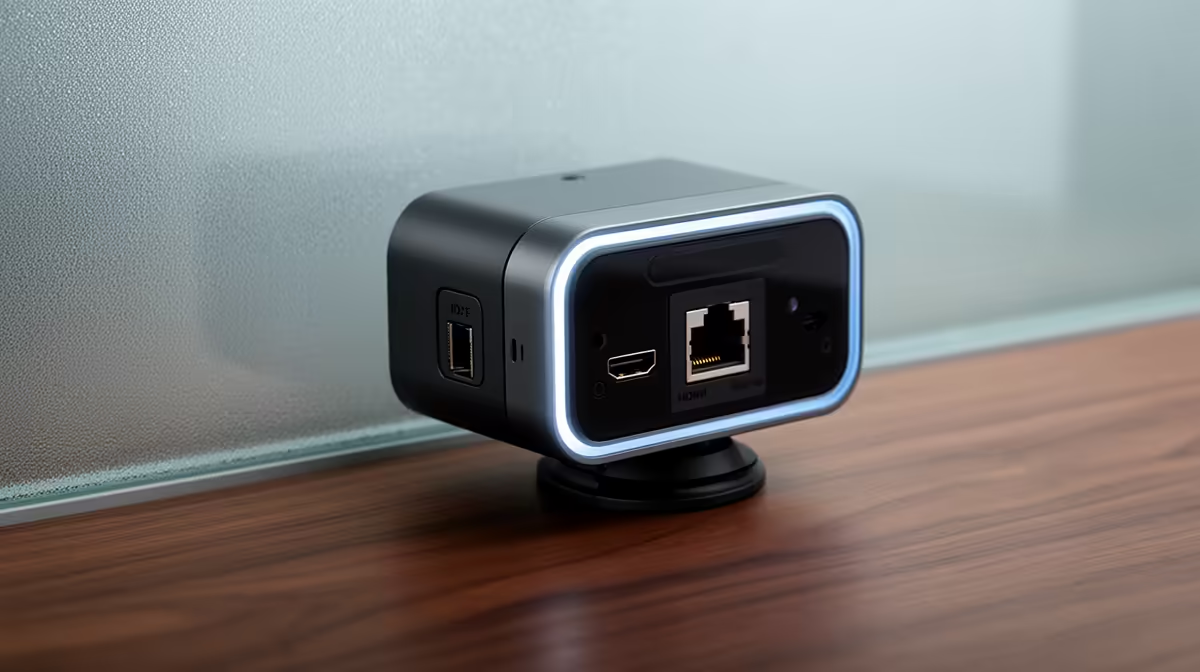
Running two cables to one camera already feels like a compromise. Running an HDMI lead that sags across a room and then a power adapter hunting for a nearby plug feels like a bigger one. Understanding exactly what each connection does, and where each one belongs in your setup, is what allows you to choose once, route cleanly, and leave the install alone. RJ45 and HDMI camera connections solve different halves of the same problem: one carries your signal over distance with a locked connector, the other delivers the highest-quality local feed to a capture device with minimal delay.
Quick Answer
RJ45 carries IP video and power over standard network cabling for runs up to 100 metres, making it the right choice for cameras mounted away from the PC. HDMI delivers the highest quality local signal to a capture card with near-zero latency. Combining both gives a system where the local stream is sharp and the remote feed is stable and independently powered.
🌐 RJ45: Video Across the Room, and Across the Building
RJ45 is an ethernet connector, and a camera with an RJ45 port is a network device that sends its feed as IP video data. The practical consequence of this is that the cable runs as far as any ethernet infrastructure runs, which on Cat5e or Cat6 cabling means up to 100 metres before you need an active extension.
For South African homes with studio rooms down a corridor, or rental properties where running a new HDMI cable through walls is not an option, RJ45 lets you place the camera wherever it is most useful without compromising signal quality. A camera mounted high for wide coverage or positioned in a separate room stays reliably connected over existing ethernet infrastructure.
The signal does not degrade gradually over distance the way passive HDMI does. Ethernet carries digital data with error checking, so the feed at 90 metres is as clean as it is at 10 metres, provided the cable is in good condition. Passive HDMI starts losing signal integrity somewhere between 5 and 10 metres on most cables, and the degradation is visible as flickering, colour shifting, or total signal loss.
Power Over Ethernet and What It Changes
A PoE-capable network switch powers the camera over the same ethernet cable carrying the video feed. A single RJ45 run to the camera location replaces both the HDMI signal cable and the separate power adapter, reducing a two-cable install to one and removing the need for a mains socket near the camera mount point.
Standard PoE delivers up to 15.4 watts and covers most IP cameras designed for streaming. PoE+ at 30 watts is needed for higher-powered units with motorised lenses. A basic managed gigabit switch with PoE on the relevant ports handles the task without being a bandwidth bottleneck.
📺 HDMI: Low Latency, High Quality, Short Distance
HDMI carries an uncompressed signal directly to a capture device with near-zero latency. For a live stream where the face cam must sync tightly with game audio, or a broadcast where a presenter monitors the live feed, this matters. IP video over RJ45 introduces a small packetisation delay that is irrelevant for pre-recorded workflows but can be noticeable in live production.
HDMI also requires no network configuration. Connect the cable and the feed appears in OBS. IP camera setup involves IP address assignment and RTSP integration. Both are manageable, but HDMI is the simpler local-desk chain.
Active HDMI Extenders as a Middle Option
If the camera sits six to fifteen metres from the capture device, beyond passive HDMI's reliable range but not far enough to justify a full IP camera setup, an active HDMI extender bridges the gap. These devices use a powered transmitter and receiver to clean and boost the signal over longer cable runs. They add a small cost and an additional device to the chain, but they preserve HDMI's low-latency advantage while handling moderate distances.
Beyond fifteen metres, the cost and complexity of active extenders starts to approach what a PoE IP camera setup costs, at which point RJ45 becomes the more straightforward long-term answer.
Pro Tip ⚡
Run both connections if your camera supports it and the use case warrants it. HDMI feeds the live local stream to a capture card for minimum-latency broadcast, while the RJ45 connection simultaneously sends the same feed over the network to a storage device or a secondary recorder. You get a clean live source and a network backup in one install without doubling the camera count.
🔧 Combining Both Connections in One Install
Cameras with both RJ45 and HDMI outputs can use each connection for a different purpose at the same time. HDMI feeds the capture card for a low-latency live stream. RJ45 goes to the network where a recorder or secondary PC stores the feed independently. If the primary session crashes, the network recording continues uninterrupted -- useful for a creator streaming live while archiving a full-quality copy for YouTube edits.
⚡ Network Infrastructure: What You Actually Need
The bandwidth requirements are modest. A 1080p IP camera uses 4 to 8 Mbps of local network bandwidth, and a 4K stream sits around 20 to 30 Mbps -- both a small fraction of what a gigabit network carries.
VLAN segmentation is worth considering on a shared home network. Placing the camera on a separate VLAN isolates video traffic from general internet use and prevents a large download from causing congestion on the camera feed.
A direct ethernet cable from the switch to the capture PC is preferable to a Wi-Fi hop at the final link. The camera's RJ45 connection is already wired, so keeping the full path wired removes Wi-Fi as a variable.
Frequently Asked Questions
How far can RJ45 carry a camera signal?
On Cat5e or Cat6 cabling, an IP camera feed travels up to 100 metres before signal degradation becomes a concern. Unlike passive HDMI, which begins losing integrity around 5 to 10 metres on most cables, ethernet carries data with error correction, so the feed at 90 metres is as clean as it is at the camera end. For longer runs, a media converter or a fibre extension carries the signal further still.
Does RJ45 also power the camera?
With a PoE-capable switch, yes. Power over Ethernet delivers up to 15.4 watts on standard PoE and up to 30 watts on PoE+. This arrives over the same cable carrying the video feed, eliminating the need for a separate power adapter or a mains socket at the camera mount point. Check the camera's rated power draw against the switch tier to confirm compatibility before purchasing.
When should I choose HDMI instead of RJ45?
HDMI is the better choice when the camera sits within five to ten metres of the capture device and minimum latency is a priority. It delivers an uncompressed feed to the capture card with near-zero delay, no network configuration required, and simpler setup overall. For live streaming where the face cam must sync tightly with game audio, or for a broadcast where on-screen monitoring needs to be lag-free, HDMI is the right local connection.
Can I run both RJ45 and HDMI connections at the same time?
On cameras that support dual output, yes. HDMI serves the local capture card for a low-latency live stream while RJ45 delivers the same feed to a network recorder independently. A crash or restart on the primary PC does not interrupt the network recording.
What switch do I need for an IP camera on RJ45?
A gigabit switch with PoE ports is the standard recommendation. It handles the power delivery and the video bandwidth without being a bottleneck, and gigabit capacity is far more than a 1080p or 4K IP stream requires. If the home network already includes a managed switch with spare PoE ports, adding the camera is simply a matter of running the cable and configuring the camera's IP address.
Ready to place your camera exactly where it needs to be?
Browse the streaming cameras, capture cards, and networking accessories to build a wired setup that puts image quality and cable management in the same plan.