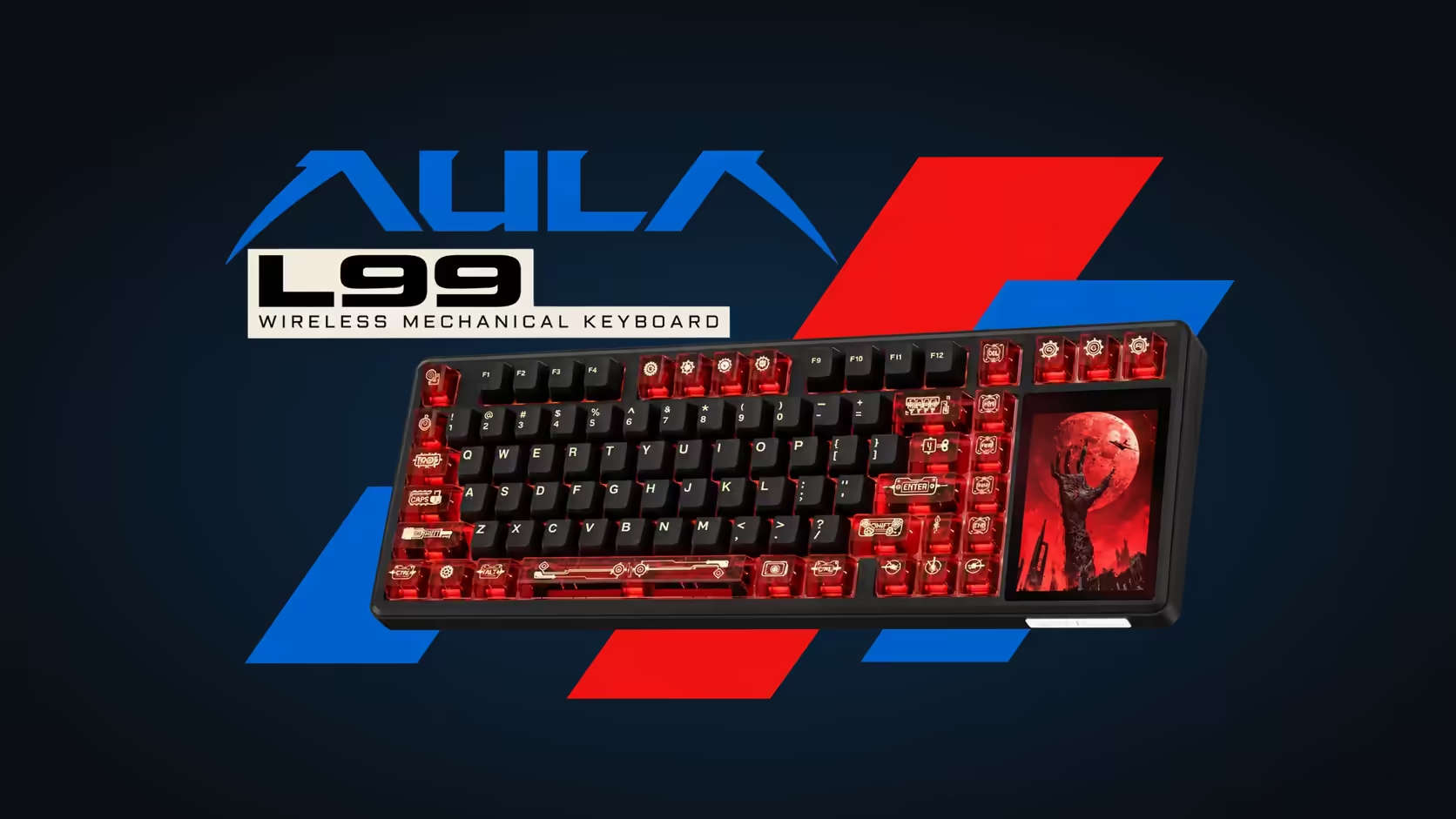
Two AULA boards put a display on the keyboard, and they could hardly approach it more differently. The L99 gives you a screen you touch and operate. The F87 Pro V2 gives you a grid of lights that reacts to what you hear. Choosing between a keyboard with a touchscreen and one with a dot-matrix display comes down to one question: do you want to control things from the board, or watch it respond to your music and games?
Quick Answer
Choose the L99 if you want to do things on the display: its 3.98-inch, 320 x 480 touchscreen runs lighting menus, a number grid, a calculator, a pointer mode and uploaded images. Choose the F87 Pro V2 if you want a board that reacts: its 49-LED dot-matrix display draws a live audio spectrum or plays custom GIFs, on a tenkeyless body that polls at 8000Hz and supports SOCD. Both are tri-mode, and both are on Evetech's keyboard shelf, the L99 at R1,099 and the F87 Pro V2 at R899.
🖥️ Two kinds of display, two kinds of use
The L99's touchscreen: a tool
The L99's panel sits in its own display area on the right of a 75% key block. It is interactive: you tap it to pick one of 20 lighting presets across roughly 16 million colours, adjust settings, bring up a number grid when a spreadsheet needs digits, or open the calculator for a quick sum. There is a mouse-simulation mode for moments without a mouse, and the panel shows the battery level. Idle, it turns into a frame for animations and stills you have put on it, and lighting schemes move between boards by import and export.
The F87 Pro V2's grid: a light show
The F87's display is 49 individual LEDs arranged as a dot-matrix panel. You do not tap it. Its headline trick is a live audio spectrum: whatever is playing through the PC, music or game sound, drives moving bars across the grid. Custom GIF animations can be set in AULA's software as an alternative. Around it, the case itself glows on every side, a feature AULA markets as a 360-degree light zone.
The difference is plain once you sit at each one. The L99 asks for your finger; the F87 asks for your speakers.
⌨️ Layout, feel and footprint
Neither board has a physical number block, but they cut it in different ways.
The L99 packs its keys into a 75% arrangement, then bolts the screen area onto the end. That makes it 390.5mm wide, 140.7mm deep and 43.3mm high, wider than a typical compact board because of the panel. Grey/White/Blue buyers get Raindrop linears and Red/Black buyers get Caramel Latte, both lubed at the factory and both starting at about 45gf and bottoming out at 55gf over 3.6mm of travel.
The F87 Pro V2 is a tenkeyless board. It keeps the full navigation cluster, the Insert, Home and Page keys above the arrows, and drops only the number pad. If you use those navigation keys for work or for game binds, the TKL spares you the Fn combinations a 75% board sometimes needs.
Both are built for a soft, damped sound. The L99 pairs its gasket mount with six layers of sound absorption over a slotted polycarbonate plate. The F87 Pro V2 uses a gasket structure with seven dampening layers, which AULA pitches at a soft bottom-out and less finger fatigue. Both have hot-swap sockets, so switches can be changed later without soldering.
⚡ Speed, batteries and connections
This is where the two boards split most clearly for gamers.
The L99 polls at 1000Hz on the cable and on its 2.4GHz receiver, with full N-key rollover. That is the long-standing standard for gaming keyboards, and it is plenty for most players. SOCD and Rapid Trigger are not listed for it.
The F87 Pro V2 polls at 8000Hz, which AULA puts at a 0.125ms response, about eight times quicker reporting than a 1000Hz board. It also supports SOCD, which settles what happens when opposing direction keys are held together, plus Mod-Tap and Toggle key modes. If you play competitive shooters or rhythm games and care about input handling, the F87 is the more specialised board.
On connections the two are closer. Either will run plugged in, on its own dongle or over Bluetooth, and either can juggle three devices. The batteries differ: 8000mAh in the L99 and 10000mAh in the F87 Pro V2, which AULA labels as true capacity. Neither maker figure comes with a rated runtime, and both boards light up heavily, so a lit screen or a busy spectrum will affect how long a charge lasts.
🎵 Which one suits your desk
Pick the L99 if
- You want to change lighting and settings without opening software.
- You miss a number pad on compact boards and like the idea of a touch numpad.
- You enjoy personalising the board with your own images and animations.
- You split your time between work and play, and want Windows and Mac modes on one board.
Pick the F87 Pro V2 if
- Music plays while you game, and you want the board to visualise it.
- You rely on the navigation cluster of a TKL layout.
- Fast polling and SOCD matter for the games you play.
- You want the deepest battery of the two.
Whichever way you lean, compare both against the wider gaming keyboards range at Evetech, and check the current keyboard best sellers to see which layouts are proving popular.
Frequently Asked Questions
Can I tap the F87 Pro V2's display like the L99's?
No. The F87's 49-LED grid is for viewing, showing an audio spectrum or GIFs. Only the L99's 3.98-inch panel is a touchscreen.
Which board has the bigger battery?
The F87 Pro V2, at 10000mAh against the L99's 8000mAh. AULA gives no runtime in hours for either.
Which layout gives me more keys?
The F87 Pro V2's tenkeyless layout keeps the full navigation cluster. The L99's 75% layout compresses it but adds the touchscreen tools, including a numpad mode.
Which one is better for listening to music while playing?
The F87 Pro V2, since its dot-matrix display turns playing audio into a moving spectrum in real time.
Can both connect to several devices?
Yes. Each offers USB-C, a 2.4GHz receiver and Bluetooth, with support for up to three devices.
How do the warranties compare?
They match. Both carry a 1 Year Local Warranty, handled by Evetech.
Which is more suited to competitive games?
The F87 Pro V2, with 8000Hz polling, SOCD, Mod-Tap and Toggle. The L99 runs at 1000Hz with full N-key rollover, which suits most casual and everyday play.
Ready to choose between touch and light?
Line up the L99 and the F87 Pro V2 against the rest of Evetech's gaming keyboard range and pick the display that suits how you play.