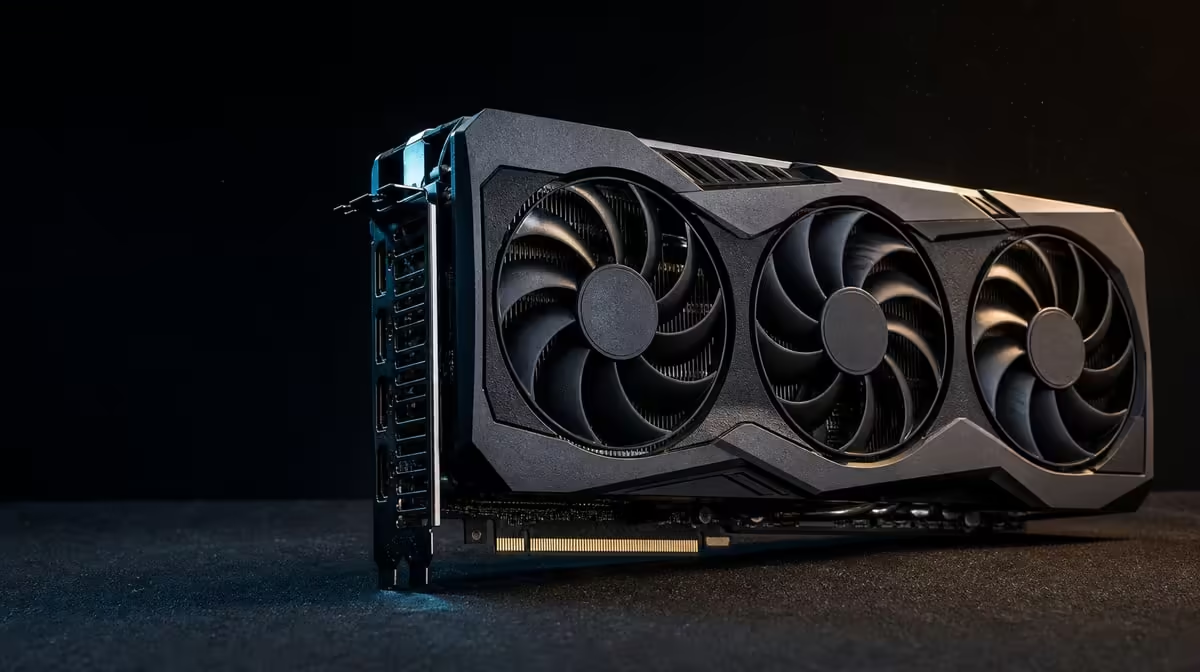
Model differences matter only when they change installation or use. What makes the ASUS TUF RTX 5090 different is its particular combination of 32GB GDDR7, 3352 AI TOPs, modern outputs, PCIe 5.0 and named durability and cooling features.
Quick Answer
At R73,599, the ASUS TUF RTX 5090 pairs a vapor chamber backed by axial-tech fans with protective PCB coating. It also provides five display sockets, PCIe 5.0 support and 32GB memory; buyers should assign each difference to a real workload or build need.
🧠 Read the memory and AI specifications separately
The card's 32GB GDDR7 describes its graphics-memory configuration. Capacity gives compatible games, creator software or AI tools room for working data, while GDDR7 identifies the memory generation.
Neither part automatically raises every game's frame rate. Observe the intended title, resolution and settings. A processor, engine or another system stage can control the result even when a large pool remains available.
Creator value depends on project behaviour. A substantial scene, timeline or image set may benefit from more space, but the application has to place useful data there. Allocation readings should be connected to completion, quality or responsiveness.
The 3352 AI TOPs figure is a different resource: theoretical operations for supported AI processing. It cannot be translated into a universal generation time without the model, precision and software path.
For an AI comparison, preserve the same input, model, application version and output settings. Note graphics-memory use and completion separately so compute and capacity do not receive each other's credit.
Add frequency to the assessment. A daily local model run can justify AI capability differently from an occasional experiment, while weekly large projects can make memory headroom more valuable than a rarely used game setting.
Check host bottlenecks during the same run. Storage, system memory and CPU preparation may control parts of the job. The card should be judged within the complete production path, not only during the interval when its GPU is busiest.
Evetech's ASUS graphics-card section is the right context for comparing how this combination sits within the brand's range.
🌡️ Examine the physical design as a system
The patented vapor chamber spreads heat through the cooler. Axial-tech fans move air across the heated structure, after which chassis ventilation has to replace the warmed case air.
No cooler name guarantees a specific temperature or sound. Game or creator load, room conditions, chassis restriction and control behaviour shape the operating result.
Confirm the product's dimensions and documented power needs before purchase. "TUF" does not establish case clearance, connector space or supply suitability. Use measurements from the actual case with installed fans and radiators.
Protective PCB coating is a named durability detail. It does not increase rendering speed or remove the need for clean handling, good ventilation and protection from liquids.
Create a maintenance route. Make sure filters remain accessible and that cables do not cross fan blades. Premium hardware benefits from a build that can be inspected without dismantling unrelated components.
Establish a thermal baseline using the real case. Record the room conditions, game or project, duration, temperature behaviour and fan response. Exact results from a different enclosure cannot substitute for that local reference.
Do not infer unlisted thermal materials from the general product class. The confirmed design details here are a vapor chamber backed by axial-tech fans; any other internal construction claim needs its own product evidence.
Use Evetech's broader NVIDIA GPU range to compare complete cooler and fit requirements, not photographs alone.
🔌 Map interface and display differences
PCIe 5.0 identifies the host connection supported by the graphics card. Check the motherboard's slot, firmware and lane-sharing rules; interface generation alone does not settle compatibility or performance.
After installation, confirm the negotiated link under load. A resting state can report reduced link behaviour because of power management, so record context and lane width.
For displays, the card provides a DisplayPort 2.1b trio alongside two HDMI 2.1b sockets. These five physical routes can serve a varied gaming or creator desk.
Map each monitor's native input, resolution and refresh target before allocating a port. Choose the complete route rather than declaring DisplayPort or HDMI universally better.
Cables and adapters need their own capability checks. A modern output cannot overcome a lead or display input that does not support the chosen mode.
Physical port count does not promise five simultaneous monitors at all resolutions and refresh rates. Confirm the exact intended combination and test screens sequentially.
Document the port order after installation. A simple rear-panel drawing helps a user replace the correct cable without disturbing a working multi-monitor layout, especially when the tower sits below the desk.
Run a creator-day rehearsal with the intended preview, timeline and reference screens. Window placement and scaling can reveal practical value that a connector inventory alone cannot.
💰 Decide whether the differences earn R73,599
Build a scorecard from the user's week. Give points to memory headroom only if projects create pressure, to AI compute only if software supports it, and to outputs only if the desk uses them.
Cooling and protective design details can add confidence, but they should pass fit and workload checks first. A card that cannot be installed cleanly is not rescued by a longer feature list.
Compare complete-system cost. Power, chassis, platform or display changes belong beside the R73,599 card figure. A less expensive GPU that avoids those changes may deliver stronger overall value.
Include setup and maintenance complexity. A model that demands a case conversion or difficult cable route may still be appropriate, but that effort should be visible in the decision rather than discovered after delivery.
Run a pre-purchase evidence review. Use game-specific performance, application compatibility and model behaviour from a comparable system. Mark any unknown instead of converting it into an optimistic assumption.
After installation, repeat the saved tests and document whether the expected bottleneck moved. This establishes which differences became useful and which remain headroom.
Preserve a "why this model" note containing no marketing adjectives: workload, measurable gain, compatibility, display map and full cost. If those entries could describe any graphics card, the comparison has not isolated the TUF model's useful differences.
Revisit the note after a month. Confirm whether the five outputs, memory capacity, AI capability and cooler have entered real use as expected. That review improves the evidence for the next purchase even if some headroom remains.
The right buyer can explain the card in a sentence: the named workload uses the memory or AI capability, the case supports its cooling, and the display or platform plan benefits from the connections. Without that sentence, the flagship position is doing too much of the argument.
Review Evetech's GPU best-seller collection after completing the scorecard and check current availability for the chosen model.
Frequently Asked Questions
Which memory configuration defines this RTX 5090 model?
It carries 32GB of GDDR7 graphics memory.
What AI capability does the graphics card include?
The card is rated at 3352 AI TOPs for supported AI processing.
How is heat managed within the card's design?
A patented vapor chamber spreads heat and axial-tech fans move air through the cooler.
What display-output combination does the card provide?
It has three DisplayPort 2.1b connectors and two HDMI 2.1b connectors.
Why might protective PCB coating matter to a buyer?
It is a named durability feature, although it does not improve speed or replace careful system design.
Which host interface does this model support?
It supports PCI Express 5.0.
How should buyers decide whether these differences matter?
Connect every feature to a measured application, installation need or display plan and compare the complete cost.
Want to know which RTX 5090 differences are useful to you?
Score the memory, AI, cooling, interface and outputs against your real build, then compare Evetech graphics cards by the features that survive that test.