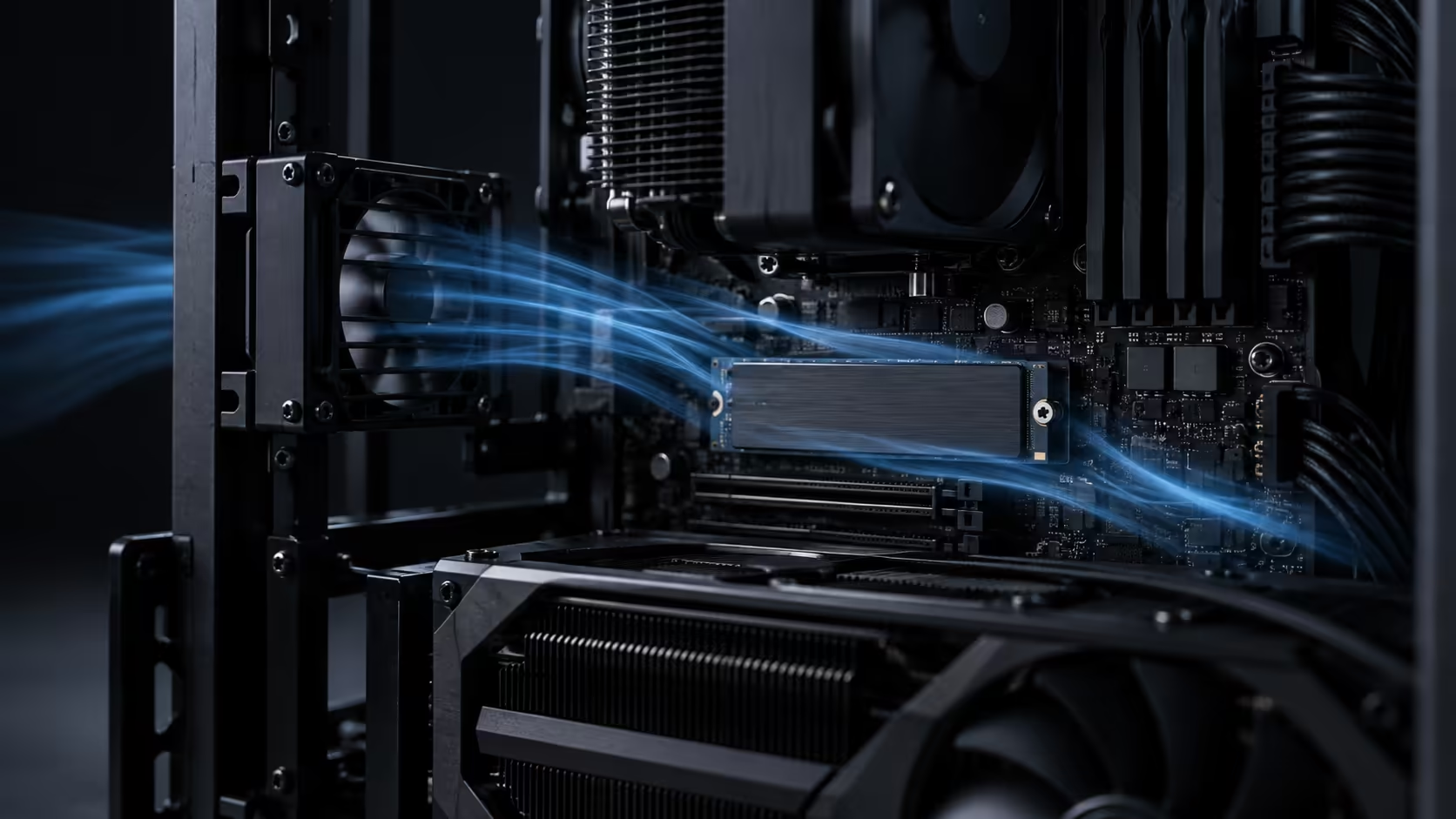
M.2 drives are the components most likely to be quietly overheating in a machine that otherwise runs cool. They sit flat against the board, often under a graphics card, in the one part of a chassis that almost no round fan is aimed at. A PWM crossflow fan is one of the few airflow parts designed for exactly that geometry, and understanding how the speed control works is what separates a useful install from a noisy one.
Quick Answer
A crossflow drum throws a wide, flat sheet of air across a board surface instead of a cone forward, which reaches M.2 drives, VRM heatsinks and RAM that round fans miss. PWM is a four-wire speed control method that varies fan speed without dropping voltage. The R15,999 ROG GR20 Edition 20 ships with a crossflow fan, and its header type is listed on the product page.
🌡️ Why an NVMe drive is the part that overheats first
An NVMe SSD does sustained work in short, extremely dense bursts, and it does that work in a package roughly the size of a stick of chewing gum. A PCIe 4.0 drive writing at several gigabytes a second is dissipating real heat from a controller with almost no surface area to shed it.
Drives protect themselves by throttling. Sequential write speed falls off a cliff partway through a large transfer, then recovers once the controller cools. If you have ever watched a large file copy start at full speed and then settle at a fraction of it, you have watched thermal throttling rather than a slow drive.
The position makes it worse. A primary M.2 slot usually sits between the CPU socket and the first PCIe slot, which means a large graphics card sits directly over it, radiating its own heat downward into a pocket of still air. Nothing in a standard airflow plan moves air through that gap.
🔧 What a crossflow fan does differently
An axial fan, the familiar square one, works like a propeller. It accelerates air along its own axis in a cone, which is ideal for pushing through a radiator or a grille and poor at covering a flat surface beside it.
A crossflow fan is a long cylinder with blades along its length, closer to a paddle wheel than a propeller. Air enters along one side of the drum and leaves along the other in a sheet as wide and as long as the drum itself. The same design moves air across the windscreen in a car and across the doorway in a shop air curtain.
On a motherboard that geometry is the point. One crossflow unit produces a moving layer over the whole board surface at once, so the M.2 heatsink, the memory and the chipset all sit in moving air rather than in the dead pocket under a graphics card.
Orientation is where installs go wrong. The sheet has to travel across the board, parallel to it. Aimed down into the board it becomes turbulence and achieves very little, which is the single most common mistake with this style of fan.
⚡ PWM, DC and why the header matters
Fan speed control comes in two common forms, and they are not interchangeable.
DC control, on a three-pin header, varies the voltage supplied to the motor. Less voltage, slower fan. It is simple and it works, but every motor has a minimum voltage below which it stalls, so a three-pin fan usually cannot be slowed very far before it stops entirely.
PWM control, on a four-pin header, keeps the supply at a steady 12V and adds a fourth wire carrying a control signal. The motor is switched on and off thousands of times per second, and the proportion of on-time sets the speed. Because the motor always sees full voltage while it is on, a PWM fan can be run far slower without stalling, and it responds to a change almost instantly.
That is why PWM matters for this job specifically. Board-surface cooling is mostly a low-speed task. You want a fan that sits at a barely audible speed for hours and ramps only when a drive starts a sustained write, and that range of control is what a four-wire connection gives you.
Check the header type on the fan and on the board before you commit to a fan curve. A four-pin fan on a three-pin header runs permanently at full speed, because the control wire has nowhere to go. A three-pin fan on a four-pin header usually runs at full speed too, unless the board offers a DC mode for that header in the BIOS.
📉 Setting a curve that is worth having
A fan curve maps temperature to speed, and the default curves that ship on most boards are written for the CPU, not for storage.
Start by choosing the right sensor. Many boards let a header follow the CPU, the chipset, or a system sensor. For board-surface airflow, a system or chipset sensor tracks the thing you care about far better than the CPU package temperature, which spikes and drops in seconds and would leave the fan surging.
Then flatten the bottom of the curve. Somewhere around 30 to 40 percent duty is usually inaudible and still moves useful air, and holding that from ambient up to about 45 degrees means the fan simply never draws attention to itself. Above that, a steady ramp to full by about 70 degrees gives the drive its cooling when a long write actually starts.
Add a delay if the board offers one. A one or two second ramp-up and a longer ramp-down stops the fan hunting up and down every time a background task touches the disk, which is more irritating than a constant slightly higher speed.
🧪 Measuring whether it worked
Do not judge this by feel. Note the drive temperature at idle from the BIOS or a monitoring tool, then run a large sustained write, at least 50GB so the drive cannot hide behind its cache, and watch where the temperature settles and whether write speed holds.
Run the same test twice, once with the fan at its minimum and once at full, and the difference tells you exactly what the airflow is worth on your board and in your room. If the gap is small, your drive already had enough air and the fan is solving a problem you do not have. If the gap is large, the curve you set is now doing real work.
Ambient temperature is part of the result. The same machine in a closed study on a hot afternoon and in the same room with a window open will give you different numbers, so take both readings on the same day if you want them to mean anything.
If a drive still throttles with good airflow, the heatsink is the next variable. Some SSDs ship with a heatspreader and some rely on the board's own M.2 cover, and the two perform very differently. Additional case fans help for general chassis airflow but will not reach the board surface the way a crossflow unit does, and the mounting points available differ from chassis to chassis.
Frequently Asked Questions
Does an M.2 drive really need extra airflow?
A drive doing short bursts rarely does. A drive doing sustained writes, video capture or large backups often throttles, and moving air over the heatsink is what prevents that.
What is the practical difference between PWM and DC fan control?
PWM keeps full voltage and switches the motor rapidly, so it can run much slower without stalling and responds instantly. DC lowers the voltage and stalls below a floor.
Can I plug a four-pin fan into a three-pin header?
It will spin, but at full speed permanently, because the control wire is not connected. You lose the entire benefit of the four-wire design.
Which sensor should the fan follow?
A system or chipset sensor, not the CPU package. CPU temperature spikes and falls in seconds and would make the fan surge constantly.
How do I know the fan is pointed the right way?
The sheet of air should travel across the board, parallel to its surface. If it is aimed straight down into components, turn it.
Ready to stop your fastest drive throttling halfway through a copy?
Check the header type first, set the curve against a system sensor, then measure the difference with a sustained write.